




Pick the wrong scheduling software and the cost isn't just the subscription. It's the hours you lose fighting the thing, the clients who bail mid-booking, the low-grade admin grind that pulls you away from the work you're actually good at.
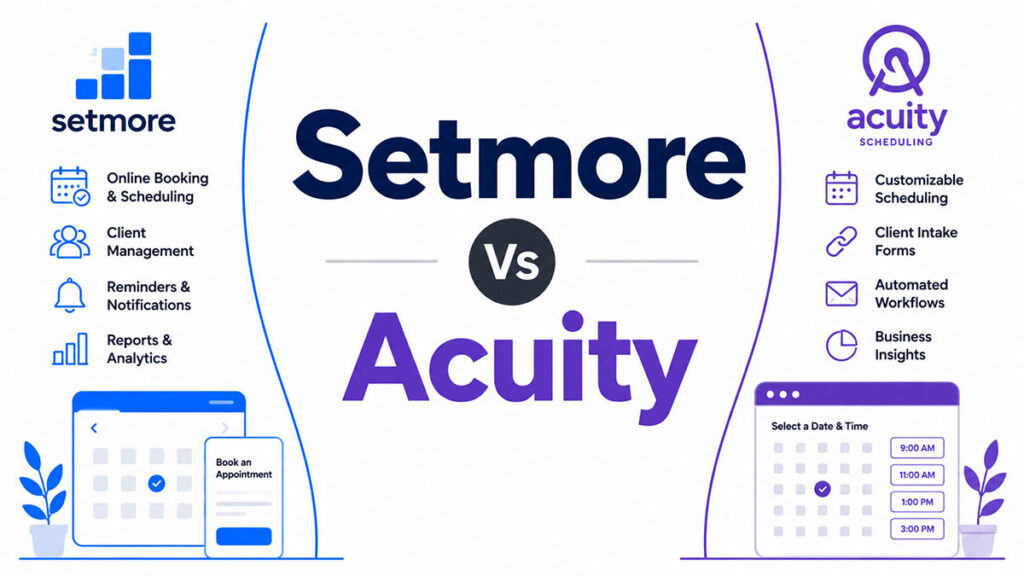
Which brings us to Setmore versus Acuity, a matchup service businesses run into all the time. Both do the core stuff. Online booking, reminders that fire automatically, taking payment up front. The split is in how they're wired: different workflows, different sizes of team, and honestly, different budgets.
Quick version before we dig in. Setmore's free plan is the real deal, not a crippled teaser. Acuity goes deeper on client intake and billing. And no, neither one is the universal right answer, so don't let any "best scheduling app" listicle tell you otherwise.
What follows runs through pricing, the features that matter, how each handles multiple staff, integrations, what users report, and a few specific scenarios. Read it and decide, no need to go open five more tabs.
What Are Setmore and Acuity Scheduling?
Start with Setmore, because its whole identity is the free plan. It's been around since 2011, run out of Portland, Oregon, and it's chasing the service businesses that want a few staff calendars going without putting a card down on day one. Salons, clinics, fitness studios, the tutor with a packed week of repeat clients. Anywhere bookings come in fast and often, that's the crowd it's after.
Acuity plays a different game. It's older actually, launched in 2006, and Squarespace scooped it up in April 2019, which is why it feels more buttoned-up than most scheduling tools. The owners who love it usually have one thing in common: they need real intake forms and they want payment sitting right there on the booking page. That's your coaches and consultants, the therapist who needs health history before a first session, the photographer locking in a deposit.
None of that means they're worlds apart on the basics. Cloud-based, mobile apps, calendar sync, reminders that go out on their own, you'll find all of it on either one. The gap is in the assumption each makes about how you work, and that assumption quietly shapes nearly every feature you'll weigh up further down.
One bit of context before the details. This market was worth $469.1 million in 2024 and is on track for $1.13 billion by 2034, growing about 9.2% a year (Fact.MR, 2024). Both of these are scrapping for a piece of it, bumping into each other across the appointments-and-scheduling, employee-scheduling, and online-booking categories.
| Factor | Setmore | Acuity Scheduling |
|---|---|---|
| Founded | 2011, Portland, Oregon | 2006 (acquired by Squarespace in 2019) |
| Free plan | Yes, up to 4 staff, 200 appts/mo | No (7-day trial only) |
| Primary users | Salons, clinics, tutors, fitness | Coaches, consultants, therapists |
| Market share (6sense) | 5.08% | 21.12% |
Acuity holds a 21.12% market share in the Appointments and Scheduling category with over 105,000 customers. Setmore holds 5.08% (6sense, 2026). That gap tells you something about adoption rate, but it does not tell you which tool fits your specific workflow.
How Do Setmore and Acuity Scheduling Differ in Core Features?
On the fundamentals, these two cover the same ground. Clients book themselves, the calendar stays managed, confirmations go out on their own, and you can take payment. So coverage isn't the question. Depth is.
Setmore's pitch is the free plan: up to 4 staff calendars and 200 appointments a month, no card required. Acuity won't give you anything for free, but the trade is that even its cheapest paid tier comes loaded. Intake forms on every plan, two-way calendar sync, time zones detected automatically. You're paying, but you're getting more out of the gate.
Here's a number that should focus the mind: 92% of businesses say no-shows cost them revenue directly (Koalendar, 2024). Both apps fight back with automated reminders. Acuity just hands you more control over when those reminders fire and how they're sequenced.
Booking Page and Client Experience
Setmore's booking page is clean and quick to stand up. You embed it anywhere, the client picks a service, then a staff member, then a slot, and it already works on mobile without you touching a setting. Facebook and Instagram booking comes built in, which is a nice touch if social is where your clients already are.
Acuity's page bends more to your will. Fonts, brand colors, layout, all adjustable. Clients can book a group class, grab a package, or set up a recurring appointment in one flow, and you get gift certificates and coupon codes natively without bolting on a plugin.
Push it further and Acuity opens up real CSS control on the higher tiers. Setmore stays deliberately plain. Whether that's a plus or a minus depends entirely on how much you care about brand polish. Some owners obsess over it. Plenty couldn't care less.
Calendar and Availability Management
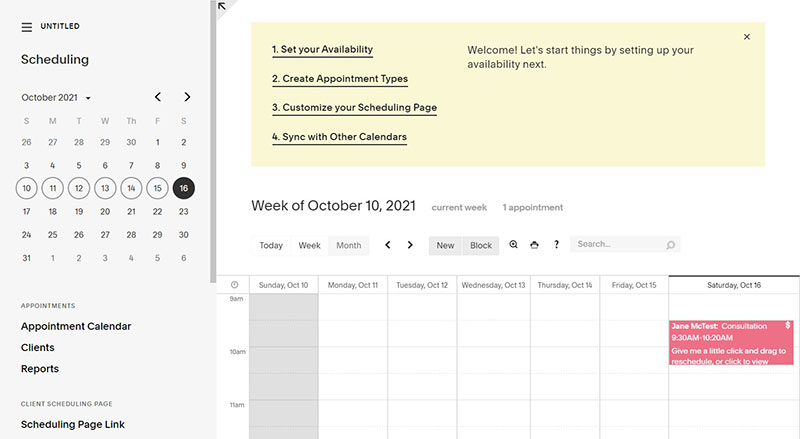
Two-way Google Calendar sync on Setmore is locked behind the Pro plan. On free, you only get one-way, which trips people up. Acuity bundles two-way sync with Google Calendar, iCloud, and Outlook into every paid plan, right from the Emerging tier.
Both let you set buffer time between appointments. The difference is granularity. Acuity lets you set different buffers per service type, so a 90-minute massage and a 15-minute consult can have their own rules. Setmore applies one buffer across the board, which gets awkward the second your services run wildly different lengths.
On time zones, Acuity is hands-off. Someone booking from another zone just sees slots in their own local time, no setup needed. Setmore can handle time zones too, but you'll be doing more of the configuring yourself on the admin end.
How Do Setmore and Acuity Scheduling Compare on Pricing?
Setmore has a free plan that genuinely works. Acuity doesn't. That one fact bends the whole pricing conversation before it even starts.
| Plan | Setmore | Acuity Scheduling |
|---|---|---|
| Entry level | Free (up to 4 staff, 200 appts/mo) | Emerging: $20/mo (1 calendar) |
| Mid tier | Pro: $5/user/mo (annual) or $12/user/mo (monthly) | Growing: $34/mo (up to 6 calendars) |
| Top tier | Team/Enterprise: custom pricing | Powerhouse: $61/mo (36 calendars, API access) |
| Free trial | Free plan (200 appts/mo cap) | 7 days |
Here's where it gets interesting. Setmore Pro is $5 per user per month on annual billing, so a 10-person team lands at $50 a month. That same team on Acuity's Growing plan? $34 total. Cheaper, yeah, but there's a catch in how it's counted. Growing covers up to 6 calendars at a flat rate, not per head, so the comparison flips depending on your size.
That's the whole trick to this one. If you're solo or under six people, Acuity's Growing plan at $34/month usually wins on value once you add up everything packed into it. Cross that six-person line, though, and Setmore's per-user model starts looking sharp again. The break-even point is roughly where you should be paying attention.
Hidden Costs to Watch
The sticker price isn't the whole story with either of these. A few things tend to bite people after they've committed.
On Setmore, the SMS reminders run through Twilio. There's no published cap, but Setmore watches your volume and can throttle texts if it decides you're sending too many. That throttling has shown up in more than a few Capterra complaints, so it's not just theoretical.
With Acuity, the thing to brace for is the long-term drift on price. Ever since Squarespace bought it in 2019, the cost has crept up, and that creep is far and away the most repeated gripe in negative Acuity reviews on G2 and Capterra as of 2024.
And one more Setmore gotcha that catches owners off guard: every staff calendar counts as a user, even if that person never logs in. So a 4-chair salon on Pro is paying for 4 users, not 1. Easy to miss until the invoice shows up.
Which Payment and Checkout Features Does Each Tool Offer?
Both run on the same processors. Stripe, Square, PayPal, take your pick. So the question isn't who you can connect to. It's what the software actually lets you do once that connection is live.
This is another area where Acuity just does more, natively. Deposits, full prepayments, tips, gift certificates, package sales, subscriptions, coupon codes, all of it built in, no Zapier bridge or duct-tape workaround required. Setmore can take payment at the time of booking too, through Square on the free plan or Stripe and PayPal once you're on Pro. But tips? Gift certificates? Selling packages? None of that is there.
Worth pausing on why this matters. 42% of consumers cop to missing at least one appointment a year (Zippia, 2024), and making people pay when they book is one of the surest ways to drag that number down. Both tools let you collect prepayment, no argument. Acuity just gives you finer control over which services demand the full amount up front and which only need a deposit to hold the slot.
Payment Features Side by Side
Setmore payment coverage:
- Square (free plan), Stripe and PayPal (Pro)
- Payment at booking or in-person via cash register
- QuickBooks and Xero sync available
- No native tip collection or gift certificates
Acuity payment coverage:
- Stripe, Square, PayPal on all paid plans
- Apple Pay and Google Pay support via Stripe
- Tip collection, gift certificates, coupon codes
- Package sales, subscriptions, and deposit rules per service type
For a hair salon or barbershop that wants to upsell products or gift cards at checkout, Acuity's payment layer is significantly more capable. For a medical clinic or tutoring service that just needs prepayment to secure the booking, Setmore's setup is simpler and cheaper.
How Do Setmore and Acuity Handle Integrations?
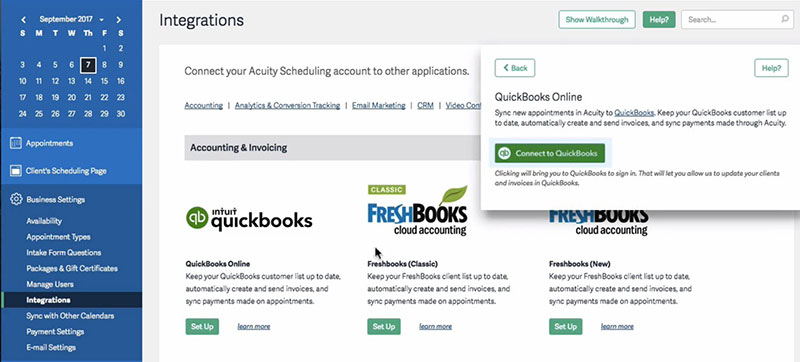
If you measure these two by integration depth, Acuity edges in front for everyday use. Two reasons mostly: it plugs straight into Squarespace, and its Zapier trigger list runs a little deeper.
Setmore's connection list is long. Google Calendar, Outlook, Apple Calendar, Zoom, its own Teleport video tool, Slack, Zapier, plus the payment side with Square, Stripe, PayPal, QuickBooks, and Xero. Facebook and Instagram are in there too for booking straight off social. There's a public API as well, though fair warning, the docs aren't friendly if you're not technical.
Acuity covers a similar spread: Google Calendar, iCloud, Outlook, Zoom, GoToMeeting, Mailchimp, Stripe, Square, PayPal, Zapier. The standout is Squarespace. If your site's already on it, Acuity drops in natively, no plugin to hunt down. The catch is the API, which only unlocks on the top Powerhouse plan.
CRM and Email Marketing Connections
Acuity wires directly into Mailchimp, so a new booking can drop a client onto an email list automatically. Setmore can't do that on its own. You'll need Zapier sitting in the middle to pull off the same trick.
On Zapier itself, both connect, and that opens the door to 5,000+ other apps either way. Acuity just exposes more trigger events, which gives it an edge if you've already built out tangled automations and want more hooks to fire off.
Picture a photography studio or a consultancy running email campaigns next to its bookings. For them, Acuity's direct Mailchimp line strips out a whole layer of fiddling. And if Squarespace is already your website, this stops feeling like an add-on at all. It's basically part of the furniture.
Video Conferencing Integrations
Setmore ships with Teleport, its own video tool, and it costs nothing extra. The client just gets a meeting link in their confirmation email, no third-party account on either side. Want Zoom instead? That's there on Pro.
Acuity goes the other way. It hooks into Zoom and GoToMeeting but brings no video tool of its own, so you need a live Zoom account to spin up links. If you're already paying for Zoom, who cares, it's a non-issue. But for a solo operator trying to keep the subscription pile small, Teleport being built in is the quieter, cheaper road.
What Automation and Reminder Features Do Both Platforms Include?
No-shows hit the bank account, plain and simple. Across service industries the no-show rate runs somewhere between 10% and 23%, and 37% of medical groups said theirs climbed in 2024 (MGMA, 2024). Automated reminders are your most direct weapon against it.
Both apps fire off email confirmations and reminders without you lifting a finger. The daylight between them is in three places: how much you control the timing, whether SMS is on the table, and what happens after the appointment wraps.
Email and SMS Reminder Depth
Acuity is the flexible one here. You can stack several reminder emails per appointment type, each on its own clock: one 48 hours out, another 2 hours before, then a check-in the day after, all on a single plan. SMS reminders come on every paid Acuity tier, no upsell.
Setmore sends its email reminders automatically too, but the timing knobs are coarser on the cheaper plans. SMS waits until you're on Pro, and the free plan only does email confirmations, nothing more. Post-appointment follow-ups? Not native. You're back to a Zapier workflow if you want those to go out on their own.
For a coach or a therapy practice where the after-session message is part of how you keep the relationship warm, Acuity's setup genuinely saves admin hours. A barbershop banging out 30 cuts a day doesn't need any of that, and Setmore's leaner approach covers what it needs without the fuss.
Cancellation Policy and No-Show Management
This is a real separator. Acuity lets you set cancellation windows by service, show your policy right at the booking step, and actually charge a no-show fee when the client's card is on file, all from the Emerging plan up. That's proper no-show protection baked in.
Setmore handles cancellations through the booking page and tucks a cancellation link into every confirmation email, which is fine as far as it goes. Charging for a no-show, though, isn't something it does on its own. There's a workaround using Stripe's partial-capture feature, but it's manual and clunky, and you'll feel it.
So if leaning on financial accountability to cut no-shows is the plan, Acuity gives you the cleaner built-in route. With Setmore you're leaning on whatever your payment processor allows rather than the software handling it for you.
How Do Setmore and Acuity Support Multiple Staff and Locations?
Multi-staff calendar management is one of the clearest decision points between the two platforms. Setmore is the more affordable option for larger teams. Acuity is more capable in terms of location logic and per-calendar configuration.
Setmore's free plan supports up to 4 staff calendars with individual booking pages and login access for each team member. Each staff member controls their own availability, and you get a real-time view of all calendars from a single dashboard. Pro unlocks unlimited staff at $5 per user per month (annual billing).
Acuity's Emerging plan supports 1 calendar. Growing supports up to 6 calendars. Powerhouse supports up to 36. Multiple locations with separate availability settings, time zones, and staff assignments are available on Growing and above.
| Team size | Setmore annual cost | Acuity plan needed | Acuity annual cost |
|---|---|---|---|
| 1 staff | $0 (Free) | Emerging | $20/mo |
| 4 staff | $0 (Free) or $20/mo (Pro) | Growing | $34/mo |
| 6 staff | $30/mo (Pro annual) | Growing | $34/mo |
| 10 staff | $50/mo (Pro annual) | Powerhouse | $61/mo |
| 20 staff | $100/mo (Pro annual) | Powerhouse | $61/mo |
For teams between 7 and 20 staff, Acuity's flat-rate Powerhouse plan is cheaper than Setmore's per-user pricing. Beyond 36 staff or locations, Acuity requires an Enterprise plan with custom pricing. Setmore scales linearly at $5 per user with no hard cap.
Location-Level Booking Logic
Acuity lets clients choose a specific location at the start of the booking flow, which then filters available staff and time slots for that location. This is built into the Growing plan. Setmore supports multiple staff pages but does not have the same location-first filtering logic natively.
For a salon with 2 locations and different staff at each, Acuity handles the client-facing experience more cleanly. For a single-location business with 8 staff members, the right online booking system for salons often comes down to whether per-user pricing or flat-rate pricing fits your growth trajectory better.
Staff Permissions and Access Control
Setmore gives you granular control over what each staff member can see and do. You can restrict access to client data, payment history, and other staff calendars. Each team member gets their own login with custom permission levels.
Acuity's staff access controls are present but less granular at lower tiers. On the Powerhouse plan, you can set different permission levels per staff member. On Growing, access controls are more binary.
For a business where staff data privacy matters, such as a therapy group practice with multiple independent clinicians, Setmore's permission structure is a practical advantage at a lower price point.
Which Industries Use Setmore vs Acuity Scheduling?
Industry fit is the fastest way to narrow this decision. Both tools work across service businesses, but their feature sets pull them toward different client profiles.
Setmore's user base skews heavily toward health and medicine (34% of reviews on Software Advice) and retail and consumer services (17%). That maps to salons, barbershops, fitness studios, and small clinics that need fast, multi-staff booking without complex client intake.
Acuity's base is more spread out: health and medicine (22%), retail and consumer services (20%), and professional services (13%), per Software Advice data. The professional services slice includes coaches, consultants, therapists, and photographers, all of whom need intake forms and package billing.
Service Businesses That Fit Setmore
A fitness studio using Setmore reported a 20% reduction in no-shows after switching to automated reminders (Salon Booking System, 2026). Setmore's strength is volume: lots of bookings, multiple staff, simple service menus.
- Hair salons and barbershops managing 4–20 staff
- Fitness studios with class scheduling needs
- Tutoring and education services with recurring appointments
- Small medical or chiropractic clinics
If you run a hair salon booking operation with multiple stylists and want to keep costs near zero while still accepting payments, Setmore's free plan covers most of what you need up to 200 appointments per month.
Service Businesses That Fit Acuity
HIPAA compliance is available on Acuity's Powerhouse plan, where covered entities can sign a Business Associate Agreement (BAA) to protect protected health information (PHI). Setmore also offers a HIPAA-compliant path through its Setmore Health plan (a dedicated account type available alongside Pro), which includes a signed BAA and enhanced security controls.
A wellness clinic using Acuity increased recurring bookings by 35% after turning on its package and subscription features (Salon Booking System, 2026). That outcome is only possible because Acuity's billing tools support bundled session sales natively.
Best Acuity fits:
- Life coaches and business consultants selling session packages
- Therapists and mental health practitioners needing HIPAA compliance
- Photographers with custom intake and deposit workflows
- Squarespace website owners who want native scheduling integration
Healthcare and HIPAA Considerations
Acuity's HIPAA features require the Powerhouse plan ($61/month). The BAA is signed within the account settings after enabling the compliance mode. This locks down appointment confirmation emails so they do not expose PHI in the subject line or ICS file attachment.
Setmore also supports HIPAA compliance through its dedicated Setmore Health plan, which requires a Pro subscription and includes a signed BAA, enhanced data security, and access controls. Healthcare providers should evaluate both options based on their specific workflow requirements.
Solo therapists and small group practices frequently use Acuity as a lightweight scheduling layer before moving to a full practice management system. It is not a replacement for dedicated EMR software, but it handles the booking and reminder layer reliably.
How Does the User Interface Compare Between Setmore and Acuity?
Both platforms run in the browser and have mobile apps. Setup time and daily usability are where they diverge.
G2 reviewers rated Setmore easier to use, set up, and administer than Acuity in a direct comparison (G2, 2024). Acuity reviewers on the same platform rated its feature depth and ongoing product direction higher. Those two findings point at the same trade-off: Setmore is faster to learn, Acuity does more once you learn it.
Setmore Admin Dashboard
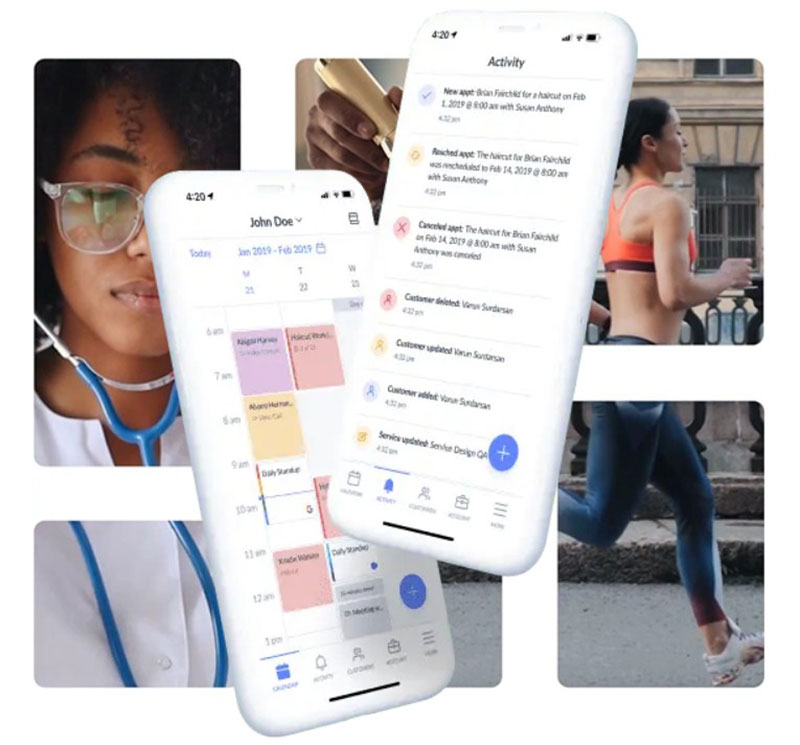
Setmore's dashboard puts appointments, staff calendars, and the booking page link in one visible layer. New users typically get a working booking page live within 15–30 minutes. No technical background needed.
Navigation strengths:
- Color-coded staff calendars on the main view
- One-click appointment creation from any open slot
- Mobile app mirrors the desktop experience closely
The most repeated Capterra complaint about Setmore is Google Calendar sync issues and occasional schedule display glitches (Capterra, 2024). These are not dealbreakers, but they show up consistently enough to flag.
Acuity Admin Dashboard
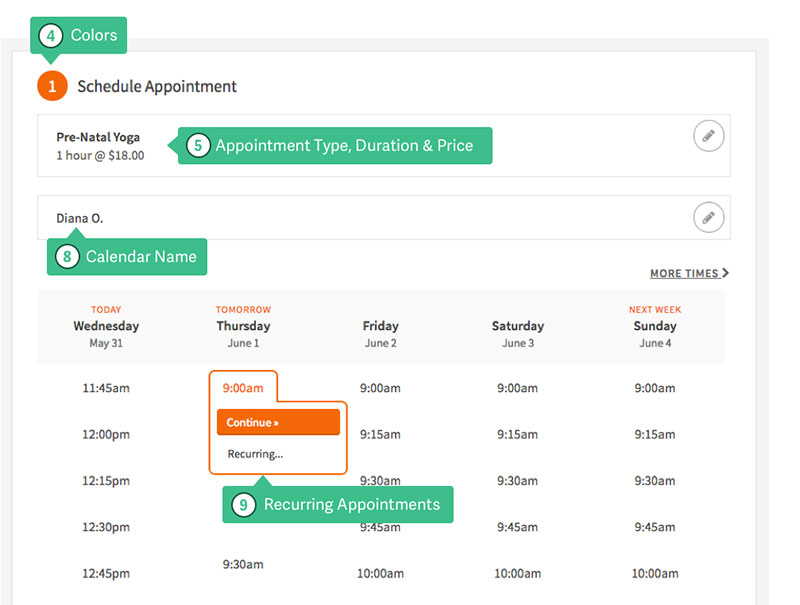
Acuity's backend is denser. Availability settings, intake form logic, appointment types, packages, and reminder sequences each live in separate menus. The weekly calendar view is widely praised and is one feature that Acuity users specifically cite as better than competing platforms.
Deeper customization of the booking page requires CSS or HTML knowledge. Non-technical users either live with the default styling or pay someone to adjust it. That is a legitimate friction point at the Emerging and Growing plan levels.
Since the Squarespace acquisition, some users have reported being logged out of the admin panel frequently, which has become a specific complaint in Capterra and Trustpilot reviews from 2023 onward.
Client-Facing Booking Page
Clean and simple on Setmore. Clients pick a service, then a staff member, then a time slot. The flow works without explanation. Mobile booking is smooth on the default theme.
Acuity's client-facing page is more structured. It can show location choices, different appointment types, package options, and intake forms in a single flow. Time zone auto-detection happens without any action from the client, which Setmore requires manual configuration to replicate.
For a business that gets clients from multiple countries or time zones, Acuity's booking page removes a support burden that Setmore's setup can create.
What Do User Reviews Say About Setmore vs Acuity?
Review data from verified platforms gives a clearer picture than marketing copy. Both tools score well overall, but the nature of positive and negative feedback is different.
| Platform | Setmore rating | Acuity rating | Review count (Acuity / Setmore) |
|---|---|---|---|
| G2 | 4.5 / 5 | 4.7 / 5 | 406 / 268 |
| Capterra | 4.6 / 5 | 4.8 / 5 | 5,723 / 958 |
| Software Advice | 4.6 / 5 | 4.8 / 5 | 5,743 / 958 |
| Trustpilot | 4.9 / 5 | 1.5 / 5 | Mixed / 3,076 |
Acuity's Trustpilot score stands out, and not in a good way. The 1.5/5 rating there comes almost entirely from customer support complaints post-Squarespace acquisition, not from the product itself. G2 and Capterra scores reflect product quality. Trustpilot reflects support experience. Both matter.
What Setmore Users Praise and Criticize
Across thousands of reviews on G2, Capterra, and Trustpilot, customer support is Setmore's most praised feature. Users consistently note that 24/7 support is available and responsive.
Common praise: ease of setup, free plan value, responsive customer support, social media booking integration.
Common complaints: Google Calendar sync inconsistencies, occasional SMS reminder failures, limited financial reporting, and no native intake forms.
One Capterra reviewer noted that their medical office encountered appointment booking outside of set hours, a sync glitch that Setmore support attributed to edge-case behavior. This suggests the platform can have reliability gaps under specific conditions.
What Acuity Users Praise and Criticize
88% of Acuity users on Software Advice recommend the product. The most praised features are the weekly calendar view, intake form flexibility, and automated reminder sequences.
Repeated complaints:
- Pricing increases since the Squarespace acquisition
- Frequent session timeouts requiring re-login
- CSS/HTML required for meaningful booking page customization
- Customer support responsiveness declining post-acquisition
Acuity is rated higher (93/100) than Setmore (86/100) on total cost of ownership calculations by ITQlick, which factors in implementation effort, learning curve, and long-term operational cost. The higher score reflects Acuity's feature completeness, not its price point.
Which Tool Is Better for Specific Use Cases?
There is no universal winner between Setmore and Acuity. The right answer depends on 3 factors: team size, billing complexity, and whether client intake matters to your workflow.
Use the table below as a starting point, then verify against your actual plan pricing before committing.
| Use case | Better fit | Reason |
|---|---|---|
| Solo operator, $0 budget | Setmore Free | Up to 200 appointments/mo, payment via Square, no cost |
| Coach or consultant selling packages | Acuity Growing | Native package sales, intake forms, payment at booking |
| Salon with 4–8 staff | Setmore Pro | Per-user pricing is cheaper at this team size |
| HIPAA-compliant practice | Either (different paths) | Acuity Powerhouse or Setmore Health both offer BAA |
| Squarespace website user | Acuity (any plan) | Native embed, no plugin required |
When Setmore Wins
Setmore is the better choice when cost is the primary constraint. The free plan supports 4 staff, Square payments, email reminders, and a branded booking page, up to 200 appointments per month. That covers most of what a small service business actually needs at launch.
It also wins for barbershops, fitness studios, and salons where the best barbershop software requirement is speed and simplicity over intake depth. Booking volume matters more than billing complexity in these settings.
Teams above 7 people where flat-rate Acuity plans become more expensive than Setmore's per-user pricing also lean toward Setmore. At 10 staff, Setmore Pro costs $50/month. Acuity Powerhouse costs $61/month. Do the math for your team size before deciding.
When Acuity Wins
Acuity is the better choice when client intake, billing complexity, or HIPAA compliance via Powerhouse are non-negotiable. If you sell session packages, need conditional intake forms, or prefer Acuity's HIPAA path, it delivers more natively at a single flat rate for teams up to 36 calendars.
It also wins for businesses already on Squarespace. The native integration removes setup friction that other scheduling tools require a third-party plugin or embed code to solve.
For anyone comparing Acuity or Calendly as their final two options, Acuity wins specifically when payment collection and intake forms are part of the booking flow. Calendly is a meeting scheduler. Acuity is a client booking system. Those are different products solving different problems.
When to Look at Alternatives
Neither platform fits every scenario. A few cases where looking elsewhere makes sense:
- Full salon management: Setmore and Acuity both lack inventory, POS hardware, and commission tracking. Vagaro or Mangomint cover these natively.
- Enterprise teams with complex routing: Calendly's team scheduling and round-robin logic outperforms both tools at scale.
- Mental health EMR needs: Acuity handles scheduling but has no clinical documentation. SimplePractice or Jane App fill that gap.
If you have compared both tools and neither quite fits, checking the broader appointment scheduling software market gives you 15+ alternatives with different pricing models and feature priorities. The right scheduling tool is the one you actually use consistently, not the one with the longest feature list.
FAQ on Setmore vs Acuity
Is Setmore better than Acuity Scheduling?
Setmore is better for small teams that need a free scheduling plan with multi-staff support. Acuity is better for coaches, consultants, and therapists who need intake forms, package billing, and deeper client management. Neither is universally superior.
Does Setmore have a free plan?
Yes. Setmore's free plan supports up to 4 staff and 200 appointments per month, with Square payments and email reminders at $0. Acuity has no free plan, only a 7-day trial. For budget-constrained service businesses with modest booking volume, Setmore Free is a genuine option.
Does Acuity Scheduling support HIPAA compliance?
Acuity supports HIPAA compliance on its Powerhouse plan. Users must sign a Business Associate Agreement (BAA) within account settings. Setmore also offers HIPAA compliance through its dedicated Setmore Health plan, which requires a Pro subscription and includes a BAA and enhanced security controls. Healthcare providers should evaluate both options based on their specific needs.
Which is cheaper, Setmore or Acuity?
Setmore is cheaper for solo users and small teams. Setmore Pro costs $5 per user per month (annual billing). Acuity's entry paid plan starts at $20 per month. For teams above 7 staff, Acuity's flat-rate pricing can become more cost-effective.
Can Acuity Scheduling collect payments at booking?
Yes. Acuity accepts payments through Stripe, Square, and PayPal on all paid plans. It also supports deposits, tip collection, gift certificates, package sales, and coupon codes natively. Setmore's payment options are more limited, with no native gift certificate or tip features.
Does Setmore integrate with Zoom?
Yes, but only on Pro plans. Setmore also includes Teleport, its built-in video meeting tool, available on all plans at no extra cost. Acuity integrates with Zoom and GoToMeeting but has no built-in video option, requiring an active Zoom account.
Which platform is easier to set up?
Setmore. G2 reviewers consistently rate Setmore easier to use, set up, and administer than Acuity. Most users get a working online booking page live within 30 minutes. Acuity takes longer due to its denser configuration options for intake forms and availability settings.
Does Acuity Scheduling work with Squarespace?
Yes. Acuity is owned by Squarespace and embeds natively into Squarespace websites without a plugin or embed code. It is the only scheduling software that integrates at the platform level with Squarespace, making it the default choice for Squarespace-based businesses.
Can Setmore handle multiple staff and locations?
Setmore supports up to 4 staff on its free plan (up to 200 appointments per month) and unlimited staff on Pro at $5 per user per month. It manages individual staff calendars and booking pages well. Multi-location filtering at the client booking level is more limited compared to Acuity's Growing plan.
Which tool is better for coaches and consultants?
Acuity. It supports custom intake forms, session packages, recurring billing, and automated follow-up emails natively. These are core requirements for coaching and consulting workflows. Setmore lacks native intake form logic and package sales, making Acuity the stronger fit for client-intake-heavy businesses.
Conclusion
This conclusion is for an article presenting the Setmore vs Acuity Scheduling comparison, and the answer is straightforward: your workflow decides.
Choose Setmore if you run a salon, barbershop, or fitness studio with multiple staff and a tight budget. The free plan is real, the setup is fast, and the multi-staff calendar management works without paying a cent.
Choose Acuity if client intake forms, package billing, or HIPAA compliance are part of your daily operation. Coaches, therapists, and consultants get more value from Acuity's depth despite the higher monthly cost.
Neither tool wins on every front. Match the platform to your booking volume, team size, and billing complexity. That single decision will save you more time than any feature comparison ever will.