
The best coaching apps split into two kinds of product, and search results mix them. Some are habit trackers and AI coaches that clients download for themselves. The rest are the tools a coach uses to book sessions and get paid, with some client tracking on top.
This ranking covers the second kind only. Amelia and Trafft take the top two spots, followed by Acuity Scheduling, CoachAccountable, Paperbell, Delenta and Kajabi.
Where the software lives is the first thing to settle. Amelia is a WordPress plugin sold as annual or lifetime licenses. Trafft is hosted software with a free plan.
Best Coaching Apps Compared
Amelia and Trafft take the top two spots. Both turn a booking page into paid sessions with reminders and calendar sync, and neither charges per client. The remaining five handle what booking software leaves out, such as client tracking, packages, contracts, group programs and course delivery.
| App | Type and billing | Best for | Main limit |
|---|---|---|---|
| Amelia | WordPress plugin, annual or lifetime license | Coaches with a WordPress site | Starter tier lists Square only for payments |
| Trafft | Hosted software, free plan plus monthly tiers | Coaches with or without a website | Packages and recurring sessions on upper tiers |
| Acuity Scheduling | Hosted, monthly plans, no free plan | Solo coaches who mainly need scheduling | Text reminders and packages start at Standard |
| CoachAccountable | Hosted, priced by active clients | Accountability-heavy programs | Cost rises with every added client |
| Paperbell | Hosted, one flat plan | Solo coaches selling packages | No course builder, community or email marketing |
| Delenta | Hosted, monthly or yearly plans by client portals | Coaches who want a CRM with goals and contracts | Starter caps at 10 client portals |
| Kajabi | Hosted course platform | Coaches selling courses and programs | Highest entry price of the seven |
Everything for Amelia, Trafft, Paperbell, Acuity Scheduling and CoachAccountable comes from each vendor's own pricing page, read in November 2026. Trafft's page lists limits and features but no prices, so those come from Capterra. Delenta's figures come from its own pricing page too. Kajabi relies on a published plan listing, and the text flags where listings disagree.
The order follows booking depth, meaning group sessions, recurring appointments, buffers and time zones. It also follows payment flexibility (gateways, deposits, packages, subscriptions) and what the bill does as clients or staff are added.
No app comes out on top everywhere, so the picks differ by practice type.
What Should a Coaching App Do?
Scheduling, client records, session delivery and payments all fall under the label, but a coach needs booking and payment collection first, then client records, and the rest after that.
Booking and Payment Features
Session types matter first. One-to-one calls, group sessions, recurring appointments and multi-session packages all behave differently, and the tool needs to handle whichever ones the coach actually sells.
Availability rules are the quiet part. Working hours, buffers between calls, a cancellation policy and per-client time zones save a lot of back and forth.
On the money side, look for card gateways such as Stripe and PayPal, plus deposits, package pricing and subscriptions. Reminders go out by email by default, with SMS or WhatsApp on some plans. Google Calendar sync and automatic Zoom or Google Meet links round it out, and nobody enjoys pasting meeting URLs by hand.
Time zones turn into a daily headache once clients live in other countries. Anything you do about scheduling across time zones depends on the app converting each slot to the client's local time at booking. Trafft lists customer time zones on every plan, and Acuity Scheduling converts them on all plans too (trafft.com, acuityscheduling.com, 2026).
Client Records and Progress Tracking
Booking software stores contact details and notes. Coaching platforms add goals, metrics and a place for the client to log in, so on top of the basics you'd want intake forms, session notes, goal and progress tracking, and a client portal.
Intake forms gather goals and history before the first call. The intake forms that life coaches send tend to be the first thing a coach builds inside any of these tools.
Amelia and Trafft cover the minimum. Both store customer notes, but neither pricing page lists goal or progress tracking.
If progress tracking matters, start with CoachAccountable or Delenta rather than a booking plugin.
Amelia for Coaches Already on WordPress
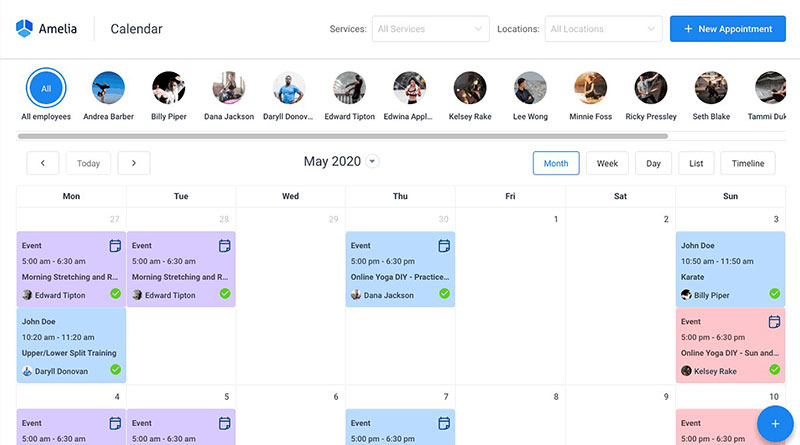
If the site already runs on WordPress and the booking system should live inside it, Amelia is the strongest pick. It's a plugin sold as annual or lifetime licenses, with a free limited version, Amelia Lite, on WordPress.org.
Amelia works only on WordPress. The vendor's pricing page lists plugin licenses for self-hosted sites and nothing else.
Bookings run through a step-by-step wizard, and the plugin handles group bookings, recurring appointments, service packages, buffer times and per-service custom fields. Square works on every plan, with Stripe, PayPal, Mollie, Razorpay and WooCommerce from Standard upward. Deposits, taxes and invoices are listed across plans.
It connects to Google Calendar, Outlook, Apple Calendar, Zoom, Google Meet and Microsoft Teams. Emails and reminders go out on a custom schedule, and there's a WhatsApp integration as well. Clients get a customer panel, and the coach gets a customer database with notes.
Amelia Lite is enough to test the booking flow. aThemes' 2026 review lists custom fields, Zoom, Google Meet, Teams, customer panels, coupons and WhatsApp notifications as paid-only.
Starter lists Square as its only payment method, which catches some coaches off guard, and the mobile app comes only with Elite (Amelia pricing page, November 2026).
A lapsed license keeps the plugin running, but updates and support stop, and yearly plans renew automatically.
Older reviews credit the original developer, TMS. Amelia's own site says TMS is now Melograno Venture Studio and credits that company in its footer, so check who sells and supports the license before buying.
The pricing model is the best part. Licenses are priced by domain count (1 domain on Starter and Standard, 5 on annual Pro, unlimited on annual Elite), and the vendor adds no per-staff or per-booking charge. Lifetime licenses exist from Standard upward. Packages, recurring appointments, group bookings and deposits are all listed, Zoom, Google Meet and calendar sync are native, and both customers and employees get their own panels.
The downsides are fairly plain. It's WordPress only, so hosting and plugin upkeep fall on the coach. Stripe and PayPal need Standard or above. Support and updates end if the renewal lapses, and there's no goal or progress tracking.
Trafft as a Hosted Booking Option
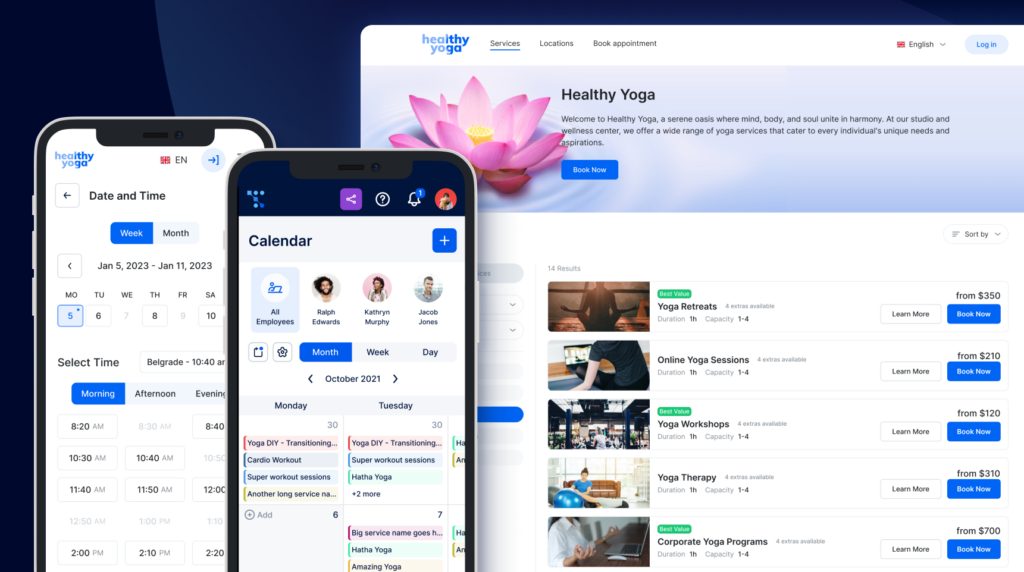
Coaches who want a hosted booking page and no website upkeep are the natural fit for Trafft, though it embeds into an existing site too. Every plan includes a standalone booking page, a booking link, a QR code and a WordPress plugin.
The free plan caps at 100 appointments a month, 1 user and 1 location, according to trafft.com's pricing page in November 2026.
Here's what each paid tier adds for a coach.
| Plan | Limits | Coach-relevant features |
|---|---|---|
| Free | 1 user, 1 location, 100 appointments a month | Booking page and Square payments; no group bookings or calendar sync |
| Mini | 3 users, 3 locations, unlimited appointments | Group bookings, buffer time, customer notes, Google, Outlook and Apple calendar sync |
| Growth | 5 users, 5 locations | Stripe and PayPal, Zoom, custom fields, client profiles |
| Professional | 15 users, unlimited locations | Recurring appointments, service packages, deposits, waiting list, Zapier |
Multi-session programs depend on recurring session bookings and service packages, and the comparison table puts both on Professional and above.
The plan cards on the same page list packages and recurring appointments on every paid tier, so the two parts of the page disagree. Treat the comparison table as the stricter reading and test both in the 14-day trial before picking a tier.
SMS reminders run on credits. Professional includes 5 a month and Business 10, while lower tiers buy credits separately.
Trafft's page text does not show prices. Capterra lists Mini at $7.99, Growth at $19.99, Professional at $39.99 and Business at $64.99 a month, and Trafft advertises savings of up to 25% on annual billing, so confirm the total at checkout.
Third-party listings describe the free plan inconsistently. One competitor's comparison page mentions a free tier for teams of up to 5, the official page says 1 user, and directory listings such as TrustRadius still show Starter and Scaling tiers that no longer appear on trafft.com.
On the plus side, there's no commission on bookings and the free plan needs no card. The booking page, embed code and WordPress plugin come with every plan, customer time zones are on all plans, and calendar sync starts at Mini.
A few things hold it back.
- Packages, recurring appointments and deposits sit on Professional and above in the comparison table
- Additional users are billed per seat, and a custom domain appears only on Business
- SMS reminders cost extra on the lower tiers
- Client records stop at notes, custom fields and booking stats, with no goal tracking
Which Other Coaching Apps Are Worth Considering?
Acuity Scheduling
Squarespace owns Acuity Scheduling, a hosted scheduler with no free plan. Tiers are capped by calendar count, with 1 on Starter, 6 on Standard and 36 on Premium.
The tier decides what a coach gets. Starter sends email reminders only, while Standard and Premium add text reminders, appointment packages with payment plans, and subscriptions (acuityscheduling.com pricing page, November 2026). Older listings call the tiers Emerging, Growing and Powerhouse and quote $49 a month for the top tier, while the live page now shows Premium at $55 billed annually.
Time zone conversion works on every plan, text reminders and packages arrive with Standard, and calendar sync covers Google, Outlook and iCloud. The catch is simple: no free plan, and the entry tier skips text reminders and packages.
CoachAccountable
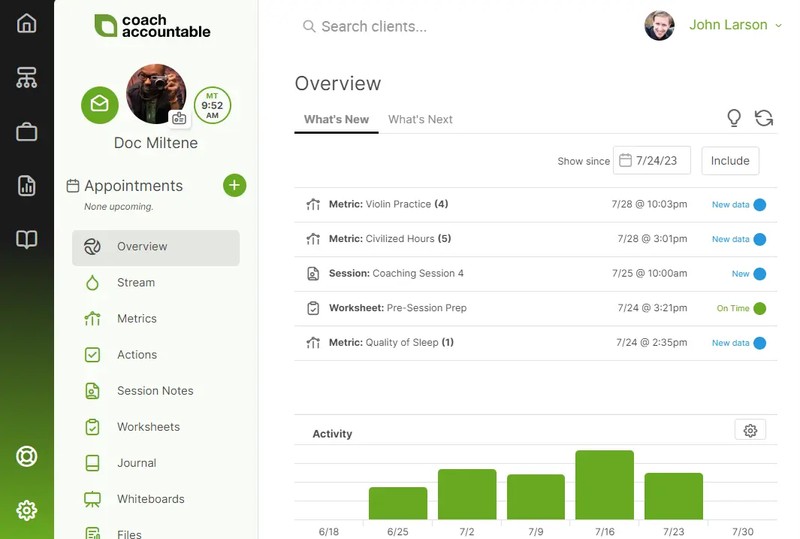
CoachAccountable bills by active client. $20 a month covers up to 2 clients and $40 covers up to 5, and the price climbs to $120 for up to 20 (CoachAccountable pricing page, November 2026).
Only active clients count, so a coach can deactivate clients between programs to hold the bill down. One Capterra reviewer does exactly that when clients move into maintenance coaching.
Every plan includes the full feature set, and the metrics for tracking quantitative client progress are something booking plugins simply don't have. Coach and administrator accounts are unlimited at no extra cost. The bill is the sore spot, since it climbs with each active client, and the same reviewer calls the tiers expensive at higher client counts.
Paperbell
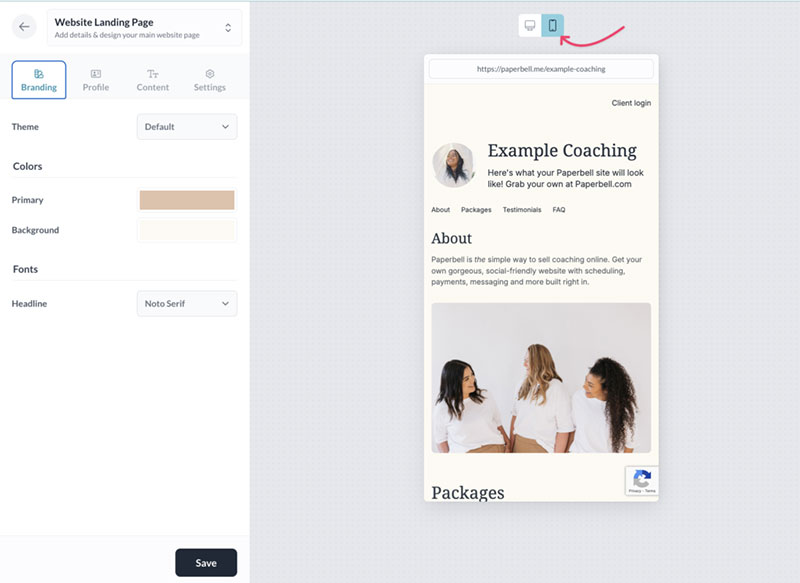
Paperbell sells one flat plan, with unlimited clients and sessions.
It bundles a coaching website, scheduling, packages, a client portal, contract signing, forms, group coaching tools and digital downloads, with no transaction fee from Paperbell itself. Payments run through Stripe and PayPal (Group.app, 2026).
Several listings still quote $57 a month. The vendor's live pricing page, updated in October 2026, lists $97 a month or $970 a year.
Having the website, portal and scheduling in one system, at one price for unlimited clients, packages and contracts, is the draw. The flat fee does sit above scheduling-only tools, and Group.app's 2026 review finds clear gaps for coaches who need more than scheduling and payments, including no course builder, community or email marketing.
Delenta
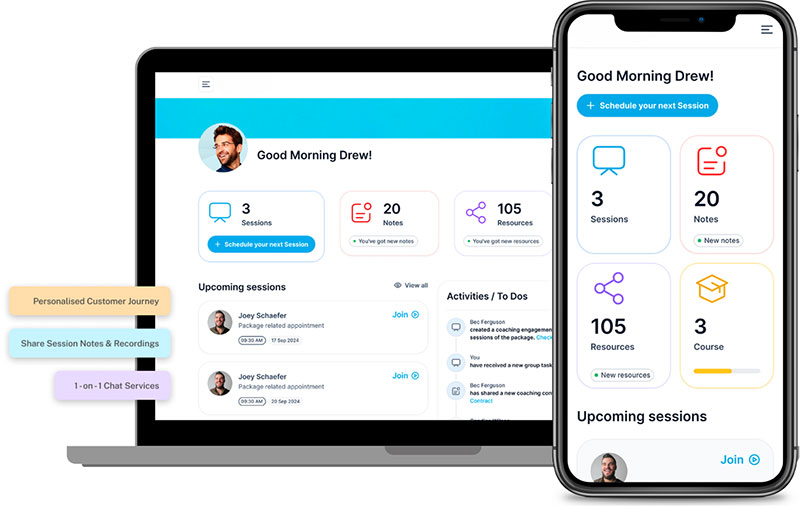
Delenta is hosted coaching software that combines a CRM, scheduling, e-sign contracts, session notes, goals and client portals. Plans are priced by the number of client portals, with one seat on the single-coach plans.
Starter costs $29 a month ($229 a year) for 10 client portals and includes lead and intake forms, a booking calendar with Google and Outlook sync, session notes, tasks, goals, e-sign contracts, and Zoom, Stripe, PayPal and Zapier connections. Pro is $49 a month for 40 portals and adds group coaching, group packages and a branded landing page. Premium is $79 a month with unlimited portals, a custom domain, subscriptions, a course creator and the mobile app (Delenta pricing page, November 2026).
The pricing page quotes both a 14-day and a 7-day free trial, so confirm the length when you sign up. Lead capture is unlimited on every plan.
It suits coaches who want contracts, goals and group programs in one workspace and are ready to pay more than a booking tool costs. A coach who only needs paid booking will spend less on Amelia or Trafft, and the portal caps mean the price steps up as the client list grows.
Kajabi
Kajabi removed its $89 Kickstarter plan in January 2026 and raised every remaining tier, so Basic now starts at $179 a month, or $143 billed annually (Ruzuku, May 2026).
Basic allows 5 products, and coaching is one of six product types alongside courses, communities, podcasts, newsletters and downloads (Kajabi help center). Advanced automations sit on Growth and Pro.
For coaches selling structured learning programs, content management matters as much as scheduling. Lessons, worksheets, videos and downloadable resources need to stay organized so clients can find the right material at each stage of a program. That's where a course platform like Kajabi serves a different purpose from booking-first tools such as Amelia and Trafft.
It earns the price when courses, memberships or a paid community bring in more than one-to-one sessions. For a practice that runs on booked one-to-one calls, a booking-first app costs far less.
How Much Do Coaching Apps Cost?
Most of the booking-first plans compared here land between roughly $8 and $27 a month, and card processing adds roughly 2.9% to 3.5% plus a fixed fee on every payment. All-in-one coaching platforms such as Delenta, Paperbell and Kajabi cost several times more.
Figures below come from vendor pages as of November 2026, except where a source is named.
- Amelia Pro lists at $199 a year and Elite at $432, with first-year promotional prices of $149 and $259 (Amelia pricing page)
- Trafft runs Mini $7.99, Growth $19.99, Professional $39.99 and Business $64.99 a month (Capterra listing; confirm the billing term at checkout)
- Acuity Scheduling Standard costs $27 a month billed annually, or $34 billed monthly (Acuity Scheduling pricing page)
- Delenta runs $29 a month for Starter, $49 for Pro and $79 for Premium, with yearly billing at $229, $469 and $699 (Delenta pricing page)
- Calendly Standard costs $10 per seat a month billed annually and adds Stripe and PayPal payment collection (Calendly pricing page)
- Stripe charges 2.9% plus 30 cents per US online card payment (NerdWallet's summary of Stripe's rate)
- PayPal Checkout charges 3.49% plus a fixed fee per payment, 49 cents on US payments (PayPal merchant fee schedule)
Amelia's discount applies to the first year only, so budget the list price from year two.
Free Options and Where They Stop
Free plans are for testing, not for running a practice. Free booking tools each hit a different wall first, whether that's appointment counts, user seats or session types.
Amelia Lite is free from WordPress.org, although the paid plugin has no trial, only a refund window. Calendly Free gives you one event type and one calendar connection, so an intro call plus a paid session already needs Standard.
A free tier lasts longest for a coach with one session type and a few clients, and stops being enough once packages, group sessions or extra team members appear.
Card Processing Fees
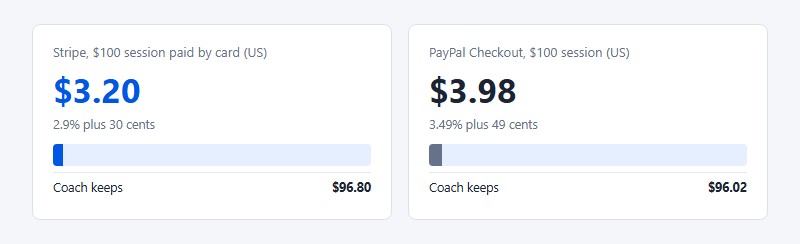
On a $100 session paid by card in the US, Stripe keeps $3.20 (2.9% plus 30 cents), and PayPal Checkout takes $3.98 (3.49% plus 49 cents).
The fixed part of the fee hurts small payments most, so a coach selling six-session packages pays it once instead of six times.
Both processors add a surcharge on cross-border payments. Stripe adds 1.5% on cards issued outside the seller's country, and PayPal adds a similar percentage on payments received from buyers in other countries.
Which Coaching App Fits Your Practice?
If a WordPress site already exists, Amelia. Trafft fits better when there's no site or the team is likely to grow, and clients who need tracking or courses belong on a coaching platform. Cost and session length decide the close calls.
Three-Year Cost of Ownership
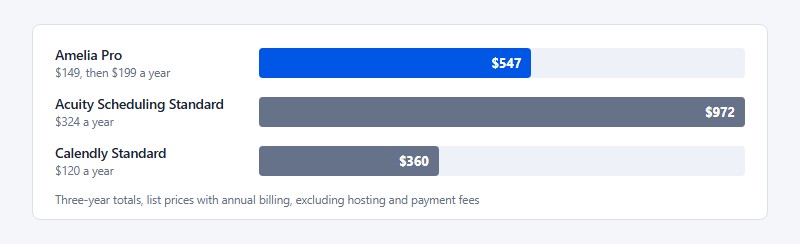
| Option | Year 1 | Years 2 and 3 | Three-year total |
|---|---|---|---|
| Amelia Pro | $149 | $199 a year | $547 |
| Acuity Scheduling Standard | $324 | $324 a year | $972 |
| Calendly Standard | $120 | $120 a year | $360 |
The totals use the list prices above with annual billing and assume Amelia renews at its listed $199. They exclude WordPress hosting, payment fees and Trafft, whose listed monthly prices vary by billing term.
Calendly's plan lists show no package selling, so the cheapest row does less than the other two.
Amelia or Trafft
Amelia makes sense when the site already runs on WordPress with someone maintaining it, and when a yearly license costs less than a per-seat bill at the team's size. It also assumes the practice stays on a single website.
Trafft is the better call with no website, or a site on another platform. Hosting, updates and backups become the vendor's job, and the free plan is a low-risk place to start.
When a Scheduling Link Plus Zoom Is Enough
A free scheduling link plus Zoom is enough for a coach with one session type, no upfront payment and sessions under 40 minutes.
The ceiling comes from Zoom. Meetings hosted on a free Basic account end after 40 minutes when the host is joined by even one participant, according to a Zoom Community manager reply in August 2026.
Plenty of coaches end up comparing Acuity against Calendly as the two simplest paid options. It mostly comes down to whether the practice sells packages at all. Single sessions are fine on the cheaper link tool, but bundles need a scheduler built for them.
Where Booking-First Coaching Apps Fall Short
Signed contracts, lesson delivery and regulated health data handling appear in neither the Amelia nor the Trafft feature lists, so a coach who needs any of them has to look elsewhere. Amelia's calendar sync also stops short of two-way.
| Gap | What happens | Where to look |
|---|---|---|
| Contract signing | Neither Amelia nor Trafft lists e-signatures | Paperbell |
| Program content | Sessions are sold and scheduled, lessons are not hosted | Kajabi |
| Health data | Neither pricing page addresses HIPAA | Acuity Scheduling Premium with a signed addendum |
| Calendar write-back | Amelia's Google sync does not move or delete appointments from Google | Test before relying on it |
Coaches who need signed agreements should settle contracts for life coaching clients before choosing, because the signing step has to live in some tool.
Calendar Sync Is Not Always Two-Way
Amelia's documentation states that its Google Calendar integration is not a full two-way sync. Moving an Amelia appointment in Google does not move it in Amelia, and deleting the Google event leaves the appointment in place.
Review sites describe the same feature as two-way, and both descriptions fit the documentation. Events saved as Busy block availability, but edits do not flow back.
Reschedule inside the booking app, never in Google Calendar.
Health Data and Compliance
- Acuity Scheduling can be HIPAA-enabled on its Premium plan, called Powerhouse in older materials (its help center still says Premium or Powerhouse), with a signed business associate addendum
- Protected health information belongs only inside that HIPAA-enabled Acuity account, not elsewhere on Squarespace
- Neither the Amelia nor the Trafft pricing page mentions HIPAA
Whether a coaching practice falls under HIPAA depends on its situation, so a compliance advisor should make that call.
Who Holds the Client Data
With Amelia, client records sit in the coach's own WordPress database, so backups, security patches and data location are the coach's job. Trafft is hosted, which means the vendor stores the records and its privacy policy governs where they live.
How to Set Up Online Booking for Coaching Sessions
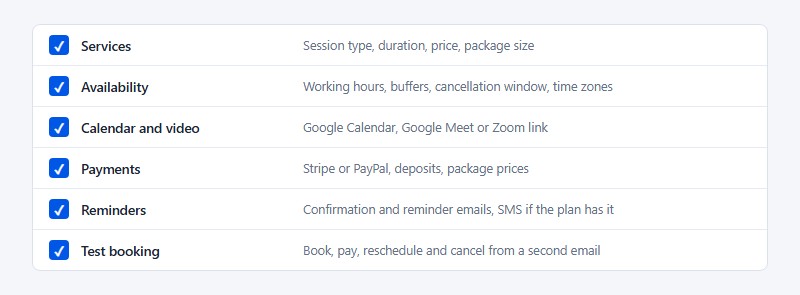
The same order works in Amelia, Trafft or any other tool on this list. It follows the standard path for setting up an online booking system, and the calendar connection is the step most likely to fail.
- Define the services. List each session type with its duration, price and package size. Amelia keeps these in its Catalog.
- Set availability rules. Enter working hours, buffers between calls, the cancellation window and time zone handling.
- Connect the calendar and video tool. In Amelia, open Features and integrations, set up Google Calendar and Google Meet, then connect each employee's calendar.
- Connect a payment gateway. Add Stripe or PayPal, then set deposits or package prices.
- Configure reminders. Set confirmation and reminder emails, and SMS where the plan allows it.
- Run a test booking. Book as a client from a second email address, pay, reschedule and cancel, then check both calendars.
Amelia's documentation points out where this usually breaks. A custom Google Cloud app left in Testing disconnects employees every 1 to 2 days until it is published to Production. Google also shows an unverified warning during authorization, and verification is optional because the integration works without it. And the Google account used during setup decides which calendars can be assigned to employees.
Reminder wording matters as much as timing, and SMS and email reminder templates save writing each message from scratch.
Coaching Apps FAQ
Do coaching apps include a mobile app for clients?
Some do. Delenta lists a mobile app on its Premium plan, while Amelia's iOS and Android app serves the team and comes only with Elite.
Trafft lists Android and iOS apps on its plans.
Can client data move to a new app when a coach switches?
Yes, at least as customer lists. Amelia lists customer import and export, and Trafft imports customers from Mini upward but exports them only from Growth.
Check whether notes and package balances travel with the file before switching.
How does an Amelia lifetime license upgrade work?
An annual license upgrades by installing the higher tier's file over the existing one. A lifetime upgrade goes through Amelia support, which describes it as not straightforward.
Which coaching apps can cap seats in a group program?
Paperbell group packages set a purchase limit and an expiry date after which the package can no longer be bought. Amelia sets a spot capacity for each event ticket type, and Trafft supports group bookings from the Mini tier.
Do SMS reminders cost extra?
Often, yes. Trafft sells SMS credits separately on its lower tiers and bundles 5 or 10 a month on the top two.
Acuity Scheduling reserves text reminders for Standard and above.
Can coaching apps send WhatsApp reminders?
Yes. Amelia lists a WhatsApp integration, and Trafft lists WhatsApp messaging.
Trafft's pricing page disagrees with itself on tiers. The plan cards show WhatsApp on every paid plan, while the comparison table marks it Business only.
Which Coaching Apps to Trial First
Start the trial with whichever app matches the existing website. That's Trafft's free plan when there's no WordPress site, and Amelia when there is.
Trial terms differ, with Acuity Scheduling at a 7-day trial, Amelia at a 15-day money-back period and Paperbell at a 30-day guarantee, so the shortest window sets the deadline when two apps run in parallel.
Inside those windows, price the sessions and packages first, run one full test booking with a payment, then take live bookings until the window closes. For the pricing step, what life coaches charge per session gives a starting point for the numbers.
Position verified on November 6, 2026. A change to Amelia's first-year promotion or to Trafft's tier limits would change this order.