




The best apps for personal trainers fall into two groups, and most trainers end up running one from each. Booking tools like Amelia and Trafft know nothing about workouts, and coaching platforms like Trainerize, TrueCoach and Everfit are uneven when it comes to scheduling. Neither Amelia nor Trafft includes a workout builder, and TrueCoach's published feature list contains no session booking.
If you want a sense of what buyers care about most, Capterra's 2026 analysis of 14,228 appointment scheduling reviews is a decent guide. Online booking was rated critical by 60% of reviewers, ahead of appointment management (58%) and calendar management (54%).
What are the best apps for personal trainers?
For trainers who sell in-person sessions, Amelia and Trafft come out ahead, since both handle booking and payments and both send reminders. Once the job is delivering workout programs and tracking client progress, Trainerize, TrueCoach and Everfit take over.
| App | Best for | Delivery | Free option |
|---|---|---|---|
| Amelia | In-person trainers with a WordPress site | WordPress plugin | Amelia Lite on WordPress.org |
| Trafft | Trainers who want hosted booking | Web app, mobile apps, WordPress plugin | Free plan, 100 appointments a month |
| Trainerize | Programs plus a client app | Web and mobile apps | Free plan, 1 client |
| TrueCoach | Programming-first coaching | Web and mobile apps | 14-day trial |
| Everfit | Coaching with booking built in | Web and mobile apps | Free plan, up to 5 clients |
| My PT Hub | Coaches who want a branded app | Web and mobile apps | Free Lite plan, 1 client |
| PT Distinction | Remote coaching with packages | Web and mobile apps | 1-month free trial |
Every tool in the table can be tested before paying. The free options come from each vendor's own pages as of November 2026.
Sorted by the job each one does best, Amelia and Trafft sit on the booking and payments side. Programming and client tracking belong to Trainerize, TrueCoach, Everfit, My PT Hub and PT Distinction, while Mindbody, Vagaro, and Glofox are really studio and membership management software.
Price matters, but how you deliver training usually settles the choice first.
A trainer who meets clients in person needs a calendar and a payment link before anything else, which is why the booking tools lead. Coaches working mostly online can start with the programming tools, and a separate guide to software for online personal trainers goes deeper on that side.
Amelia: WordPress booking for trainers who own their site

Amelia runs as a WordPress plugin, so clients book, pay for and reschedule sessions on your own website. Licenses are priced per site, annual or lifetime, not per client.
One-to-one sessions go in as appointments, and group classes as events with capacity limits and waiting lists. Recurring bookings, session packages and shared resources such as rooms or equipment are covered too. On payments, Amelia connects to Square, Stripe, PayPal, Mollie and Razorpay, plus 50+ gateways via WooCommerce, and it handles deposits, invoices and tax rates. Reminders go out by email, SMS and WhatsApp, and online sessions can carry Zoom or Google Meet links.
Group pricing follows headcount. Amelia's own example for a training session charges $50 for the first participant and $20 for each additional one.
Plan tiers decide which of these features you get. Amelia's gym page puts recurring bookings, deposit payments, invoices and calendar integrations at Standard, and service packages, resource management and event waiting lists at Pro.
The pricing page lists nearly the same features under every plan, so the gym page breakdown is the more specific source. Check the comparison table before buying.
As of its late-October 2026 pages, Amelia also ships a Business app for iOS and Android. Trainers see their sessions, get push alerts for bookings and cancellations, and scan attendees in with QR tickets, while clients keep booking on the website.
Amelia's FAQ limits that app to the Elite plan, which is aimed at agencies and developers. The pricing page marks the app on every plan, so ask support before counting on it.
On the plus side, licenses are priced per site with a lifetime option, and group classes, waiting lists, packages and shared resources all live in one plugin. Payment coverage is wide through WooCommerce, and booking data stays on your own hosting.
The downsides are real, though. You need a WordPress site that you host and maintain, there's no workout builder and no training app for clients, and there's no free trial, only Lite and a 15-day money-back guarantee.
Trafft: hosted booking with a standalone page

Trafft drops the website requirement. It's hosted, so a trainer gets a standalone booking page, an embeddable form and a staff calendar with no website required. Plan prices follow the number of staff users, not the number of clients.
The free plan covers 1 user, 1 location and 100 appointments a month, with no group bookings and no Stripe (Trafft pricing page, October 2026). Every paid plan lifts the appointment cap.
Trainers who book the same client every week need recurring weekly appointments, and Trafft's feature table places them on the Professional plan and above. Service packages and deposit payments sit at the same level.
The plan cards on the same page list those features on every plan, so the two parts of the page disagree. Test them in the 14-day trial before paying.
Payments and integrations scale by tier as well. Square works on every plan, while Stripe, PayPal, Authorize.net and Mollie start at Growth. Google, Outlook and Apple calendar sync starts at Mini. Zoom and per-employee calendar sync start at Growth, and Zapier starts at Professional.
| Strengths | Limits |
|---|---|
| Works with or without a website, QR-code booking link included | No workout builder and no training app for clients |
| No commission per booking, per Trafft's FAQ | Group bookings, Stripe and Zapier sit on paid tiers |
| Free plan plus a 14-day trial for testing first | SMS credits bought separately below Professional |
Amelia or Trafft: which one fits your setup?
If you already run a WordPress site and are happy to host the booking system yourself, Amelia fits. Trafft makes more sense when you have no site, or when you'd rather test a hosted calendar on a free plan first.
Where the bookings live is the first difference. Amelia keeps them on your WordPress hosting, and Trafft hosts them for you, though Trafft also ships a WordPress plugin that embeds its form, so WordPress alone does not decide it.
Billing differs too. Amelia sells licenses per site, annual or lifetime, while Trafft bills a monthly or annual plan priced by staff users.
For testing, Trafft has a free plan and a 14-day trial. Amelia has the limited Lite version and a 15-day money-back guarantee. If you stop paying, a lapsed Amelia license keeps working but stops getting updates and support, per Amelia's FAQ. Trafft's free plan stays available after the trial.
Both cover group classes and session packages on their mid and upper plans, and deposits too, so features rarely break the tie.
A solo trainer with no site can simply start on Trafft's free plan. If you're already paying for WordPress hosting, you lose little by choosing Amelia, and the lifetime license option is a bonus.
Trainerize: coaching app with a free plan and paid add-ons
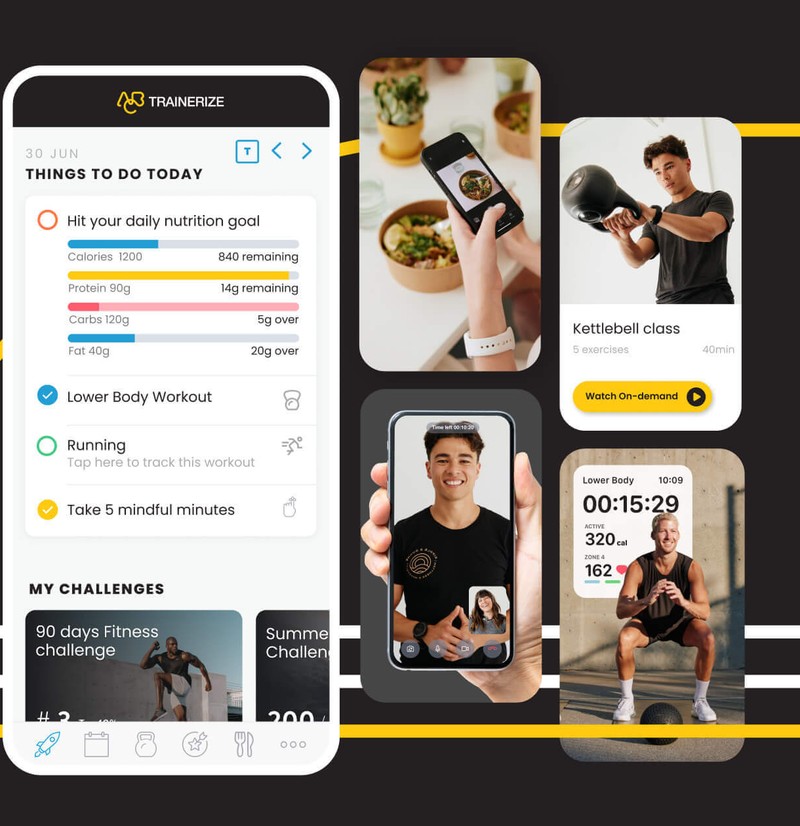
Trainerize is a coaching platform built around a client app. Trainers build workouts and habits on the web, and clients log them on their phones. Plans are priced by client seats, not by trainer.
The Basic plan is free for 1 client. Grow is listed at $9 a month for 2 clients and adds the AI workout builder, client meal and macro tracking and links to wearables. Pro 5 starts at $23 a month on its plan card (the FAQ says $25) and covers 5 to 200 clients, with custom exercise videos and consultation forms (Trainerize pricing page, November 2026).
Booking and payments are where Trainerize splits from the booking tools. The Business add-on, $25 a month, includes scheduling, referrals and product selling, and Stripe payments are a separate $10 a month add-on. A custom branded app costs a $169 one-time setup fee on Pro.
In-person trainers should note the client types. Basic clients can only book appointments and make purchases, and Trainerize's FAQ says they do not count against the plan's client limit.
| Strengths | Limits |
|---|---|
| Free plan for 1 client, AI workout builder from Grow | Booking, Stripe payments and video coaching are paid add-ons |
| Garmin, Fitbit and MyFitnessPal links on paid plans | The plan card and the FAQ disagree on the Pro 5 price |
| Client types that let in-person clients book without using a seat | Cancelling deactivates clients above the free limit |
TrueCoach: programming-first coaching
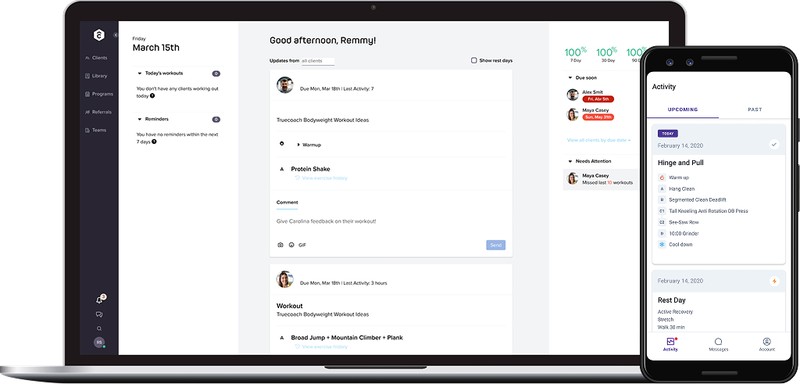
TrueCoach is built for trainers who spend most of their week writing programs. It has a drag-and-drop workout builder, a library of more than 3,000 exercise videos, a client tracker, MyFitnessPal nutrition logging and in-app messaging. Clients use the app for free.
Plans are capped by active clients: Starter is $26.34 a month for up to 5, Standard is $57.99 for up to 20, and Pro is $136.99 for up to 50 (TrueCoach pricing page, November 2026). A 14-day free trial needs no credit card, and annual plans carry a 90-day money-back guarantee for first-time subscribers.
Standard adds public coach profiles, wearable data, a custom-branded app and advanced habit and nutrition tracking. Automated payments run through Stripe, though the processing rate is worth confirming first, as the payments section below explains.
The feature list contains no session booking, so a trainer who sells in-person sessions still needs a calendar tool next to it.
| Strengths | Limits |
|---|---|
| Drag-and-drop builder and a video library of 3,000+ exercises | No session booking in its feature list |
| Free client app and a 14-day trial without a card | Plans are capped at 5, 20 or 50 active clients |
| Stripe payments with recurring and one-time charges | Payments are limited to the US, UK, Canada and Australia |
Everfit: coaching with booking built in
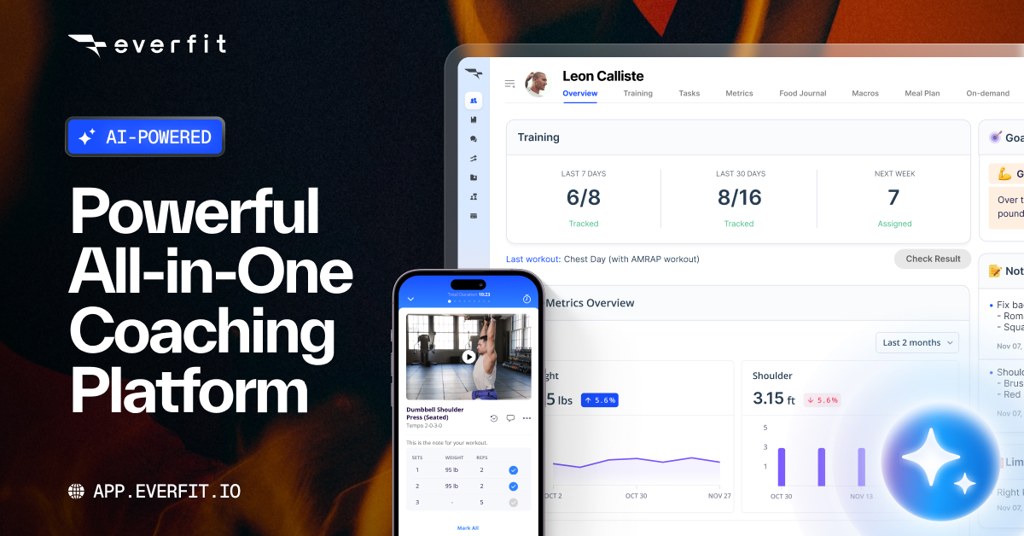
Everfit combines workout programming with booking, habits and nutrition in one plan. It is the only coaching platform in this guide that lists booking and scheduling inside its core paid tier.
The Starter plan is free for up to 5 clients, with a workout builder, metrics, progress photos, messaging and both the coach and client apps. Pro starts at $19 a month ($16 on annual billing) for 5 clients and adds booking, habit coaching, forms, a food journal with macro tracking, basic meal plans and custom branding. Studio starts at $105 a month for 50 clients and adds group chat, broadcasts and an on-demand training portal (Everfit pricing page, November 2026).
Several features are add-ons: Autoflow automation from $29 a month, Payments and Packages from $9 a month, and Meal Plans and Recipe Books from $39 a month. White-label apps sit on Enterprise, and Pro and Studio offer a free trial with no card.
Everfit describes its booking only in general terms, so test it against your session types before relying on it.
| Strengths | Limits |
|---|---|
| Free plan for 5 clients, booking included from Pro | Automation, meal plans and payments cost extra |
| Food journal, macros and habit coaching on Pro | Group chat and broadcasts need Studio |
| Subscriptions, one-time packages and trial periods through the payments add-on | White-label apps are Enterprise only |
My PT Hub: branded app and in-app payments
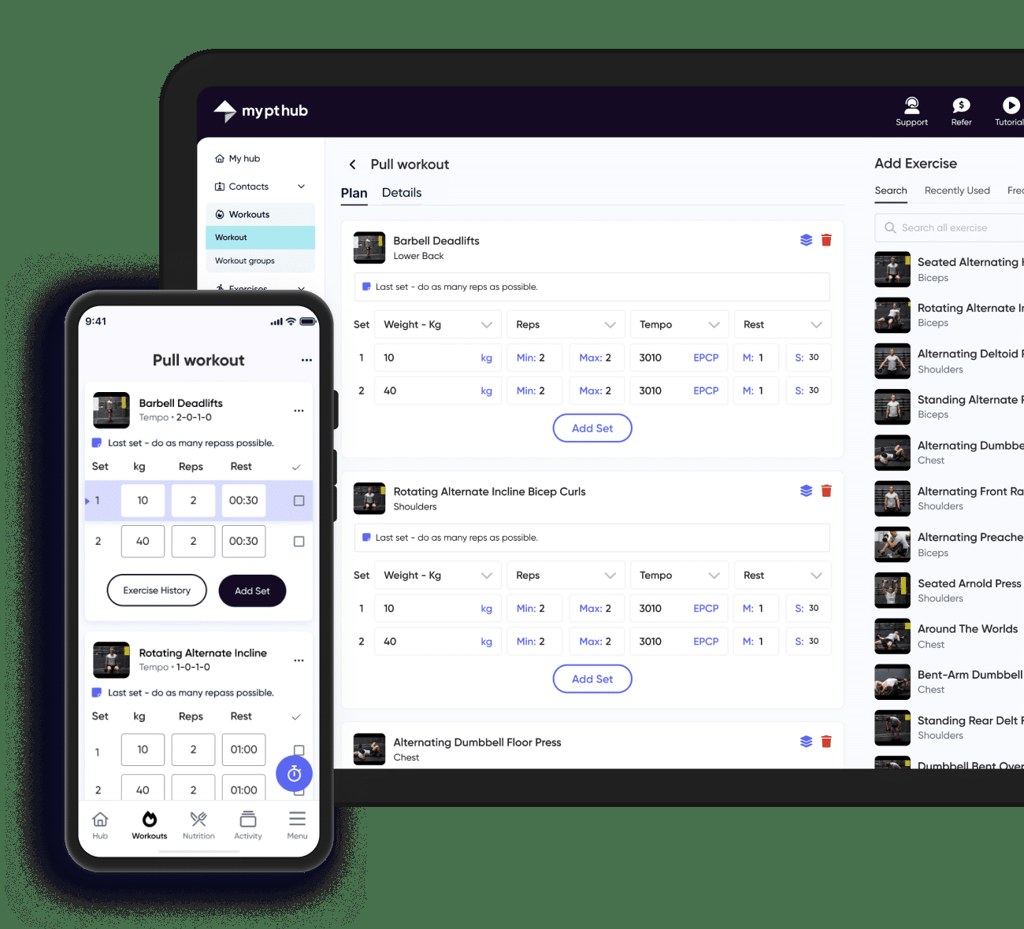
My PT Hub is a coaching platform with a workout builder, nutrition plans, a client app and payment processing. It is priced in euros, and its client caps are low on the cheaper tiers.
The Lite plan is free for 1 client, with 10 workouts and 10 nutrition plans. Starter costs €22.50 to €25 a month, depending on billing, and covers 3 clients. Premium is listed at €52 to €59 a month with unlimited clients and adds the AI workout builder, group bookings and classes, while Ultimate is €195 to €215 and includes a custom branded app (My PT Hub pricing page, November 2026). A 30-day trial needs no card, and the account drops to Lite afterwards unless you upgrade.
One-to-one bookings and payment processing start at Starter, with Stripe handling the payments, including one-off and recurring charges. A custom branded app is a one-time €95 add-on on Starter and Premium, while a white-label app listing costs €145 a month on Premium. Zapier is a €18 monthly add-on.
| Strengths | Limits |
|---|---|
| Free plan and a 30-day trial | Only 1 client on Lite and 3 on Starter |
| One-to-one bookings and Stripe payments from Starter | Branded app and white label cost extra |
| Unlimited clients from Premium | Zapier is a separate monthly add-on |
PT Distinction: branded apps, assessments and packages
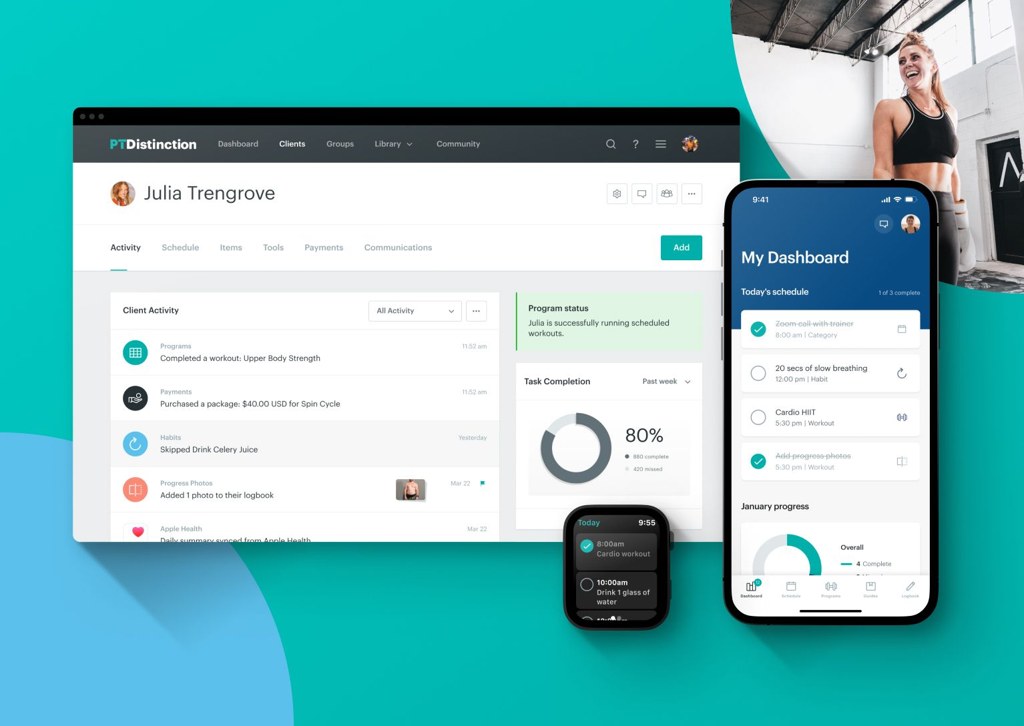
PT Distinction is aimed at trainers who want clients to open an app carrying the trainer's own brand. Every plan includes assessments, group training and selling packages with payments.
Basic costs $19.90 a month for 3 clients, Pro is $59.90 for 25 clients and Master is $89.90 for 50. Extra clients are billed per head after a free first month, from $6 on Basic down to $1.60 on Master. Each plan has a 1-month free trial, and you can cancel in the first month and pay nothing (PT Distinction pricing page, November 2026).
Fully branded Android and iOS apps and website integration come with Pro and Master, while Basic gets the standard apps. The pricing page does not list session booking, so it fits remote coaching and package sales better than a calendar-driven in-person practice.
| Strengths | Limits |
|---|---|
| Assessments, group training and packages with payments on every plan | Fully branded apps only on Pro and Master |
| 1-month free trial and same-day support | No session booking on the pricing page |
| Extra clients charged per head, so costs scale gradually | Basic includes only 3 clients |
Which apps cover workout programming and client tracking?
Trainerize, TrueCoach and Everfit do this best, and clients get a free app with all of them. Where they split is booking and payments.
Coaching and programming platforms
TrueCoach caps plans by active clients, starting at 5 on Starter, then 20 on Standard and 50 on Pro (TrueCoach pricing page, November 2026). The others limit you in different places.
| App | Where it helps | Where it falls short |
|---|---|---|
| Trainerize | Free plan; AI workout builder, Garmin, Fitbit and MyFitnessPal links on paid plans | Booking links, Stripe payments and video sit in paid add-ons |
| TrueCoach | Drag-and-drop builder, exercise video library, Stripe payments | No session booking in its feature list |
| Everfit | Booking and scheduling included from Pro | Automation, meal plans and payments are add-ons, group chat needs Studio |
| My PT Hub | Branded app option, in-app one-off and recurring payments | Branded app and white label cost extra |
| PT Distinction | Branded client app, assessments, group training, packages and payments | Fully branded apps only on the Pro and Master plans |
PT Distinction's details here come from its own pricing page, checked in November 2026. That page does not list session booking.
Nutrition logging runs through MyFitnessPal in both Trainerize and TrueCoach. Both pull Garmin data. On TrueCoach, wearable sync, including Apple Health, is limited to the Standard and Pro plans.
Progress photos and custom metrics live in one dashboard on all three, with workout history alongside, and that's the core of client tracking for personal trainers.
In-person trainers should check Trainerize's client types. Coaching clients get programs and tracking, while Basic clients can only book appointments and make purchases, and Trainerize's FAQ says they do not count against a plan's client limit.
Studio and membership software
Studio software replaces a booking plugin once the business runs classes and memberships across several trainers.
Mindbody is business management software for fitness and wellness businesses, rated 4.0 of 5 from 2,993 reviews on Capterra. Vagaro covers appointment booking, packages, client records and virtual appointments, and sits at 4.7 of 5 from more than 3,600 reviews on Capterra. Glofox does gym and studio management, and Trainerize lists it as an integration on its 200-client and larger tiers.
A solo trainer rarely needs this much. Trainers who find Mindbody too heavy can compare lighter Mindbody alternatives before paying for a full studio suite.
How do payments, packages and recurring billing compare?
Booking tools collect payment at checkout, while coaching platforms bill subscriptions and prepaid packages through their own payment add-ons. Neither Amelia nor Trafft lists subscription billing in its features, so a monthly coaching fee needs a second tool.
Gateway fees sit on top of anything the app charges. Stripe's US rate is 2.9% plus 30 cents per successful domestic card transaction, with 1.5% extra for international cards and 1% extra when currency conversion applies (Stripe pricing page, November 2026).
The fixed 30 cents weighs more on small sales, so a single session loses a bigger share to fees than a prepaid package does.
| App | Gateways | Packages and recurring | Watch for |
|---|---|---|---|
| Amelia | Square, Stripe, PayPal, Mollie, Razorpay, WooCommerce gateways | Packages and deposits, no subscriptions listed | Starter lists Square only |
| Trafft | Square on every plan, Stripe, PayPal, Authorize.net, Mollie from Growth | Packages, deposits, payment links | Refunds start at Professional |
| Trainerize | Stripe, through a paid add-on | Session packs, memberships, subscriptions | A standalone Stripe account loses automatic delivery |
| TrueCoach | Stripe | Recurring and one-time payments | US, UK, Canada and Australia only |
| Everfit | Built-in checkout, gateway not named on its page | Subscriptions, one-time packages, trial periods | Payments are a paid add-on |
Trainerize's Stripe payments FAQ says the first payout can take up to 10 business days after your first sale, and Stripe may ask for identity or business documents before you accept anything. Plan the first client payment around that delay.
Trainerize's Business add-on also lists access to the Stripe add-on. Confirm whether payments require Business before you budget for them.
Everfit's page lists failed-payment recharging and overdue reminders, plus client self-cancellation. Those are the chores a booking tool leaves with you.
TrueCoach advertises free automated payments run through Stripe, and its pricing page says there are no extra fees. Its help center is inconsistent about the processing rate: one article quotes Stripe's 2.9% plus 30 cents for US coaches, while another says 5% per card transaction. A competitor's pricing analysis (FitBudd, October 2026) also reports a flat 5% fee calculated on the invoice total. Confirm the rate in TrueCoach's payment terms before relying on any of these figures.
What do these apps cost?
Booking tools cost far less than coaching platforms, because they bill per site or per staff user instead of per client.
- Amelia runs from $49 a year for Starter up to $259 a year for Elite (Capterra listing). Those are first-year promotional prices, since Amelia's own pricing page shows Pro at $149 against a $199 list price, and Elite at $259 against $432.
- Trafft starts at $7.99 a month for Mini and tops out at $64.99 for Business (third-party price trackers, 2026).
- Trainerize's Pro 5 is $23 a month on its plan card and $25 in its FAQ, which fits the 10% annual-billing discount it advertises.
- Everfit's Pro starts from $19 a month for 5 clients (Everfit pricing page, August 2026 update).
Other regional Capterra and GetApp pages list different "starting" prices for Trafft, and its own pricing page loads prices dynamically. Confirm the live price on trafft.com/pricing before budgeting.
Pricing models vary a lot across these tools. Amelia sells a per-site license, annual or lifetime. Trafft charges per staff user, monthly or annual. Trainerize, TrueCoach and Everfit price by client tier, and on top of that Trainerize sells booking, payments, nutrition or video as separate add-ons, while Everfit does the same for payments, automation and meal plans.
Plan tiers also decide which features you get, and the sources disagree on where some sit. Capterra's Amelia listing places recurring appointments and packages at Pro, while Amelia's gym page puts recurring bookings at Standard.
Capterra's Trafft listing groups recurring appointments, packages and deposit payments at Professional. That matches Trafft's feature table and not its plan cards.
Amelia's annual licenses renew automatically and its page advertises a first-year discount, so ask what year two costs. Lifetime licenses exist for Standard, Pro and Elite if you would rather pay once.
Because Everfit lists booking inside Pro, a trainer with simple one-to-one sessions may not need a separate booking tool. Everfit describes that booking only in general terms, so test it against your session types before skipping Amelia or Trafft.
Software belongs in the fixed-cost lines of a personal trainer business plan, next to insurance and equipment.
How to run booking and programming in two apps without double work
Treat the booking tool as the source of truth for schedule and money, then push each new client into the programming app with an automation.
- Give each tool one job. The booking tool owns the calendar, packages and payments, and the programming app handles workouts, check-ins and nutrition.
- Link Stripe to the booking tool and leave the programming app's own billing switched off, so each sale has a single record.
- Sync your personal calendar so outside events block booking slots. Capterra reviewers of Amelia ask for more two-way sync options, so check how each direction behaves.
- Build the automation. Trafft's Zapier app triggers on completed bookings, cancellations, reschedules, status changes and new customers. Amelia connects through webhooks and Thrive Automator on its pricing page, and Capterra reviewers note that Zapier needs a paid Amelia plan.
- Check the plan gates on both sides. Trafft's feature table puts Zapier on Professional and above. Trainerize lists Zapier from Grow, while TrueCoach's plan cards show Zapier automations on Standard and Pro but its feature list says Pro only.
- Test with a dummy client. Book, pay, reschedule and cancel once, then check that exactly one client profile exists in the programming app.
The action step depends on what the programming app exposes to Zapier. Look for a create-client or invite action on its Zapier page before you commit to a pairing.
Duplicate profiles tend to be the first casualty, because clients often book with a different email than the one in the programming app. Trafft's "Booking Completed" trigger is worth testing too, since Zapier describes it as firing when a new booking is made, so check whether it fires at booking time or after the session.
Cancellations need their own route. They're better sent to a message or task, since a coaching platform without booking has nothing to cancel.
When an app for personal trainers is the wrong choice
A trainer with only a few clients and a loose schedule, who has no trouble collecting payment, doesn't need an app yet. A booking page, a payment link and a notes file cover that stage.
Paid tools start to earn their fee when double bookings, chased payments or program edits eat billable time. Each one has its own limits, though.
- On Amelia, a solo trainer still has to be set up as an employee, and one Capterra reviewer (November 2025) noted that employee has to be visible on the booking form. Two 2026 reviewers reported missing purchase records and unreliable automated reminders, which are individual reports against an otherwise positive listing.
- Trafft drew a complaint from one Capterra reviewer (October 2025), who found the mobile calendar too sparse for a quick view of the day or week. Check it on your phone during the trial.
- With coaching platforms, per-client tiers mean one extra client can push you into a larger plan, so project your roster before you choose.
Stripe Payment Links cover the no-app stage. Stripe's pricing page describes them as no-code links for selling products and subscriptions, with no setup or monthly fees.
A free online booking system can handle the calendar until the schedule fills up.
Switch when the admin starts costing billable hours, not before.
Apps for Personal Trainers FAQ
Can clients book without downloading an app?
Yes. Amelia embeds booking forms on your WordPress pages, and Trafft offers a standalone booking page, a shareable link and a QR code, all in the browser.
Coaching platforms work differently, because workouts and programs live in the vendor's client app.
How do reminders cut no-shows?
A reminder reaches the client before the session, and a deposit gives them a reason to show up.
Amelia sends email, SMS and WhatsApp reminders, supports deposits, and tags repeat no-shows by color so you can see who misses sessions most.
Can a consumer fitness app replace trainer software?
Generally no. A consumer app delivers workouts to its own users, but it has no booking calendar, client records or payment collection tied to your business.
Those are the jobs Amelia, Trafft and the coaching platforms exist to do.
What is a white-label client app, and is it worth paying for?
It's a client app published under your own name in the App Store and Google Play, instead of the vendor's. Trainerize includes one on Studio plans and notes that publishing independently needs an Apple Developer account at $99 a year.
A logo-and-colors branded app is the lighter first step.
Do I need a separate nutrition app like MyFitnessPal?
Usually not. Everfit's Pro plan includes a food journal and macro tracking, Trainerize's Grow plan adds client meal and macro tracking, and TrueCoach syncs with MyFitnessPal.
Detailed meal-plan generators are paid add-ons on Trainerize and Everfit.
Can I export client data if I switch apps?
It depends on the tool and plan. Amelia lists customer import and export in its customer database, and Trafft's feature table includes customer export from Growth upward.
Trainerize deactivates clients above the free limit when you cancel, so save your client records first.
Which App a Personal Trainer Should Set Up First
Among apps for personal trainers, a booking tool such as Amelia or Trafft comes first, because scheduling and payment collection use the most admin time before a client roster grows.
Order matters, and the slowest step goes first. Payment account verification should start this week. A booking page with calendar sync comes next, and the coaching platform can wait until program edits outweigh scheduling.
Stripe verification and the first payout run on the processor's schedule, not yours, so that step starts earliest. The cost is a gap in the meantime, with clients getting workouts by message or PDF until the coaching platform goes live.
Both vendors advertise seasonal discounts (Trafft up to 20% off, Amelia up to 50% off). Prices were verified on November 4, 2026, so recheck them at checkout.
Trainers with the tools in place can move on to how to get online personal training clients.