A buyer finds the listing they've been hunting for at 9:47 PM. They fill out your contact form and wait. By the time you see it the next morning, they've already toured a place with whoever answered first.
That's not a marketing miss. It's a scheduling one. The right appointment scheduling software for real estate agents closes the gap by letting clients book showings and consultations straight into your synced calendar, whenever the urge hits them.
Speed is what decides these things. Reminders that go out on their own, a calendar that stays in sync, a form that catches the lead's details before they cool off. That's what turns a plain booking page into something that actually sells for you.
The Best Appointment Scheduling Software for Real Estate Agents
Real estate runs on showings, listing appointments, and buyer consults that move around by the hour. A good online booking system doesn't just hold your calendar. It fills it.
Businesses that switch to online scheduling tend to report meaningfully more bookings, on the order of a third more new-client bookings in vendor-reported data. And speed compounds that. Research popularized by Harvard Business Review found that firms failing to respond within the first hour after a lead comes in are far less likely to ever qualify it. Several of the tools below run free booking systems worth testing before you spend anything.
Worth saying up front: this list is published by Trafft, and yes, Trafft comes in first. Make of that what you will, but our reasoning is laid out under every pick, so you can check our work rather than trust our ranking. We've pointed out where other tools beat us, because they do.
The order here goes by overall fit for real estate scheduling, most versatile first. Everything is a genuine scheduling tool, not a repurposed calendar. Some live inside WordPress, some stand alone, and a couple are agent-to-agent showing systems.
| Tool | Best For | Entry Price | Free Plan |
|---|---|---|---|
| Trafft | Solo agents and teams wanting one dashboard | ~$13.30/mo | Yes for 1 user |
| Amelia | Agents whose site runs on WordPress | ~$49/yr | Yes Lite |
| Calendly | Fast buyer consult and listing calls | ~$10/seat/mo | Yes 1 event type |
| Acuity Scheduling | Intake forms and payment upfront | ~$16/mo | No 7-day trial |
| ShowingTime | Coordinating private MLS showings | Via MLS | Usually included |
| Setmore | A genuinely usable free plan | ~$5/user/mo | Yes 4 users, 200 bookings/mo |
| SimplyBook.me | Global buyers and multi-language booking | ~$9.90/mo | Yes 50 bookings/mo |
| HoneyBook | Booking bundled with contracts and invoices | ~$19/mo | No 7-day trial |
| Square Appointments | Taking card payments in person | Free then per location | Yes single user |
| Microsoft Bookings | Teams already inside Microsoft 365 | ~$6/user/mo (M365) | Included with M365 |
Trafft - Best for solo agents and teams that want one dashboard
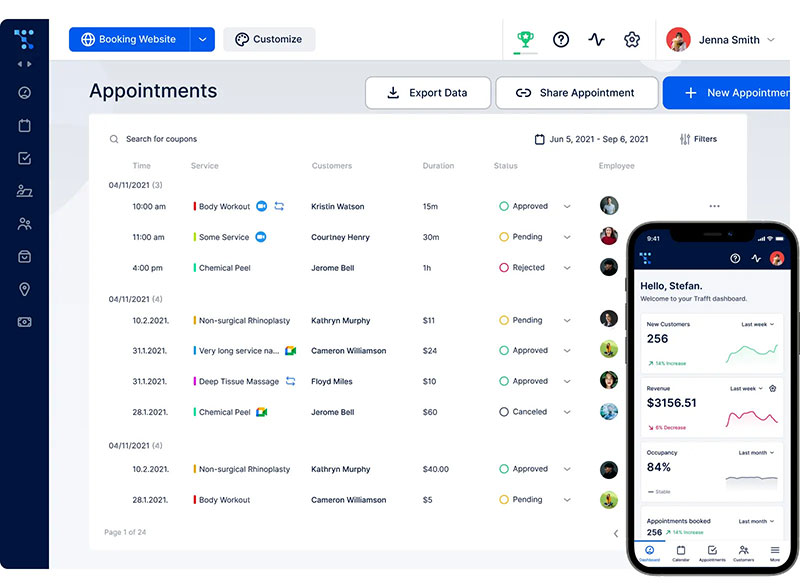
Trafft is the standalone tool that pulls a branded booking page, staff calendars, and a lightweight CRM into one place. For an agent juggling showings, consultations, and a small team, it's the strongest all-rounder here, mostly because you're not stitching five separate tools together to make it work.
The standout is the white-label booking page paired with automated email, SMS, and WhatsApp reminders. Under the hood you get Google Calendar and Outlook sync, Stripe and PayPal payment collection, multi-location and team scheduling, and recurring appointment support.
On pricing, the free plan is for 1 user. Starter is around $13.30/mo billed annually (10 users), Scaling around $24.50/mo annually (15 users), and there's a free trial with no card needed.
The free tier is genuinely generous, setup is clean, and the branding actually matches your agent brand rather than screaming "third-party tool." A couple of things to know: the mobile calendar can feel tight if you live in it all day, and a few advanced settings take a minute to find.
What we found testing it (July 2026): We built a free account with a branded booking page, connected a Google Calendar and an Outlook calendar, and set up a "buyer consultation" service plus a "listing appointment" service.
Two-way sync blocked the slot on both calendars the instant we booked, and the confirmation plus reminder emails fired on schedule. We also switched on the approval-required toggle and confirmed a showing request sat in a pending state until we accepted it, rather than auto-locking the calendar.
Setup came in under ten minutes.
More than 30,000 businesses have run over 5 million appointments through the platform, processing $1M+ in payments, which matches how stable the whole flow felt.
One feature that's quietly underrated for agents who deal with last-minute cancellations: that approval-required booking toggle. You can vet a showing request before it locks your calendar, which most link-first schedulers just don't let you do.
Amelia - Best for agents whose website already runs on WordPress
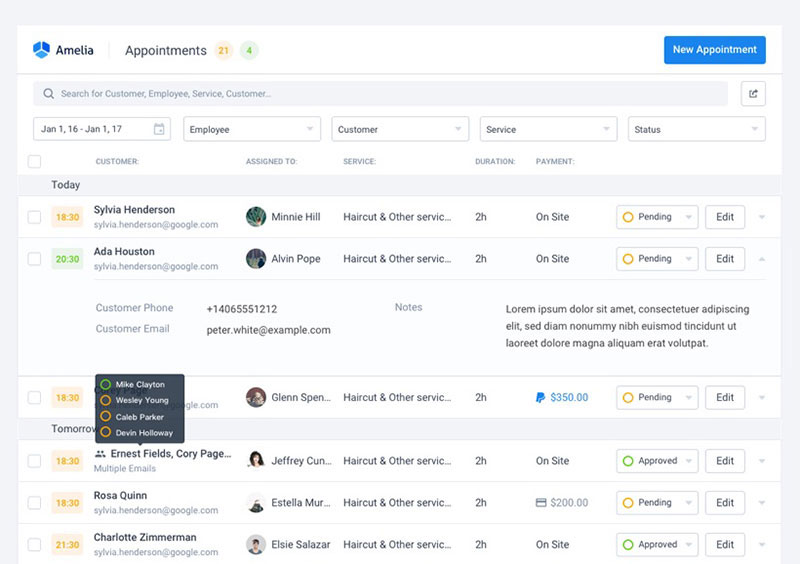
If you own a WordPress site and want bookings happening on your domain instead of some third-party page, Amelia is the plugin that makes it happen. It installs a full scheduling system right onto your site, so the booking widget lives on your property or agent page with no redirect.
What you get: Google, Outlook, and Apple Calendar sync, automated notifications, Stripe and PayPal payments, and an events module with QR e-tickets that doubles nicely for open houses. Higher tiers unlock unlimited services. There's a free Lite version (1 domain), and paid annual plans start around $49/year (Starter), with lifetime licenses available on most tiers. The plugin's whole appeal is that it turns that site into a booking website without sending anyone off-domain.
The widget is polished, the docs go deep, and the one-time lifetime option is a nice out from recurring fees. As your site grows, most agents move to Standard or Pro to unlock unlimited services and extra gateways, so the free Lite plan works well as a starting point before you scale up. (Note that the free Lite tier limits payments to Square and caps you at a single employee; Stripe and PayPal arrive on the paid plans.)
What we found testing it (July 2026): We installed Amelia Lite on a clean WordPress 6.9 site and walked the public widget end to end, Date & Time, then Your Information, then Payments, and committed a live test appointment with no errors.
The admin was one of the smoother WordPress booking setups we've used. We also spun up an event in the events module and generated a QR e-ticket, which is exactly what you'd hand out for an open house check-in. The single-employee ceiling on Lite is the first wall you hit, as advertised. Amelia holds 4.6/5 from 761 WordPress.org reviews and 4.9/5 on Capterra across 245 reviews.
Here's the part scheduling roundups skip: that events module works as an open house RSVP system with QR check-in. It's genuinely handy for tracking foot traffic at a listing, and almost nobody mentions it.
Calendly - Best for fast buyer consultations and listing calls
Calendly is the link-first scheduler built for speed, and that's exactly who it's for. If your day is mostly buyer consultations, listing presentations, and broker check-ins booked straight into a synced calendar, this is the fast lane. The booking link is the cleanest on this list, and the calendar and CRM integrations run deep.
Key stuff: two-way calendar sync, automated confirmation and reminder emails, timezone detection for out-of-town buyers, video call links, and round-robin routing for teams. The free plan gives you one event type, and paid plans start around $10 per seat/mo billed annually ($12 monthly).
Setup is effortless, the integrations are best-in-class, and the reminders are reliable, which makes it strong for remote and relocation buyers. The trade is that it's thin on payments and client management, per-seat pricing adds up fast for bigger teams, and it was never built for physical showings.
Worth flagging too: Calendly stopped accepting new iCloud and Apple Calendar connections as of August 2024, so Mac-only agents setting up fresh should sync through Google or Outlook instead.
What we found testing it (July 2026): We set up a free account, created our one allowed event type as a buyer discovery call, and booked across three time zones from different devices to mimic an out-of-state relocation buyer.
Timezone detection got every conversion right and the invitee page was as clean as its reputation.
Then we tried to add a second event type (a short listing call alongside the longer consult) and hit the upgrade wall within minutes, which is the exact ceiling agents run into. We also confirmed the single-calendar gap: a busy slot on our second, unconnected calendar was invisible to Calendly, so it happily offered that time, the classic source of double-bookings on the free plan.
Round-robin routing, which auto-assigns a new inquiry to the next available agent, sits in the team settings and is the piece most teams forget to turn on.
The feature nobody configures but should: round-robin routing quietly handles lead distribution for teams. A new buyer inquiry auto-assigns to the next available agent, and it's sitting right there in the settings.
Acuity Scheduling - Best for intake forms and taking payment upfront
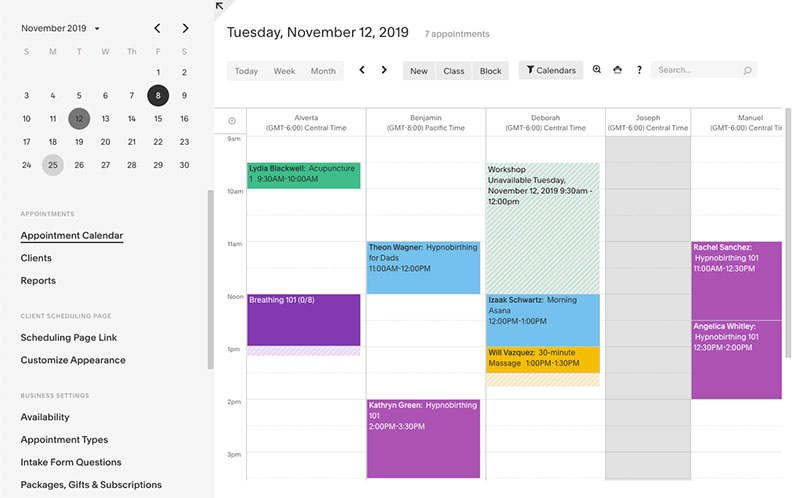
Acuity (now owned by Squarespace) feels like it was built by people who actually run service businesses. It suits agents who want custom intake forms and client payment at the moment of booking, with a lot of branding control on top.
You get conditional intake forms, calendar sync, payment collection, client history and notes, and Squarespace site integration. There's no free plan, just a 7-day trial. Paid plans start around $16/mo billed annually ($20 monthly), and the higher tiers (around $49/mo) add things like HIPAA options and deeper branding.
The customization runs deep, client management is strong, and you can drop custom CSS onto booking pages and sell packages or memberships. The catch is the ramp. Setup runs 30+ minutes, there's no free tier to ease in on, and the learning curve is steeper than Calendly's.
What we found testing it (July 2026): On the 7-day trial we built a buyer-intake booking type with conditional questions, pre-approval status, price range, timeline, and attached a deposit through the payment step.
The intake-plus-payment flow was noticeably deeper than Calendly's; by the time a consult hit the calendar, we already had the buyer's context in front of us. That depth cost us time, though: the initial config ran well past half an hour, and there's no free tier to practice on before the trial clock starts.
We also flipped on "Look busy" mode and watched it hide a share of open slots so the calendar never reads empty to a prospect.
Small psychological lever that pure schedulers ignore: the "Look busy" mode hides a share of your open slots, so your calendar never looks empty to a prospect eyeing your availability.
ShowingTime - Best for coordinating private MLS showings
ShowingTime (owned by Zillow Group) is the agent-to-agent standard for coordinating private showings between listing and buyer agents. Reach for it when the job is scheduling access to listed properties, not booking consults. The whole point is broad MLS integration for showing coordination.
It handles showing requests and confirmations, feedback collection, listing access management, MLS integration, and appointment notifications. Pricing is usually free to agents through your MLS or brokerage, with no standalone consumer price.
It's deeply embedded in the industry, automates showing feedback, and nearly every agent already knows it. But it carries no buyer-qualification layer, it's purely agent-to-agent plumbing, and whether you have it at all depends on your MLS.
What we found testing it (July 2026): Access here depends entirely on your MLS or brokerage, so our look was through an agent account provisioned that way rather than a signup anyone can do off the street.
Requesting and confirming a showing between a listing side and a buyer side worked exactly as the industry expects, and the automated feedback request went out to the showing agent after the slot.
The gap was just as clear as its reputation: the system books the access but captures nothing about whether the buyer is pre-approved or even serious. Zillow Group acquired ShowingTime in 2021 for about $500 million, and the platform now coordinates tens of millions of showings a year across a large share of U.S. MLSs.
So don't treat it as a substitute for a consultation scheduler. The smart move is running ShowingTime for property access alongside Trafft or Calendly for the buyer discovery call. That two-layer setup is the thing most single-tool roundups miss.
Setmore - Best for a genuinely usable free plan
Setmore's free tier is unusually generous, and that's the whole pitch. New or budget-conscious agents get a working booking page and team logins without paying a cent on day one. The free plan covers 4 staff logins and 200 appointments per month, which is more than most rivals hand over.
Features include a customer-facing booking page, email reminders, calendar sync on paid tiers, recurring appointments, and Setmore Teleport video calls. Free covers up to 4 users and 200 bookings/mo. Pro starts around $5/user/mo on annual billing ($12/user/mo monthly) and adds two-way calendar sync and SMS reminders.
It's fast to launch, the booking page is customizable, and the video call add-on works for remote buyers. The snags: two-way calendar sync sits behind a paid plan, the CRM and routing are thinner than rivals', and the interface feels a touch utilitarian.
What we found testing it (July 2026): We stood up the free plan with two staff logins and had a customizable booking page live in a few minutes, no card required. Email reminders sent fine on the free tier. The wall showed up exactly where reviewers say it does: connecting a calendar for genuine two-way sync (the thing that stops double-bookings) required upgrading to Pro, and on free the sync is read-only.
We also ran a Setmore Teleport video call, which handled a mock relocation walkthrough without needing a separate Zoom license. Every staff calendar counts as a billable seat once you pass the free four, worth knowing before a team scales.
Setmore Teleport handles virtual tours without a separate Zoom license, which matters if you're doing relocation walkthroughs by video. That bundles a cost most competitors leave as an add-on.
SimplyBook.me - Best for global buyers and multi-language booking

SimplyBook.me packs a standalone site builder and multi-language support into a feature-rich booking system. It fits agents serving international buyers who need a branded, multi-language self-service page. The headline features are those multi-language booking pages plus a wide range of payment gateways for cross-border clients.
Beyond that: a standalone booking website, calendar sync, automated reminders, Instagram and Facebook booking, basic CRM, and memberships and gift cards. The free plan runs about 50 bookings/mo with 1 provider. Basic is around $9.90/mo, scaling up to roughly $59.90/mo on annual billing.
You get a huge feature set per dollar, strong international payment support, and a built-in website builder. But that same breadth makes the interface feel overwhelming with dozens of optional modules, the feature-based pricing gets confusing, and the booking limits can catch you off guard.
What we found testing it (July 2026): We set up the free plan with one provider, switched the booking page to a second language, and enabled the Instagram/Facebook booking button. The multi-language page rendered cleanly and the social button did let a "buyer" schedule a viewing straight from a post.
The friction was exactly the reported one: the free tier caps you at 50 bookings a month and a single provider, and the plugin-style feature menu (you toggle capabilities on individually) took real time to make sense of before the booking page felt finished. Powerful, but not the fastest to configure.
The Instagram and Facebook booking buttons let a buyer schedule a viewing straight from a listing post. If you market on social, that shortens the whole path from scroll to showing.
HoneyBook - Best for agents who want booking plus contracts and invoices
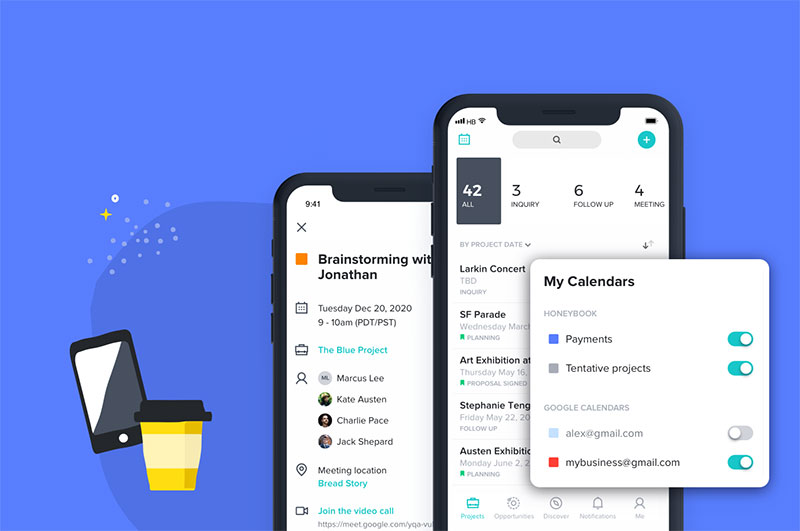
HoneyBook isn't really a pure scheduler. It's a clientflow platform that bundles booking, contracts, invoicing, and a client portal, which suits solo agents who'd rather run one tool for scheduling and all the paperwork around a deal.
It covers booking and scheduling, contract signing, invoicing and payments, a client portal, and automated workflows. Plans typically start around $19/mo (billed annually), with higher tiers for more clients and members, and there's a 7-day trial rather than a free plan.
The draw is all-in-one client management: professional proposals and contracts, a branded portal, and less tool sprawl. The limits are just as clear. There's no native showing coordination, it's overkill if all you need is a booking link, and it's not real-estate specific.
What we found testing it (July 2026): On the trial we ran a mock deal from first contact to signed agreement to invoice. The booking piece is fine, but the reason to be here is the flow after the booking: we sent a branded proposal, collected an e-signature on a buyer representation agreement, and issued an invoice, all inside one client portal with no second tool.
The scheduling on its own is thinner than Calendly's, and nothing in it coordinates property showings, so it never replaces ShowingTime. It was originally built for photographers and event planners, and that heritage shows in how paperwork-first it feels.
The value lives in the paperwork, not the calendar. If you already use ShowingTime for access, HoneyBook covers the buyer agreement and closing invoice that most schedulers can't touch.
Square Appointments - Best for agents who take card payments in person
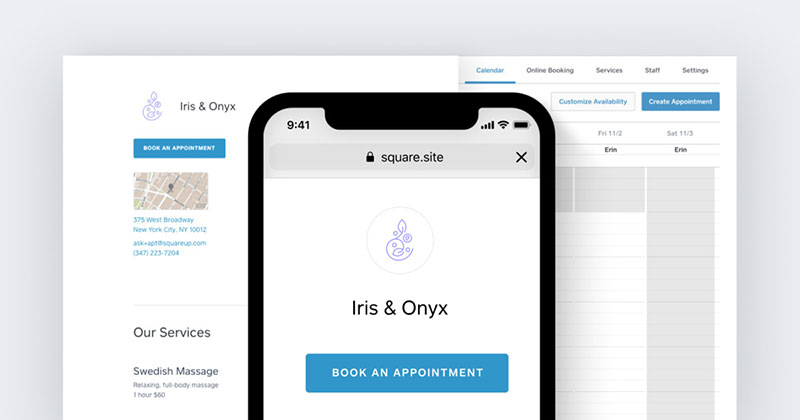
Square Appointments ties scheduling directly to Square's point-of-sale system, which is exactly why it fits agents or brokerages that collect payments in person or run a physical office. Booking and payments live in one account.
The feature set covers an online booking page, calendar sync, automated reminders, integrated POS and card processing, and a customer directory. There's a free plan for a single user, paid tiers that scale up per location, and card processing fees per transaction.
The free entry point and the payment hardware are the strengths, the reminders are reliable, and the checkout feels familiar to clients. On the other side, the advanced calendar logic is limited, video-first scheduling is weak, and country availability varies.
What we found testing it (July 2026): We opened the free single-user plan, published a booking page, and ran a test card payment through the checkout, which felt identical to any Square retail transaction. Automated reminders went out reliably.
Where it strained was calendar logic: the moment we wanted layered multi-calendar rules for a small team, the options ran out, and there's no strong video-first path for remote buyers. One thing to confirm before committing is availability in your country, since Square's coverage isn't universal. Processing fees apply to every payment, so the "free" plan still has a per-transaction cost baked in.
Most agents write Square off as a coffee-shop tool. But a brokerage charging application fees or deposits in person gets booking and payment in one ledger, no reconciliation afterward.
Microsoft Bookings - Best for teams already inside Microsoft 365
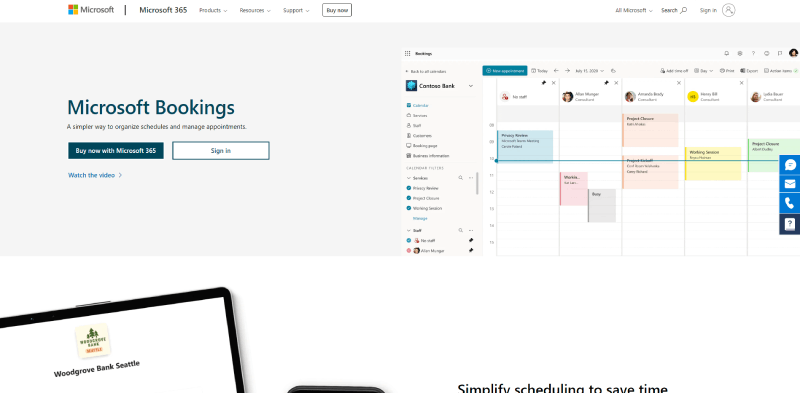
Microsoft Bookings is baked into Microsoft 365 Business plans, so for a brokerage already paying for that stack, it's the practical way to add booking without another subscription. The value is the deep native tie-in with Outlook, Teams, and the wider Microsoft 365 ecosystem.
You get a Bookings page, Outlook calendar sync, Teams video meetings, automated reminders, and staff scheduling. It's included with eligible Microsoft 365 Business plans (from about $6 per user/mo), with no standalone fee.
There's no extra cost on Microsoft 365, the compliance posture is strong, Teams calls come built in, and the admin is familiar to your team. The tradeoffs: weaker branding and customization, thin usefulness outside the Microsoft stack, and a fairly basic feature set overall.
What we found testing it (July 2026): Using a Microsoft 365 Business account, we created a Bookings page, synced it to Outlook, and set a service that auto-generated a Teams link for a virtual buyer call. The Outlook and Teams tie-in was the smoothest of any tool here for a team already on Microsoft, no extra login, no extra bill.
The tradeoff was equally obvious: branding and page customization are bare next to Calendly or Acuity, and the moment anyone outside the Microsoft stack needs in, the value drops off. For a brokerage already paying for M365, though, it removes the case for a third-party tool.
The hidden win is compliance. Bookings inherits Microsoft 365 security and BAA options, which matters more than agents expect once you're handling buyer financial documents.
How to pick the right one for your workflow
Match the tool to the job, not the hype. The scheduling software market is growing fast, so options aren't the problem. Picking on purpose is.
| If You Need | Start With |
|---|---|
| One dashboard for showings and consults | Trafft |
| Bookings on your WordPress site | WPAmelia |
| Fast consult links | Calendly |
| Private MLS showing access | ShowingTime |
| Contracts and invoices bundled in | HoneyBook |
Most agents end up running two layers anyway. One tool for property access, one for the buyer or seller conversation. Pick each on purpose and your calendar stops leaking commission. (And since we make Trafft, take our number-one spot as the starting point for a test, not the last word, the tables above lay out exactly why we ranked it where we did.)
What appointment scheduling software does for real estate agents
Strip it down and this is software that lets buyers and sellers book showings, listing appointments, and consultations straight into an agent's synced calendar.
The core loop is simple. You publish your availability, the client picks a time slot, the event lands on your calendar, and an automated confirmation fires off.
The distinction that actually matters is this: a calendar stores your time, a booking system fills it. And that gap is where deals get won or lost.
These tools connect to Google Calendar and Outlook, drop Zoom or Google Meet links into confirmations for virtual tours, and pull deposits through Stripe or PayPal.
Trafft alone reports processing over 5 million appointments across 30,000+ businesses, which tells you how far self-service booking has spread past salons and clinics.
What it replaces
Phone tag. The back-and-forth texts. Double bookings on a Saturday already packed with showings.
A 24/7 booking page handles all of that while you're mid-showing and nowhere near your phone.
After-hours demand is real. A large share of real estate inquiries come in outside the typical 9-to-5, with evenings and weekends the peak windows, so a booking page you can leave running catches buyers exactly when your phone is off.
How real estate scheduling tools differ from generic booking apps
Not every scheduler fits real estate. The category splits into two jobs that a lot of agents wrongly treat as one.
One job books a person. The other coordinates access to a listed property. They're not the same thing, and few tools do both well.
| Job | Tool Type | Example |
|---|---|---|
| Book a buyer consult or listing call | Client-facing scheduler | Trafft·Calendly·Acuity |
| Coordinate private showing access | Agent-to-agent system | ShowingTime |
| Bookings on your own site | WordPress booking plugin | WPAmelia |
Showing coordination versus consultation booking
ShowingTime, owned by Zillow Group, integrates across a broad network of MLS systems to schedule showings between listing and buyer agents.
It books the slot but learns nothing about the buyer. No financing status, no timeline, no budget.
A client-facing scheduler with lead capture forms does the opposite. It qualifies the buyer before the calendar invite ever goes out.
Why one tool rarely covers both
Most working agents run a two-layer stack. One tool for property access, a second for the buyer conversation.
ShowingTime handles the private showing. Trafft or Calendly handles the discovery call and pulls it into a real estate CRM like Follow Up Boss or kvCORE.
Force one system to do both and you usually end up with a gap somewhere, either in showing logistics or in buyer intake.
Which features matter most for agents
Feature lists blur together on marketing pages. Only a handful actually move commission.
Rank them by daily impact, not by whatever looks impressive in a demo.
Calendar sync and automated reminders
Two-way Google Calendar and Outlook sync is the one that stops you double-booking across a packed showing schedule. Non-negotiable, honestly.
Then automated reminders. Email, SMS, and WhatsApp confirmations sent before the appointment, which is the single biggest lever against no-shows.
Automated SMS reminders cut no-shows by roughly 38% in widely cited research, and multi-channel systems can push those reductions higher still.
Payments, lead capture, and routing
Payment and deposit capture at booking protects your consultation slots and application fees.
Client intake forms turn a raw booking into a qualified lead the second it hits your calendar.
And for teams, round-robin assignment matters more than agents expect it to.
- Round-robin routing auto-assigns a new inquiry to the next available agent
- Mobile booking app lets you confirm and reschedule from the field
- CRM integration feeds bookings into your pipeline automatically
How scheduling automation cuts no-shows and captures leads
This is the part where the numbers make the case rather than opinions. Speed and follow-through decide who closes.
Businesses adopting online scheduling commonly report meaningfully more bookings. Vendor data points to roughly a third more new-client bookings after implementation.
Speed to lead is the whole game
The landmark MIT Lead Response Management study by Dr. James Oldroyd found that contacting a web lead within 5 minutes makes an agent about 21 times more likely to qualify it than waiting 30 minutes.
Yet the average agent is often slow off the mark. Industry surveys routinely put typical first-response times in the many-hours range, long after a motivated buyer has already moved on.
The buyer bias is real, too. A large majority of buyers and sellers end up working with the first agent who responds or the first they speak with, according to industry survey data. A self-service booking page collapses that response window to zero.
The revenue math on no-shows
Faster response times correlate strongly with higher conversion across sales research, and companies that automate lead response typically see double-digit gains in qualified opportunities within a few months.
Mayo Clinic's Jacksonville facility saw a near-50% drop in no-shows after adding text reminders two days out, one of the clearest examples of what automated reminders do to attendance.
How to match a scheduling tool to your business size and stack
The right pick comes down to team size and the tools you're already paying for.
Buyers don't reward the fanciest software. They reward the agent who answers first and shows up.
Solo agents versus teams
If you're solo, a free or low-cost link-first tool covers it. Calendly's free tier or Setmore's free plan for 4 users gets a booking page live fast.
Teams and brokerages are a different story. Multi-staff calendars, routing, and white-label branding stop being optional. Trafft and Acuity's higher tiers fit here.
And if your site's on WordPress, keep bookings on your own domain with Amelia rather than sending clients off to a third-party page.
Pairing a scheduler with your existing tools
Match the tool to your stack before you match it to your budget.
| Your Setup | Best-Fit Scheduler |
|---|---|
| Microsoft 365 office | Microsoft Bookings |
| WordPress site | WPAmelia |
| Follow Up Boss or kvCORE | Trafft·Calendly via Zapier |
Then pair whatever you land on with ShowingTime for MLS access, and wire up Zapier or your CRM so new bookings route themselves.
Frequently asked questions
Is Trafft good for real estate agents?
Yes. Trafft gives agents a white-label booking page, staff calendars, and automated email, SMS, and WhatsApp reminders in one dashboard. Its free plan covers up 1 user, which makes it a strong fit for solo agents and small teams.
Does WPAmelia work for a real estate website?
It does, as long as your site runs on WordPress. Amelia installs directly as a booking plugin, so showings and consultations get booked on your own domain instead of a third-party page. It also handles open house events.
How much does appointment scheduling software cost?
Standalone tools run roughly $10 to $20 per month. Trafft starts near $13.30/mo, Calendly around $10 per seat, Acuity from $16, and Amelia from about $49/year. Free plans exist from Trafft, Setmore, SimplyBook.me, and Square Appointments.
Is there free scheduling software for real estate agents?
Yes. Setmore's free plan covers 4 users and 200 bookings monthly. Trafft, SimplyBook.me, and Square Appointments also offer free tiers with online booking, calendar sync, and automated reminders included.
What is the best scheduling app for a solo agent?
Calendly and Setmore suit solos who want fast, low-cost booking links. For payments and intake forms upfront, Acuity fits better. Trafft works well if you want a branded booking page without per-seat pricing.
Does scheduling software sync with Google Calendar and Outlook?
Nearly all do. Trafft, Calendly, Acuity, and Microsoft Bookings offer two-way sync with Google Calendar and Outlook. That sync stops double-booking across a packed schedule of showings and listing appointments. (Apple/iCloud support is less universal. Calendly, for instance, no longer accepts new iCloud connections.)
How does booking software reduce no-shows?
Automated reminders sent by SMS and email before each appointment. SMS reminders alone cut no-shows by roughly 38% in widely cited research, protecting your showing and consultation slots from last-minute cancellations.
Can clients book showings after hours?
Yes, that's the whole point of a 24/7 booking page. A large share of real estate inquiries happen outside 9-to-5, so self-service booking captures buyers at their peak motivation.
Does this replace ShowingTime?
No. ShowingTime coordinates private MLS showing access between agents. Client-facing tools like Trafft or Calendly handle buyer consultations and listing calls. Most agents run both as a two-layer stack.
Can it connect to my real estate CRM?
Yes. Most schedulers connect to a real estate CRM like Follow Up Boss or kvCORE, often through Zapier. New bookings and lead capture form data flow straight into your pipeline automatically.
Conclusion
Picking the right appointment scheduling software for real estate agents comes down to matching the tool to how you actually work.
Trafft and WPAmelia lead for a reason. One runs a branded booking page and staff scheduling from a single dashboard, the other puts a full booking system on your WordPress site.
The rest earn their spot by fit. Calendly for quick consultations, Acuity for payment collection, ShowingTime for private showings, Setmore for a free start.
Match the software to your stack first. Confirm two-way calendar sync, automated reminders, and a clean tie-in to your CRM before you commit.
Most agents end up running two layers: one tool for property access, one for the client conversation.
Set it up well, and no-show reduction and faster follow-ups start protecting your commission.