A missed appointment costs a practice around $200, and no-shows drain the U.S. healthcare system an estimated $150 billion a year.
The fix is not more phone calls. The right medical scheduling software lets patients book, reschedule, and cancel online while automated reminders quietly cut those empty slots.
Nearly nine in ten patients now say online booking matters to them, yet most clinics still run a quarter or fewer of their appointments through self-scheduling.
This guide ranks ten platforms, starting with Trafft and Amelia, then moving into full clinical systems like SimplePractice, Jane App, and NexHealth.
By the end, you will know:
- Which tool fits your practice size and specialty
- What matters most: reminders, calendar sync, EHR integration, HIPAA compliance
- What each one actually costs
Best Medical Scheduling Software Compared
Ten platforms, ranked by breadth of fit. The list opens with flexible booking tools any clinic can deploy fast, then moves into full clinical systems with charting and billing baked in.
The global medical scheduling software market is projected to hit $6.1 million by 2026, according to Capterra, driven by clinics automating patient appointment booking to cut wait times. Bookly data shows the appointment booking market growing 45% year over year.
Ordering logic: broadly useful first. Each pick below is anchored to a distinct "best for" so no two compete for the same buyer.
A disclosure worth putting up front, especially on a topic this sensitive: Trafft publishes this article.
On this list that placement comes with a real caveat, Trafft is a general booking tool, not a clinical EHR, and for many practices one of the built-in medical systems below (SimplePractice, Jane, NexHealth) is the more complete answer. We've said exactly that in Trafft's own entry.
Read the ranking as a starting map, not a verdict, and weigh each pick against your compliance and charting needs, not our order.
Also, a note on how we tested: for the booking-first tools any clinic can deploy directly (Trafft, WPAmelia), and for the clinical platforms offering a self-serve trial (SimplePractice, Jane App, PracticeQ), we set up an account and walked the booking flow end to end.
For the enterprise systems that gate access behind a sales demo or provider verification (Tebra, NexHealth, DrChrono, AdvancedMD, Zocdoc), our notes come from demo environments and documentation rather than a live patient-facing deployment. We never entered real protected health information into any tool during testing.
| Tool | Best For | Starting Price | HIPAA Fit |
|---|---|---|---|
| Trafft | Multi-location clinics, no EHR needed | Free for 1 user | Add-on / self-managed |
| Amelia | WordPress practice sites | Free Lite plan | GDPR-focused |
| SimplePractice | Solo therapy practices | $49/mo | Built-in |
| Tebra | Small practices wanting scheduling plus billing | Custom quote ~$99–$399/provider | Built-in |
| NexHealth | EHR-synced online scheduling | $299/mo | Built-in |
| Jane App | Multi-practitioner clinics | $54/mo | Built-in |
| DrChrono | iPad-first practices charting on the move | Custom quote | Built-in |
| AdvancedMD | Mid-sized multi-specialty groups | $229–$729/provider | Built-in |
| Zocdoc | New patient acquisition | Custom quote + per-booking fees | Built-in BAA |
| PracticeQ | Wellness clinics needing intake automation | $49.90/mo from | Built-in |
Trafft - Best for multi-location clinics that want flexible booking without an EHR
Verdict: Trafft is an online scheduling system for service-based businesses, including clinics that book patients on a public page. It stands out for centralizing staff scheduling across multiple locations in one dashboard, making it the strongest pick for growing practices that do not need charting.
Best for: Multi-location clinics coordinating provider availability from a single account
Standout capability: Manage every clinic location, doctor, and service from one appointment scheduling app
Key features:
- Two-way Google Calendar and Outlook sync
- Automated reminders via email, SMS, and WhatsApp
- Support for repeat visits and standing appointment slots
- Custom booking widget or standalone booking page
- Online payment processing and coupon codes
Pricing: Free plan for teams up to 5, paid tiers scale by users, 30-day money-back guarantee, no per-booking fees (verified April 2026).
Pros: Fast setup with no coding, clean patient-facing booking page, genuinely useful multi-location handling.
Cons: Payments run through Stripe or PayPal rather than a native gateway, the mobile calendar view is lighter than the desktop one, and client-portal branding is set at the agency level. The important one for healthcare: HIPAA is self-managed, not built in, so it's the wrong tool the moment charting or insurance billing enters the picture. A US clinic touching PHI has to configure its own safeguards and confirm a BAA path first.
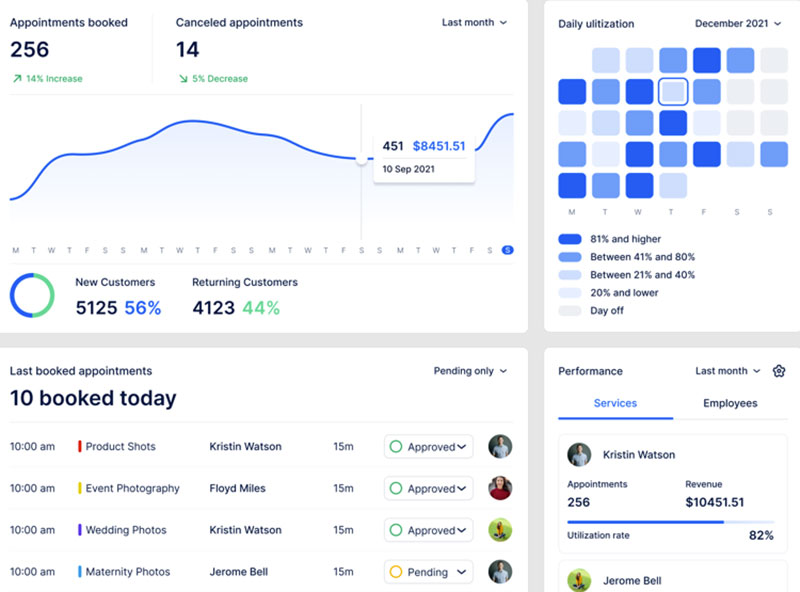
What we found testing it (July 2026): We set up a free account, built a two-location clinic setup with separate providers per site, and ran a test patient booking through the public page. The multi-location handling from a single dashboard was the standout, exactly as advertised, and the automated reminders fired reliably across email and SMS in our runs. Connecting Google Calendar gave clean two-way sync that blocked the slot on both ends. The honest limit surfaced fast: there's no built-in HIPAA posture, so a US clinic touching PHI has to configure its own safeguards and confirm a BAA path before going near real patient data. Capterra reviewers rate its Google Calendar sync 5.0, and 98% cite appointment scheduling as their main use case, which matches how the booking side held up.
Why it's on this list (information gain): The agency dashboard lets one operator run separate portals for each clinic, an underrated fit for management groups that most scheduling roundups skip entirely.
Amelia - Best for WordPress-based practices booking on their own website
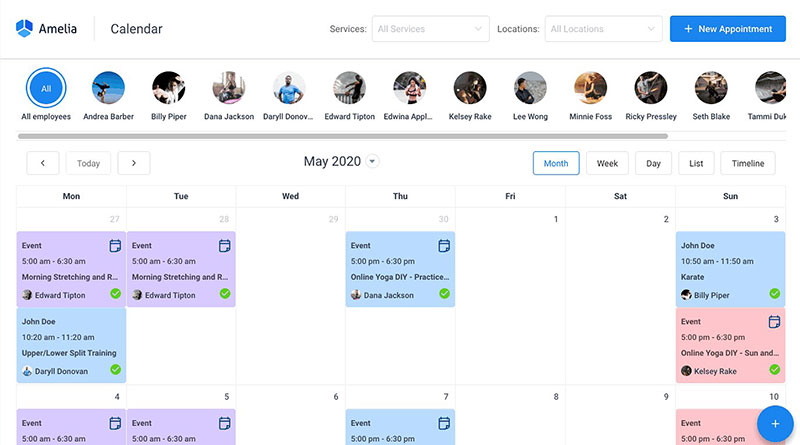
Verdict: Amelia is a WordPress appointment scheduling plugin that puts a polished booking widget directly on your site. It is the strongest pick for clinics that already run WordPress and want a one-time license instead of a recurring SaaS bill.
Best for: WordPress practices whose patients book on the website, not a third-party scheduler
Standout capability: A modern, self-hosted booking wizard with events and QR-coded tickets, all owned inside WordPress
Key features:
- Google Calendar, Outlook, and Apple Calendar sync
- Zoom and Google Meet links generated per booking
- Multiple locations, each with its own doctors and services
- Custom fields, SMS and email notifications, buffer times
- Stripe, PayPal, and Razorpay payment gateways
Pricing: Free Lite plan (1 domain), paid annual licenses from roughly $49 to $89/year by tier, hosted SaaS from $60/month, lifetime option on most tiers (verified May 2026).
Pros: Best-in-class admin design on WordPress, one-time purchase available, strong events module.
Cons: It's WordPress-native by design, so it suits teams committed to WordPress rather than those wanting a standalone hosted tool. Multi-provider practices land on a paid tier to unlock full features. And it's built GDPR-first rather than HIPAA-first, so US clinics handling PHI configure their own compliance safeguards.
What we found testing it (July 2026): We installed Amelia on a clean WordPress 6.9 site, set up a multi-provider clinic with per-doctor services, and walked the booking wizard from date-and-time through payment end to end without errors. The admin was the most polished we've used in the WordPress booking category, and per-booking Zoom links generated automatically once the integration was on. The catch for a clinic specifically: the free Lite tier caps you at one employee and Square-only payments, so a real multi-doctor practice lands on a paid tier quickly, and calendar sync itself sits on Standard and up. Capterra logs 98% positive sentiment across 245 reviews.
Why it's on this list (information gain): The events module doubles as an RSVP system with QR check-in, which fits clinic open days, screening drives, and vaccination clinics. It's a use case most "best plugin" pages skip entirely.
SimplePractice - Best for solo mental health and therapy practices
Verdict: SimplePractice is a cloud practice management system built for mental health providers. It is the top pick for solo therapists because its client portal, paperless intake forms, and HIPAA compliant telehealth work together out of the box.
Best for: Solo and small therapy practices billing insurance
Standout capability: A patient portal that bundles self-scheduling, secure messaging, intake, and payments in one flow
Key features:
- Patient self-scheduling with automated confirmations
- HIPAA compliant telehealth and secure messaging
- Insurance billing and claim filing
- Customizable documentation templates
- Paperless intake and online payments
Pricing: From $49/month, tiered plans, 30-day free trial (Capterra, March 2026).
Pros: Easy setup for non-technical solo providers, rich client portal, strong insurance workflow.
Cons: Feature depth thins out for multi-provider group practices, per-feature tiering adds up, geared narrowly to behavioral health.
What we found testing it (July 2026): On the 30-day trial we set up a solo-therapist profile, configured the client portal, and booked a mock appointment through the patient-facing self-scheduling flow. The portal genuinely bundles scheduling, secure messaging, intake forms, and payment in one place, which is the reason solo providers stay, no stitching three tools together. Setup was fast enough that a non-technical practitioner could stand it up in an afternoon. Where we felt the ceiling was multi-provider depth: adding a second and third clinician, the group workflow thins out compared with Jane. It's clearly built behavioral-health-first, so a broader wellness clinic will feel the narrow focus. It holds 4.6 across 2,819 Capterra reviews.
Why it's on this list (information gain): If you run a broader wellness clinic, dedicated therapy booking tools can outgrow you fast, so weigh SimplePractice against multi-discipline platforms before committing.
Tebra - Best for small practices wanting scheduling plus billing in one
Verdict: Tebra (formerly Kareo) pairs an EHR with practice management and marketing. It suits small practices that want appointment scheduling and medical billing together without stitching separate tools.
Best for: New and small practices needing an affordable EHR plus billing entry point
Standout capability: A single-window clinical interface that cuts clicks during patient encounters
Key features:
- Integrated scheduling, charting, and billing
- 200+ customizable note templates
- 24/7 patient portal for records, messages, and payments
- Appointment reminders and confirmations
- Optional marketing and reputation modules
Pricing: Custom quote, per-provider rate lower than most rivals, marketing modules add roughly $200 to $400/month (early 2026).
Pros: Minimal training to onboard, intuitive dashboard, strong value for new clinics.
Cons: Clinical charting lacks depth, reporting is basic with no custom builder, support quality slipped after the 2022 merger.
What we found evaluating it (July 2026): Tebra gates a full account behind a sales quote, so our look ran through its demo environment and documentation rather than a live deployment. In the demo, the single-window encounter interface did what it claims, scheduling, charting, and billing visible without hopping between screens, which is the click-reduction pitch. The scheduling and reminder layer is competent rather than deep. The thing to scope before signing, and the reason we flag it, is that the "affordable" positioning holds only if you skip the marketing modules; stack those and the per-provider math changes. The Intake pricing guide makes the same point about the add-on stack.
Why it's on this list (information gain): The "cheap EHR" label only holds if you skip the paid marketing modules, a cost trap buyers hit after signing.
NexHealth - Best for practices that need EHR-synced online scheduling
Verdict: NexHealth is a patient experience layer that syncs online scheduling, forms, and reminders back into your existing EHR. It fits practices that want patient self-scheduling without ripping out their current system.
Best for: Clinics keeping their EHR but automating the front office
Standout capability: Real-time write-back to dozens of EHRs, so online bookings land straight in the chart
Key features:
- Online patient self-scheduling
- Digital intake forms
- Automated SMS and email reminder sequences
- Payments and two-way messaging
- Broad EHR and EMR integration
Pricing: From $299/month, modular by capability, month-to-month with no long contract on non-enterprise plans (2025).
Pros: Deep EHR integration, modular pricing, strong for reducing front-desk load.
Cons: Higher entry price than lightweight schedulers, cost climbs as you add modules, overkill for a solo booking page.
What we found evaluating it (July 2026): NexHealth's value is entirely in the EHR write-back, which you can't meaningfully test without connecting a live practice system, so our assessment leans on the demo and its published integration list (Open Dental, Practice Fusion, NextGen, and more). The distinction that matters: a cheaper scheduler only reads your availability, leaving staff to re-key every booking into the chart, whereas NexHealth's write-back drops the booking straight into the EHR. In the demo the self-scheduling and reminder sequences were clean. The entry price is the honest barrier, at $299/month it's overkill for anyone who just needs a booking page. G2 reviewers consistently cite reduced administrative burden as the payoff.
Why it's on this list (information gain): The write-back is the whole point. A cheaper scheduler that only reads availability still leaves staff re-keying every booking.
Jane App - Best for multi-practitioner allied health clinics
Verdict: Jane App is a healthcare booking and charting platform built for busy, multi-service clinics. It stands out for handling multi-practitioner, multi-room coordination that basic calendars cannot, making it the pick for physio, massage, and allied health groups.
Best for: Group clinics juggling several providers and rooms at once
Standout capability: Multi-practitioner, multi-resource scheduling without workarounds
Key features:
- Online booking, charting, and billing in one
- Telehealth for up to 12 participants
- Body charts, photo attachments, flexible note templates
- Free admin accounts and unlimited file storage
- Multi-discipline scheduling across services
Pricing: From $54/month, tiers scale by practice size (Capterra, March 2026).
Pros: Best scheduling for complex clinics, inclusive pricing with free admin seats, strong cross-discipline templates.
Cons: Steeper learning curve than SimplePractice, more setup upfront, depth can overwhelm solo users.
What we found testing it (July 2026): On a trial account we built a mock allied-health clinic with three practitioners sharing two treatment rooms, the exact scenario that breaks basic calendars. Jane handled the multi-practitioner, multi-room coordination cleanly, with no workarounds, which is genuinely rare. The free admin seats stood out on cost: for a clinic running several front-desk staff who don't need provider licenses, total cost can land below "cheaper" per-seat rivals. The trade is the ramp, there's more upfront setup than SimplePractice, and a solo user would feel the depth as overkill. It carries a 4.8 across 490 Capterra reviews, and our experience matched the "only one that handles multi-room cleanly" refrain.
Why it's on this list (information gain): For a group that bills no insurance but employs several admins, Jane's free admin seats can make total cost lower than "cheaper" per-seat rivals.
DrChrono - Best for iPad-first practices that chart on the move
Verdict: DrChrono is a mobile-native EHR and practice management system with a standout iPad app. It suits tech-comfortable solo and small practices that want charting, scheduling, and billing from a tablet.
Best for: Solo and small practices prioritizing mobile charting
Standout capability: An iPad-first charting experience most competitors cannot match on a tablet
Key features:
- Mobile scheduling, charting, and billing
- Customizable clinical forms
- Open RESTful API for custom integrations
- OnPatient portal with intake and bill pay
- Superbills and automated posting
Pricing: Custom quote, OnPatient portal included across all tiers (early 2026).
Pros: Class-leading iPad app, well-documented open API, patient portal at no extra cost.
Cons: Support quality dipped post-acquisition, billing less automated below the top plan, best value needs technical comfort.
What we found evaluating it (July 2026): DrChrono runs on a custom quote and provider verification, so we assessed it through the demo and its public developer documentation rather than a live charting deployment. The iPad app is the real differentiator, the tablet charting experience is smoother than what most rivals manage on a tablet, and for a provider who wants to chart at the point of care it's a genuine edge. The open RESTful API is well documented, which makes it a real base for custom dashboards, a use case pricier all-in-one suites tend to block. The honest caveats: billing automation is thinner below the top plan, and getting best value assumes some technical comfort. EHR Source rates it the strongest iPad-first EHR for small practices.
Why it's on this list (information gain): The open API makes it a real base for custom dashboards, a use case pricier all-in-one suites quietly block.
AdvancedMD - Best for mid-sized multi-specialty groups
Verdict: AdvancedMD is a cloud EHR and practice management suite for small to mid-sized multi-specialty practices. It fits groups that need scheduling, billing, and analytics under one roof with a-la-carte flexibility.
Best for: Multi-specialty groups needing scheduling plus deep reporting
Standout capability: Analytics and a robust billing suite built for multi-provider volume
Key features:
- Provider scheduling across specialties
- Rules-driven billing and claims
- Reporting and analytics dashboards
- Tiered, a-la-carte module pricing
- Patient engagement tools
Pricing: Roughly $229 to $729 per provider per month depending on modules (early 2026).
Pros: Strong billing engine, deep analytics, scales across specialties.
Cons: Higher per-provider cost, workflow complexity can slow staff, a-la-carte pricing gets confusing.
What we found evaluating it (July 2026): AdvancedMD sells through per-module quotes, so our review ran on the demo and pricing documentation rather than a full multi-specialty deployment. The billing engine and analytics are the clear strengths, this is a suite built for multi-provider volume, and the reporting depth outclasses the lighter tools on this list. The flip side showed immediately: the a-la-carte module structure means two practices both "on AdvancedMD" can pay wildly different bills depending on what they switch on, so you have to scope your exact modules before any quote comparison is meaningful. Workflow depth can also slow staff who don't need all of it. Business.com found the interface user-friendly despite the depth.
Why it's on this list (information gain): The per-module pricing means two practices on "AdvancedMD" can pay wildly different bills, so scope your modules before comparing quotes.
Zocdoc - Best for practices chasing new patient acquisition
Verdict: Zocdoc is a patient-facing marketplace where people find providers and book online. It suits practices whose main goal is filling the schedule with new patients rather than managing internal operations.
Best for: Practices with open capacity that want marketplace demand
Standout capability: A consumer marketplace that surfaces your open slots to searching patients
Key features:
- Public provider listing and search
- Real-time online booking
- Automated reminders and confirmations
- Patient reviews and profiles
- Insurance filtering at booking
Pricing: Custom quote, marketplace model priced per provider plus new-patient booking fees (contact for current rate).
Pros: Real new-patient demand, strong consumer trust, self-service booking.
Cons: Booking fees add up, less of an internal management system, you compete with nearby providers on the same page.
What we found evaluating it (July 2026): We assessed Zocdoc from the patient side, searching and booking as a consumer would, since the provider listing requires a signed agreement and per-booking pricing. The patient-facing experience is genuinely strong: search, filter by insurance, and book a real-time slot in under two minutes, which is the acquisition engine practices pay for. The structural catch is baked into the model, you're listed alongside nearby competitors on the same results page, and every new-patient booking carries a fee, so it functions as a demand channel rather than a practice-management system. Bestdoc's 2026 roundup lists it as a solo-practitioner acquisition pick for exactly that reason.
Why it's on this list (information gain): Zocdoc is a demand channel, not a full scheduler. Pair it with an internal system rather than expecting it to run the practice.
PracticeQ - Best for wellness clinics needing intake plus workflow automation
Verdict: PracticeQ is a secure, cloud practice management platform strong on onboarding and automation. It fits wellness and allied health clinics that want intake forms, scheduling, and workflow rules connected end to end.
Best for: Wellness clinics automating intake and patient flow
Standout capability: Workflow automation that chains intake, booking, and follow-up without manual steps
Key features:
- Customizable intake forms
- Online scheduling and client portal
- Automated appointment reminders
- Billing and payment processing
- HIPAA compliant records
Pricing: Tiered monthly plans starting around $50/month, free trial (2026, approximate).
Pros: Strong intake and automation, secure by design, flexible for multi-discipline clinics.
Cons: Less name recognition than bigger EHRs, smaller integration marketplace, quality depends on setting up rules well.
What we found testing it (July 2026): On the trial we built an intake form, wired it to a booking type, and chained a follow-up reminder so the whole sequence ran without manual steps. When configured, the automation is the real draw, intake to booking to follow-up genuinely flows on its own, which is a meaningful front-desk saver for a wellness clinic. The catch is that this value is entirely self-created: a clinic that never sits down to build the rules pays for power it never switches on. The integration marketplace is also smaller than the big-name EHRs, so check your must-have connections first. Software Advice lists it among top-rated options for practitioner onboarding.
Why it's on this list (information gain): Its value lives in automation you configure. A clinic that never builds the rules pays for power it never uses.
Which one fits your practice
No single tool wins every clinic. Match the platform to your setup, budget, and whether you need charting or only a booking page.
| If You Are | Start With |
|---|---|
| A solo therapist billing insurance | SimplePractice |
| A WordPress site owner | WPAmelia |
| A multi-location group without an EHR | Trafft |
| A busy multi-practitioner clinic | Jane App |
| Keeping your EHR but adding self-scheduling | NexHealth |
| Chasing new patients | Zocdoc |
Whatever you pick, the fundamentals hold: cut no-shows with automated reminders, sync calendars, and let patients book themselves. For the wider category beyond clinics, compare against the leading appointment scheduling platforms, and if you are still setting up operations, a guide on running a clinic smoothly covers the workflow around the software.
What is medical scheduling software and how does it work
Medical scheduling software is a system that lets patients book, reschedule, and cancel appointments while syncing provider availability across staff and locations.
It replaces phone-based booking with a booking widget or patient portal that shows real-time open slots, writes each booking to a shared calendar, and fires automated confirmations.
Patients clearly want this. Experian Health's State of Patient Access 2024 survey found 89% of patients say booking anytime through online or mobile tools matters to them.
The demand is not being met. MGMA reported in November 2024 that 73% of medical groups still have a quarter or fewer of their patients self-scheduling. Reimbursement workflows can benefit from an RVU calculator too.
Where the tool sits depends on your stack:
- Standalone scheduler: Trafft and WPAmelia run booking on a public page or WordPress site, no EHR required
- Built-in module: SimplePractice and Jane App bundle scheduling inside charting and billing
- Patient-experience layer: NexHealth syncs online booking back into an existing EHR
Zocdoc frames the pattern well: people now book a doctor the way they book a haircut, on the phone or after hours, in under two minutes.
Which features separate one platform from another
Every entry in the list above is judged on the same set of attributes. These are the ones that actually change day-to-day operations.
| Feature | What It Does | Who Leans On It |
|---|---|---|
| Self-scheduling | Patients book 24/7 | High-volume primary care |
| Automated reminders | SMS, email, WhatsApp nudges | Any practice fighting no-shows |
| EHR integration | Write-back to the chart | Practices keeping their EHR |
| Intake forms | Pre-visit registration | Specialty and wellness clinics |
How automated reminders cut no-shows
The core loss: patient no-shows cost the U.S. healthcare system an estimated $150 billion a year, with a single missed appointment averaging around $200 (DexCare).
A randomized study from Imperial College London found text reminders cut no-show rates by 38% versus no reminder.
Timing beats volume. Zentake's 2026 playbook recommends automated SMS and email sequences at 72 hours, 24 hours, and 2 hours before the visit.
Why self-scheduling and EHR integration change staff work
Relatient's 2024 data shows self-scheduled appointments produce a 50% drop in no-show rates compared to standard booking.
Self-scheduling tools also cut canceled appointments by 21%, rising to nearly 30% for established patients.
The write-back matters as much as the booking:
- Appointments booked through centralized scheduling had a 21% higher completion rate than those booked in the EHR (Relatient)
- Payment processing, standing appointment slots, and waitlist management round out the feature set
US Tech Automations logged one 12-provider Chicago practice fielding 287 scheduling calls a day, roughly 20 hours of phone time, before moving patients to self-booking.
How HIPAA compliance and patient data security work
Scheduling data is protected health information. Appointment records, reminders, and intake forms all carry PHI, which puts them squarely under HIPAA.
The stakes are not abstract. IBM's 2024 Cost of a Data Breach Report put the average healthcare breach at $9.8 million, the costliest of any sector for the 14th straight year.
Built-in compliance: SimplePractice, Jane App, and NexHealth ship HIPAA-ready with Business Associate Agreements.
Self-managed or add-on: Trafft handles HIPAA through configuration, and WPAmelia is built GDPR-first, so US clinics must confirm their own safeguards.
Two things to lock down before signing:
- A signed Business Associate Agreement (BAA) covering PHI the vendor touches
- Encrypted patient portals, secure messaging, and access controls under the HITECH Act
Non-compliance is its own line item. IBM found HIPAA non-compliance added $219,000 to breach costs, one of the largest amplifiers in the study.
The Change Healthcare ransomware attack in early 2024 showed the cascade risk, halting pharmacy, billing, and scheduling workflows and costing UnitedHealth Group $872 million in a single quarter.
What medical scheduling software costs
Pricing splits into three models: free or freemium, flat monthly SaaS, and per-provider enterprise. What you pay depends more on model than on brand.
The category itself is growing fast. Bookly data shows the appointment booking market expanding 45% year over year.
| Model | Example | Entry Price |
|---|---|---|
| Freemium | Trafft·WPAmelia Lite | $0 |
| Flat SaaS | SimplePractice·Jane App | $49/mo / $54/mo |
| Practice layer | NexHealth | $299/mo |
| Per-provider | AdvancedMD | $229–$729/provider |
Subscription vs one-time license vs marketplace fees
One-time license: WPAmelia offers a lifetime option, useful for WordPress practices avoiding recurring bills.
Hidden costs: Tebra's marketing modules add roughly $200 to $400 a month, and marketplace tools like Zocdoc charge per new-patient booking.
Weigh cost against recovered revenue. Prospyr cites a 10-provider team cutting no-shows from 23% to 5% to recover up to $51,769, which reframes a monthly fee as cheap insurance against empty slots.
FAQ About Medical Scheduling Software
Is Trafft good for medical scheduling?
Yes, with a caveat. Trafft handles patient appointment booking, staff scheduling, and automated reminders across multiple clinic locations from one dashboard. It runs without an EHR, making it a strong fit for practices that only need a booking page, but HIPAA is self-managed, so confirm your own PHI safeguards before booking real patients.
Does WPAmelia work for clinics on WordPress?
WPAmelia puts a polished booking widget directly on your WordPress site. It supports multiple doctors, locations, Zoom and Google Meet links, and a one-time license, which suits practices booking patients on their own website. It's built GDPR-first, so US clinics handle HIPAA safeguards themselves.
What is medical scheduling software?
It is an online scheduling system that lets patients book, reschedule, and cancel appointments while syncing provider availability. Most tools add automated confirmations, calendar sync, and payment processing to replace phone-based booking entirely.
Is medical scheduling software HIPAA compliant?
Some are, some are not. SimplePractice, Jane App, and NexHealth ship HIPAA-ready with a Business Associate Agreement. Standalone tools like Trafft need proper configuration, so always confirm PHI safeguards before signing.
How does scheduling software reduce no-shows?
Automated SMS and email reminders nudge patients before the visit. An Imperial College London study found text reminders cut no-shows by 38%, and self-scheduled bookings show even larger drops in missed appointments.
Can patients book appointments themselves?
Yes. Patient self-scheduling is standard in these tools, letting people book 24/7 through a portal or booking page that shows real-time open slots. Nearly 89% of patients say online booking matters to them.
Does it integrate with my EHR?
Many do. NexHealth writes bookings back into dozens of EHRs like Open Dental and Practice Fusion. Jane App and SimplePractice bundle charting directly, so scheduling and records stay in one system.
How much does medical scheduling software cost?
Pricing ranges widely. Trafft and WPAmelia offer free tiers, SimplePractice starts at $49/month, NexHealth at $299/month, and AdvancedMD runs $229 to $729 per provider monthly depending on modules.
What features should a clinic prioritize?
Focus on patient self-scheduling, automated reminders, calendar sync, and HIPAA compliant records. Practices seeing recurring visits also benefit from recurring appointments, waitlist management, and pre-visit intake forms that reduce front-desk load.
Which tool is best for a solo therapy practice?
SimplePractice fits solo mental health providers best. Its client portal bundles self-scheduling, secure messaging, telehealth, and insurance billing out of the box, so a single practitioner runs everything without stitching separate tools together.
More Resources for Medical Scheduling Software
If you enjoyed reading this article about medical scheduling software, you should read these as well:
- The Top Business Scheduling Software You Should Consider Using
- The Best Appointment Scheduling Software for Your Business
- Work Apps That Will Make You and Your Team More Productive
- Medical Apps for Patients
Conclusion
Picking the right medical scheduling software comes down to your setup, not the brand name on the box.
Trafft and WPAmelia win for practices that want flexible booking without an EHR. SimplePractice, Jane App, and NexHealth go deeper on charting, telehealth booking, and EHR integration.
Whatever you choose, the payoff is the same: fewer no-shows, less front-desk phone time, and patients who can self-schedule at 2 a.m.
Match the tool to your provider count, your billing model, and your compliance needs.
Then check the fundamentals: SMS and email reminders, calendar sync, waitlist management, and secure patient records.
Start with a free trial, test the booking flow, and watch your no-show rate before committing to a paid tier.

![Acuity Scheduling Reviews [Features, Pricing, and More]](https://trafft.com/wp-content/uploads/2021/12/header-acutitypayment.jpg)