The 3pm doesn't show. You can't fill the hour, you can't bill it, and the time was blocked out anyway.
That happens more in behavioral health than in any other specialty. Missed-appointment rates run roughly 18% to 22%, and most of that gap is a scheduling problem rather than a clinical one.
The ten tools below were checked against vendor pricing pages in July 2026, with the real limitations left in rather than smoothed over.
The best therapy scheduling software, ranked by use case
Booking-first tools open the list because most solo clinicians overbuy. Then the full mental health EHR platforms, then the niche picks.
Every tool gets measured on the same points, in the same order, so you can compare without re-reading.
Worth saying up front: Trafft publishes this article. The reasoning sits under every pick and each tool, ours included, gets an honest "where it falls short" list. Several tools below beat Trafft outright for specific jobs, insurance claims, progress notes, supervision tracking, multi-discipline clinics, and we've said so plainly in each case.
How we tested: all ten offer a free tier or a free trial, so we built a working setup on each in July 2026, ran a test booking through the client-facing flow, connected a calendar, and triggered reminders where the plan allowed.
On the EHR platforms we used demo client records only. No real protected health information went into any system during testing, and where a feature sits behind a tier we didn't buy, we've said so rather than guessing.
| Tool | Type | Entry Price |
|---|---|---|
| Trafft | Booking platform | Free paid from ~$13.30/mo |
| Amelia | WordPress plugin | Free Lite $49/yr |
| SimplePractice | Mental health EHR | $49/mo |
| TherapyNotes | Behavioral health EHR | $69/mo solo |
| TheraNest | Caseload-priced EHR | from $29/therapist/mo |
| Jane App | Multi-discipline PM | CAD $54/mo |
| Practice Better | Coaching + therapy | Free Sprout $35/mo |
| Carepatron | Practice management | Free |
| Zanda | Solo allied health | $19/mo |
| IntakeQ / PracticeQ | Forms-first | from $29.90/mo |
Prices verified against vendor pages and Capterra listings in July 2026. They move often, and several vendors run near-permanent "sale" pricing alongside a higher anchor price, so confirm before you sign.
Trafft: best for cash-pay therapists who want booking and payment without an EHR

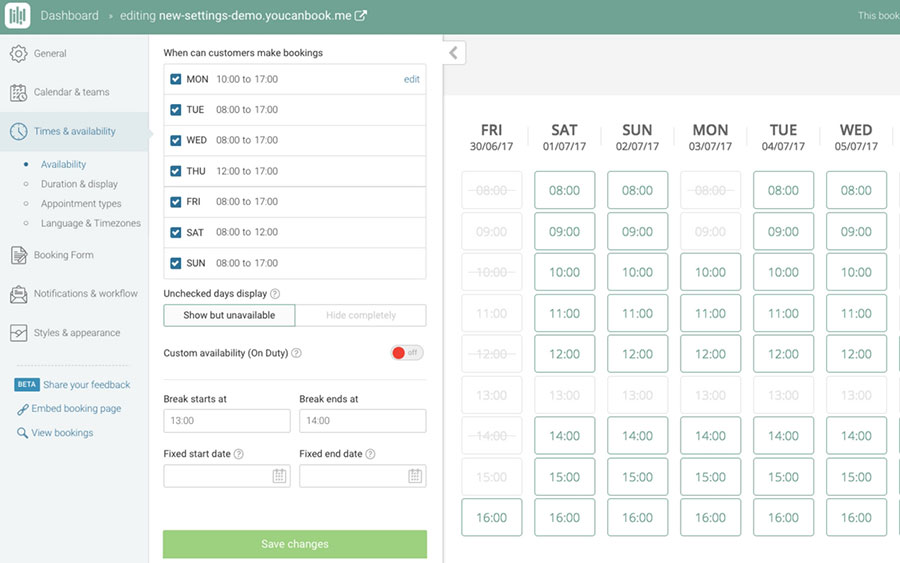
Trafft covers the booking and money side without charging EHR prices for clinical documentation you'll never open. A branded booking page, deposits, and automated reminders, running on a free tier that covers several staff.
Best for solo practitioners and small counseling teams billing clients directly rather than insurers. You can have a working booking page layout plus payment capture live in under an hour.
What you get:
- Google, Outlook, and Apple calendar sync
- SMS, email, and WhatsApp appointment reminders
- Stripe and PayPal deposits or full payment at booking
- Repeat weekly bookings, buffer time, multi-location, staff schedules
Pricing: Free version available. Capterra lists Starter at $13.30/month billed annually for 10 users and Scaling at $24.50/month annually, or $48.30 monthly.
Where it wins:
- Free plan supports 1 user
- Deposit capture cuts no-shows
- Multi-location practices run from one dashboard
Where it falls short:
- No progress notes, superbills, or insurance billing
- Mobile calendar is lighter than the desktop dashboard
- No BAA on offer, so clinical records belong in a separate HIPAA platform
What we found testing it: we built a free account with a recurring weekly session type, connected Google Calendar, and required a deposit before confirmation. The 24-hour and 1-hour reminder SMS fired on schedule, and the deposit step held the slot as unconfirmed until payment cleared, which is the mechanic that does the actual no-show work. Setup ran under half an hour. The ceiling is exactly where you'd expect: there is nowhere to write a progress note, nowhere to generate a superbill, and no BAA on offer, so anything clinical has to live in another system.
Most round-ups treat booking tools and EHRs as rivals. They're layers. Keep bookings and payments in Trafft, keep clinical records in a HIPAA platform, and the booking layer never touches PHI in the first place.
Amelia: best for therapists who already run a WordPress site
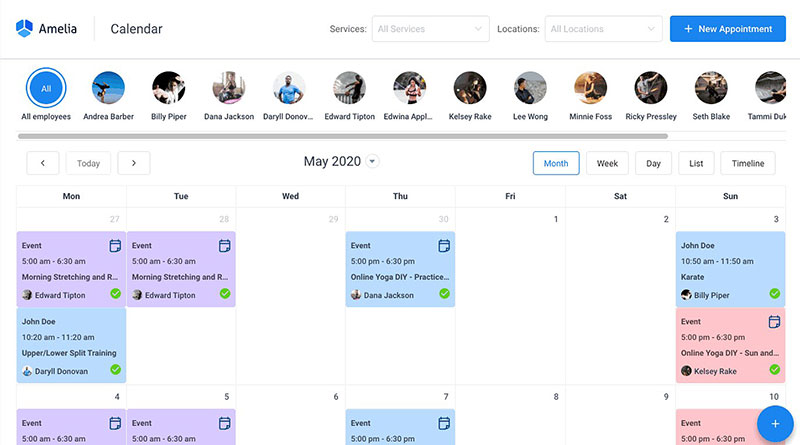
Amelia puts appointment records in your own database instead of a vendor cloud, with a lifetime license that kills the subscription entirely. That combination is the whole reason to pick it.
Best for WordPress practice sites where the owner wants control over where client data lives.
What you get:
- Step-by-step booking wizard and catalog form
- Zoom, Google Meet, and Microsoft Teams links generated per session
- Deposits, packages of sessions, custom intake fields
- No-show tagging, buffer time, time zone handling for remote clients
Pricing: Free Lite version on WordPress.org (1 domain, 1 employee, Square-only payments). Paid tiers ladder up from $49/yr Starter, $89/yr Standard, $149/yr Pro (where Google and Apple Calendar two-way sync and video meetings unlock), and around $259/yr Elite for unlimited domains. Lifetime licenses start near $299 for Standard. No free trial, but a 15-day money-back guarantee.
Where it wins:
- 4.9/5 on Capterra across roughly 245 reviews
- Data never leaves your host
- Unusually deep integration list for a plugin
Where it falls short:
- Key integrations sit behind higher tiers, and two-way calendar sync specifically requires Pro
- No clinical notes module, so documentation lives elsewhere
What we found testing it: we installed the Lite version on a clean WordPress 6.9 site and walked a session booking from date and time through payment, which completed without errors. The booking wizard is one of the cleanest in the WordPress category, and per-session video links generated automatically once the integration was on. Two limits surfaced fast. Lite caps you at one employee with Square-only payments, and two-way calendar sync sits on Pro, so a practice running a personal calendar alongside the practice one lands at $149/yr rather than $49.
One thing worth being blunt about: self-hosting is not the same as HIPAA compliance. WordPress.org signs no BAA, and most managed hosts decline one. Specialist HIPAA WordPress hosting runs roughly $200 to $500 per month versus $30 to $60 for standard managed hosting, so price that in before choosing this route for anything touching PHI.
If you want to discover how Trafft and Amelia stack up against each other, check our in-depth Trafft vs. Amelia comparison.
SimplePractice: best for solo therapists who bill insurance
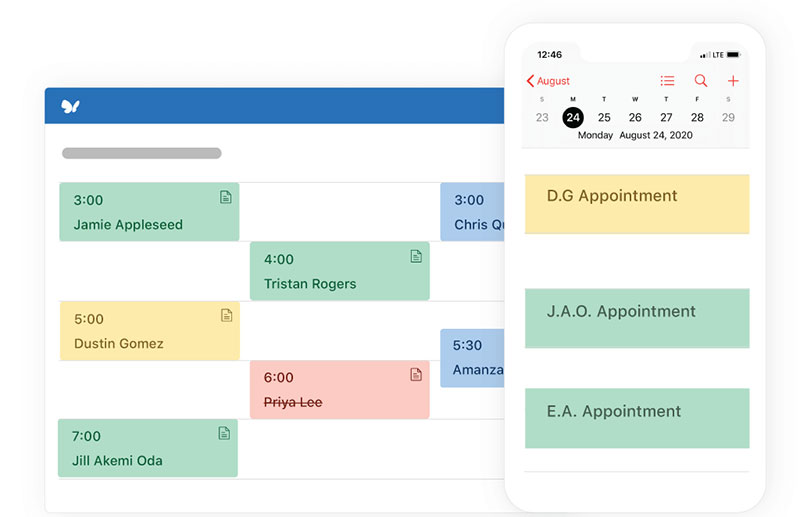
SimplePractice is the default for solo clinicians who want one login for the whole practice. Scheduling, notes, telehealth, claims, and a client portal, all in one place, and you pay for that convenience.
Best for solo private-practice therapists submitting insurance claims. The client portal is the standout, letting clients self-schedule, sign forms, and pay without email ping-pong.
What you get:
- Drag-and-drop calendar with multi-provider views
- Client self-scheduling, intake forms, and eSignature
- Integrated telehealth and secure messaging
- Insurance claims, superbills, and card payments
Pricing: Starter $49, Essential $79, Plus $99 per month, with a 30-day free trial. The AI Note Taker add-on is $35 per clinician per month.
Where it wins:
- Cleanest interface in the category
- Huge template library
- Telehealth bundled into every tier
Where it falls short:
- Calendar sync with Google, Apple, or Outlook requires Essential at $79
- Calendar colour coding needs Plus at $99
- The Starter plan rose from $29 to $49 in March 2025, per SteadyPractice and Oli Health reporting
What we found testing it: on the 30-day trial we set up a demo practice, published the client portal, and booked a session as a client would, signing an intake form and paying in the same pass. The portal is the reason people stay; scheduling, forms, and payment genuinely happen in one flow with no email back and forth, and the interface is the least cluttered of any EHR here. The tier trap is real, though. We started on Starter and immediately wanted to connect a personal Google Calendar, which isn't available until Essential at $79. Anyone running two calendars should price this from $79, not $49.
The realistic solo number is not the headline. Essential plus AI notes lands at $114 per month before card processing.
Treat the $49 tier as a decoy for most therapists. Any clinician running a personal calendar alongside the practice calendar needs sync, and sync starts at $79. Compare from there.
TherapyNotes: best for group practices running heavy insurance volume
Unlimited non-clinical users at no cost, so schedulers and billers never add to the bill. That's the structural advantage, and it's why group practices land here.
Best for group practices with 2 to 30 clinicians and a real billing workload. The whole product is built around structured, repeatable workflows.
What you get:
- Multi-provider scheduling with recurring session support
- Prebuilt progress note and treatment plan templates
- Electronic claims and ERA processing
- Client portal, telehealth, e-prescribing
Pricing: Solo $69/month. Group is $79 for the first clinician plus $50 per additional clinician. Enterprise uses group rates above 30 users. 30-day free trial, no setup fee.
Where it wins:
- 24/7 phone and email support
- Free data import from another EMR
- Unlimited clients, notes, and file storage
Where it falls short:
- A la carte fees stack up: claims and ERAs at 14 cents each, text reminders 14 cents, premium telehealth $15 per clinician, e-prescribe $65 per prescriber, TherapyFuel AI documentation $40 per clinician
What we found testing it: on the trial we added a scheduler as a non-clinical user and confirmed it cost nothing, which is the whole structural argument for this platform and it holds up. Multi-provider scheduling with recurring sessions worked cleanly. The friction is in the templates. They're built around adult one-to-one outpatient work, and when we tried structuring a note for a couples session the prebuilt fields fought us rather than helped. The a la carte fees also add up quietly; every text reminder and every claim carries its own cents-level charge that never appears on the plan page.
A 10-user practice pays $79 plus nine seats at $50, so $529 monthly before add-ons, per ITQlick's 2026 cost model.
The templates are tuned for adult one-to-one outpatient work. Play therapists, couples counsellors, and group facilitators end up fighting the forms, which rarely shows up in comparison tables.
TheraNest by Ensora Health: best for practices with a fluctuating caseload
TheraNest ties cost to how many active clients you carry rather than a flat seat fee. For part-time clinicians and nonprofits with unpredictable volume, that's the sensible model.
Best for part-time therapists, nonprofits, and small practices with a caseload that moves month to month.
What you get:
- Colour-coded calendar with multi-provider and supervision tracking
- Automated reminders and a waitlist
- Searchable DSM and CPT code database
- Electronic claims, ERA and EOB processing, unlimited document storage
Pricing: From $29 per therapist per month on Essentials, with Capterra listing client-band tiers at $42 for up to 30 clients and $65 for up to 50. 21-day free trial, no credit card, no permanent free plan.
Where it wins:
- Integrated Wiley Treatment Planner content
- Strong claims tooling
- Annual billing saves roughly a month
Where it falls short:
- Add-ons priced separately: $35 per provider for the AI Session Assistant, $25 for Wiley, $12 for telehealth
- Interface lag reported by reviewers
- Payments locked to the in-house processor at about 2.99% plus 30 cents
What we found testing it: the 21-day trial needs no card, which made it the easiest EHR here to evaluate properly. Supervision tracking and co-signature both worked as described, and that's a genuine differentiator for anyone carrying supervisees. We also confirmed the reviewer complaint about interface lag; page loads were noticeably slower than SimplePractice or Jane on the same connection. The platform also includes unlimited online document storage, which is useful for practices managing large volumes of intake forms, treatment records, and supporting files. The band structure is the thing to model before signing. Sitting at 31 active clients puts you in the same tier as sitting at 50, so the effective per-client cost swings hard depending on where you land.
One G2 reviewer noted the price stayed flat as their practice shrank, which is the trade-off hiding inside caseload pricing.
It looks kind when you're starting out and turns expensive at the band edges. Sitting at 31 active clients costs the same as sitting at 40.
Jane App: best for multi-disciplinary clinics with a therapist on staff
Jane schedules rooms, equipment, and practitioners in one grid, across several disciplines at once. Mental health sits alongside physiotherapy, massage, and chiropractic, which is exactly where single-discipline therapy platforms fall down.
Best for Canadian and US clinics where one calendar serves multiple professions.
What you get:
- Branded online booking that converts well
- Free SMS reminders on the Practice tier
- Charting across multiple modalities
- Insurance billing for both Canada and the US
Pricing: Balance CAD $54, Practice CAD $79, Thrive CAD $99 per month, verified May 2026. Extra staff run CAD $39 part-time or CAD $59 full-time. AI Scribe is CAD $15 per practitioner.
Where it wins:
- Transparent published pricing
- 4.8/5 from roughly 490 Capterra reviews
- Genuinely good booking flow
Where it falls short:
- No treatment plan module at all, a real gap for therapy work
- CAD-denominated pricing, so US clinics carry FX exposure
- Jane Payments became mandatory in May 2026 at 2.85% plus 25 cents
What we found testing it: we built a mock clinic with three practitioners across two disciplines sharing two treatment rooms, the exact scenario that breaks single-discipline platforms. Jane handled the room and practitioner grid without workarounds, which nothing else on this list attempts. The client-facing booking flow was the best of any EHR here. Then we went looking for a treatment plan module and there isn't one, which for a therapist is not a minor omission. That single gap is why a behavioural-health-only practice should look elsewhere no matter how good the calendar is.
A five-practitioner clinic on Practice with four full-time additions comes to CAD $315 monthly, roughly USD $230 at mid-2026 rates.
Behavioural-health-only practices should skip it. Jane's breadth is the point, and paying for breadth you never touch is the most common mistake clinics make here.
Practice Better: best for therapists working alongside coaching or nutrition
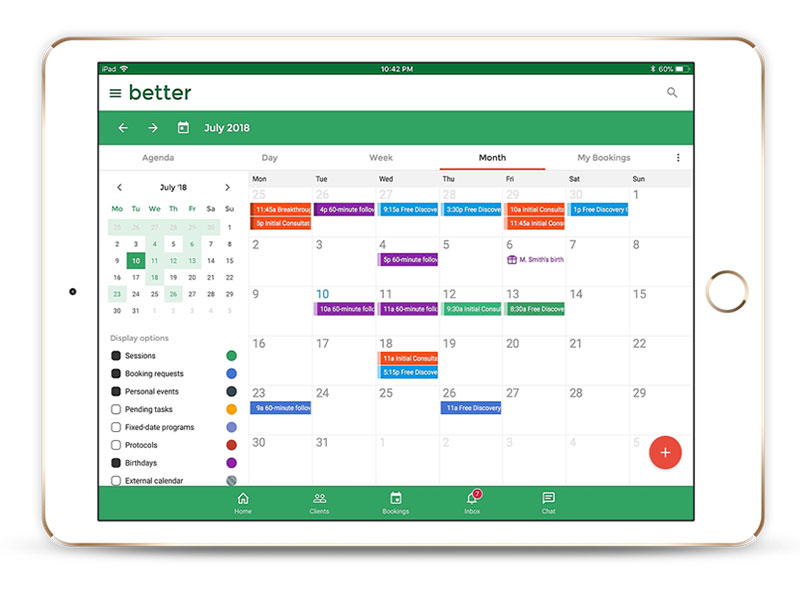
Practice Better attaches programs, courses, and between-session accountability to the client record. It fits practitioners whose work extends past the 50-minute hour into structured protocols and homework.
Best for holistic and integrative practitioners blending therapy with coaching, nutrition, or wellness programs.
What you get:
- Scheduling with reminders and client self-booking
- 180-plus note and form templates
- Fixed-date, self-paced, and evergreen program delivery with client check-ins
- HIPAA and PIPEDA compliance, invoicing, group messaging
Pricing: Free Sprout plan for one practitioner. Starter listed from $35/month, rising through Professional, Plus, and Team. Trials run 14 days on paid plans and 30 days on Team.
Where it wins:
- 4.7/5 across roughly 295 G2 reviews
- Genuinely all-in-one
- Strong support scores
Where it falls short:
- Tight active client caps on lower tiers, with Starter limited to 10
- Weaker insurance billing than the dedicated therapy EHRs
- Steeper learning curve than SimplePractice
What we found testing it: we used the free Sprout plan to build a multi-week program with scheduled check-ins between sessions, which is the thing this platform does that none of the therapy EHRs match. Homework and protocol delivery attach directly to the client record rather than living in a separate email thread. The learning curve is real; it took noticeably longer to get oriented than SimplePractice did. And the constraint that decides your tier isn't features, it's the active client cap. Starter stops at 10, which a growing caseload passes within months.
G2 reviewers repeatedly describe it as an all-in-one minus the website, which matches how most practices actually deploy it.
Client caps, not features, are what force the upgrade. Read the active-client number on each tier before the feature list, because that's the line you'll hit first.
Carepatron: best for clinicians who need a real free plan
Carepatron's free tier is usable rather than a demo. Scheduling, notes, and client records at no cost, with team and automation features behind the paywall.
Best for new solo practitioners and students building a first caseload, or anyone who can't justify $69 a month yet.
What you get:
- Online booking against published availability
- Customisable assessment, treatment plan, and progress note templates
- Google Calendar sync and automated reminders
- Multi-location calendar views and telehealth
Pricing: Free tier with no card required. Paid plans commonly listed between $19 and $49 per user per month depending on billing and promotion, with a running discount on the first months of annual plans.
Where it wins:
- 4.5/5 from roughly 821 Capterra reviews
- Easy setup
- Self-serve checkout with public pricing
Where it falls short:
- Mobile experience missing features found on desktop, per reviewers
- Thin reporting and limited multi-location support
- E-prescribe costs $39 per user per month, with claim filing from 25 cents each
What we found testing it: the free tier took a card-free signup and gave us working scheduling, notes, and client records, which is more than most "free" plans in healthcare software offer. Google Calendar sync connected without trouble. The gap appears on mobile: we ran the same tasks on desktop and phone, and several things we'd just done on desktop weren't available on the app, which matches the recurring reviewer complaint about needing a computer to manage the schedule. Reporting is also thin enough that anything analytical goes out to a spreadsheet.
Published paid pricing varies wildly across listing sites. Pull the number off carepatron.com the day you buy, not from a comparison article.
Zanda, formerly Power Diary: best for allied health solo practitioners outside the US
Zanda has the lowest credible entry price among full practice management platforms. Australian, UK, and New Zealand counsellors pick it for that plus a calendar built around solo workflows.
Best for sole-trader counsellors and psychologists outside the US insurance system.
What you get:
- Calendar with colour coding and appointment types
- Two-way SMS and chat with clients
- Telehealth with 100 free participant minutes monthly
- Clinical notes, client portal, Xero and Stripe integrations
Pricing: Starter $19/month for one practitioner, Growth $49 with multi-clinic features. Extra practitioners run about $9.50 under the current promotion. 14-day free trial, no card needed.
Where it wins:
- Emails and email reminders are free
- Introductory discounting on new subscriptions
- One-to-one onboarding and data migration
Where it falls short:
- SMS costs 9 cents per outbound message, so a clinic texting 200 clients weekly adds roughly $72 monthly
- A dedicated SMS number is about $5
- Telehealth Plus is billed separately
What we found testing it: the 14-day trial needs no card. We set up a solo calendar with colour-coded appointment types and ran both email and SMS reminders to compare the cost model, which is where the headline price falls apart. Email reminders are free and worked fine. SMS bills at 9 cents per outbound message plus roughly $5 for a dedicated number, so a practice that prefers text lands well above $19 in practice. Two-way SMS itself worked well, and the onboarding call was the most hands-on of any vendor here.
The platform rebranded from Power Diary, so a good share of the reviews you'll find online still use the old name. The software underneath is the same.
That $19 headline holds only if you use email reminders. Switch to SMS and the effective cost can climb sharply, which no pricing page makes obvious.
IntakeQ and PracticeQ: best for forms-first practices
Buy this when paperwork, not the calendar, is the bottleneck. IntakeQ started as secure electronic intake forms and grew into PracticeQ, a full scheduling and billing layer on top.
Best for practices drowning in intake paperwork, consents, and repeat questionnaires. The standout is questionnaire analytics across aggregated form responses.
What you get:
- Conditional intake forms and consents with eSignature
- Booking, reminders, and a secure client portal
- Superbills, claims, invoicing, and payments
- HIPAA-compliant messaging and telehealth
Pricing: Forms Only starts at $29.90/month at low volume, rising to $49.90. PracticeQ runs $39.90 low volume and $74.90 standard, per Capterra. Free trial available, no free plan.
Where it wins:
- Strongly positive sentiment across roughly 321 Capterra reviews
- Genuinely excellent form builder
- You can buy forms alone
Where it falls short:
- Two product names for one ecosystem confuses buyers
- Volume-based tiers mean growth triggers a price jump
- The scheduling calendar is competent rather than best-in-class
What we found testing it: on the trial we built a conditional intake questionnaire where answering one way surfaced follow-up sections and answering another skipped them, plus a consent with eSignature. The form builder is the best on this list by a clear margin, and nothing else here comes close on branching logic. The calendar underneath is fine and unremarkable, which is exactly the point; if your scheduling already works, Forms Only at $29.90 covers the part that actually hurts. Working out which product you're buying took longer than it should have, since IntakeQ and PracticeQ are one ecosystem under two names.
The split pricing rewards a specific setup, where forms handle onboarding and an existing calendar handles bookings. Most buyers never notice that option exists.
No other tool here sells the intake layer separately. If your scheduling already works and only the paperwork hurts, this is the cheapest fix on the list.
How to choose without overbuying
Start with billing. Insurance claims mean an EHR. Private pay means you can likely stop at a solid appointment scheduling platform.
One table, not two. Find the row that describes your practice, then compare only inside it.
| Your Situation | Reach For | Why |
|---|---|---|
| Private pay, no claims | Trafft·Amelia | Booking and payment without EHR pricing |
| Solo, insurance billing | SimplePractice | Claims and portal in one login, price from $79 |
| Group practice, claims volume | TherapyNotes | Schedulers and billers cost nothing |
| Fluctuating or part-time caseload | TheraNest | Cost tracks active clients, not seats |
| Multi-discipline clinic | Jane App | Rooms and practitioners in one grid |
| Therapy plus coaching or nutrition | Practice Better | Programs and between-session check-ins |
| Zero budget to start | Carepatron·Amelia Lite | Genuinely usable free tiers |
| Outside the US, sole trader | Zanda | Lowest credible entry price, local rails |
| Paperwork is the bottleneck | IntakeQ Forms Only | Buy the intake layer on its own |
Then check the fee stack. Card processing, SMS, e-prescribe, and AI notes are charged separately on almost every platform here, and they routinely add a substantial premium to the sticker price.
Reminders deserve their own look. Whether you use a dedicated reminder tool or a built-in one, the wording matters as much as the timing, and a tested set of SMS and email reminder wordings does more for no-show rates than a second notification.
Last thing. If you're still deciding whether to build the booking flow yourself or buy it, working through the setup steps for an online booking system first will tell you more about your own workflow than any feature comparison will.
What is therapy scheduling software?
Strip out the marketing and it's a booking and calendar system built for mental health practices. Client self-scheduling, recurring weekly sessions, telehealth links, intake forms, and automated reminders, plus safeguards for protected health information that generic calendar tools don't provide.
The category splits into three product classes that get treated as one in most comparison articles.
| Class | What It Handles | Named Examples |
|---|---|---|
| Booking platform | Calendar, payments, reminders | Trafft·Amelia |
| Mental health EHR | Scheduling plus notes and claims | SimplePractice·TherapyNotes·TheraNest |
| Multi-discipline practice management | Rooms, staff, mixed modalities | Jane App·Zanda |
Demand for the underlying function isn't in question. 95% of consumers surveyed by Eliciting Insights have either booked a medical appointment online or would if the option existed, with demand above 90% in every age group including Baby Boomers at 92%.
Therapy scheduling software vs practice management software
Scheduling software owns the calendar, the booking page, reminders, and payment capture. Nothing clinical.
Practice management software owns all of that plus progress notes, treatment plans, superbills, claims, and the client record.
The dividing line is the clinical record. Once a system stores diagnosis codes or session content, it's handling PHI and needs a signed BAA.
Linear Health reports that fewer than 30% of US practices offer self-scheduling patients can actually use, against 80% of patients who say they want it.
What a scheduling tool cannot do that an EHR can
A booking layer stops at the appointment. These live only in the EHR tier:
- Progress notes, treatment plans, and supervision co-signature
- Electronic claims, ERA processing, and superbills
- Diagnosis and CPT code storage tied to the client record
- Audit logging that survives an OCR investigation
Documentation is where the hours go. Eleos Health research puts therapist documentation at 35% of working hours, roughly 16 minutes per client encounter, which is over eight hours weekly at a 30-client caseload.
Understanding the mechanics behind a booking system makes the split obvious. The calendar layer is a scheduling problem. The record layer is a compliance problem.
What makes scheduling software HIPAA compliant?
A signed Business Associate Agreement. Everything else is secondary.
Without a BAA from the vendor, using the tool to handle PHI is a violation regardless of how good the encryption is.
What the rules actually require:
- BAA: the vendor becomes a Business Associate under 45 CFR 160.103 and accepts liability for the data
- Technical safeguards: encryption in transit and at rest, role-based access controls, and audit logging under the Security Rule
- Risk analysis: required at 45 CFR 164.308(a)(1)(ii)(A), and the single most common enforcement trigger
- Breach notification: without unreasonable delay and no later than 60 days, missed at your own expense
The enforcement pattern backs that priority order. OCR ran a dedicated risk analysis enforcement initiative through 2025 and confirmed in early 2026 that it will continue and expand to include risk management, which is why a missing or incomplete risk analysis is the failure most likely to cost you.
OCR resolved 21 cases with financial penalties in 2025, its second-highest year on record, collecting $8,330,066 according to the HIPAA Journal. Small practices are not exempt: 55% of OCR settlements in 2022 landed on them.
Vendor risk isn't theoretical either. Business associate breaches have exposed substantially more records than breaches at healthcare providers directly, which is precisely why the BAA matters more than any single technical control.
Not every booking record is PHI, though. A name and a time slot on a general services calendar is different from a slot labelled "EMDR intake, PTSD." Appointment type, reason for visit, and diagnosis codes are what convert a calendar entry into protected data.
Self-hosting doesn't solve this. WordPress.org signs no BAA, and mainstream managed WordPress hosts generally don't offer one, which rules them out for PHI. Specialist HIPAA WordPress hosting runs roughly $200 to $500 monthly against $30 to $60 for standard managed hosting.
Practitioners outside the US face parallel regimes: PIPEDA in Canada, UK GDPR and the Data Protection Act, and the Australian Privacy Principles. Jane App and Zanda are built with those first, which is part of why both handle non-US practices better than the American EHRs do.
The practical workaround for private-pay clinicians is the split-layer setup. Booking and payment sit in a general tool, the clinical record sits in a HIPAA platform, and the booking layer never touches PHI. That approach also makes building a standalone booking website a reasonable option rather than a compliance liability.
How much does therapy scheduling software cost?
Costs fall into bands, and most therapists misjudge which one they're in.
- Booking tools: $0 to roughly $50 per month, or a one-time lifetime licence
- Solo mental health EHR: $49 to $99 per month before add-ons
- Group EHR: $79 base plus $30 to $50 per additional clinician
Pricing models differ more than the headline numbers do. TherapyNotes charges per seat, TheraNest charges by active client count, IntakeQ charges by volume band, and Amelia sells a flat lifetime licence.
Margins make the difference matter. SimplePractice's 2025 State of Private Practice report puts the average self-pay session at $139.75 against $99.75 for insurance reimbursement, a gap of roughly $40 per session.
At two missed sessions a month, the lost revenue outweighs almost every subscription on the list. That maths is also why the no-cost booking options are a real starting point for new practitioners, not a compromise.
The fees that are not on the pricing page
| Fee Type | What It Costs |
|---|---|
| Card processing | Jane 2.85% + 25c·TheraNest ~2.99% + 30c·TherapyNotes 3.1% + 30c |
| SMS reminders | Zanda 9c·TherapyNotes 14c |
| AI documentation | SimplePractice $35/clinician·TheraNest $35/clinician·TherapyNotes $40 |
| E-prescribing | Carepatron $39·SimplePractice $49 + $89 setup·TherapyNotes $65/prescriber |
A clinic texting 200 clients weekly adds roughly $72 monthly on SMS alone. And a ten-clinician TherapyNotes practice pays $529 monthly before any of the above, per ITQlick's 2026 model.
How therapy scheduling software reduces no-shows
Behavioral health carries the highest missed-appointment rate of any medical specialty. A VA pragmatic trial across more than 38,000 appointments recorded 18.0% to 21.9% missed rates in mental health clinics against 10.5% to 12.1% in primary care.
Outpatient therapy typically runs 20% to 30%, and substance use programs reach higher still.
The mechanisms that fix it aren't equally effective:
- Self-rescheduling is the highest-leverage fix. Self-selected appointments carry 20% to 30% lower no-show rates than phone-booked ones, per Linear Health
- Deposits and card on file work as enforcement rather than persuasion, which is why booking tools with payment capture outperform reminder-only setups
- Two-way SMS: vendors report substantially lower no-show rates versus one-way reminders, though those figures come from the vendors themselves
- Waitlist backfill converts a cancellation into revenue instead of an empty hour
Reminders alone are weaker than vendors imply. A 12-year retrospective study across 10 clinics found a centralised phone reminder moved the no-show rate only from 16.3% to 15.8%, while the average cost per no-show reached $196 by 2008.
Telehealth is the structural fix. Mental health accounted for 63.9% of all telehealth claim lines by October 2025 per FAIR Health data, up from 32.4% in Q1 2019, and virtual delivery removes the travel friction that drives missed sessions in the first place.
What to verify during the free trial
The table above tells you where to start. This section covers what to actually test once you're inside, because the things that go wrong after signing rarely appear on a feature list.
| Practice Attribute | What To Verify Before Buying |
|---|---|
| Insurance billing | Claims, ERA processing, superbills |
| 2+ clinicians | Per-seat cost and free admin users |
| Telehealth-only | Time zone handling, link generation |
| Outside the US | PIPEDA or GDPR posture, local payment rails |
Remote caseloads need one thing the others don't. Client-side time zone detection prevents the 9am booking that lands at 2am, and anyone coordinating sessions across time zones should test that behaviour during the trial rather than after. Book yourself a session from a device set to another time zone and watch what the client sees.
Supervisees add another filter. TheraNest carries supervision tracking and co-signature, and it worked cleanly in our testing. Most booking platforms don't attempt it at all, so if you carry supervisees, this single requirement narrows the list before anything else does.
Two more worth checking while the trial is live. Run a note through whatever template library the platform ships and see whether it fits how you actually document, since prebuilt templates skew heavily toward adult one-to-one outpatient work. And add a second calendar, because calendar sync is the feature most often gated one tier above where buyers expect it.
The admin load justifies the exercise. Psychiatrists spend an average of 10.6 hours weekly on administrative tasks, about 20.3% of working time and among the highest shares of any physician specialty measured.
Cutting that down is ordinary small business process automation, applied to a clinical setting.
How to switch scheduling systems without losing bookings
Most therapists stay put out of fear rather than satisfaction. Black Book Research found over 60% of physicians would switch readily if the transition were painless, yet KLAS puts active switchers at only about 15% in any 12-month window.
The fear is partly earned. In an AAFP survey of 305 family physicians, 81% called the time investment a moderate or major challenge, 70% cited productivity loss, and 56% flagged data loss during conversion.
What usually transfers cleanly:
- Client demographics and contact records
- Appointment history
- Outstanding balances
What usually doesn't: signed consent forms, stored card tokens, note formatting, and custom intake field logic.
ICANotes puts a small behavioral health practice's realistic switch at a few thousand dollars in setup and migration fees, plus three to ten weeks of transition and a temporary productivity dip.
Free imports narrow the gap. TherapyNotes includes data import from another EMR at no charge, and Zanda offers one-to-one onboarding with migration support.
A few things that make the cutover survivable:
- Run both calendars in parallel for one billing cycle, with new bookings going only into the new system. Double-booking is the main risk, and it comes from staff reflexively opening the old calendar
- Time the cutover against the claim cycle, not the calendar month. Switching mid-cycle strands submitted claims in a system you're trying to leave, and behavioral health claim denial rates run materially higher than most other specialties
- Tell clients before the portal changes, not after. Card details and consents almost always need re-collecting, and a client who gets an unexplained payment request from an unfamiliar system tends to cancel rather than ask
If the current system is fighting you daily, the cost of staying compounds quietly. The same principles apply whether the goal is a medical scheduling setup or a two-person counselling practice. The software should disappear into the workflow.
We've asked Simon Bacher, Co-Founder of the start-up Simya Solutions and one of the creators of the Ling, a gamified language learning app with over 10 million downloads, what he thinks about therapy scheduling software and this is what he said:
"Broad integration is one must-have aspect of therapy scheduling software to stay relevant and in demand. Many language therapists seek Ling as a part of their intervention, especially when treating patients with foreign languages. Choosing a robust scheduling software with the ability to integrate third-party apps, like Ling, into the system provides them with a centralized resource hub and toolkit without needing to shift from one software or app to another."
Frequently asked questions about therapy scheduling software
What is the best therapy scheduling software?
There is no single winner. Trafft and Amelia suit private-pay practices that only need booking and payments, while SimplePractice and TherapyNotes fit clinicians submitting insurance claims and storing clinical documentation.
Is Trafft a good fit for therapists?
For cash-pay practices, yes. Trafft handles client self-scheduling, deposits, recurring appointments, and SMS reminders on a free tier. It offers no progress notes, no superbills, and no BAA, so clinical records belong elsewhere.
Is Amelia HIPAA compliant?
Not by itself. Amelia stores booking data in your own WordPress database, but compliance depends on your hosting. WordPress.org signs no Business Associate Agreement, and specialist HIPAA hosting runs roughly $200 to $500 monthly.
What is the cheapest therapy scheduling software?
Carepatron and Amelia Lite both offer genuinely free tiers. Among paid options, Zanda starts at $19 monthly, Amelia Starter at $49 yearly, and Trafft's Starter plan sits near $13.30 monthly when billed annually.
Do therapists legally need HIPAA compliant scheduling software?
Only if the system handles protected health information. A name and time slot may not qualify. Appointment reason, diagnosis codes, or session notes do, and then a signed BAA becomes mandatory.
Can I use Calendly for therapy appointments?
For consultation calls, yes. For a clinical caseload it falls short on recurring session logic, intake forms, cancellation policy enforcement, and PHI handling. Most therapists outgrow it quickly.
What is the difference between scheduling software and an EHR?
Scheduling software owns the calendar, booking page, reminders, and payments. An EHR adds progress notes, treatment plans, superbills, insurance claims, and audit logging tied to the client record.
Which therapy scheduling software works best for group practices?
TherapyNotes, mainly because non-clinical users are free. Group pricing runs $79 for the first clinician plus $50 per additional clinician, while schedulers, billers, and practice administrators cost nothing.
Does scheduling software actually reduce no-shows?
Reminders alone move the needle slightly. Self-scheduling and deposits do the real work, with self-selected appointments showing 20% to 30% lower no-show rates than phone bookings, according to Linear Health.
Can therapy scheduling software handle telehealth sessions?
Most can. Trafft, Amelia, SimplePractice, and TheraNest generate Zoom, Google Meet, or built-in video links per appointment. Check whether telehealth is bundled or billed separately, since several vendors charge extra.
Conclusion
Choosing the best therapy scheduling software comes down to one question: does your practice bill insurance?
Private-pay clinicians rarely need an EHR. Trafft and Amelia handle calendar sync, deposits, and a client portal for a fraction of the cost.
Practices filing claims belong with SimplePractice, TherapyNotes, or TheraNest, where superbills and caseload reporting come built in.
Group practices carry more moving parts, and scheduling is a large share of what makes running a clinic work day to day.
Check three things during the trial: waitlist behaviour, buffer time settings, and whether the mobile app matches the desktop calendar.
Load a real week of appointments before you decide. That shows what holds up once your caseload fills.