

A color client spends a good part of the appointment sitting with foils on, and the stylist is free to cut someone else in the meantime. Most generic calendars can't see that, so they mark the whole block as busy. The apps on this 2026 list were chosen on how they deal with hair-specific booking, meaning processing time, deposits, client formula notes and payment at the chair.
Solo stylists, booth renters and salon teams all use these booking and payment platforms in place of paper appointment books and phone scheduling.
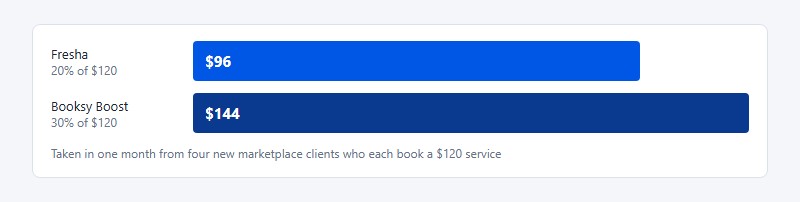
Marketplace commissions are the line item most people skip past. According to each company's 2026 pricing page, Fresha charges 20% of a new marketplace client's first booking and Booksy Boost charges 30%.
Hair Stylist Apps To Try
Trafft and Amelia come first, followed by GlossGenius, Vagaro, Fresha, Booksy, Square Appointments, Boulevard, Mangomint and Zenoti, roughly in order from solo chairs up to multi-location chains.
How an app charges matters more than its feature list once a salon starts growing, since the pricing model decides what the bill turns into.
| Pricing model | Apps | What raises the bill |
|---|---|---|
| Flat tiers or license | Trafft, Amelia, GlossGenius | Moving up a tier |
| Per stylist or calendar | Vagaro, Fresha, Booksy | Every new chair |
| Per location (plus users) | Square, Boulevard, Mangomint | New locations, provider caps |
| Custom quote | Zenoti | Locations, voice and messaging use |
Marketplace apps also take a cut of the new clients they send you, which is 20% for Fresha and 30% for Booksy Boost. Vagaro documents a 20% new-customer fee for its UK Marketplace, but its US pricing page lists the Marketplace listing as free. None of these fees show in the monthly price, and they can cost more than the subscription itself.
If you're still deciding between booking tools in general, this roundup of hair salon booking systems covers the wider field.
Trafft - Best for salons that plan to grow from one chair to several locations

Going from one user to 30 on Trafft means a plan change instead of a platform migration, which is why it suits salons that expect to add stylists. It's booking software with a free-forever plan and paid tiers that scale by users and locations. Salon owners hiring their second stylist, or their tenth, are the target, and the standout is a white-label mobile app, available on request on paid plans.
- Booking website with group bookings, plus Android and iOS apps
- Waiting list and recurring appointments for regulars on a 6-week cycle, plus calendar sync and WhatsApp messaging, all on the paid tiers
The free plan covers 1 user, 1 location, 100 appointments a month, and 200 automated emails, and it has no time limit. Paid tiers (Mini, Growth, Professional, Business) go up to 30 users, and paid plans come with a 14-day trial and a 30-day money-back guarantee. Square payments work on every tier, and PayPal, Stripe, Authorize.net and Mollie start at Growth.
SMS is an add-on on the lower tiers, and you only lose the Trafft branding and get a custom domain on Business. The free plan only takes payments through Square, so plan for that if you already use another processor.
Do the math on the free cap. Five clients a day over 22 working days is 110 appointments, which already goes past the 100-appointment limit. A busy solo stylist will outgrow the free plan in the first month.
Amelia - Best for stylists whose website already runs on WordPress
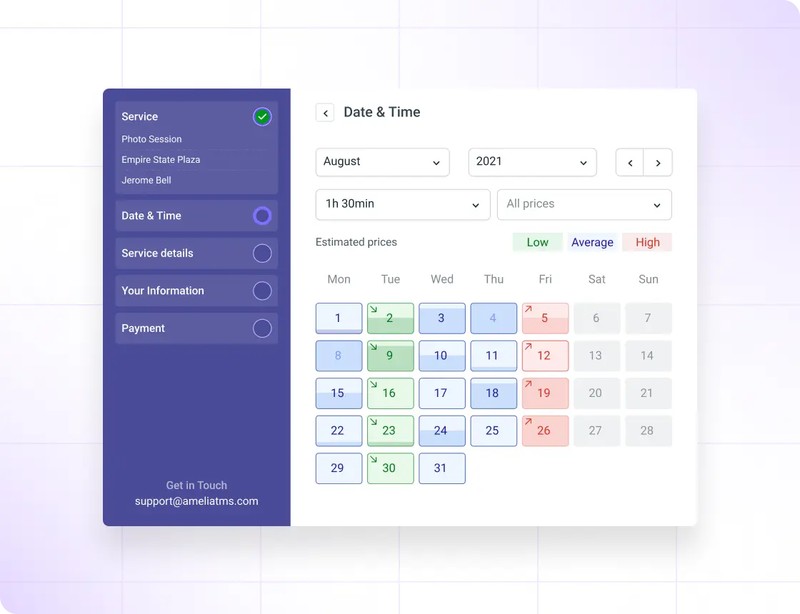
Because Amelia is a WordPress booking plugin, the booking flow lives on your own domain, and stylists who already run WordPress pay a yearly or lifetime license instead of a monthly fee for every chair. Lifetime licenses are the standout here, since very few salon apps offer them. It fits stylists and small salons that have a WordPress site.
The booking widget works step by step, and the plugin covers deposits, coupons, invoices and an events module for classes or workshops. It connects to PayPal, Stripe, Square, Mollie and Razorpay.
Pricing is as follows:
- Lite is free on WordPress.org
- On Pro, Amelia's pricing page shows $199 and $149 side by side and gives the domain limit as both 5 and 1, so confirm the current price and domain count at checkout
- On Elite, the page lists unlimited domains in one place and 20 in another, and the FAQ says it includes the mobile app
- Paid plans have no trial and a 15-day money-back guarantee
There's no per-staff fee, you get full control over how the booking page looks, and there's a wide choice of payment gateways. Hosting, plugin updates and site security are on you, though, and the FAQ ties the mobile app to Elite only.
Lite is limited to basic step booking, and Amelia's own pricing page calls it a "free limited version." Treat it as a test drive, not a long-term setup.
There's no marketplace, so you never pay a new-client commission. A client who finds you on Google and books on your site costs you nothing extra.
GlossGenius - Best for independent stylists who want one predictable card fee
Solo stylists like GlossGenius for its simple processing, which is 2.4% + $0.15 in person, with no separate card-on-file or manual-entry fee listed. It's an all-in-one booking and payments app for beauty pros, and it suits solo stylists and booth renters building a personal brand. If you're weighing a chair, this guide to salon booth rental explains the setup.
- Custom booking site with login-free client booking
- POS, card readers, Tap to Pay on iPhone and Android
- Automated rebooking reminders, email and text marketing
- Gold adds forms, waivers, Google booking, and an automated waitlist
| Plan | Annual billing | Monthly billing | Team size |
|---|---|---|---|
| Standard | $24/mo | $28/mo | Not stated |
| Gold | $48/mo | $56/mo | Up to 9 |
| Platinum | $148/mo | $168/mo | 10+ |
There's no free plan, but the trial runs 14 days with no credit card. Fees are easy to predict and clients can book without making an account. On the other side, invoices cost 2.9% + $0.30, and you get 2,500 marketing texts only on Platinum.
GlossGenius has a 4.8/5 rating from 351 reviews on Capterra UK.
Its pricing page lists no separate fee for card-on-file or keyed-in payments, which matters most for no-show fees and deposits. Square's free plan charges 2.6% + $0.15 in person, close to GlossGenius's 2.4% + $0.15, but 3.5% + $0.15 on card-on-file charges.
Vagaro - Best for small teams that want every tool plus a marketplace
One bookable calendar on Vagaro lists at $30 a month (promo price $23.99 for the first 6 months), and each extra calendar adds $10, up to seven.
It's a salon management suite with a consumer marketplace built in, and it fits teams of 2 to 7 stylists who want booking, POS, payroll and a website from one vendor. Small salons that want one bill for everything are the obvious match, and the add-ons are the widest set on this list.
Online booking, a free Vagaro Marketplace listing, staff scheduling, memberships, packages and gift certificates are included. Text marketing, payroll and the website builder each cost extra.
The pricing page lists no annual option and says you can cancel anytime. A 3-stylist salon pays $50 a month before add-ons and card fees.
The upsides are a low cost per extra stylist, 24/7 live support and a large marketplace. The downsides are add-ons that stack up and marketplace new-customer fees (Vagaro documents 20% for UK businesses, so confirm the US terms).
Vagaro holds 4.7/5 from 3,692 reviews on Software Advice. The most common complaints in Vagaro reviews are interface problems and glitches.
The per-calendar fee is capped. For a team of 7 or more, that makes Vagaro cheaper per stylist than Booksy's flat $20 per extra user.
Fresha - Best for new stylists who need marketplace clients fast
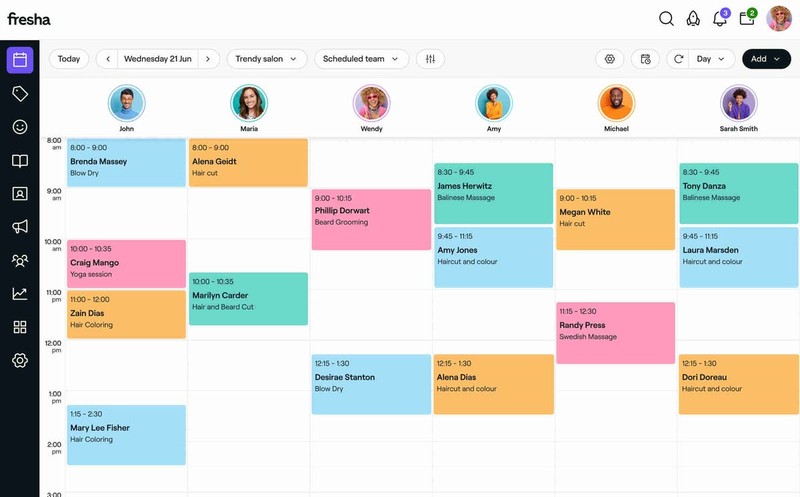
Stylists starting from zero clients get the most out of Fresha, which ties booking and POS software to a large consumer marketplace. The catch is a 20% fee on each new marketplace client's first booking. Newly licensed stylists with an empty book are the obvious fit, and client discovery through the marketplace is the draw.
- Upfront payments, no-show and cancellation fees
- Commission tracking and clock-in timesheets, plus 100 free messages per team member
Independent costs $19.95 a month. Team costs $14.95 per bookable team member, and both plans come with a 7-day trial. The pricing page no longer lists a free plan.
Entry is cheap for a solo chair, and returning clients never trigger a fee. The new-client fee is 20% with a $6 minimum, though, and online card payments cost 2.79% + $0.20.
Fresha's help center says the fee still applies if you cancel the appointment on the client's behalf, and the fee is non-refundable.
To take Fresha bookings through your own website or social pages, your profile has to be listed on the marketplace (Fresha help center). You can't keep the booking tools and skip the marketplace. This Vagaro and Fresha comparison sets the two models side by side.
Booksy - Best for stylists who want a consumer app sending them bookings
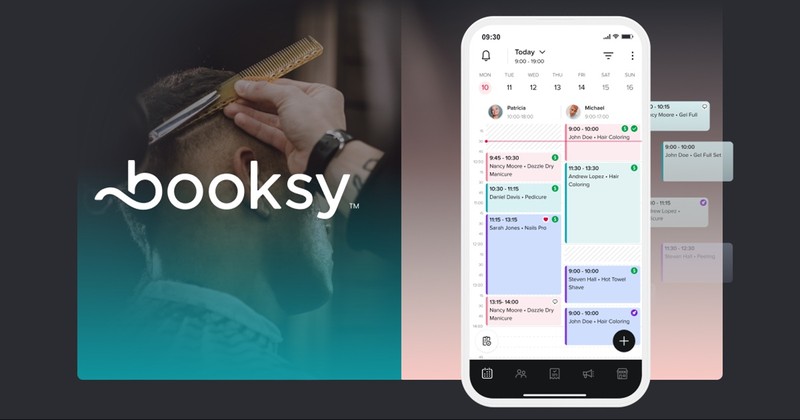
In busy cities, where clients search an app for open slots, Booksy Biz works best for solo stylists. It's a single-plan booking app paired with a popular consumer marketplace, aimed at solo stylists who want discovery on a simple flat plan. Everything is included in that one plan, so there's nothing to upgrade.
It includes 24/7 online booking, automated reminders, in-app payments and tipping, inventory and commission tracking per staff member.
Pricing is $29.99 a month plus tax, plus $20 for each additional team member, with a 14-day free trial.
Data transfer is free, 1:1 onboarding support comes once you subscribe, and the card reader rate is 2.49% + $0.10. Against that, $20 per extra user is double Vagaro's rate, and Boost charges 30% of a new client's first visit.
Booksy's pricing page caps the Boost commission at $100 per new client, and its help center adds a $10 minimum fee for free services.
The $100 cap changes the math on big services. A $400 color correction from a Boost client costs you $100 instead of $120, so Boost hurts least on high-ticket work. See Booksy and Vagaro compared for the team-pricing difference.
Square Appointments - Best free option for stylists already using Square
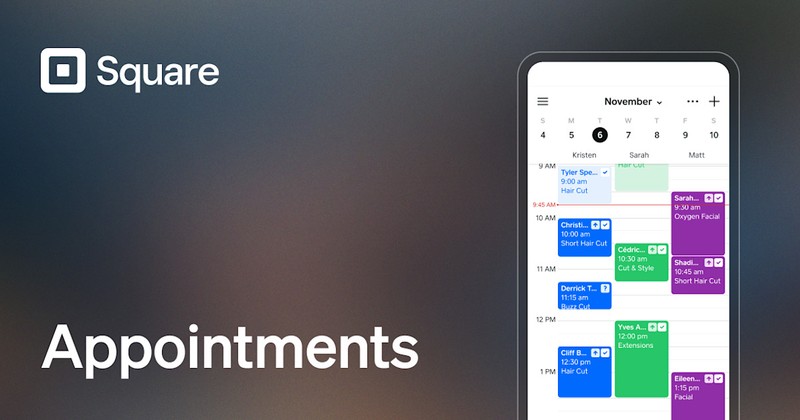
The $0 plan on Square Appointments includes online booking and has no limit on employee calendars, which makes it the best free starting point. It's a scheduling app built into Square's payment system, so stylists who already take payments with Square hardware get the most from it.
Online booking, reminders, deposits and prepayments are included, and from the Plus tier up there's a waitlist and no-show fees charged to a card on file.
| Plan (per location) | Price | In-person rate | Online rate |
|---|---|---|---|
| Free | $0 | 2.6% + $0.15 | 3.3% + $0.30 |
| Plus | $49/mo | 2.5% + $0.15 | 2.9% + $0.30 |
| Premium | $149/mo | 2.4% + $0.15 | 2.9% + $0.30 |
Text marketing starts on Plus, with 500 texts included.
Entry is $0 and the hardware may be gear you already own. The app isn't built for hair, though, and the waitlist and no-show fees are not on the Free plan, since Square's pricing page lists them with Plus.
Square lists the card-on-file rate at 3.5% + $0.15 on all three plans. Many Square Appointments reviews skip this detail.
Enforcing a salon cancellation policy through Square means charging the card on file, which is Square's highest card rate. Upgrading the plan doesn't lower it.
Boulevard - Best for premium salons selling a high-touch client experience
Boulevard is priced per location and aimed at upscale salons and spas. On Essentials it fits salons of up to 5 providers, where Precision Scheduling and a polished checkout justify a higher monthly fee. Think premium salons with high average tickets. Precision Scheduling is built for complex, multi-step services, and that is what the extra money buys.
Online booking, a business dashboard, integrated POS for salon checkout, the Boulevard Duo app and basic reporting are included. Premier adds check-in for walk-ins and groups.
Essentials is $176, Premier $293 and Prestige $410 per location per month, as Boulevard's pricing page lists them. The same page shows lower limited-time prices for new customers, and Capterra lists $159, $260 and $364.
It isn't priced per stylist, and it handles service sequencing well. There's no free plan, and Essentials includes only 250 free texts a month.
Prestige includes the Forms and Charts add-on. On lower tiers Forms start at $65 a month per location.
The 5-provider cap on Essentials is a sharp price step. Hiring a 6th stylist moves you to Premier, an increase of $117 a month for one hire.
Mangomint - Best for small salon teams that put ease of use first
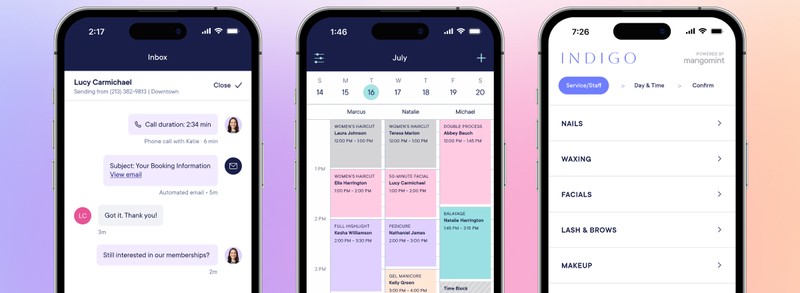
Mangomint changed its pricing on August 1, 2026. It now charges $120 a month per location plus $10 per user, and every customer moved to the new model.
The software is known for a clean interface and strong support, and it works best for small teams that want front-desk automation without enterprise complexity. Think 2- to 10-stylist salons with a busy front desk. Express Booking and a Virtual Waiting Room handle check-in without staff.
It includes unlimited text and email confirmations and reminders, memberships, gift cards, mobile apps, and Forms and Charting. Optional add-ons are phone ($70 a month per line), marketing (from $30 a month) and payroll ($50 a month plus $8 per worker).
A 3-stylist salon pays $150 a month before add-ons.
Data transfer is free, you can cancel anytime and there's a free trial account. Add-ons push the total up, and every extra user adds $10.
Software Advice shows Mangomint at 5.0 overall from 361 reviews, with 4.9 for ease of use and 5.0 for customer support.
Many comparison pages still quote the three tiers Mangomint retired (Essentials, Standard and Unlimited), so check the date on any price you read.
Zenoti - Best for multi-location chains and franchise groups

Zenoti is sold through custom quotes to salon and spa chains, and it makes most sense for groups running several locations that need central reporting, a branded client app and AI front-desk tools. Salon chains and franchises are the audience, and the standout is a white-label app listed under your salon's name in the App Store and Google Play.
- Branded online booking on web, social, and Google
- Employee app, inventory, integrated payments and multi-location dashboards
- AI agents, including a voice receptionist, need the AI Plus package
There's no public price list. Zenoti's pricing page says multi-location pricing is customized to your footprint, and that voice, SMS and messaging usage is billed on consumption with optional base packs.
One system across every location is the upside. There's no free plan or trial, and it's far more than a single-chair stylist needs.
Because usage is billed on consumption, your bill moves with call volume and message traffic. A flat-tier app doesn't work that way, so ask for usage limits in writing before you sign.
Thank you for subscribing. Check your mail for details
What to look for in a hair stylist app
Pick an app that schedules hair services correctly and takes payment in the same place. Everything else matters less.
A generic calendar only books time slots, while a hair stylist app has to handle services that come with processing gaps, deposits and formula history.
These are the must-haves.
- Processing time settings, so a second client can book during color
- Deposits and card on file taken at booking
- Automated reminders with a confirm or cancel option
- Client notes with room for formulas and photos
- Client list export to CSV or Excel
Marketplace listing, payroll, memberships and a branded client app are nice to have but not required.
Check the SMS allowance before you commit. Many apps include reminder texts but charge for marketing texts, and a full book uses a lot of both.
Test checkout on the phone you'll actually use at the chair. A clunky mobile app costs you time with every client.
How much do hair stylist apps really cost?
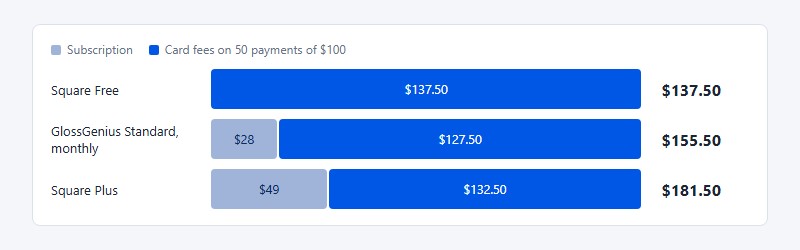
On $5,000 a month in card sales, a solo stylist pays roughly $137 to $182 a month all-in. The subscription is the smallest part of that.
The bill is a subscription (flat, per stylist, per location or quoted), card processing (a percentage, sometimes plus a fixed fee per transaction) and, on marketplace apps, a commission on a client's first booking.
Transaction fees aren't the only payment-related cost to consider. Salons accepting online deposits, prepaid packages or card-on-file payments should also review the fraud protection tools available through their payment provider. Suspicious transaction checks and clear dispute procedures can help reduce payment risks, although the level of protection varies by provider and may come with additional fees.
For a worked example, take 50 in-person card payments a month averaging $100, at November 2026 list prices.
| App and plan | Subscription | Card fees | Monthly total |
|---|---|---|---|
| Square Free | $0 | $137.50 | $137.50 |
| GlossGenius Standard (monthly) | $28 | $127.50 | $155.50 |
| Square Plus | $49 | $132.50 | $181.50 |
Square Free wins when nearly every payment is a tap. The gap narrows once you charge deposits, no-show fees, or late balances to a saved card, because Square bills those at its highest rate.
The key figures below come from vendor pricing pages as of November 2026.
- GlossGenius charges 2.4% + $0.15 in person, with no separate card-on-file or manual-entry fee listed
- Square charges 3.5% + $0.15 for card on file, on every plan
- Fresha takes 20% of a new marketplace client's first booking, with a $6 minimum
- Booksy Boost takes 30% of a new client's first visit, with a $10 minimum for free services and a $100 maximum
Say four new marketplace clients book at $120 each. Fresha takes another $96 that month, and Booksy Boost takes $144.
Add-ons push the total up too. Vagaro, for example, sells text marketing, payroll, and its website builder separately from the base subscription.
Marketplace apps vs your own booking link
A marketplace sells you discovery and charges for every new client it sends. With your own booking link there's no per-client cost, though finding clients falls to you.
Use the marketplace while the book is empty. Once it fills, move rebooking to your own link.
The commission depends on the ticket. Zenoti's 2026 Beauty and Wellness Benchmark Report (salon edition) puts the median salon ticket at $77, so Fresha's 20% comes to about $15.40 on a typical first visit. On a $120 color service, it's $24.
A marketplace listing lets clients searching the app find you without ad spend, and reviews build up in one visible place. The cost is a commission on every first visit, and clients who already know you can get counted as new if they find you through the marketplace.
Building a recognizable salon brand outside a marketplace also takes consistent visuals. A design app can help stylists create branded Instagram posts, promotional banners, service menus and graphics that direct potential clients to their booking page. Keeping these materials consistent makes it easier for customers to recognize the salon across social media and its website.
Your own link works the other way around.
Social media tools add another cost to running a salon, so smaller businesses should compare their options before paying for a subscription. Looking at free Hootsuite alternatives can help independent stylists find ways to organize promotional posts without immediately adding another monthly expense. As with booking software, the free plan's publishing limits matter more than the headline price.
- There's no per-client fee, and you own the page, the branding and the client relationship
- Discovery depends on Instagram, Google, and referrals
Salons that sell haircare products alongside appointments have another way to turn social traffic into revenue. A shoppable video platform can connect product demonstrations, styling tutorials and customer videos with opportunities to purchase featured products. The booking app still handles salon appointments, while shoppable content supports retail sales.
There's one catch with Fresha, whose help center says your profile must be listed on its marketplace before you can take online bookings through your website or social pages. On Fresha, using the software means using the marketplace.
If you go direct, put effort into building a booking website clients can find, and plan for building a clientele without app traffic.
Getting clients to that booking page takes consistent promotion. A social media scheduler helps stylists plan Instagram, Facebook and other posts ahead of time instead of creating content between appointments. The booking link then gives interested followers a direct way to reserve a service.
How hair stylist apps handle processing time and double booking
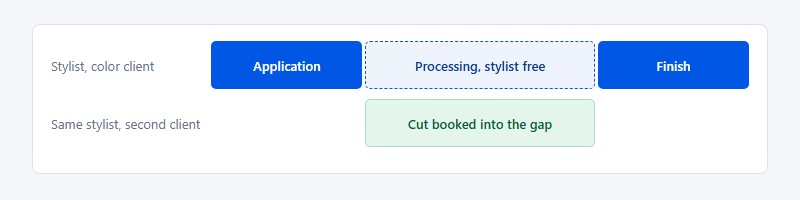
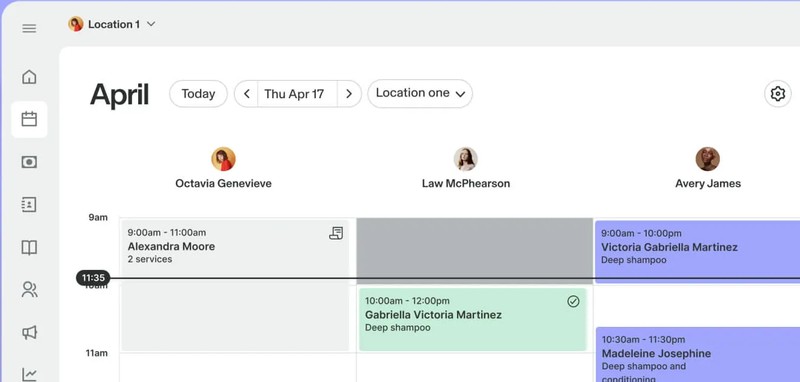
Salon apps split a color service into application, processing and finishing, and the processing window stays open so another client can book into it.
Vagaro notes that color, highlights, and similar services can leave a gap of 45 minutes or longer while the product processes. That's a haircut's worth of unbilled time.
Square uses the same model: an initial duration, a processing time, and a final duration. Its help center says processing time lets clients book during the downtime of existing appointments.
A few settings prevent conflicts.
- Buffer time adds cleanup minutes after a service
- Resource booking reserves the chair, station, or bowl with the appointment (Square's pricing page lists it under Premium)
- A waitlist fills a gap when someone cancels
Test it from the client's side. Square's help article doesn't explain how online booking handles those gaps, so book a test appointment on your public link before you trust any hair salon scheduling software with your Saturdays.
Setting up deposits, no-show fees and cancellation rules
The no-show numbers you see quoted vary widely. Zenoti's 2026 benchmark materials report 2025 no-show rates of 2% at specialty salons and 1% at full-service salons, against 4% at barbershops.
The gap probably comes from the samples. Zenoti's data comes from businesses on its own platform, which are likely to use reminders and booking rules, so read its figures as what a managed book looks like, not what an unprotected one does.
- Choose protection by service: a deposit for long color appointments, card on file for cuts.
- Set the deposit as a fixed amount or a percentage of the service.
- Write the policy: the cancellation window (24 or 48 hours) and the fee.
- Make clients accept the policy before the booking goes through.
- Schedule reminders at 24 hours and 2 hours, each with a confirm or cancel button.
- Turn on the waitlist so late cancellations get filled.
Here is plain policy wording to adapt. Fill in the deposit, the window and the fee for your own salon.
A deposit of [amount or percentage] is taken when you book and comes off your final bill. Cancel or reschedule at least [24 or 48] hours before your appointment and the deposit is moved to your new time or returned. Cancellations inside that window and no-shows are charged [the deposit or a fee of amount]. By booking, you agree to this policy.
Deposits and cancellation fees also create a risk of payment disputes. Before charging a saved card, check what chargeback protection and dispute-handling support your payment provider offers. Keep the client's acceptance of the cancellation policy, booking confirmation and reminder history available, since those records may help when responding to a disputed charge. A written policy alone does not guarantee that a chargeback will be resolved in the salon's favor.
Write the reminder text yourself rather than keeping the default. These SMS and email reminder templates are a quick starting point.
Marketplace clients follow a different rule. Fresha's help center says its new-client fee is calculated on the value of the client's first completed appointment, excluding tips and service charges.
Storing color formulas and client history
Most apps store formulas in free-text client notes, not structured fields. That's fine as long as you write them the same way every time.
Whatever app you use, record the formula at the chair while it is fresh. Notes written later from memory are where the shade and developer details go wrong.
Record the same things on every visit.
- Brand, shade, developer, and ratio
- Processing time
- Before and after photos
- Allergies and patch-test dates
Here is a layout that works in the notes field of any app. Copy it and fill it in at the chair on every visit.
Date and stylist: [date, name]
Brand and shade: [brand, shade]
Developer and ratio: [developer, ratio]
Processing time: [minutes]
Before and after photos: [saved where]
Allergies and patch test: [notes, date of last patch test]
Before-and-after photos can also support salon marketing when clients have agreed to their use. Stylists can schedule and post gorgeous photos of completed color transformations, cuts and styling work to show potential customers what they offer. Keep promotional images separate from private client records, and get permission before publishing identifiable photos.
Consultation details belong in the same profile. A proper hairdressing consultation captures hair history that the formula alone doesn't show.
For clients considering a major color change, a hair color changer can provide a visual starting point before the consultation. A digital preview won't predict the exact salon result, since the client's existing color and hair condition still matter. It can, however, help the stylist understand the shade the client has in mind before discussing the formula and appointment time.
On a team, decide who can edit notes. Two stylists rewriting one client's formula is how a level 7 turns into a level 5.
Check the export, too. Pabau's migration guide says Vagaro exports through support may be billable and that Vagaro does not support bulk export of EMR attachments, so a migration done in a rush can leave records behind.
Which app fits solo stylists, booth renters and salon teams
Business size decides the pricing model that hurts least. Features come second.
| Business type | Top priority | Cheapest cost model | Examples |
|---|---|---|---|
| Solo stylist | Low card fees, booking link | Flat tier or free plan | GlossGenius, Square, Trafft |
| Booth renter | Own payments and client list | Flat tier, single user | GlossGenius, Booksy |
| Team of 2 to 10 | Commission tracking, payroll | Per location plus user | Vagaro, Mangomint |
| Multi-location chain | Central reporting, branded app | Custom quote | Zenoti, Boulevard |
Booth renters need one thing above all, and that's keeping the client list. Make sure the account is in your name, not the salon owner's.
Chains face a different trade-off, between enterprise depth and onboarding time. Compare a wider set of salon software options before signing an annual contract.
How to switch hair stylist apps without losing clients
Switching goes smoothly as long as nothing gets cancelled until the export is in hand.
- Export the client list as CSV or Excel.
- Export client notes, services, gift card balances, and packages one by one.
- Request future appointments from support if the app has no calendar export.
- Import into the new app, or use its migration service.
- Run both apps for 1 to 2 weeks, with new bookings going only to the new one.
- Replace the booking link on Instagram, Google, and your website.
- Text clients the new link and ask them to re-save a card.
Saved cards usually stay with the old payment processor. Plan to collect them again at each client's next visit.
Anything entered in the old app after the export won't come across, so you'll have to add it by hand. Pabau's migration guide also warns that a full export through Vagaro support may cost extra.
Some vendors do the move for you. GlossGenius's App Store listing says its team transfers your client list, appointments and notes from your current system at no charge.
The new app still needs setting up before go-live. This guide to setting up an online booking system covers the service menu and availability rules.
When a hair stylist app is the wrong fit
An app costs more than it saves when your bookings don't come in online.
- A barber-style queue of mostly walk-ins doesn't need deposits or online slots
- A few clients a week rarely justifies a paid subscription
- Older regulars may keep calling no matter what, so some clients won't ever book online
- A 20 to 30% first-visit cut on a $400 service is a lot to give up on high-ticket marketplace work
Lock-in is the risk most people underrate. Weak export tools, hardware tied to one processor, and annual contracts all make leaving expensive.
If you only need a calendar and a booking link, a free online booking system covers it. Upgrade when no-shows or processing-time gaps start costing you money.
Hair Stylist Apps FAQ
Is a hair stylist app the same as salon management software?
Mostly, yes. Both handle booking, payments and client records.
Salon management software adds the back office (payroll, inventory, commission splits, multi-location reporting), while a stylist app is usually built mobile-first for a single chair.
Do clients need to download an app to book?
No, not with most platforms. GlossGenius, Square and Trafft use login-free booking pages that open in any browser.
Marketplace apps like Booksy and Fresha also have consumer apps, but clients can still book through your link.
Can clients book from Instagram or Google?
Yes. Put your booking link in your Instagram bio or on a booking button.
For Google, some apps connect directly to Search and Maps. GlossGenius includes Google booking on its Gold plan, and Zenoti covers web, social and Google booking.
Are free hair stylist apps worth using?
For a new or part-time book, yes. Square Appointments Free, Trafft's free plan and Amelia Lite all handle basic scheduling at no cost.
Watch the limits. Trafft's free plan caps you at 100 appointments a month, and free tiers usually charge higher card fees or leave out SMS reminders.
Which is better for a solo stylist, GlossGenius or Vagaro?
GlossGenius suits stylists who want predictable fees: 2.4% + $0.15 on in-person payments, no separate card-on-file fee listed, and plans starting at $24 a month on annual billing.
Vagaro suits stylists who want marketplace exposure and extra tools, as long as they accept paid add-ons and possible marketplace new-customer fees (Vagaro documents 20% for UK businesses, so confirm the US terms).
Do I need a card reader?
Not always. Tap to Pay on iPhone turns your phone into a contactless terminal on apps like GlossGenius.
Get a reader if clients pay with chip cards, or if you want faster checkout at a front desk. GlossGenius lists its Tap & Go Reader at $49.
Can I run two booking apps at the same time?
You can, but only for a short switchover. Two live calendars without real-time sync will eventually double-book a slot.
If you do overlap, send all new bookings to one app and block the same hours in the other.
How do tips work in hair stylist apps?
Clients add a tip at checkout, either on the card reader or in the booking app, and it gets paid out with the service.
On teams, check how tips reach each stylist. Some platforms pay them out automatically through payroll, while others make the owner pay tips out by hand.
Which Hair Stylist App to Start With, and When to Upgrade
Start with the hair stylist app that has the lowest fixed cost and handles processing time correctly. Move to a paid plan only when a measurable threshold makes the upgrade pay for itself.
- Spend the first week on a free or flat-tier plan with a booking link
- Add deposits and card on file once no-shows show up
- Move to a plan priced for teams when you hire a third stylist
The thresholds are easy to calculate. Square Plus saves 0.1 points on in-person payments, so its $49 fee breaks even at $49,000 a month in tap and chip sales, or at $12,250 a month in online payments, where the gap is 0.4 points.
The trade-off is that every upgrade makes leaving harder, because more of your data ends up in one vendor's system.
Prices here were checked in November 2026. Fresha's pricing page no longer lists a free plan and Mangomint changed its pricing in August 2026, so check again before May 2027.
Once the app is running, the next job is filling it, which is where marketing yourself as a hairstylist comes in.