Event planning software pulls together the pieces of running an event (calendar availability, registration, staffing, payments) so a host isn't stuck coordinating five separate tools without manual back-and-forth.
Conference organizers, sales teams and service businesses are the core users, usually running it alongside a shared calendar. Depending on the platform, the job ranges from turning open slots into bookable sessions all the way up to registration forms, staff schedules and onsite check-in. Full venue logistics and catering still sit outside almost every tool on this list.
Time zones are the part that catches teams out. Nearly 60% of remote workers said their company operates across two to five time zones, with another 19% spanning six to ten, according to Buffer's State of Remote Work report (2021). A calendar on its own does not resolve that gap.
Top Event Planning Software
Ranked by overall best fit, broadest use case first.
Prices verified September 2026. This category revises pricing often, so treat every figure as a starting point to confirm on the vendor's own page.
| If you need | Best pick |
|---|---|
| An all-in-one planning platform with payments and staff management | Trafft |
| A WordPress plugin with a lifetime-license option | Amelia |
| A single link for one-on-one meetings | Calendly |
| Enterprise-scale conference management | Cvent |
| Multi-step registration with payment plans | Regpack |
Trafft: best all-in-one planning platform for service businesses
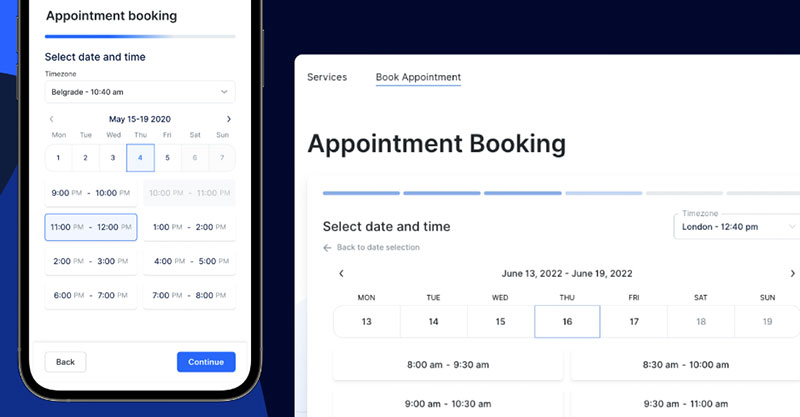
Trafft is a booking and planning platform sold as either a WordPress plugin or standalone SaaS, aimed at salons, clinics and consultants. Staff-level calendar sync, online payments and automated reminders sit in one dashboard, which is where it pulls ahead of a single-purpose booking link once a team grows past one person.
It suits service businesses with several staff who need shared calendars rather than a solo booking page. In practice it behaves closer to full business scheduling software than a booking link, covering staff schedules, locations and client records under one login.
What you get:
- Google, Outlook, and Apple calendar sync (paid plans)
- Online payments via Square on every tier, with Stripe, PayPal, Authorize.net and Mollie from the Growth plan up
- Email reminders on all plans; SMS via purchased credits
- Multi-location and multi-staff support
- Custom booking forms and branding
Trafft restructured its plans in 2026. The current ladder is Free, Mini (3 users, 3 locations), Growth (5 users, 5 locations), Professional (15 users, unlimited locations), Business (30 users, unlimited locations), and Enterprise for 50+ users on request. The older Starter and Scaling tier names no longer appear on the pricing page, so any comparison quoting them is out of date. Billing is monthly or annual, with annual saving up to 25%. Third-party trackers still list conflicting figures against retired tier names, so check the live page rather than an aggregator.
There is no per-booking commission, the money-back guarantee runs 30 days, and the staff-level features (individual calendars, permissions, commissions) are ones most booking links don't have at any price.
Trafft's own pricing page lists the Free plan at 1 user, 100 appointments per month, and 1 location, with no Google, Outlook or Apple calendar sync. Widely repeated claims that the free tier includes five staff logins and unlimited appointments do not match the current page. The free trial runs 14 days, and calendar sync, Stripe and bundled SMS credits all come with the paid tiers, so price the plan that matches your team rather than the free headline.
Few tools here run both as a WordPress plugin and a fully hosted SaaS, which is what makes Trafft workable for teams that outgrow a plugin without forcing a full platform migration. The demos cover both routes.
Amelia: best for WordPress sites that want a lifetime-license option
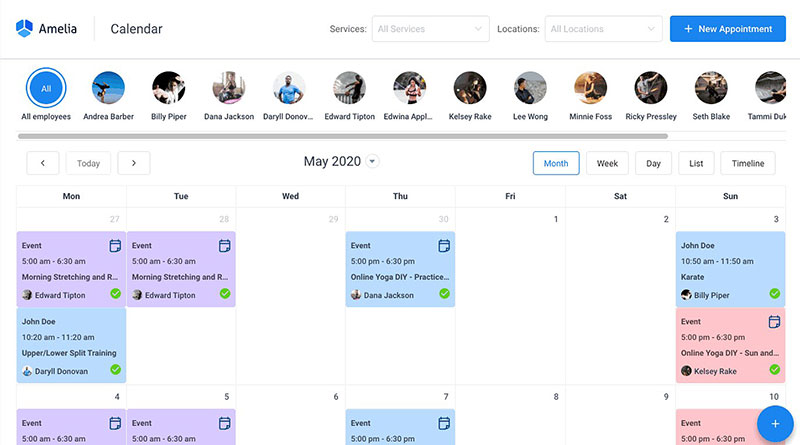
Every paid tier here sells two ways, annual or lifetime, which is unusual in a market that has otherwise moved entirely to subscriptions. That is the reason to look at it.
Amelia is a WordPress booking and event planning plugin covering appointments, events and employee schedules inside the WordPress dashboard. It suits site owners already on WordPress who want appointment and event booking without a permanent monthly SaaS bill.
The plugin covers:
- Events calendar module for single-day, multi-day, and recurring events, with QR-coded e-tickets
- Individual employee schedules and days off
- Google Calendar sync
- Multiple payment gateways (Stripe, PayPal, Razorpay)
- Multi-location management under one license
A free Lite tier sits on WordPress.org. Paid licences are sold annually or as a lifetime purchase, with a hosted SaaS version running roughly $60/month. The pricing page carries the current grid, since figures circulating on aggregator sites are frequently stale.
One correction worth noting: framing Amelia as purely a one-time purchase misreads the model. Annual is the default published option. Lifetime is the alternative.
The booking wizard is polished, employee-level scheduling is included at every paid tier, and the documentation is strong. Against that, it is WordPress-only unless you pay for the SaaS version, there is no free trial (only a 15-day money-back guarantee), and on annual licences updates and support run for the term.
Ratings hold up well: 4.9/5 from 245 Capterra reviews and 4.6/5 from 761 WordPress.org reviews, across a base of 90,000+ active installs.
The lifetime licence is the real exception in this market. Nearly everything else in this comparison bills monthly forever, and for a WordPress site that plans to stay put, buying the plugin once changes the five-year cost more than any feature on the list. The demos show the client-facing flow before you commit.
Calendly - Best for solo professionals and sales teams booking one-on-one meetings
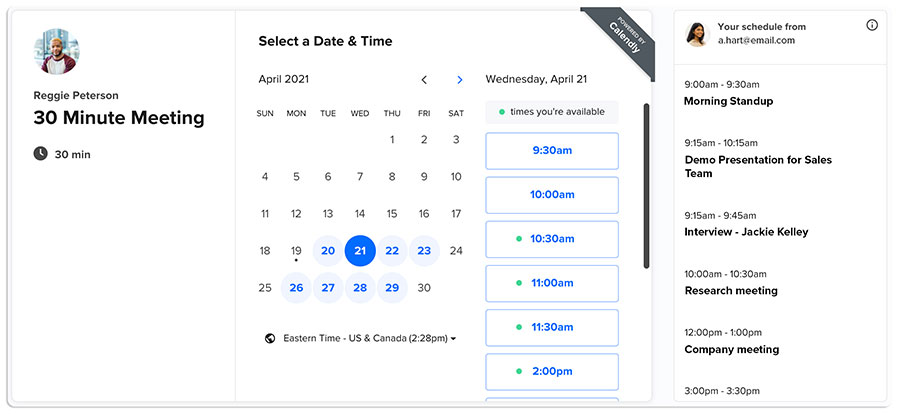
Calendly generates a booking link that replaces email back-and-forth with a shareable page showing real-time availability. It works best for individuals and revenue teams booking discovery calls, demos or consultations rather than managing event logistics.
Consultants, recruiters and sales teams are the core audience. Round robin scheduling and lead routing on the Teams plan is the feature that earns its keep, distributing inbound meeting requests across a team automatically.
Features that matter here:
- Multiple connected calendars on paid plans (one only on Free)
- Automated workflows and email reminders
- Zoom and Google Meet integration
- Salesforce and HubSpot sync
- Collective and round robin event types
The free plan is limited to one event type and one connected calendar. Standard runs $10 per seat/month and Teams $16 per seat/month billed annually ($12 and $20 month-to-month), with Enterprise starting around $15,000/year.
Calendly also added two AI tiers on 19 August 2026. Standard Plus and Teams Plus each sit $8 per seat/month above their base plan (so roughly $18 and $24 annually), adding Notetaker, which joins Zoom, Meet and Teams calls and writes recaps, and Callie, an assistant you copy into an email thread to handle scheduling back-and-forth. Neither changes the underlying scheduling features.
The booking page design is clean and widely recognized, the CRM integrations run deep, and invitees trust the brand, which matters more than it sounds. The catch is that one-event-type cap, which forces an upgrade almost immediately for anyone running more than one kind of meeting. SMS reminders also run on a credit model capped at 250 per seat per month on Standard and Teams, and once exhausted they simply stop.
Calendly holds 4.7/5 across 4,144 reviews on Capterra (September 2026), one of the highest review volumes in this category. Its sub-scores are ease of use 4.7, features 4.5, value for money 4.5, and customer service 4.4, the last being the weakest.
Most competitors' free tiers allow unlimited event types with some other limit attached. Calendly caps the event type itself, which is the detail that pushes active users toward a paid seat faster than the pricing page suggests.
Cvent - Best for large conferences and enterprise event programs
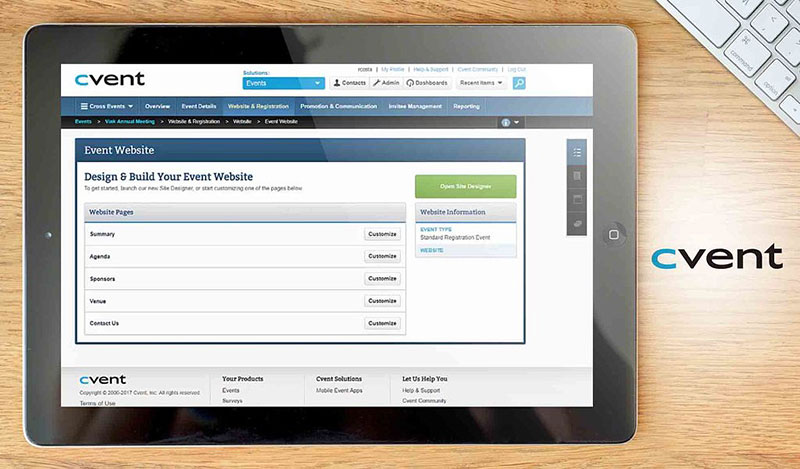
Cvent is an enterprise event management platform covering registration, agenda management, onsite check-in and post-event reporting. It fits organizations running dozens of concurrent events under one budget, not solo planners booking a handful of one-off dates.
For teams responsible for broader event production, those scheduling and attendee-management tools usually sit alongside venue, staging, audiovisual, and onsite logistics rather than replacing them.
Enterprise marketing and events teams are the buyer here, managing conferences, trade shows and sales kickoffs across a shared calendar.
Onsite check-in with badge printing and barcode scanning is the piece nothing lighter can match, alongside trigger-based email communications tied to registration status. At larger venues, dedicated check-in devices may also be locked into Windows kiosk mode so attendees can use the registration interface without accessing the rest of the device.
Cvent's core toolkit:
- Customizable registration forms and event websites
- Real-time reporting and budget tracking across events
- Attendee management and session tracking
- Salesforce, SAP Concur, and Microsoft Teams integrations
- Onsite badge printing and barcode check-in
There is no public self-serve pricing. The PayGo, Contract and Enterprise plans are all quote-based. Third-party trackers report a very wide range depending on event volume, and those figures should be treated as directional only, since none of them come from Cvent.
CRM and travel-tool integrations run deep, hybrid and virtual formats are handled alongside in-person, and the reporting holds up across multi-event budgets. No free tier exists, no transparent starting price either, and implementation and support are commonly quoted on top of the base contract rather than inside it.
Cvent holds a 4.5/5 rating across roughly 1,100 reviews on Capterra, with reviewers most often citing centralized planning tools and responsive support.
Pricing this against a $10/month booking link misses the point. Cvent is built for organizations running many events against one shared budget pool, so the comparison that matters is against other enterprise event suites.
Whova - Best for in-person and hybrid conferences that need attendee engagement
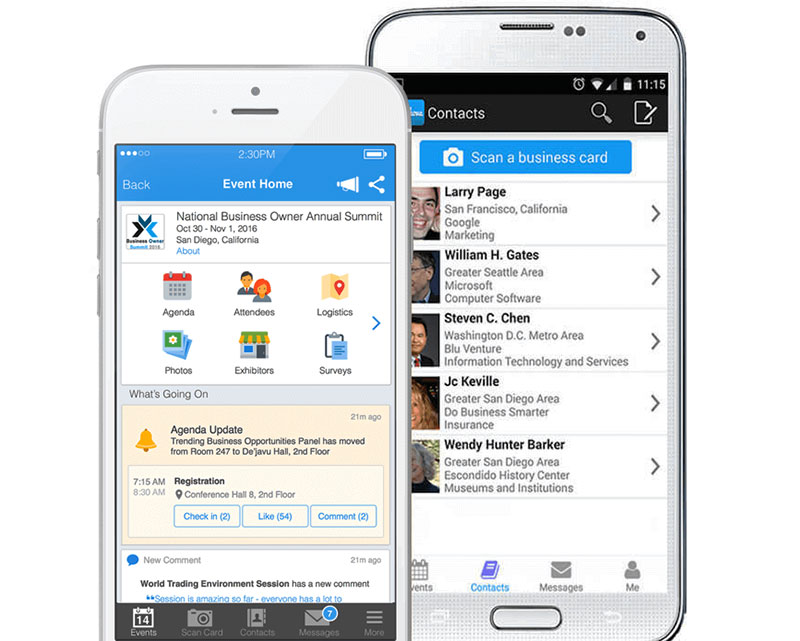
Whova is an event management app built around attendee networking, session agendas and personalized schedules. It suits organizers who need attendees to interact with each other, not just show up at the right time.
Conference and association organizers are the main users, particularly those who want networking, chat and live polling alongside session scheduling. The networking layer (profiles, meetups, community boards) sits on top of standard agenda management and is the actual product.
- Personalized attendee agendas
- Live streaming and virtual session support
- Attendee messaging and meetup scheduling
- Event maps and real-time notifications
- Integrations with Zoom, Google Calendar, and Eventbrite
Pricing is custom quote only, with no published starting price. Attendees rate it easy to navigate with little training, the networking feature set is strong, and it works across event sizes. The absence of a free plan and any published pricing means budgeting requires a sales conversation before you can compare it against listed-price tools.
Whova holds one of the highest ratings in this category on Capterra, at 4.8/5 across roughly 2,500 reviews, with its strongest adoption among small businesses and education organizations.
A team that only needs a booking page and a reminder email is paying for engagement features it will likely never open. That is the whole calculation with Whova.
Doodle - Best for group polling when many people need to agree on one time
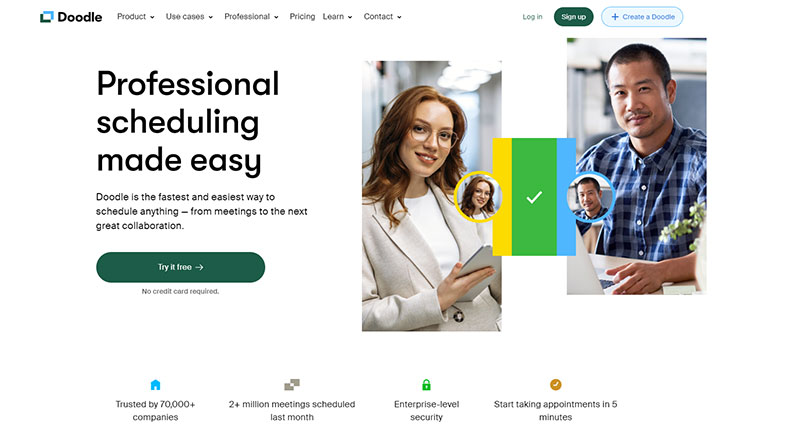
Doodle lets a group vote on proposed time slots through a shared poll, replacing email chains for multi-person scheduling. It solves one specific problem well: finding a time that works for several people at once, rather than one host booking one guest.
Committees, academic groups and event teams that need several stakeholders to agree on a date before anything gets booked are the natural fit. Automatic timezone detection on polls is the standout, which matters for any group trying to schedule a meeting across time zones without manual conversion.
- Group polls with no account required to vote
- Personal booking pages on paid plans
- Two-way sync with Google Calendar, Outlook, and iCal
- Automatic timezone detection for participants
- Custom branding on Pro and Team tiers
A free plan exists, with ads shown to participants. Pro and Team tiers sit in the high single digits per user per month on annual billing, with Enterprise on custom terms. Doodle adjusts these periodically, so confirm on the live page.
For the specific job of group polling it is best in class, and the lack of an account barrier for participants is a genuine advantage. Those ads on the free plan show to every participant, though, and it is not a direct-booking replacement for a standard scheduling link. It collects no payments at all, so it cannot take a deposit.
Capterra reviewers describe the free version as simple but repeatedly note that most features are paid and that ads appear throughout the polling screen.
Doodle intentionally skips direct one-to-one booking on its core plan. So the most common complaint isn't about the poll feature itself. It's from people expecting a full scheduler and finding a single-purpose voting tool instead.
HoneyBook - Best for creative event planners who need CRM and invoicing built in
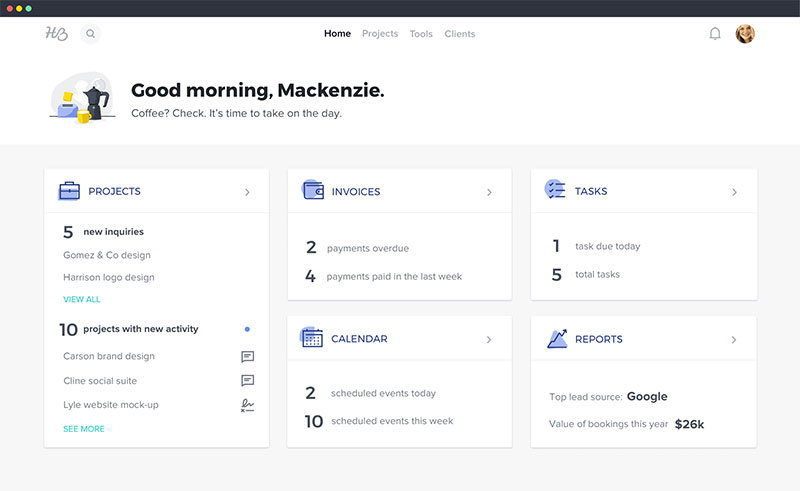
HoneyBook is a client management platform for creative and service businesses, bundling proposals, contracts, invoicing and scheduling into one workflow. It fits planners who need to manage the entire client relationship, not just the calendar slot.
Wedding and event planners, photographers and consultants who bill through proposals and contracts get the most out of it. The automation workflows are the reason, triggering contracts, invoices and follow-ups from a single client booking.
- Proposals and contracts with e-signatures
- Online payments and invoicing
- Client portal and mobile app access
- Scheduler with automation workflows
- QuickBooks integration on higher tiers
HoneyBook has repriced upward. Capterra's 2026 listing puts Starter at $36/month, Essentials at $59/month, and Premium at $129/month, with a free trial and no free plan. Earlier figures in the $19 to $79 range are out of date.
Scheduling, proposals, contracts and payments live in one client record, ease-of-use ratings are strong, and there are over 80 integrations. No free tier exists. HoneyBook branding is only removable from Essentials up, automation workflows sit above the entry price, and reviewers report payment processing around 3% on top of the subscription.
It rates 4.7/5 on Capterra, where event planners, photographers and consultants are named among its core user base, but only 4.4/5 across 188 G2 reviews, where reviewers more often describe it as less intuitive than a dedicated scheduler.
Read it as a client relationship platform with scheduling as one module, not a dedicated scheduling tool. If all you actually need is a booking page rather than contracts and invoicing, that distinction is now expensive to get wrong at $36 to start.
Setmore - Best for small teams that want a generous free plan
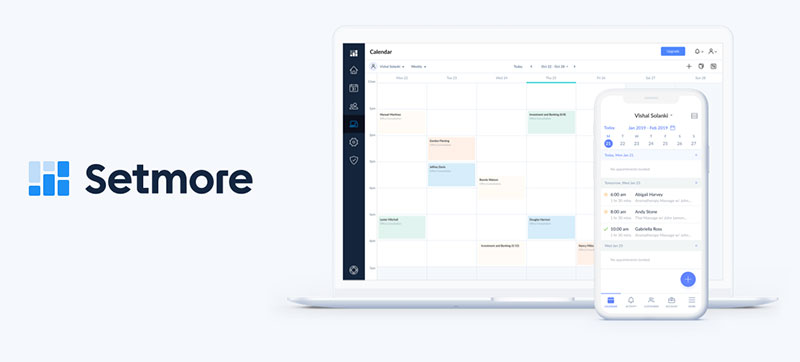
The free tier is the pitch. Customer self-booking and email reminders for up to four staff is more than most competitors give away.
Setmore is an appointment scheduler covering self-service booking, reminders and basic payments, suited to small businesses that want to avoid a subscription until they outgrow the free plan's limits.
- Customer self-service booking page
- Two-way calendar sync on paid plans
- SMS reminders and online payments (Pro tier)
- Social media booking integration
- Integrations with Salesforce, Zoho CRM, and Slack
The free plan covers up to 4 staff logins and 200 bookings per month. Setmore Pro runs about $5 per user/month on annual billing, rising for month-to-month terms.
That is one of the more generous free tiers in this category and one of the lowest published paid entry prices in the comparison, with a clean self-booking page and a wide CRM integration list even on lower tiers. The free plan does cap out at 200 appointments per month, and it excludes video conferencing and two-way calendar sync.
Independent 2026 pricing comparisons confirm the free plan supports up to four users with payment collection via Stripe and Square, capped at 200 bookings per month, and place Setmore Pro among the two cheapest published annual entry prices in the category.
That 200-appointment monthly cap is easy to miss when signing up, and it is usually the first limit small teams hit, well before the four-user cap becomes relevant.
SimplyBook.me - Best for businesses needing HIPAA compliance or heavy customization

SimplyBook.me is a booking widget built around a marketplace of roughly 70 optional add-ons, so businesses enable only the features they need. It fits businesses with specific compliance or workflow requirements that generic schedulers don't cover out of the box.
Clinics and international service businesses are the clearest case, particularly anyone needing a HIPAA-compliant option or multi-language booking pages. That HIPAA configuration is available as an add-on from the Standard tier, useful for a provider that also needs medical scheduling software-level data handling without switching platforms entirely.
- Around 70 modular "custom features" (intake forms, coupons, deposits, memberships, HIPAA)
- Embeddable booking widget for any website
- Multi-language booking pages
- Stripe, Square and PayPal payment processing, including on the free plan
- HIPAA-compliant option from the Standard tier
The free plan is capped at 50 bookings per month, 1 provider, and 1 custom feature. Paid tiers run roughly $9.90 to $11.90 (Basic), $24.90 to $29.90 (Standard), and $49.90 to $59.90 (Premium) per month, varying by billing cycle and currency, with a custom Enterprise tier above that. A 14-day trial requires no credit card.
Modularity is the strength, along with HIPAA and multi-language support many competitors skip, a flexible embeddable widget, and payment processing even on the free plan. The feature menu also creates real decision fatigue, and reviewers consistently rate ease of use below its overall score for exactly that reason.
Independent 2026 pricing audits describe the free tier as genuinely usable for testing at 50 bookings, one provider and one feature, while noting SimplyBook.me has fewer ecosystem integrations than Square Appointments or Acuity.
The advertised plan price rarely matches the final cost. Booking volume, provider count and the number of active custom features all move together as you scale up the tiers.
Regpack - Best for camps, courses, and multi-step registration with payment plans
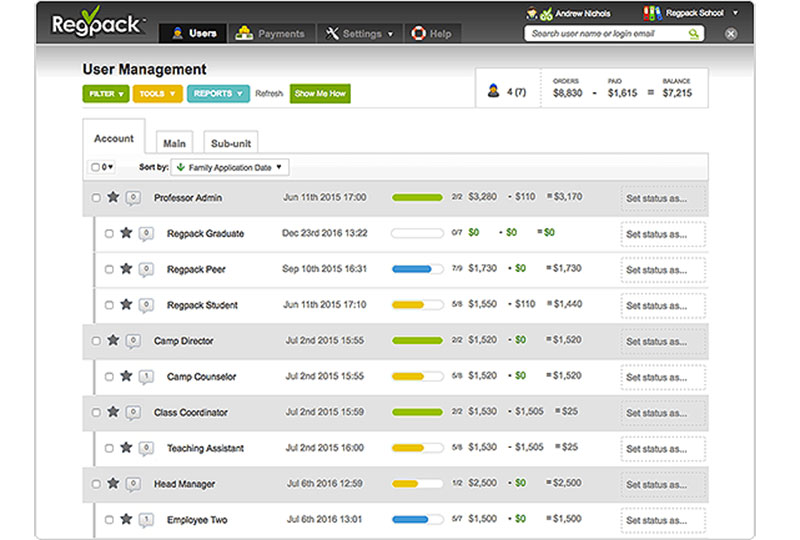
Regpack is a registration and payment platform for camps, courses and programs, built around conditional-logic forms that adapt per registrant. It fits organizers who need registration and billing to work together, not a simple appointment slot.
Camps, schools and program operators managing multi-step sign-ups with installment billing are the target. The conditional-logic forms route each participant to the correct pricing tier or document step automatically, based on their own answers.
- Multi-step registration workflows with conditional logic
- One-time fees, deposits, and installment billing
- Dynamic reporting and analytics
- Automatic email communication triggers
- Project duplication for repeat programs and seasons
Pricing is custom quote, with no published self-serve tiers.
Capterra reviewers report streamlined project setup and duplication for recurring programs, with strongly positive feedback on the registration process itself. The same reviewer base reports recurring technical glitches and limited payment-method flexibility.
Regpack holds a 4.4/5 rating on Capterra built primarily on camp, course and program registration use cases, and reports serving several thousand organizations.
It earns its spot where scheduling and multi-step, multi-payment registration overlap, such as camps and course cohorts. For simple one-off appointment booking, a lighter tool does the job faster.
What Is Event Planning Software?
The difference from a plain shared calendar is automation, and the difference from a stitched-together spreadsheet is that everything (availability, registration, staffing, payments) lives in one place instead of five.
At the narrow end, that means deciding which slots are bookable and removing them the moment someone claims one. At the wider end, on platforms like Cvent or Regpack, it means running registration forms, payment plans and onsite check-in for an event with hundreds of attendees.
It still is not full event production. Venue contracts, catering and physical setup mostly sit outside its job, even though a few platforms bundle limited versions of those functions in.
What typically falls inside the category:
- Booking pages and calendar sync for one-off or recurring sessions
- Registration forms, ticketing, and payment or deposit collection
- Staff and team scheduling across multiple locations
- Attendee management, check-in, and post-event reporting
- Group polling for multi-stakeholder date coordination
- Automated confirmation and reminder notifications
How Does Event Planning Software Work?
Most planning platforms build outward from one core piece: a booking engine. At a basic level, how a booking system works comes down to availability rules, a booking page, a confirmation trigger and a synced calendar entry.
The host sets available hours once. The system checks that window against every connected calendar in real time.
The Booking Sequence Step by Step
- Host connects a calendar and sets availability
- Invitee opens the booking page and sees only genuinely open slots
- Invitee selects a time and submits any required details
- System confirms the slot, blocks it everywhere, and fires a notification
Skip step two's real-time check and the whole sequence breaks, since a stale availability list is what causes double bookings in the first place.
Confirmation and Reminder Triggers
Most tools fire an instant confirmation, then a reminder a day out. Some add a final nudge an hour or two before.
The reminder step is not cosmetic. A randomized controlled trial at an urban pediatric resident clinic found no-show rates of 23.5% when a text reminder was added to a standard voice reminder, versus 38.1% with voice alone, a 14.6 percentage-point difference (Lin et al., International Journal of Pediatrics, 2016). It is a small trial, 170 patients, but the direction matches larger systematic reviews.
Email-only reminders still work. They just get missed more easily than SMS, especially for same-day sessions.
How Does Event Planning Software Handle Calendar Sync and Time Zones?
Two-Way Sync and Conflict Prevention
With two-way sync, changes flow in both directions. A manually added meeting blocks the booking page, and a new booking appears on the connected calendar without refreshing anything.
One-way sync only pushes confirmed bookings out, so anything added directly to the calendar never reaches the booking page.
- Two-way sync is real-time and prevents conflicts automatically
- One-way sync is cheaper to build, but leaves a blind spot
Check how many calendars a plan actually connects, not just whether sync exists. Calendly's free plan allows one; Trafft caps multiple-calendar sync at six accounts and reserves it for its upper tiers.
Time Zone Detection and Display
Automatic time zone detection reads the invitee's browser location and displays every slot in their local time, not the host's.
This matters more than most teams assume. Nearly 60% of remote workers said their company operates across two to five time zones, and another 19% across six to ten (Buffer, State of Remote Work, 2021). That survey is now several years old and Buffer has since changed the questions it asks, but no more recent industry-wide figure has replaced it.
Without detection, a "3 PM" slot becomes a guessing game the moment attendees span more than one region.
How Do Availability Rules Work in Event Planning Software?
Availability rules define which slots a host is willing to offer, on top of raw free time.
Buffer time inserts a gap before or after a booking so back-to-back sessions don't run into each other. Working hours set the baseline window, say 9 AM to 5 PM, outside of which nothing is bookable at all.
Blackout dates block specific days entirely, overriding working hours for that date. Capacity limits put a hard cap on attendees in a single slot, which is a workshop and class feature more than a one-on-one one.
Acuity Scheduling's buffer time setting is a common reference point here, letting a host add minutes before or after any session type without touching the underlying calendar.
How Does Event Planning Software Support Group and Team Scheduling?
Two different problems hide under the same label: distributing bookings across a team, and getting several people to agree on one date.
- Round robin sends each new booking to the next available team member, useful for sales or support queues
- Collective availability only shows a slot when every required host is free, useful for panel interviews or joint sessions
Speed matters more than most teams realize once a booking request turns into a sales lead.
The Lead Response Management study run by Dr James Oldroyd at MIT Sloan with InsideSales.com, covering more than 15,000 leads across six companies, found that contacting a web lead within 5 minutes rather than 30 raised the odds of qualifying it by roughly 21 times, and the odds of making contact at all by around 100 times.
Worth getting the attribution right on that one. The 21x figure is routinely credited to Harvard Business Review, but it comes from that 2007 MIT study. HBR's own 2011 audit (Oldroyd, McElheran and Elkington, "The Short Life of Online Sales Leads") is a separate piece of research covering 2,241 US firms, and it found an average first response time of 42 hours, with firms responding within an hour roughly seven times more likely to qualify a lead than those waiting an hour longer. Both are now more than a decade old.
Calendly's round robin event type applies this logic directly to booking requests, routing them to whichever rep is free right now instead of a single fixed host.
What Integrations Does Event Planning Software Need?
| Integration | Purpose | Example connection | What breaks without it |
|---|---|---|---|
| Video conferencing | Auto-generate a meeting link at booking | Zoom, Google Meet | Manual link-sharing by email |
| Calendar | Two-way availability sync | Google Calendar, Outlook | Double bookings |
| CRM | Route bookings into a pipeline | Salesforce, HubSpot | Leads booked but untracked |
| Payment processor | Collect deposits or fees at booking | Stripe, PayPal | No-shows go unfiltered |
Video Conferencing and CRM Connections
A booking without an auto-generated video link creates an extra manual step for every single meeting, which adds up fast across a busy calendar.
CRM sync solves a quieter problem. Without it, a booked call has no record in the pipeline it's supposed to feed. Teams that also manage delivery work in Jira may connect planning data with Jira time tracking so meetings, client work, and logged project time are easier to reconcile across systems.
Payment Processing at Booking
Collecting even a small deposit at booking changes the psychology of the appointment.
A quality improvement project at Ng Teng Fong General Hospital in Singapore found that requiring a deposit for sleep study appointments cut the monthly no-show rate by 51%, from 9.1% to 4.3%, and lifted sleep lab utilisation from 80.6% to 89.2% (CHI Learning & Development System, 2018). Deposits were forfeited on a no-show or on a cancellation made less than five working days out.
That pattern holds outside healthcare too. Any event where a no-show has a real cost benefits from payment friction at the point of booking.
Check that your chosen tool actually supports it. Doodle collects no payments at all, and several tools here gate deposits behind an upper tier.
How Much Does Event Planning Software Cost?
Pricing in this category does not run on one model.
- Free tiers commonly cap volume rather than features, such as 50 bookings per month on SimplyBook.me, 100 on Trafft, or 200 on Setmore
- Per-seat pricing for team plans runs roughly $5 to $20 per user per month across Setmore, Calendly and their peers, before AI add-ons
- Enterprise, quote-based pricing for conference-scale platforms is not published at all, and starts well into five figures per year
The gap between the second and third of those is the real decision point, since it separates team scheduling tools from full conference platforms.
Anyone evaluating free online booking systems should check the volume cap first, since that limit, not the missing features, is usually what forces an upgrade. Check the user cap second, since several free plans allow only one.
Event Planning Software vs Appointment Scheduling Software: What’s the Difference?
| Attribute | Event planning software | Appointment scheduling software |
|---|---|---|
| Structure | Variable capacity, often one fixed date | One host, one invitee, repeating |
| Typical user | Conference or workshop organizer | Consultant, clinician, service provider |
| Core metric | Attendee count, session capacity | Booking rate, no-show rate |
| Example tool | Whova, Cvent | Calendly, Setmore |
The two categories overlap on calendar sync, reminders and buffer rules, but diverge on what they optimize for.
A conference organizer using Whova cares about session capacity and attendee engagement, while a consultant using Calendly cares about filling repeating one-on-one slots without gaps.
What Should You Look For Before Choosing Event Planning Software?
Before any feature comparison, decide whether you want one centralized tool or a stitched stack.
Centralizing gets you a single login and a single source of truth for availability, one vendor to troubleshoot when sync breaks, and consistent branding across every booking page.
For hosted planning products, that model is also part of Cloud computing, since the vendor runs the underlying infrastructure and delivers the software over the internet rather than requiring a local installation.
It also means you inherit whatever integrations that one vendor supports, and switching later means migrating booking history and links.
Smaller teams evaluating booking systems for small businesses tend to lean centralized, since a stitched stack of separate polling, payment and calendar tools adds setup time most small teams don't have.
How Do You Set Up Event Planning Software?
Setup order matters more than most guides admit, since skipping the sync check is the single most common cause of early double bookings.
- Connect and verify calendar sync before anything else
- Set working hours, buffer time, and any blackout dates
- Configure confirmation and reminder notifications
- Connect payment processing if the event requires it
- Book a test slot as an invitee to confirm the flow end to end
That last step gets skipped constantly, and it's the only one that catches a broken time zone display or a missing confirmation email before a real invitee does.
Before step one, confirm your plan includes calendar sync at all. Several free tiers, Trafft's among them, exclude it entirely, which makes the rest of the sequence impossible.
For a first-time setup, following the standard order for setting up an online booking system avoids most of the early misconfigurations covered in the next section.
What Goes Wrong When Implementing Event Planning Software?
One-way sync is the most common failure, and it's often invisible until a double booking already happened.
Feed-based calendar subscriptions (the kind built on the iCalendar/ICS standard) typically refresh on a delay rather than instantly, which leaves a real window for conflicts on high-traffic calendars.
- Time zone misconfiguration, usually from a host manually overriding auto-detection
- Free-tier volume limits hit mid-event with no warning until bookings stop
- SMS credit pools running dry mid-month, silently ending reminders on plans like Calendly's 250-per-seat allowance
- Reminder emails landing in spam, producing silent no-shows with no error to debug
- Payment integration left disconnected after a plan upgrade, so deposits silently stop collecting
Most of these are configuration failures, not product failures, which is why the test-booking step in setup exists.
When Does Event Planning Software Not Make Sense?
A single one-off event with a handful of invitees rarely needs a dedicated tool.
A shared calendar invite is faster to send than configuring availability rules, notifications and a booking page for an event that will never repeat.
- Events that need venue contracts, catering, or complex logistics belong on a full event production team, not a planning tool alone
- Purely internal meetings inside one organization are usually served fine by native calendar tools already in place
- High-compliance environments may need a vetted, quote-based enterprise platform before any planning convenience matters
- Very low booking volume rarely justifies even a free plan's setup time over a plain calendar link
The failure mode to watch for isn't the tool underperforming. It's using a conference-scale platform for a problem a shared calendar already solved.
FAQ on Event Planning Software
Does Event Planning Software Work for Virtual and Hybrid Events?
Yes. Most platforms generate a video conferencing link automatically once a virtual slot is booked, and hybrid formats add an in-person location field alongside that link.
The scheduling layer stays the same; only location and capacity limits change.
What Happens If Two People Try to Book the Same Slot at Once?
The system checks availability at the moment of submission, not when the page loads, so whoever books first claims the slot.
The other visitor sees it vanish or gets an instant conflict notice, never a confirmed double booking.
Is Event Planning Software Secure or GDPR and HIPAA Compliant?
Compliance depends on the vendor and plan tier, not the category itself.
Some tools offer HIPAA-compliant configurations as a paid add-on, SimplyBook.me from its Standard tier being the clearest example, while GDPR compliance usually requires checking data residency and a signed data processing agreement first.
Do You Need Technical Skills to Set Up Event Planning Software?
No coding is required for a standard setup.
Connecting a calendar, setting availability rules and publishing a booking page usually takes under an hour through a guided interface, though embedding a widget on an existing site can require basic HTML familiarity.
Are AI Features Worth Paying Extra For?
They are now a separate line item rather than a bundled upgrade. Calendly's Standard Plus and Teams Plus tiers, added in August 2026, cost $8 per seat per month on top of the base plan and add meeting notes and an email-based scheduling assistant, without changing any scheduling feature. If your bottleneck is booking coordination rather than meeting recall, the base tier does the job.
When Should You Upgrade Event Planning Software?
Upgrade once the free-tier volume cap, the single-calendar sync limit, or missing round robin routing starts blocking real bookings. Not when a new feature merely looks appealing.
Fix these in order, since later steps depend on the earlier ones holding.
- Calendar sync first, since a stale slot corrupts every later booking
- Availability rules second, once sync can be trusted
- Team routing last, since it only helps once availability is reliable
A team distributed across regions while relying on round robin routing compounds both risks at once, since a slot open in one place can already be stale before a distant teammate replies. Closing that gap with tighter routing rules adds a configuration step most solo hosts never need.
That configuration work belongs to the larger discipline of automating the workflow around every booking, not to the planning tool alone.