Most teams don't choose scheduling software so much as fall into it, and then quietly pay for that choice every week. The Zoho Bookings versus Calendly question catches out more of them than you'd think, because the two tools genuinely solve different problems.
On the basics they match up. Calendar sync, automated reminders, online booking, both have the table stakes covered. The split is in what each one was actually engineered to do.
Calendly owns meeting scheduling for sales and recruiting. Zoho Bookings goes a different way, digging into service catalogs, paid appointments, and a tight wire into the rest of the Zoho world.
Below I work through pricing, the core features, integrations, how each handles a team, the day-to-day experience, and what the review data actually says, so you can line the right tool up against how your business really runs.
What Is Zoho Bookings?
Zoho Bookings is a cloud scheduling platform that lives inside the wider Zoho ecosystem. It does service-based booking, paid appointments, team scheduling, the lot. But it's not a standalone product the way Calendly is, and that's the thing to keep in mind throughout.
It comes bundled in Zoho One, and you can also grab it on its own subscription, starting with a free plan that covers a single staff member and basic calendar sync.
Core Purpose and Target User
The people it's really built for are service businesses that need to sell and manage paid appointments at volume. Here's what that looks like in practice:
- Two-way sync with Google Calendar, Outlook, and Zoho Calendar
- Service catalogs where each offering carries its own price, duration, and description
- Native lines into Zoho CRM, Zoho Invoice, and Zoho Meeting
- Group bookings, collective sessions, and round-robin assignment all handled
Worth a mention: the South Indian Restaurant Group reported sales jumping 200% after they switched over to Zoho Bookings, going by Zoho's own published testimonials. Take vendor testimonials with the usual grain of salt, but a number like that is still telling.
Where It Fits in the Zoho Ecosystem
Zoho Bookings is one of 55-plus apps packed into Zoho One. That tight stitching is the whole pitch, and also the whole catch.
Already on Zoho CRM or Zoho Invoice? Then booking ties straight into your client records and your billing without you wiring anything up. Living outside the Zoho stack entirely? A lot of those perks just evaporate, and you're left with a decent scheduler that happens to want you to buy into everything else.
For the bigger picture, this market was worth $332.8 million in 2024 and is projected to hit $891 million by 2032, growing 13.1% a year (Verified Market Research, 2024).
What Is Calendly?
Calendly is the standalone one, built around a single move: share a link, the other person picks a time, that's it. No email ping-pong, no coordinating who's free when.
It launched in 2013 and now sits on roughly 57.6% of the appointment scheduling market (Enlyft, 2024). When you're weighing the two, that kind of dominance is hard to wave away.
Core Purpose and Target User
Where Calendly really shines is high meeting volume. Think sales teams and recruiters living in their calendars, consultants, SaaS companies booking demo after demo. If your day is mostly meetings with people outside your company, this is the tool aimed at you.
| User Type | Primary Use | Key Feature Used |
|---|---|---|
| Sales teams | Booking demos, discovery calls | Routing forms, CRM sync |
| Recruiters | Interview scheduling | Round-robin, collective events |
| Consultants | Client intake calls | Booking page, intake forms |
| SaaS companies | Product demos, onboarding | HubSpot and Salesforce sync |
Calendly integrates with 100+ tools including Salesforce, HubSpot, Zoom, Slack, Stripe, and PayPal. Using Calendly increased initial screening calls by 100% for recruiting teams in 2024, according to Calendly's own platform data.
Calendly's Position in the Market
87% of Calendly's user base comes from small businesses under 50 employees (Enlyft, 2024). The tool scales from individual free users to enterprise organizations paying $15,000+ per year.
That range tells you something important: Calendly is designed to grow with a team, not just serve a single function.
How Do Zoho Bookings and Calendly Compare on Core Features?
Both nail the fundamentals. Calendar sync, booking pages, automated reminders, availability rules, none of that is where they part ways. What separates them is how far each one pushes on the use cases it cares about.
For a sense of scale, Calendly carries a 9.3% mindshare in the scheduling category against Zoho Bookings at 3.4%, going by PeerSpot user-engagement data from June 2026.
Booking Page and Service Menu Differences
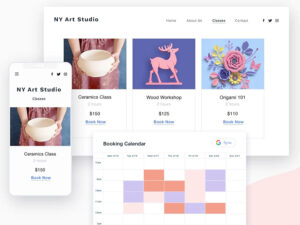
Zoho Bookings bakes a service menu right into the booking page. Every service has its own name, description, price, and length. The client picks what they want first, then lands on the time slots. For a business selling distinct paid services, that flow just makes sense.
Calendly runs on a different assumption. Its page is about picking a time, full stop. You get availability and event types, but there's no native service catalog with pricing attached. Sure, you can bolt on custom fields to collect intake details, but the pricing and the service descriptions live somewhere outside the actual booking flow.
If your clients need to choose between several paid services before they book, that's not a minor inconvenience. It's a real hole.
Calendar Sync and Availability Management
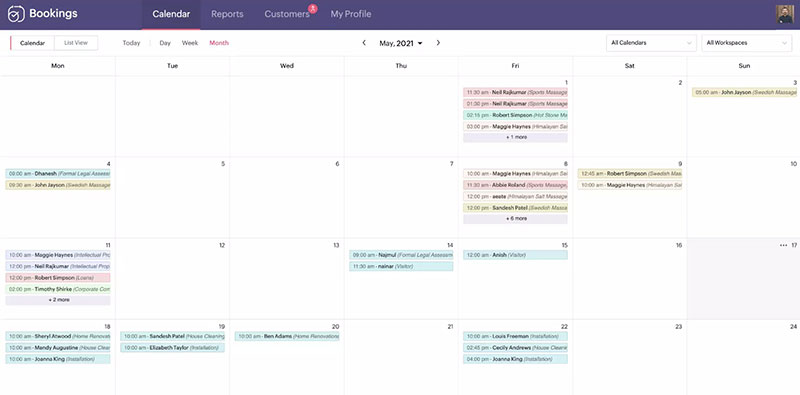
Both cap out at 6 calendars per user (per Zoho's own 2024 comparison). Beyond that count, here's how they line up:
- Zoho Bookings syncs with Zoho Calendar, Google Calendar, and Outlook
- Calendly reaches further out of the box: Google Calendar, Outlook, Office 365, iCloud, and more
- Buffer times and daily booking caps are on both
- And both stop you double-booking across whatever calendars you've connected
So Calendly wins on raw connection breadth from day one. Zoho's edge is the other direction, the sheer depth of how it syncs with its own calendar and CRM. Different kinds of "more," really.
Round-Robin and Team Scheduling
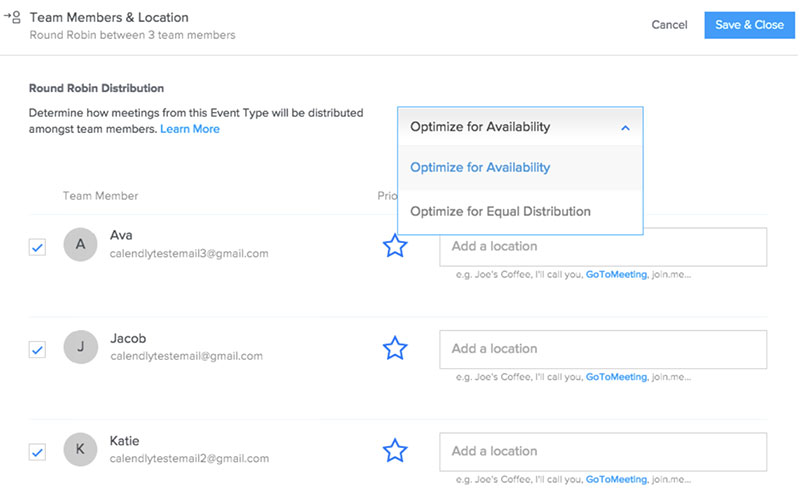
Round-robin just rotates incoming bookings through your available staff so the load spreads out. Both tools do it. Where they diverge is cost and how much fuss it takes.
Zoho hands you round-robin all the way down at its Basic tier. Calendly makes you climb to the Teams plan for it, which runs $16 per seat per month on annual billing. That's a meaningful difference if rotation is something you need from the start, not a nice-to-have later.
Collective booking, the kind where a client books one session with several hosts at once, is in both as well. Zoho uses it for panel interviews and group onboarding. Calendly does the same job through its collective event types, though again you'll need a paid plan to get there.
How Do Zoho Bookings and Calendly Compare on Pricing?
Both tools offer free plans. The cost difference becomes clear once you add staff members or unlock advanced features. Zoho Bookings charges per staff member. Calendly charges per seat.
| Plan | Zoho Bookings | Calendly |
|---|---|---|
| Free | 1 staff, 1 service | 1 event type, 1 calendar |
| Entry paid | $8/staff/month (Basic) | $10/seat/month (Standard, annual) |
| Mid tier | $12/staff/month (Premium) | $16/seat/month (Teams, annual) |
| Enterprise | FLEX (custom pricing) | From $15,000/year |
Where Zoho Bookings Wins on Cost
Zoho offers a 25% discount on annual billing, which adds up fast for teams. A 5-person team on the Premium plan saves over $1,440 per year by switching from monthly to annual payments (Zeeg, 2025).
Zoho One subscribers get Bookings included in the bundle, which makes the standalone cost essentially zero if you already pay for the broader Zoho suite.
Where Calendly's Pricing Gets Complicated
Routing forms, which qualify and route leads before they book, are only available on the Teams plan at $16 per seat per month. That can be a significant jump for small teams that need just this one feature.
Salesforce integration also requires the Teams plan. If your sales workflow depends on Salesforce sync, you are locked into the higher tier from day one.
Calendly's Enterprise plan starts at $15,000 per year flat, covering organizations with 30+ users.
Which Tool Has Better Integration Support?
Integration depth is where the gap between these two tools is most obvious. Calendly connects to more third-party tools. Zoho Bookings connects more deeply to its own stack.
Calendly's Integration Network
Calendly launched a native Google Workspace integration in January 2024, enabling scheduling directly from Gmail and Google Calendar for over 3 billion active Google users (Calendly Press Release, 2024).
- Native CRM sync: Salesforce, HubSpot (bi-directional)
- Marketing tools: Marketo, Pardot
- Video conferencing: Zoom, Google Meet, Microsoft Teams, Webex
- Payments: Stripe (on Standard and above)
- Automation: Zapier, webhooks, native API
Smith.ai saw 34% of marketing qualified leads convert to appointments directly from their website after implementing Calendly Routing with their existing marketing stack (Calendly, 2023).
Zoho Bookings' Integration Strengths
Native Zoho connections are where Bookings has no equal in this comparison:
- Zoho CRM: client records sync automatically with bookings
- Zoho Invoice: paid appointments generate invoices without manual entry
- Zoho Meeting: video links are created and sent on confirmation
- Zoho Campaigns: appointment data feeds directly into email campaigns
Outside the Zoho ecosystem, Bookings connects via Zapier (2,000+ apps) and Zoho Flow. The API is documented but less mature than Calendly's, and third-party developer adoption is lower.
Payment processing is available through both Stripe and PayPal on Zoho Bookings' Premium plan, giving it one payment option more than Calendly's Standard tier.
How Do Zoho Bookings and Calendly Handle Team Scheduling?
Team scheduling covers round-robin assignment, collective booking, admin controls, and how each platform handles shared availability. Both tools support these functions, but at different price points and with different feature depth.
Round-Robin Assignment
Round-robin distributes incoming bookings across available staff to balance workload. Zoho Bookings includes round-robin on its Basic plan at $8 per staff per month. Calendly requires the Teams plan at $16 per seat per month for the same feature.
For a 10-person team that only needs round-robin and nothing else from the Teams tier, Zoho Bookings costs 50% less to achieve the same outcome.
Collective and Group Booking
Collective booking lets a client schedule a session with multiple hosts at once. Both tools handle this, but Zoho goes further.
| Feature | Zoho Bookings | Calendly |
|---|---|---|
| Collective booking (multi-host) | Yes, via group panel | Yes, collective event types |
| Group class booking | Yes (series and drop-in) | No native equivalent |
| Seat limits per session | Configurable, no cap | Limited in free/standard tiers |
| Recurring group appointments | Up to 1,000 sessions or 2 years | Available on paid plans |
Admin Controls and Permissions
Calendly's Teams plan includes admin features for managing team events, user permissions, and standardizing meeting types across the organization. This is useful for larger sales teams where consistency in booking page design matters.
Zoho Bookings gives admins control over staff availability rules, appointment capacity, and booking form fields at the workspace level. The depth of control is comparable, but the interface takes longer to learn. Several G2 reviewers noted that initial setup is tricky but manageable within a few hours (G2, 2024).
Which Tool Is Better for Service-Based Businesses?
Zoho Bookings wins this use case. It is the only tool in this comparison with a native service catalog, paid appointment collection, and group class booking all in one booking flow.
Calendly is built for meetings. Zoho Bookings is built for services. That is not a minor distinction.
Service Catalog with Pricing
Zoho Bookings lets you build a catalog where each service has a name, description, price, duration, and assigned staff. Clients see the menu, choose a service, and book with payment in the same flow.
Calendly has no equivalent. You can create multiple event types, but pricing and service descriptions are not part of the native booking page. Payment collection through Stripe is available on Standard and above, but it sits outside a catalog structure.
TurningWest, a coaching business, moved its client sessions to Zoho Bookings and now books 20 to 40 sessions consistently, according to Zoho's published case studies.
Group and Class Booking
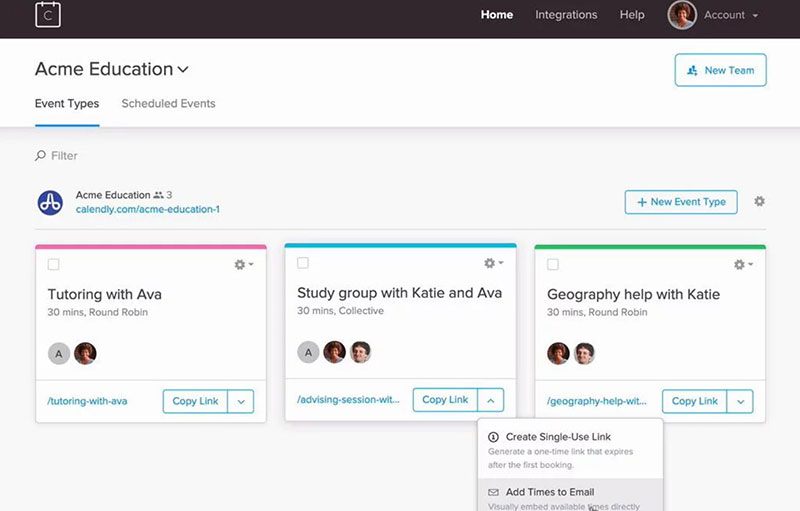
Zoho Bookings supports 2 types of group bookings. Series bookings let clients enroll in recurring classes across multiple sessions with a single reservation. Drop-in bookings let clients book individual sessions from a recurring schedule.
Both types support configurable seat limits and automated reminders to enrolled attendees. You can run up to 1,000 recurring sessions or a 2-year schedule from a single setup.
Calendly does not offer a native equivalent to either of these structures. A fitness studio, a language school, or a consulting firm running group workshops would hit this limitation almost immediately with Calendly.
Payment Collection at Booking
On its Premium tier, Zoho Bookings takes payment right at the booking through Stripe or PayPal, pins it to the client record, and can spin up a Zoho Invoice on its own. The whole money trail handles itself.
Calendly's version is thinner. From the Standard plan up it'll collect payment, but Stripe only, and there's no invoice generation built in. Want it tied to an invoicing tool? You're adding a third-party integration to get there.
So if you bill clients the moment they book and you need a clean paper trail behind it, Zoho does the whole thing start to finish. With Calendly you're bolting on at least one more tool to land in the same place, which is one more subscription and one more thing that can break.
Which Tool Is Better for Sales and Revenue Teams?
This one isn't close. Calendly takes it. Sales teams running HubSpot, Salesforce, or Marketo reach for it specifically because of the routing forms, the two-way CRM sync, and the lead-qualification layer sitting on top. Zoho Bookings has nothing that really matches that.
And the reason any of this matters comes down to one ugly stat: reps spend just 28% of their time actually selling (HubSpot, 2024). The rest gets eaten by admin, a big chunk of it manual scheduling and updating the CRM by hand. Anything that hands those minutes back is going straight to the bottom line, which is exactly the pitch Calendly is making to revenue teams.
Routing Forms and Lead Qualification
Calendly's routing forms sit between a website visitor and a booking page. Before anyone books, they answer qualifying questions about company size, budget, or use case. Based on their answers, Calendly assigns them to the right rep or redirects them to a self-serve path.
Smith.ai saw 34% of marketing qualified leads convert to booked appointments directly from their website after implementing Calendly Routing, along with a 20% increase in show rates for initial consultations (Calendly, 2023).
Zoho Bookings has intake forms and custom fields on the booking page, but no native routing logic that assigns leads to reps based on their responses.
CRM Sync for Sales Workflows
Calendly (Teams plan):
- Salesforce: bi-directional sync, account owner matching, meeting activity logged automatically
- HubSpot: contact creation, deal updates, workflow triggers on booking
- Marketo and Pardot: form imports, routing logic from existing marketing flows
Sales teams using integrated scheduling tools saw a 26% faster deal cycle compared to teams relying on manual coordination, according to a Forrester study cited in BizData360's 2024 integration report.
Meeting Analytics for Revenue Teams
Calendly tracks no-show rates, cancellations, reschedules, and booking volume per event type. Sales managers use this to identify which reps have the highest drop-off before meetings close.
Zoho Bookings generates reports on both appointments and revenue, which is useful for service billing, but lacks the pipeline-stage reporting that sales teams need to connect scheduling activity to closed deals.
How Do Zoho Bookings and Calendly Compare on User Experience?
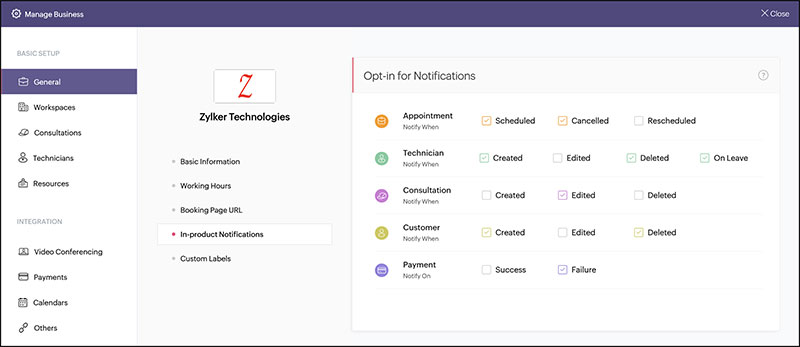
Calendly is faster to set up. Zoho Bookings offers deeper customization but takes longer to configure. Neither is complicated once you know what you need.
Calendly holds a 4.7/5 rating on Capterra from over 4,000 verified reviews and is used by 86% of Fortune 500 companies (Contrary Research, 2024). Zoho Bookings holds a 4.4/5 on Capterra from 47 reviews.
Onboarding and Initial Setup
Calendly's clean interface lets new users create a first booking page within minutes. No formal training is needed for individual contributors or client-facing staff (Capterra, 2024).
Zoho Bookings has more configuration steps. Users on G2 note it feels tricky at first but becomes manageable within a few hours of use. The setup rewards patience with more control over branding, email templates, and workspace structure.
Booking Page Design and Customization
Zoho Bookings advantages:
- Custom domain mapping for booking pages (keeps clients on your website URL)
- HTML email template imports for fully branded confirmation and reminder emails
- Custom sender address for outgoing notifications
- Brand color palette applied across booking page elements
Calendly allows logo uploads, color customization, and page personalization on paid plans, but it does not support custom domain mapping or full HTML email template imports at the Standard tier.
Mobile App and Admin Dashboard
Both platforms have iOS and Android apps, but with meaningful gaps.
Multiple Zoho Bookings users on Capterra noted the mobile app lacks functionality available on the desktop version, particularly around managing group bookings and viewing staff reports. Calendly's mobile app receives similar feedback, with some reviewers noting wish for better mobile UI for complex schedule management (GetApp, 2024).
The admin dashboards differ in focus. Calendly's centers on meeting volume, routing performance, and team scheduling trends. Zoho's focuses on appointment counts, revenue totals, and staff utilization across workspaces.
What Do Users Say About Zoho Bookings vs Calendly?
Review data is lopsided in volume. Calendly has 3,441 reviews on Software Advice and 4,107 on GetApp. Zoho Bookings has 47 on Capterra and 21 on G2. The sample sizes alone tell you something about adoption rates.
| Platform | G2 Rating | Capterra Rating | Review Volume (G2) |
|---|---|---|---|
| Calendly | 4.7 / 5 | 4.7 / 5 | 2,558+ |
| Zoho Bookings | 3.9 / 5 | 4.4 / 5 | 21 |
What Calendly Users Praise and Complain About
Top praise (G2 and Capterra, 2024): ease of setup, Google Calendar integration, time saved on back-and-forth scheduling, clean client-facing booking experience.
Top complaints: essential features locked behind paid tiers, pricing jumps between plans, limited customization on the free version, occasional calendar syncing issues with non-Google providers.
84% of G2 reviewers give Calendly five stars (Prospeo, 2024). That number is hard to argue with on pure user satisfaction.
What Zoho Bookings Users Praise and Complain About
Praise centers on value for money, especially for Zoho One subscribers who get the tool at no additional cost. Users in the e-learning, coaching, and service industries highlight the ease of creating booking pages with custom branding and automated reminders.
Complaints are more varied. A Capterra reviewer (April 2024) described the tool as one that "rarely works" and noted hours spent troubleshooting before support resolved the issue. Others flag the limited iOS app, occasional missing Zoho Meeting links in booking confirmations, and the absence of a meeting-approval step before events land on staff calendars.
Integration with non-Zoho platforms is the most consistent complaint across G2, Capterra, and Software Advice reviews.
When Should You Choose Zoho Bookings Over Calendly?
Choose Zoho Bookings when your scheduling needs go beyond meeting booking and into service delivery, payment collection, or group class management. The tool is built for this. Calendly is not.
You Are Already in the Zoho Ecosystem
This is the clearest reason. If your business runs on Zoho CRM, Zoho Invoice, or Zoho One, Bookings connects to your existing client records, invoicing workflows, and meeting tools without a single third-party bridge.
Zoho One includes Bookings in the bundle. A 5-person team on Zoho One pays nothing extra for scheduling automation that would cost $480 to $960 per year on Calendly's paid tiers.
Your Business Sells Services by the Appointment
Right fit signals:
- You offer multiple service types at different price points (consultations, workshops, classes)
- You collect payment at the time of booking, not after
- Clients need to select a specific service before choosing a time slot
- You run recurring group sessions (fitness classes, language courses, training programs)
None of these scenarios work natively in Calendly. All of them work out of the box in Zoho Bookings Premium.
Budget Is a Constraint for a Growing Team
Zoho Bookings' Basic plan at $8 per staff per month includes round-robin scheduling, two calendar connections per user, and Zapier integration.
Calendly charges $16 per seat per month (annual billing) for the same round-robin feature. For a 10-person team, that is a $960 annual difference for functionally the same capability.
When Should You Choose Calendly Over Zoho Bookings?
Choose Calendly when your primary goal is converting inbound interest into booked meetings, especially in a sales, recruiting, or consulting workflow where speed to booking directly affects revenue.
82% of buyers with sales questions want a response within 10 minutes. The average business takes 42 hours (HubSpot, 2024). Routing forms close that gap by letting qualified leads book without waiting for a human to respond.
Your Stack Is Built Around Salesforce or HubSpot
Calendly's bi-directional sync with Salesforce and HubSpot is mature, widely used, and documented. Contact records update automatically when a meeting is booked. Account owner matching routes known leads to their assigned rep without manual reassignment.
Zoho Bookings connects to Salesforce only via Zapier. That works, but it adds a dependency and limits the depth of the sync compared to Calendly's native CRM integration.
You Need Fast Setup Across a Non-Technical Team
Calendly's onboarding is the fastest in this comparison. No service catalog to configure, no workspace structure to build.
A new team member can go from signup to sharing a working booking link in under 10 minutes. That matters when you are onboarding a 20-person sales team and cannot afford a week of configuration overhead.
Polished Client Booking Experience Is the Priority
Calendly's booking page design is clean and familiar. Because it holds over 57% market share in scheduling tools (Enlyft, 2024), many clients have already used it before. There is no friction in the booking flow.
Well, almost none. The pricing table becomes a problem if the features your team needs sit one tier above what you want to pay.
Quick decision rule: if your main bottleneck is meetings, choose Calendly. If your main bottleneck is service bookings or payments, choose Zoho Bookings. Both tools do the basics well, and both have real gaps outside their core use case. Picking the wrong one usually means paying for a third tool to fill the gap.
Looking for alternatives to both? There are several Calendly alternatives worth comparing, and broader appointment scheduling software options that cover use cases neither platform handles well, from multi-location businesses to medical scheduling and booking systems built specifically for small businesses.
FAQ on Zoho Bookings vs Calendly
Is Zoho Bookings better than Calendly?
It depends on your use case. Zoho Bookings is better for service-based businesses that need paid appointments, service catalogs, and group bookings. Calendly is better for sales teams, recruiters, and consultants focused on high-volume meeting scheduling.
Does Zoho Bookings have a free plan?
Yes. The free plan covers 1 staff member and 1 service, with basic calendar sync and automated confirmation emails. Calendly also offers a free tier, limited to 1 event type and 1 calendar connection. Both free plans suit individual users only.
Can Zoho Bookings integrate with Salesforce?
Not natively. Zoho Bookings connects to Salesforce via Zapier or Zoho Flow. Calendly has a native Salesforce integration on its Teams plan, with bi-directional sync and automatic account owner matching built in.
Which tool is cheaper for a 10-person team?
Zoho Bookings. Its Basic plan costs $8 per staff per month, including round-robin scheduling. Calendly's Teams plan, needed for the same feature, costs $16 per seat per month (annual billing), a $960 annual difference for a 10-person team.
Does Calendly support service menus with pricing?
No. Calendly does not offer a native service catalog with pricing and descriptions. It handles event types and time slots, not service-based booking flows. Zoho Bookings includes full service menus with price, duration, and staff assignment.
Which scheduling tool has better CRM integration?
Calendly. It offers native bi-directional sync with Salesforce, HubSpot, Marketo, and Pardot on paid plans. Zoho Bookings integrates deeply with Zoho CRM but relies on Zapier for most other CRM connections, which limits sync depth.
Can Zoho Bookings collect payments at booking?
Yes. Zoho Bookings Premium supports payment collection via Stripe and PayPal at the time of booking. It also generates Zoho Invoice records automatically. Calendly collects payments through Stripe only, with no native invoicing tool.
What do users say about Zoho Bookings vs Calendly on G2?
Calendly holds a 4.7 out of 5 on G2 from 2,558+ reviews. Zoho Bookings holds 3.9 out of 5 from 21 reviews. Calendly users praise ease of use. Zoho Bookings users highlight value for money and Zoho ecosystem fit.
Does Calendly support group or class bookings?
Not natively. Calendly handles collective events with multiple hosts, but has no group class booking with seat limits or series enrollment. Zoho Bookings supports both series and drop-in group bookings, with configurable seat caps and recurring session schedules.
Which tool is easier to set up?
Calendly. Most users create their first booking page within minutes, with no formal training needed. Zoho Bookings takes longer due to workspace configuration and service setup, but offers more customization once the initial setup is complete.
Conclusion
This conclusion is for an article presenting Zoho Bookings vs Calendly as two tools that serve genuinely different needs, not two versions of the same thing.
Calendly wins on lead routing, CRM sync, and ease of setup. It is the default choice for sales teams running high meeting volume.
Zoho Bookings wins on service catalogs, group class scheduling, and payment collection at booking. If you already use Zoho CRM or Zoho One, it becomes even harder to justify paying Calendly's per-seat pricing.
Neither tool is universally better. The right pick comes down to whether your bottleneck is meeting scheduling or service delivery.
Match the tool to the workflow, not the brand.