





Sometimes, life happens, and appointments need to be rescheduled. Whether it’s due to a conflict, an emergency, or a simple mistake, it’s important to handle rescheduling professionally and politely.
Having a clear and well-written reschedule appointment email can help you communicate effectively with clients or patients, maintaining a positive relationship even when plans change.
In this article, we’ll provide you with various reschedule appointment email samples, templates, and examples to help you professionally reschedule appointments while keeping your clients or patients informed and satisfied.
Free Reschedule & Cancellation Policy Generator
Why the Way You Reschedule an Appointment Matters
Rescheduling an appointment is sometimes unavoidable, but the way you communicate it can make a big difference. If the message is unclear, too late, or too casual, clients may feel frustrated or start to question how organized your business is.
A good reschedule appointment email helps you keep the experience professional. It shows that you respect the client’s time, explains the change clearly, and gives them an easy way to choose a new time.
This can help you reduce cancellations, avoid confusion, and keep clients from missing their next appointment.
Apart from a good rescheduling email, learn how to create a clear appointment cancellation policy that prevents confusion before schedule changes happen.
When Is It Appropriate to Send a Reschedule Appointment Email?
There are times when rescheduling is simply unavoidable, but it should always be communicated as soon as possible. Politely rescheduling appointments helps clients understand the situation and makes the change feel more professional.
When to send an appointment reschedule email?
Reason |
When it applies |
Sudden illness |
You or a team member cannot attend the appointment. |
Family emergency |
An unexpected personal situation affects availability. |
Employee unavailability |
A staff member’s schedule changes unexpectedly. |
Double booking |
Two appointments were scheduled for the same time. |
Technical issue |
A system, tool, or service problem interrupts delivery. |
Business closure |
Weather, maintenance, or another disruption forces closure. |
Urgent personal conflict |
A time-sensitive conflict cannot be moved. |
No matter the reason, the goal is always the same: inform the client quickly, apologize briefly, and offer a simple path to book a new time.
Clear communication during rescheduling also helps businesses reduce no-shows by keeping clients engaged instead of leaving the appointment unresolved.
What Should a Reschedule Appointment Email Include?
The question isn’t only how to reschedule a meeting, but also what that message should include.
It should be clear, polite, and easy for the client to respond to. The goal is not just to inform them about the change, but also to help them move smoothly to a new appointment time without confusion.
To make that happen, every reschedule email should include a few important details:
- A clear subject line so the client immediately understands that the appointment needs to be changed
- The original appointment date and time to avoid any misunderstanding
- A brief reason for rescheduling so the change does not feel abrupt or unexplained
- A short apology to acknowledge the inconvenience
- Alternative time slots or a booking link so the client can quickly choose a new time
- A confirmation request asking them to reply or select the new appointment
- A polite closing that keeps the communication professional and respectful
When these elements are included, the email feels organized, considerate, and much easier for the client to act on. This is exactly what helps reduce back-and-forth messages and makes the rescheduling process simpler for both sides.
Reschedule Appointment Email Samples for Different Situations
Below are different reschedule appointment email samples you can use depending on the situation. You can adjust the tone, reason, and alternative time slots based on your business and client relationship.
Basic reschedule appointment email sample
Subject: Request to Reschedule Your Appointment
Dear [Client's Name],
I hope this message finds you well. Unfortunately, I need to reschedule our appointment originally set for [Original Date and Time] due to [reason for rescheduling]. I sincerely apologize for any inconvenience this may cause.
Please find below a few available time slots for the rescheduled appointment:
- [Option 1]
- [Option 2]
- [Option 3]
Kindly let me know which time works best for you. I appreciate your understanding and flexibility.
Best regards,
[Your Name]
[Your Contact Information]
Professional reschedule appointment template (for emergencies)
Subject: Apology and Rescheduling Request
Dear [Client's Name],
I’m so sorry for the short notice, but due to [emergency or reason], I need to reschedule our appointment scheduled for [Original Date and Time]. I apologize for any inconvenience this may cause.
To make things easier for you, I’ve provided a few alternative times for the rescheduled appointment:
- [Option 1]
- [Option 2]
- [Option 3]
Please let me know if any of these times work for you. I truly appreciate your understanding in this matter.
Thank you,
[Your Name]
[Your Contact Information]
Reschedule email with alternative booking link
Subject: Please Select a New Appointment Time
Dear [Client's Name],
We need to reschedule your appointment originally booked for [Original Date and Time] due to [reason for rescheduling]. We apologize for any inconvenience this may cause.
To make rescheduling faster and easier, please use the booking link below to choose a new time that works best for you:
[Insert Rescheduling Link]
Once you select your preferred slot, your new appointment will be confirmed automatically.
Thank you for your understanding, and we look forward to seeing you soon.
Best regards,
[Your Name]
[Your Business Name]
Simple reschedule appointment email sample
Subject: Need to Reschedule Your Appointment
Dear [Client's Name],
I need to reschedule our appointment on [Original Date and Time]. I apologize for the change, and I appreciate your understanding.
Here are a few alternative times for our meeting:
- [Option 1]
- [Option 2]
- [Option 3]
Please confirm which time is most convenient for you.
Best regards,
[Your Name]
Employee unavailability reschedule email
Subject: Update About Your Upcoming Appointment
Dear [Client's Name],
We need to reschedule your appointment originally set for [Original Date and Time] because the staff member assigned to your appointment is no longer available at that time.
We apologize for the change and want to make it as easy as possible to find a new time that works for you. Please choose one of the available options below:
[Option 1]
[Option 2]
[Option 3]
Please let us know which time works best, and we’ll confirm your new appointment as soon as possible.
Best regards,
[Your Name]
[Your Business Name]
Reschedule doctor appointment email sample
Subject: Rescheduling Your Appointment
Dear [Patient's Name],
We regret to inform you that we need to reschedule your upcoming appointment, originally scheduled for [Original Date and Time]. Unfortunately, due to [reason for rescheduling], we are unable to accommodate this time.
Please select a new time for your appointment from the following options:
- [Option 1]
- [Option 2]
- [Option 3]
If none of these options work, please feel free to contact us so we can find another suitable time.
We apologize for any inconvenience this may cause and appreciate your understanding.
Sincerely,
[Your Name]
[Your Contact Information]
[Your Practice Name]
Reschedule appointment email with a discount offer
Subject: Reschedule Your Appointment with a Special Offer
Dear [Client's Name],
I apologize for needing to reschedule our appointment on [Original Date and Time]. Unfortunately, due to [reason], we need to find a new time.
To show our appreciation for your understanding, we’d like to offer you a [discount percentage] discount on your next appointment. Here are a few times we have available:
- [Option 1]
- [Option 2]
- [Option 3]
Please let me know which time works best, and we’ll make sure to confirm your new appointment promptly.
Thank you again for your understanding and continued support.
Warm regards,
[Your Name]
Sample email for rescheduling appointment with extra service offer
Subject: Apology and New Appointment Times
Dear [Client's Name],
I regret to inform you that I need to reschedule our appointment on [Original Date and Time] due to [reason]. I sincerely apologize for any inconvenience this may cause.
To make up for the change, I’d like to offer you [complimentary service or extra time] during your next appointment. Please find the available times below:
- [Option 1]
- [Option 2]
- [Option 3]
Please confirm the time that works best for you. We truly appreciate your flexibility and look forward to seeing you soon.
Best regards,
[Your Name]
[Your Contact Information]
Business reschedule appointment template
Subject: Update Regarding Your Upcoming Appointment
Dear [Client's Name],
Due to unforeseen circumstances, we must reschedule your appointment originally scheduled for [Original Date and Time]. We apologize for any disruption this may cause.
Please choose one of the following alternative times that works for you:
- [Option 1]
- [Option 2]
- [Option 3]
We will update our records and confirm your new appointment as soon as possible. We value your time and appreciate your understanding.
Kind regards,
[Your Business Name]
[Your Contact Information]
Make Rescheduling a Breeze with Trafft
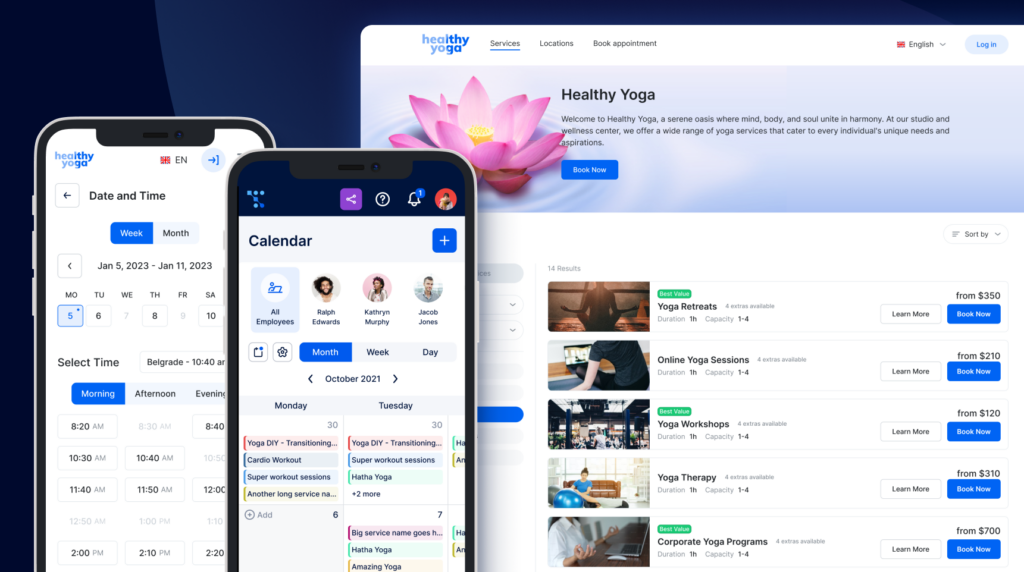
Managing appointments and rescheduling can be a time-consuming process, but with Trafft, you can streamline the entire workflow. Trafft’s powerful booking software allows businesses to easily reschedule appointments, manage client availability, and send automated notifications to keep everyone in the loop.
Whether you're dealing with last-minute changes, scheduling conflicts, or simply need to update an appointment, Trafft’s user-friendly platform makes it simple.
You can offer your clients the ability to reschedule themselves, avoiding endless back-and-forth emails. Plus, with automated reminders and confirmations, you’ll ensure that no appointments are missed, and your clients remain satisfied.
Why Choose Trafft for Rescheduling?
- Automated Notifications: Send immediate updates and confirmations via email or SMS.
- Customizable Availability: Easily adjust your availability to avoid double bookings or conflicts.
- Self-Rescheduling: Allow clients to reschedule at their convenience, without interrupting your workflow.
- Professional Experience: Maintain a polished and efficient booking system that reflects your professionalism.
Ready to take control of your schedule and simplify rescheduling?
Start using Trafft today and experience hassle-free appointment management!
Best Practices for Rescheduling Appointments Without Frustrating Clients
Even when a scheduling change is necessary, the process does not have to create a negative experience. A few small communication habits can make rescheduling feel organized, respectful, and much easier for clients to accept.
Notify clients as early as possible
As soon as you know the appointment needs to be moved, send the reschedule email. Early notice shows respect for the client’s time and gives them a better chance to adjust their own schedule without frustration.
Keep the apology short and sincere
A simple apology is enough. You do not need a long explanation, but you should acknowledge the inconvenience and keep the tone polite and professional.
Offer more than one alternative
Instead of asking the client when they are free, provide a few new appointment options right away. This reduces unnecessary back-and-forth messages and helps confirm the new booking faster.
Include a booking link when possible
If you use online scheduling software, let clients reschedule the appointment themselves through a booking link. This gives them more flexibility and makes the entire process much more convenient.
Confirm the new appointment
Once the client selects a new time, always send a confirmation email so both sides have the updated appointment details in writing. To make sure those scheduling emails reach inboxes properly, it is also smart to perform a periodic SURBL reputation check and verify that your booking links are not being flagged by email security filters.
Send a reminder before the new date
Once the new appointment is confirmed, sending timely appointment reminders helps reduce the risk of missed follow-ups and keeps the client informed before the updated booking.
Show appreciation for their flexibility
If the rescheduling happens on short notice or creates inconvenience, a small gesture such as a discount, extra service, or simple thank-you message can help the client feel valued and maintain goodwill.
For more insights, check out our detailed guide on how to reschedule an appointment with ease!
Conclusion
Having a well-prepared reschedule appointment email sample can save you time and stress while ensuring your clients remain happy and informed.
Whether you’re rescheduling due to a conflict, an emergency, or a simple mistake, maintaining professionalism and clear communication is key.
Use these templates, modify them to suit your needs, and you’ll find rescheduling appointments becomes a smooth and hassle-free process!