Somebody has to write the appointment down, text a reminder the day before, and chase the payment after. Business automation software takes those steps off a person's memory and runs them off rule-based triggers instead, so the same action fires every time a condition is met.
Salons, clinics, coaches, and agencies typically run it next to a calendar and a payment gateway. Trafft is the cloud version of that idea. WPAmelia is the WordPress plugin version, and between them they represent the two deployment models most of this category falls into.
WPAmelia sits at 4.6 out of 5 across 761 reviews on WordPress.org as of 2026. That number rarely shows up in category comparisons, because self-hosted plugins get left out of them.
Business Automation Software
Ranked by merit, strongest all-around pick first.
Trafft and WPAmelia lead because both cover the full loop: booking, reminders, payments, and staff scheduling, without stitching together three separate apps.
The rest of the list fills specific gaps that the top two don't fully close, from consumer-facing marketplaces to workflow glue.
Numbers worth knowing before the list starts:
- Automated reminders are linked to roughly 29 to 39 percent fewer appointment no-shows across the studies most commonly cited in this space, including research referencing the Cochrane Database of Systematic Reviews' review of mobile-phone reminder trials
- Trafft's free plan covers 5 team members at no cost (Trafft, 2026)
- Amelia holds a 4.6 out of 5 rating across 761 reviews on WordPress.org (2026)
- Calendly's free plan is capped at 1 event type and 1 connected calendar (2026)
- Zapier's free plan stops at 100 tasks a month and blocks anything past a 2-step Zap (2026)
| Tool | Deployment | Starting price | Free plan |
|---|---|---|---|
| Trafft | Cloud SaaS | Free (1 user) | Yes |
| WPAmelia (Amelia) | Self-hosted WordPress plugin | $339/year (Elite) | Yes, free Lite plugin on WordPress.org |
| Calendly | Cloud SaaS | $10/seat/month | Yes, 1 event type |
| Acuity Scheduling | Cloud SaaS (Squarespace) | $16/month | No, 7-day trial |
| Setmore | Cloud SaaS | $9/user/month | Yes, 4 users |
Trafft: best for service businesses that want scheduling, payments, and reminders in one free-to-start tool
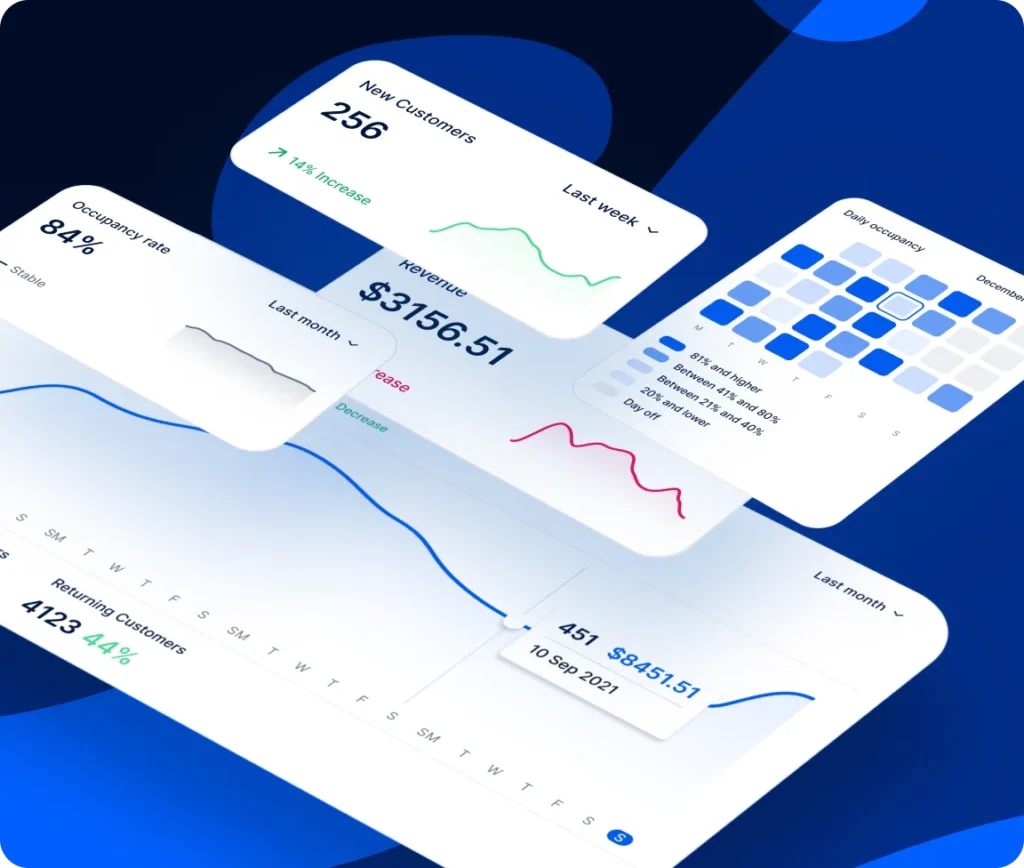
What makes Trafft worth putting first is the pairing of a free plan that isn't a token gesture with a CRM, SMS/email/WhatsApp reminders, and a KPI dashboard. If you're a salon, clinic, coaching practice, or agency automating bookings on a tight budget, this is the strongest general pick. That free tier includes 5 team members, custom fields, and deposit payments, all of which several competitors keep behind a paywall.
The feature set covers:
- SMS, email, and WhatsApp appointment reminders
- Built-in CRM with customer tagging and history
- Multi-location and resource management (rooms, equipment)
- KPI dashboard for revenue, occupancy, and new customers
- Zapier and calendar sync (Google, Outlook)
Nothing to pay for up to 5 team members. Paid tiers start around $13.30/month (Starter, 10 users, billed annually) and scale to around $24.50/month (Scaling, 15 users, billed annually), with a custom Enterprise tier for larger teams. An $89 lifetime-access tier has also circulated through AppSumo for early adopters.
On the plus side:
- Free plan covers a full 5-person team, not just one seat
- Deposit and full payment collection built into the booking flow
- WhatsApp reminders alongside SMS and email, uncommon at this price
Where it falls short:
- Large ERP and marketing platforms connect through Zapier rather than native integrations (Research.com, 2026)
- Pricing tiers are simpler than rivals, which suits most teams but offers less flexibility for unusual structures
Research.com's 2026 review found the reporting useful for day-to-day resource planning, covering the essentials rather than enterprise-grade analytics depth. Reviewers on Software Advice rated it 5 out of 5 for ease of use, with most of the praise landing on booking customization and how fast support answers.
The free tier alone already beats what Calendly charges for one paid seat. Most side-by-side lists skip that comparison entirely because they only line up paid plans against paid plans.
For a wider shortlist that focuses purely on the appointment-scheduling angle, the full roundup of appointment scheduling software picks goes deeper into niche players.
Amelia: best for WordPress sites that want booking built into the CMS they already run
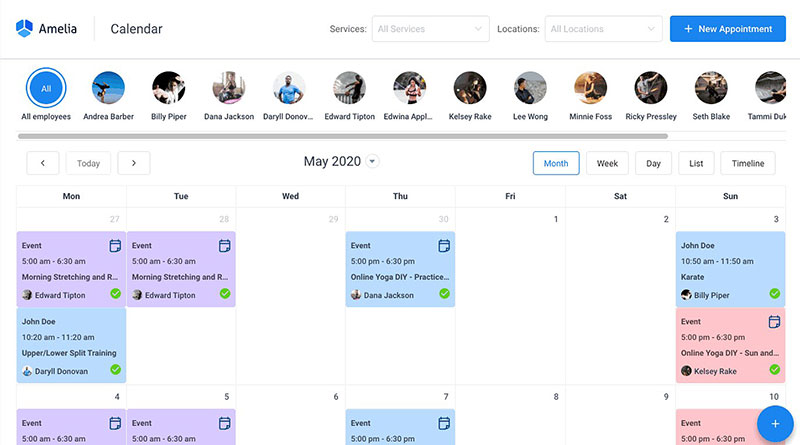
Amelia launched in June 2018 at WordCamp Europe in Belgrade, built by the same TMS team now operating as Melograno Venture Studio. It's a self-hosted WordPress plugin that runs appointments, packages, and ticketed events directly inside WP admin, which is the whole appeal. Your booking system lives on your own domain, inside a stack you already pay for.
That makes it the pick for WordPress-based salons, clinics, and studios that want a one-time-license feel and real control over hosting. The ticketing side is the part people underestimate: multiple ticket types, QR codes, waiting lists, sitting right alongside standard appointment booking. Very few WordPress booking plugins do both properly.
Core features:
- Step-by-step or catalog-style booking widget via shortcode
- Employee, location, and resource management
- Stripe, PayPal, Mollie, and RazorPay payment support
- Google Calendar, Outlook, and Zoom sync
- Recurring appointments and customer packages
A free Lite version is available through WordPress.org for individuals and small businesses with basic booking needs. Paid plans run Starter, Standard, Pro, and Elite; the Elite license runs $339 per year, or $999 as a lifetime purchase. There's also a hosted SaaS version at $60 per month if self-hosting isn't appealing.
What it does well:
- Deep multi-gateway payment support out of the box
- Native ticketed-event system, not just appointments
- Runs entirely inside a stack you already own (WordPress)
What to watch:
- WordPress-native by design, so it suits teams committed to the platform
- REST API access sits on the Elite tier, worth checking if you plan custom integrations
- Self-hosting means the WordPress update and security schedule is yours to run, which cloud tools handle for you
Capterra lists Amelia at 4.9 out of 5 across 245 reviews as of 2026. A hands-on 2026 test by Booknetic timed setup, from empty install to live booking page, at about ten minutes.
The thing nobody mentions in these comparisons: self-hosting is a trade, not a free win. You get the data and the domain, and you take on the maintenance that comes with them. For teams already running WordPress, that's a schedule they keep anyway, which is exactly why Amelia lands well with them and poorly with everyone else.
Calendly - Best for solo consultants and salespeople booking one-on-one meetings
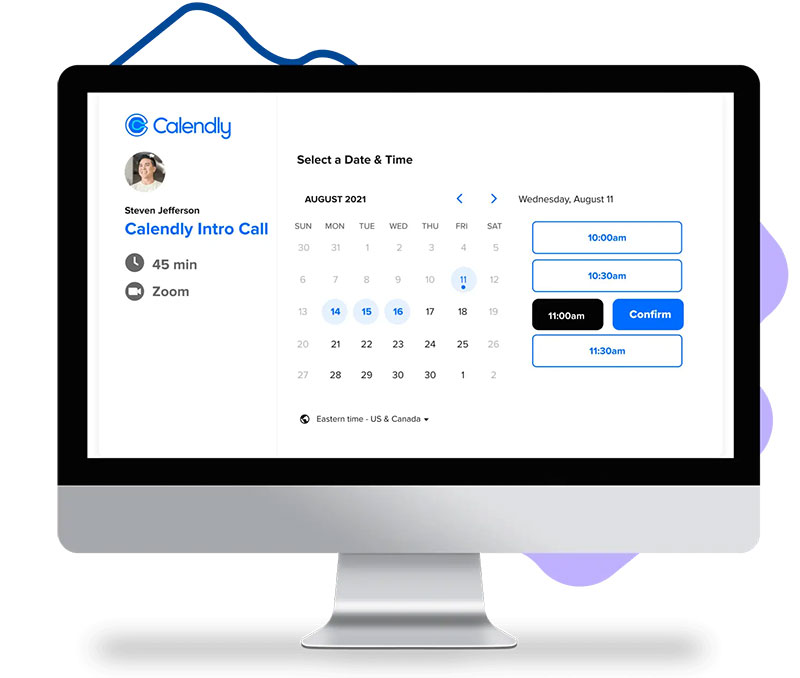
Share a link, let the other person pick a slot. Calendly built its entire product around that one interaction and it's still the fastest way to book a meeting without an email thread. The catch shows up the moment a team needs more than the single free event type, because pricing is per seat from there. For sales teams, that booking step often sits directly inside the sales process, moving a prospect from outreach to a scheduled conversation without another round of back-and-forth.
Consultants, recruiters, and salespeople get the most out of it. Brand recognition helps too. Most external meeting partners have already used it, so nobody has to figure out your booking page. Recruiters using LinkedIn Recruiter can also send a scheduling link once a candidate is ready for an interview, cutting out another manual coordination step.
Features that matter:
- Shareable booking links with unlimited meetings on the free event type
- Round-robin scheduling on Teams plan
- Stripe and PayPal payment collection on paid tiers
- Zapier and Salesforce integration
The free plan is limited to 1 event type and 1 calendar. Standard runs $10 per seat monthly on annual billing, Teams runs $16 per seat, and Enterprise starts near $15,000 per year.
Arguments for it:
- Setup takes minutes for a single meeting type
- Wide third-party integration support
- Familiar to most external meeting partners already
Arguments against:
- Per-seat pricing adds up fast for a growing team
- Free plan blocks automated reminders and most integrations
- No native multi-location or staff-resource management the way service-business tools have
G2's 2026 pricing data shows reviewers repeatedly citing the single-event-type limit as the main reason they upgrade to Standard.
Run the math on a 5-person team and the Teams plan lands at $80 to $100 a month for scheduling alone. That changes the picture against a flat free tier covering the same headcount elsewhere on this list.
Anyone weighing it directly against the alternatives can check the dedicated Calendly review for the full breakdown.
Acuity Scheduling - Best for Squarespace-based businesses and HIPAA-adjacent solo practices
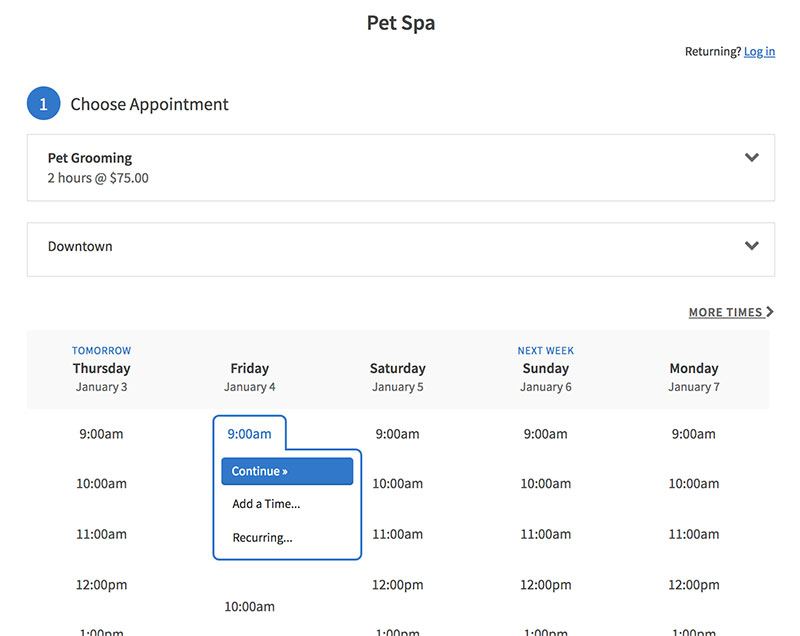
Squarespace bought Acuity in 2019 and the integration between the two is about as tight as you'd expect. If your site already lives on Squarespace, embedding takes no plugin and no workaround, whether the booking form sits on a service page or one of several campaign landing pages. The other reason people land here is HIPAA: the Premium tier is HIPAA-eligible with a signed BAA, which puts it in rare company on this list.
Solo health and wellness practitioners running a single calendar are the natural fit.
What you get:
- Packages, memberships, and subscriptions support
- SMS reminders (Standard tier and up)
- Up to 36 calendars on Premium
- Custom API and CSS on the top tier
There's no free plan, only a 7-day trial. Starter runs $16/month annually, Standard $27/month, and Premium $49/month.
Strengths:
- One of the few tools on this list with a HIPAA-ready plan
- Squarespace embedding with no extra setup
- Mature packages and membership billing
Weak spots:
- No free tier at all
- SMS reminders locked out of the entry Starter plan
- Cost climbs quickly once you need more than one calendar
JPK Design Co's 2026 review flagged that the HIPAA option only exists on the $49/month Premium plan, which prices out smaller health practices.
The 2019 acquisition folded Acuity into a website-builder roadmap rather than a scheduling-first one. That's the likeliest explanation for why SMS and branding removal only unlock two tiers up instead of on the base plan.
See the full Acuity Scheduling review for the tier-by-tier feature gap.
Setmore - Best for small teams that want a real free plan before committing to SMS reminders
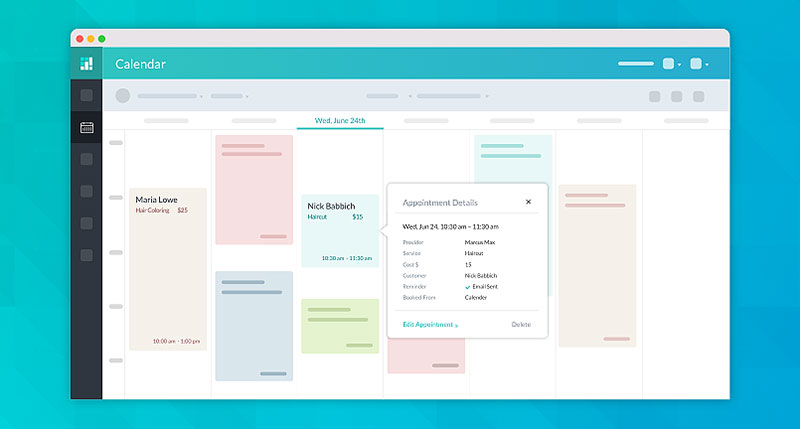
Setmore's free tier is one of the more generous ones here: 4 users and 200 bookings a month, which is enough for a small team to actually run on rather than just poke at. Most free plans in this category cap you at one seat. For companies already comparing cloud-based HR software for small business, that multi-user allowance makes Setmore easier to test alongside the rest of the team's operational stack.
It suits small teams testing a real multi-user setup before paying for SMS and branding removal.
Included:
- Google Calendar, Zoom, and Stripe integrations
- Zapier connectivity
- Two-way calendar sync on paid tiers
- Custom branding removal (Pro plan)
Free for up to 4 users and 200 bookings monthly. Team runs $9 per user per month annually, Pro runs $12 per user per month.
Good points:
- Free tier actually usable for a small team, not just a solo trial
- 40-plus integrations including WordPress and Square Payments
- High reviewer marks for ease of use and support
Less good:
- No SMS reminders on the free plan
- Reporting and customization are limited below Pro
- Setmore branding stays visible until you upgrade
Capterra's 2026 profile (958 reviews, 4.6 out of 5) shows reviewers praising ease of use and support, while flagging client-management and calendar features as weaker spots.
Here's the tension. The free plan covers 4 users, more generous than Calendly's single free seat. But SMS reminders, the feature that actually cuts no-shows, stay paywalled even on the mid-tier Team plan.
The full Setmore review covers where the free plan starts to feel tight.
SimplyBook.me - Best for businesses that want to build a custom feature set instead of a fixed plan
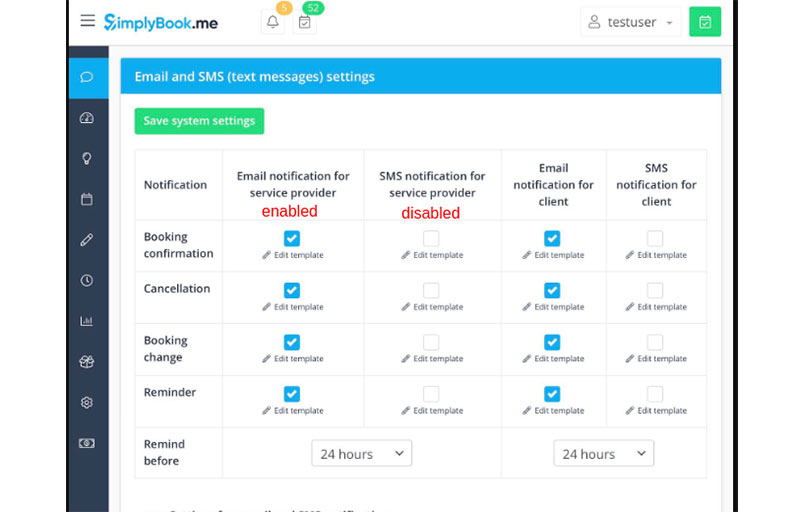
Rather than fixed tiers, SimplyBook.me sells access to a marketplace of features you toggle on individually. That works well if your requirements are unusual or regulated and don't map cleanly onto a standard scheduling plan. It works less well if you just want to pick a plan and stop thinking about it.
That modular structure also makes it a useful reference point when comparing broader automation software solutions, since businesses can add only the workflow features they actually need.
The security credential is the standout: ISO/IEC 27001:2022 certification (certificate 195212, issued by NQA and most recently recertified in March 2024), which you don't often see on a booking tool at this price point.
For organizations evaluating scheduling alongside physical security technology, that kind of independently audited security framework matters more than a vague security claim on a pricing page.
On offer:
- 60 to 77-plus toggleable custom features by tier
- GDPR-compliant, EU-hosted data
- Memberships, packages, gift cards, and coupons
- Full booking website, not just a booking page
Free for 1 provider and 50 bookings monthly. Paid tiers run from roughly $9.90 to $59.90 per month depending on providers, bookings, and feature count.
In its favor:
- Formal ISO 27001 certification, rare in this category
- Highly customizable feature marketplace
- No transaction fees or per-user surcharges
Against it:
- Feature-based pricing gets confusing fast
- SMS gateways and custom domains billed separately
- Booking caps on lower tiers can surprise a growing business
Software Advice lists SimplyBook.me at 4.6 out of 5 across roughly 1,286 reviews, alongside that formally audited certification.
For a health-adjacent or otherwise regulated business, the certification is the reason to look here at all. General scheduling comparisons skip that use case entirely.
The dedicated SimplyBook.me review breaks down which features are worth toggling on.
Vagaro - Best for salons and studios that need chair rentals and class rosters
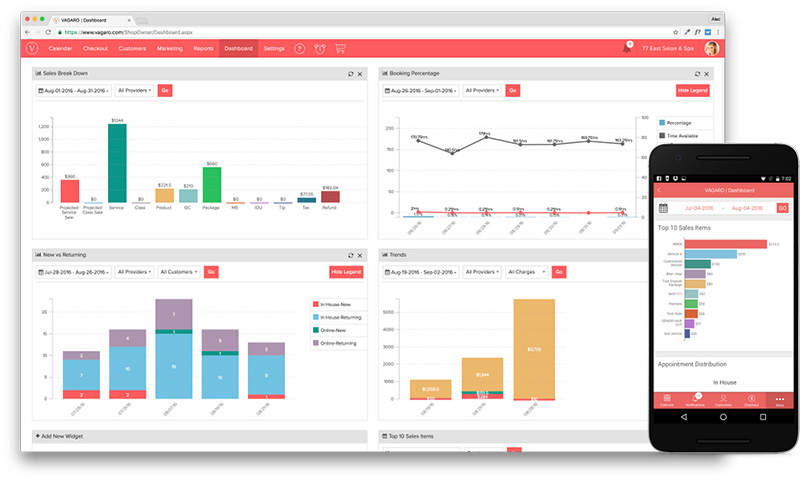
Vagaro is booking plus point-of-sale, built specifically for beauty, wellness, and fitness. Commission structures, chair rentals, class rosters: generic schedulers model these badly or not at all, and Vagaro handles them natively instead of through a workaround.
Its marketplace and messaging features can also support a salon's social media marketing efforts by giving promotions and new-client campaigns somewhere concrete to send potential customers.
Multi-stylist salons, spas, and fitness studios are the target.
What's in the box:
- Consumer-facing marketplace and directory listing
- Automated SMS and email reminders
- Google Calendar sync across all plans
- Gift card and credit card processing
The Just Me plan starts at $23.99 to $25 per month, with roughly $10 per month added for each additional bookable calendar or employee.
Upsides:
- Deep salon-and-wellness-specific feature set
- Built-in marketplace for new client discovery
- Strong reviewer marks for affordability relative to feature depth
Downsides:
- Per-calendar pricing scales fast for bigger teams
- Add-ons (SMS marketing, forms, storage) push real cost well above the base rate
- Card processing fees run 2.2 to 3.5 percent on top of the subscription
Koalendar's 2026 cost breakdown found real monthly totals climbing to $100-$200 once a salon adds 5 to 8 common add-ons on top of the advertised starting rate.
Which means the advertised price undercounts what any team past 2 or 3 staff will pay. Every added bookable calendar costs roughly $10 a month regardless of how many hours that person actually works, so a part-timer costs the same as a full-timer.
The full Vagaro review walks through where those add-on costs stack up.
Square Appointments - Best for solo operators already using Square for payments
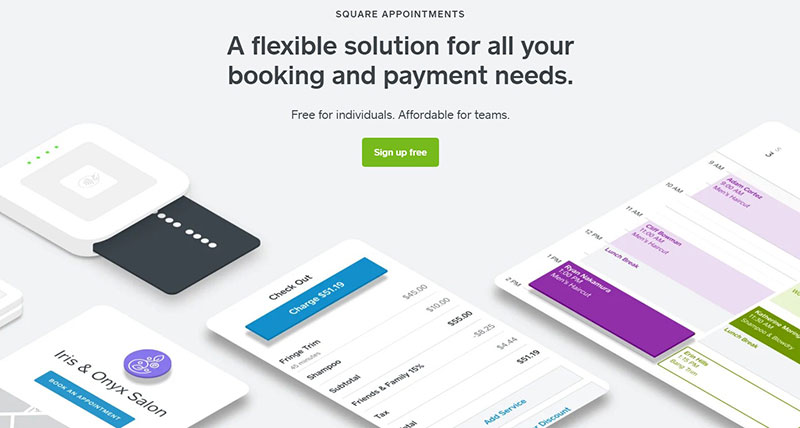
If you already run Square hardware or Square payment processing, this is scheduling bolted onto something you use daily. Solo operators pay nothing monthly, only the standard card-processing fees, and no per-employee charge appears until you actually add staff.
That makes it especially useful when appointment booking, payments, and lead capture all need to feed into the same customer journey without another standalone system.
Included:
- Integrated card processing and POS
- Payroll and banking tools in the wider Square suite
- Free tier for single-location, single-user setups
- Multi-location support on paid tiers
Free for solo users, with card-processing fees around 2.6 percent plus $0.15 per in-person transaction. Plus runs $49/month, Premium $149/month for larger teams.
Reasons to pick it:
- No monthly fee at all for a single provider
- Tight integration with Square's broader payments and banking tools
- Predictable, transparent processing-fee structure
Reasons not to:
- Fewer beauty or wellness-specific features than Vagaro
- Team tiers get expensive compared to niche competitors
- Best value depends on already using Square hardware
Square's own comparison page confirms pricing starts free for a single user, with card processing the only mandatory cost against a comparable paid tier from Vagaro.
The free tier removes seat-based cost entirely. That only pays off inside the Square ecosystem though, because outside it the processing fees end up doing the same job a subscription would.
The complete Square Appointments review covers where the free tier stops being enough.
vcita - Best for professional service firms that want CRM and booking in one login
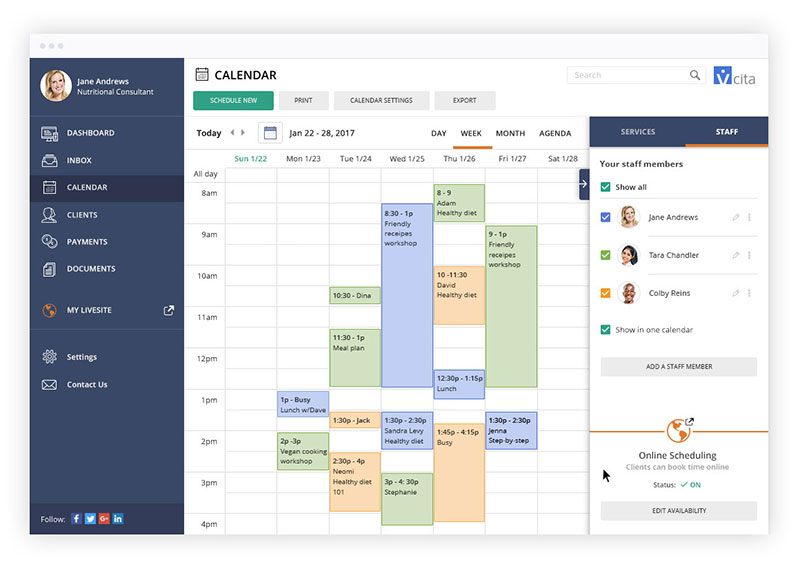
vcita approaches this from the other direction. It's a CRM for professional service businesses, and scheduling is one module inside a bigger client-management suite. Accountants, lawyers, consultants, and coaches who want invoicing, lead capture, and booking behind one login rather than three connected apps will find the shape familiar.
The modules:
- Client CRM with lead capture
- Invoicing and online payments
- Appointment scheduling and reminders
- Client portal for document sharing
Pricing starts at $35 per month. There's a free trial, but no permanent free plan.
Worth noting in its favor:
- Scheduling, CRM, and invoicing in a single subscription
- Built specifically for professional service firms, not generic bookings
- Serves 100,000-plus users across accountants, lawyers, and consultants
And against:
- Higher entry price than most tools on this list
- No permanent free tier
- Overkill if all you need is a calendar and reminders
Capterra places the starting price at $35 per month, with an ease-of-use score of 4.4 from reviewers concentrated in solo and small professional-service businesses.
The distinction that justifies the price: this is a CRM with scheduling attached, not a scheduler with CRM bolted on. Invoicing and lead capture are in the entry cost, and pure booking tools charge extra for both.
For small firms that want client work, scheduling, and follow-up centralized, it gets closer than most booking tools to a great platform for project management, even if project tracking itself is not its primary job.
The full vcita review compares it against dedicated scheduling-only tools.
Zapier - Best for connecting your booking tool to every other app in the business
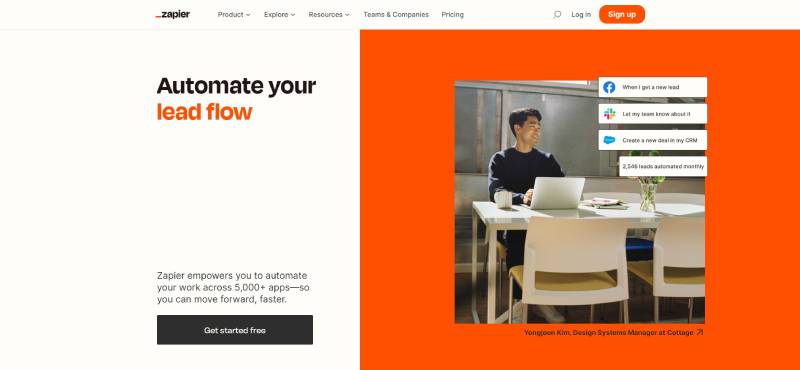
Zapier isn't a scheduling tool. It's the layer that connects whichever booking software you pick to nearly everything else the business runs on, and it earns a spot here because most of the tools above get more useful once they're wired into email, spreadsheets, a CRM, cloud storage, or social media management platforms.
What it does:
- No-code multi-step workflows ("Zaps")
- Thousands of app integrations
- Filters, paths, and conditional logic on paid tiers
- Native connections to Trafft, Amelia, Calendly, Setmore, and most tools on this list
The free plan is capped at 100 tasks a month and 2-step Zaps. Professional starts near $19.99/month annually for 750 tasks, Team runs around $69/month for 2,000 tasks.
Good:
- Works alongside every other tool on this list, not against them
- No coding required to build a workflow
- Scales from a single automation to complex multi-app chains
Bad:
- Not a booking tool by itself, requires pairing with one
- Task-based billing gets expensive fast at real volume
- Free tier's 2-step limit rules out most useful workflows
Multiple 2026 pricing breakdowns confirm the free plan can't run more than a two-step Zap, which rules out most realistic booking-to-CRM or booking-to-spreadsheet workflows without upgrading.
It doesn't compete with the other nine tools, it plugs them together. So the question isn't whether to pick Zapier. It's which of your other tools actually needs it to reach the rest of your stack. That is also why it belongs in a wider conversation about automation tools, rather than scheduling software alone.
The broader category is covered in the workflow automation software comparison for teams weighing Zapier against alternatives.
SenseHR
If you want to optimize your human resources management, HR management software like SenseHR is the ideal tool. This cloud-based HR software for small business allows you to manage various HR tasks effortlessly. With just a few clicks, you can handle employee data, streamline onboarding, and ensure smooth HR processes.
Additionally, SenseHR provides free training and implementation for every customer, making it easy to get started. You can also migrate your data at no extra cost, ensuring a seamless transition.
Managing HR tasks is just one part of the solution. You'll also need to engage with your employees and track their performance. SenseHR helps you with all of this, offering a comprehensive platform to support your HR needs.
What Is Business Automation Software?
Any recurring business task that follows the same steps every time can be handed to pre-set rules instead of staff input. That's the category. Trafft and WPAmelia sit at the front of the appointment-driven corner of it, one cloud-based, one built into WordPress.
Underneath, the software watches for a trigger (a new booking, a set time, a status change) and fires an action (a confirmation, a reminder, a payment charge) without a person repeating that step by hand. More advanced systems may add an AI-powered assistant that interprets a request before deciding which automated action should run.
What separates it from a plain calendar or a spreadsheet:
- It executes the same action every time a condition is met, not only when someone remembers to
- It connects several steps, booking, payment, reminder, follow-up, into one flow
- It produces a record, a booking log, a receipt, a dashboard entry, without extra data entry
- It keeps running when the person who set it up is on holiday
What it is not: a general task manager, a spreadsheet with formulas, or a script someone runs by hand once a week.
How Is Business Automation Software Different From Workflow Automation and RPA?
Business automation software is usually purpose-built for one function, like scheduling, with the booking widget, calendar sync, and reminders already built in.
Workflow automation is broader. It connects the outputs of separate tools, a form, a spreadsheet, an inbox, into a single sequence, the way workflow automation tools such as Zapier do.
Robotic process automation (RPA) goes further still, mimicking clicks and keystrokes inside legacy software that has no API to connect to at all.
| Category | Scope | Typical example |
|---|---|---|
| Business automation software | One business function, purpose-built | Trafft, Amelia |
| Workflow automation | Connects multiple tools and functions | Zapier |
| RPA | Mimics manual clicks inside legacy systems | UiPath |
How Does Business Automation Software Work?
Trigger, condition, action. Every automated flow runs on that logic.
A customer picks a time slot. That is the trigger.
The software checks whether that slot, staff member, and resource are actually free. That is the condition.
It then confirms the booking, charges a deposit, and schedules a reminder, without a staff member touching the calendar at all. The same logic can also power an AI tool or support workflow, for example when a customer request needs to be classified before the next action fires.
What comes out the other end without manual input:
- A confirmed booking tied to a specific employee and location
- A payment or deposit record
- A scheduled reminder over SMS, email, or WhatsApp
- A customer record updated with booking history
What still needs a person: pricing decisions, dispute handling, and anything outside the rules the business set up in advance.
Booking is one narrow slice of this. A wider set of business automation examples shows the same trigger-condition-action pattern running payroll, invoicing, and lead follow-up in other departments.
What Deployment Models Does Business Automation Software Use?
Most of the market splits between cloud SaaS and self-hosted plugins, with a smaller slice running on-premise or open source builds.
| Model | Example | Who maintains updates | Typical cost |
|---|---|---|---|
| Cloud SaaS | Trafft, Calendly | Vendor | Free tier to monthly subscription |
| Self-hosted plugin | WPAmelia (Amelia) | Site owner | Annual license or lifetime purchase |
| On-premise or open source | Custom deployments | Internal IT | Development and hosting cost |
With cloud SaaS the vendor hosts everything and pushes updates automatically. With a self-hosted plugin the business installs the software on its own WordPress site and controls the update schedule itself.
Amelia's own case study, published by its developer TMS Outsource, reports 100 licenses sold within about six weeks of its June 2018 launch at WordCamp Europe in Belgrade, real evidence of demand for the self-hosted model specifically.
A smaller group of businesses run open source business software instead, trading vendor support for full control over the codebase.
How Does Business Automation Software Connect With Other Business Tools?
Calendar sync is the baseline integration here. Google Calendar and Microsoft Outlook keep a personal calendar and a booking calendar from double-booking the same hour, which is the single most common source of scheduling embarrassment.
Beyond that, payment gateways, CRM systems, marketing platforms, and cloud storage services can all become part of the same workflow. A business might even backup to Backblaze B2 as part of a separate automated data-protection process, depending on how its wider stack is configured.
Setmore alone lists more than 40 integrations, including Zapier, WordPress, Square Payments, and HubSpot CRM, according to Capterra's 2026 profile of the product.
When a native integration doesn't exist, somebody re-enters the booking data by hand somewhere. Which is the exact manual step this software category exists to remove. For developers, that gap is often filled by a developer API connection when a native connector is unavailable.
How Does Business Automation Software Handle Payments and Deposits?
Payment automation runs on the same trigger logic as scheduling, applied to money instead of time.
A partial charge taken at the moment of booking is the deposit model, common in salons and clinics fighting no-shows. Collecting the entire fee upfront is more typical for classes, workshops, and ticketed events, where the seat is gone whether the person shows or not. Refunds work the same way in reverse: a cancellation inside the allowed window triggers the refund automatically instead of becoming a manual finance request.
Trafft's booking flow lets an owner set the deposit value per service and collect it inline, rather than chasing payment after the appointment happens.
Every one of these flows touches cardholder data, which is why payment automation and compliance can't really be discussed separately.
How Does Business Automation Software Reduce No-Shows and Improve Customer Communication?
Automated reminders are linked to meaningfully fewer missed appointments. Studies referencing the Cochrane Database of Systematic Reviews' analysis of mobile-phone reminder trials report reductions typically in the 29 to 39 percent range, though Cochrane itself grades the underlying trial evidence as low to moderate quality. Worth keeping that caveat in mind before treating the number as gospel.
The figures usually cited:
- Automated reminders are associated with roughly 29 to 39 percent fewer no-shows in the studies most often cited on this topic (Cochrane Database of Systematic Reviews evidence base)
- SMS reminders carry an immediate open rate above 90 percent at the moment of delivery, ahead of email or voicemail
- Multi-channel reminder systems combining SMS, email, and voice report reductions in no-shows that vary widely by study, with some research reporting figures as high as 30 to 60 percent
SMS, email, and increasingly WhatsApp Business API messaging are the channels that matter. SMS wins on open rate. Email wins on detail, since it carries full confirmations, receipts, and calendar attachments. WhatsApp sits somewhere in between and works best where customers already message on it daily.
Underneath all three, a booking tool's customer relationship management layer tracks history and repeat-visit patterns, so a reminder is informed by what that customer has actually done before. In more advanced setups, businesses can also set up their chatbot to answer common appointment questions or route customers toward the right booking flow automatically.
A cancellation policy enforced automatically at the point of booking closes the loop by giving the reminder's deadline real financial weight.
For a wider set of numbers on automation adoption beyond scheduling, business automation statistics tracks the same trend across other departments.
How Does Business Automation Software Manage Staff and Resources Across Locations?
Each staff member sets working hours, and the booking form only shows slots that match. Rooms, chairs, and equipment get treated as bookable assets the same way a person is. One admin view covers every branch instead of forcing a separate calendar per site.
Amelia's resource-sharing feature removes a time slot from the public booking form the moment the last unit of a shared resource, a massage room, a piece of equipment, is taken, whether or not staff notice in real time.
Permission settings decide visibility. An owner sees every location. An employee typically sees only their own schedule.
What KPIs and Dashboards Does Business Automation Software Track?
Most platforms in this category ship a KPI dashboard by default, not as a paid add-on.
Tracked automatically:
- New customers over a given period
- Revenue per service or per employee
- Daily and employee occupancy rate
- No-show and cancellation rate
These overlap heavily with what a broader guide to KPI for a service company recommends tracking manually. The software just automates the collection of it.
Occupancy rate matters more than raw booking count. A fully booked calendar with a high no-show rate still leaves empty chairs, which is why the two figures usually sit side by side on the same dashboard.
What Are the Benefits of Automating a Business With Software?
Forrester's Total Economic Impact study of Microsoft Power Automate found a 248 percent return on investment over three years for a composite enterprise organization (modeled on a 30,000-employee, $10 billion-revenue company). That figure is specific to that platform and that scale, but it's broadly representative of the kind of return rule-based automation can produce.
Time is the first benefit most owners notice. Manual scheduling, confirmation calls, and reminder texts drop off a staff member's task list once the software runs them on its own.
Revenue follows close behind. Fewer empty slots from no-shows, plus deposits collected upfront, mean less revenue lost to last-minute cancellations.
Consistency is the less obvious one. A reminder sent by software goes out the same way every time. A reminder that depends on a staff member remembering does not. The same principle applies to content workflows using artificial intelligence to improve your writing, where repeatable drafting or editing steps can be standardized instead of recreated from scratch every time.
That same consistency matters in the final output too. A top-quality AI detector can help check whether AI-assisted content maintains a consistent, natural quality instead of varying noticeably from one's unique tone or brand voice.
The ceiling on all this differs by size. A solo operator mostly gains back time. A multi-location team gains coordination it could never manage by hand at all.
A closer look at business automation benefits breaks these gains down by department rather than by business size.
How Do You Choose the Right Business Automation Software for Your Business?
The deployment model usually narrows the shortlist before any feature comparison even starts.
Cloud SaaS gives you:
- No hosting or update responsibility
- Usually cheaper to start, often with a genuine free tier
- Faster setup, live in under an hour in most cases
The cost of that convenience:
- Recurring monthly cost that scales with seats or locations
- Less control if the vendor changes pricing or retires a feature
A self-hosted plugin flips both. You get a one-time or annual license instead of a per-seat subscription, plus full control over hosting, data, and the update timeline. You also inherit responsibility for WordPress security and updates, and you're tied to one platform with no easy way to migrate the booking system alone.
Industry shapes the decision as much as deployment model does. A clinic usually needs the intake-form and confidentiality features built into dedicated medical scheduling software, a salon leans on the staff-commission logic inside salon scheduling software, and a consultant is often better served by the billable-hour tracking inside consultant scheduling software.
TMS, now operating as Melograno Venture Studio, is a useful case in point. The company behind both Trafft and Amelia offers the same underlying booking logic through two different deployment models rather than forcing every customer into one choice.
Is Business Automation Software Secure and Compliant?
Yes, though compliance depends on what data the software actually touches, not just which vendor built it.
GDPR applies the moment the software stores an EU customer's name, email, or booking history. Enforcement is not theoretical. Cumulative GDPR penalties exceeded 7.1 billion euros since 2018, with roughly 1.2 billion euros issued in 2025 alone, according to the DLA Piper GDPR Fines and Data Breach Survey.
PCI DSS applies the moment the software processes a card payment, regardless of business size. The previously future-dated requirements of PCI DSS version 4.0.1 became fully mandatory for applicable merchants on March 31, 2025, per the PCI Security Standards Council, retiring the transition allowances businesses had relied on under version 4.0.
Certifications vary by vendor. SimplyBook.me holds ISO/IEC 27001:2022 certification audited by NQA, a level of formal security certification still uncommon among booking tools at this price point.
Encryption in transit and at rest is the baseline every vendor should confirm on request. A named certification like ISO 27001 is the exception that signals more than a marketing claim on a pricing page.
How Do You Implement Business Automation Software Step by Step?
Learning how to automate business processes starts with mapping what already happens manually, before touching any software settings.
That same principle applies whether you're configuring a scheduler, connecting automation tools, or evaluating an AI tool such as Jasper for a repeatable content workflow.
- List every manual step in the current booking process, from first contact to payment
- Set up services, pricing, and duration inside the software
- Add employees, locations, and any shared resources
- Connect calendar sync and the payment gateway
- Configure reminder timing and channel: SMS, email, or WhatsApp
- Run a full test booking the way a customer would, start to finish
- Publish the booking form and monitor the first real bookings closely
Most setup problems trace back to skipping step one. A business that never mapped its manual process ends up automating the wrong sequence, then blaming the software for it.
If the internal team lacks the time or the process knowledge to run that audit, a business automation consultant is a common next step before committing to a platform.
When Does Business Automation Software Not Work?
Automation only works on a process that repeats the same way often enough to justify setting rules for it.
It breaks down in a few specific situations:
- No repeatable process: a business that negotiates every deal individually has nothing consistent to automate against
- High-touch, relationship-driven sales: long B2B cycles built on trust and custom terms resist rule-based booking flows
- Very small, informal operations: a single-person business doing a handful of bookings a month may find the setup work outweighs the time it saves
- Judgment calls a rule cannot make: a distressed customer, an unusual refund request, a first-time client with special requirements
None of this makes the software bad. It means the return on setting it up scales with volume and repetition, not with feature count.
A business booking two appointments a week doesn't need a KPI dashboard, multi-location sync, or automated deposit collection. A shared calendar and a phone call still do that job.
FAQ on Business Automation Software
What Are Common Examples of Business Automation Software?
Trafft and WPAmelia cover appointment scheduling and reminders. Zapier connects booking tools to email, spreadsheets, and CRM software, while Stripe and PayPal automate payment collection and deposits.
Each example targets one repeatable task rather than the whole business at once.
Is Business Automation Software Worth It for a Solo or Very Small Business?
It depends on booking volume. A solo operator taking a handful of appointments weekly gets less return on setup time.
Setmore's free plan (4 users) and Trafft's free tier (1 user) remove the cost barrier for testing it first.
What Is the Real Difference Between Free and Paid Business Automation Software?
Free tiers cover core booking and a capped user count. Paid tiers unlock SMS reminders, branding removal, deposit payments, and integrations like Zapier or WooCommerce.
The jump usually happens the moment a business needs automated reminders, not more calendars.
What Common Mistakes Happen When Setting Up Business Automation Software?
The most frequent one is skipping the manual process map and configuring services directly. Others include leaving deposit payments off, ignoring calendar sync conflicts, and misjudging reminder timing.
Publishing the booking widget before a full test booking is the most common launch error.
How Long Does It Take to Set Up Business Automation Software?
A single-location service business with one calendar can go live in under an hour, assuming services and staff availability are entered ahead of time.
Multi-location setups with resource sharing and custom branding typically take a full day to configure properly.
What Should You Automate First With Business Automation Software
Turn on deposit capture and SMS reminders before staff scheduling or multi-location sync. Those two recover lost revenue immediately, while the rest only saves time later.
Setup order matters more than feature count:
- Deposit or full payment collection first
- SMS or WhatsApp reminders second
- Staff scheduling and multi-location sync third
Front-loading payment and reminder automation means early KPI dashboard numbers reflect recovered revenue, not full occupancy or staffing efficiency. Those metrics stay noisy until the second phase goes live.
The next practical step is learning how to automate your business end to end, beyond the scheduling layer alone.