Running a service-based business without a solid booking system is like trying to juggle with one hand tied behind your back - sooner or later, something’s going to drop. Missed appointments, double bookings, and endless back-and-forth emails will eventually drain your time, energy, and revenue.
That’s why it’s essential to choose the right scheduling software. In this post, we’re putting two popular options head-to-head: Trafft und Setmore. Both help businesses streamline bookings, but they take different approaches and offer unique features.
Let’s see which one is the better fit for your business!
Overview of Each Tool: Trafft and Setmore at a Glance
Trafft overview
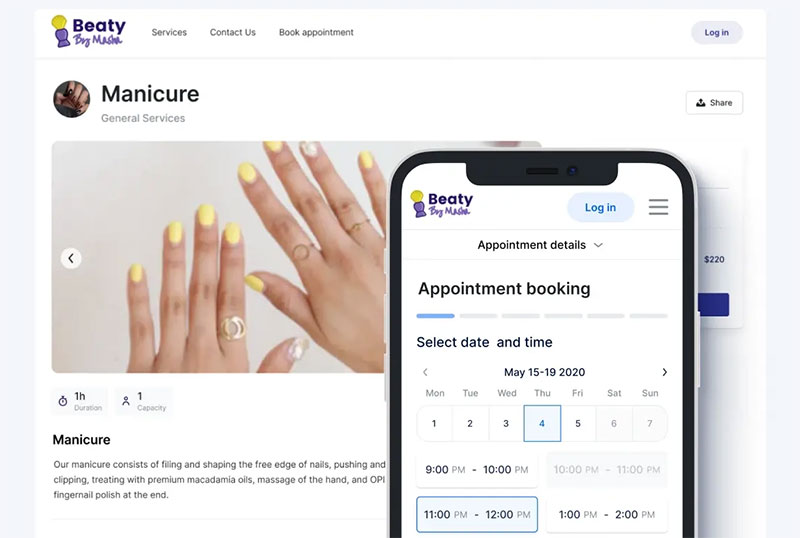
Trafft is a modern scheduling and booking software designed to simplify appointment booking for service businesses. It combines booking, payments, staff management, and reminders into one streamlined platform, making it a strong all-in-one solution.
It’s built for small to medium-sized businesses, but also scales well for large enterprises, salons, spas, fitness trainers, consultants, and other service-based professionals. Whether you’re managing multiple teams and locations, or you’re just on your own, Trafft is designed to cut down on admin work so you can focus on clients.
Setmore overview
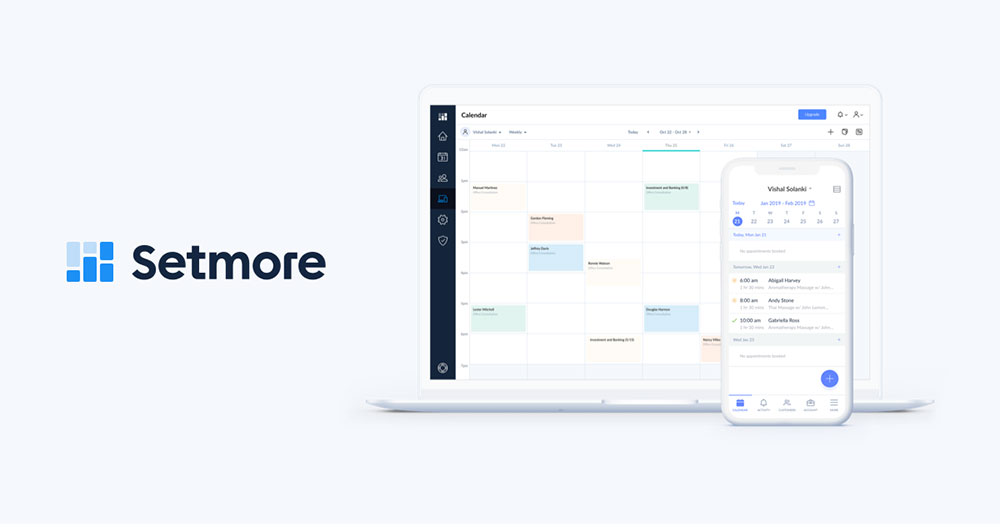
Setmore offers a reliable appointment scheduling system that’s adopted across different industries. It’s easy to set up and integrates with widely used tools, making it a go-to for many service providers.
Setmore is particularly popular in industries like wellness and beauty, education, healthcare and among freelancers who need a straightforward solution.
Key Features Comparison
Booking and scheduling
Trafft offers a modern and flexible booking system, where clients can book appointments with just a few clicks. You can enable recurring appointments, making it easy for clients to book repeating sessions such as weekly consultations or classes. It also supports group bookings and multi-seat reservations, which is useful for fitness studios, workshops, or seminars.
Another highlight is multi-location support, where you can manage bookings for several branches or service locations from one account, without needing separate tools
Setmore also provides recurring appointments and group booking features. Clients can book multiple services in one session, which adds convenience for industries like beauty and wellness.
While it doesn’t have the same built-in multi-location structure as Trafft, you can still manage different branches by assigning staff calendars and separate booking links, making it adaptable for growing teams.
Calendar management
Trafft makes calendar management straightforward by offering two-way sync with Google Kalender, Outlook, und Apple Kalender. This way, all appointments booked through Trafft instantly appear in staff calendars, preventing double bookings and scheduling conflicts.
Customers also have the option to add appointments directly to their personal calendars with a single click. For staff, Trafft allows custom calendar views, detailed availability settings, and the ability to set special days, days off, or holidays when they’re off.
Setmore also provides strong calendar management features, including syncing with Google and Office 365. This keeps schedules updated in real time across devices, whether on desktop or mobile. Staff can set their working hours, breaks, and time off directly within the system, making it easy to maintain accurate availability. Advanced calendar features require a paid plan, but the basic setup is simple and effective for most businesses.
Zahlungen
Trafft offers a seamless payment experience since you can accept payments directly at the time of booking. You can charge the full price, but also request deposits and reduce the chance of no-shows and last minute cancellations. You can accept payments through secure online gateways such as PayPal, Stripe, Square, Mollie, and Authorize.Net
Setmore also makes it easy to collect payments online. Through integrations with Square, Stripe, PayPal, and LawPay, you can accept payments directly from the booking page, or in person using connected card readers. This is especially useful if you handle both online and walk-in clients.
Notifications and reminders
One of Trafft’s main goals is to keep everyone on the same page, both employees and customers. You can send automated and customized email and SMS notifications to your customers to confirm bookings, send reminders, rescheduled, and cancellations. You can fully customize message templates, timing, and sender details to fit your brand tone. Automated reminders will surely help minimize no-shows, and keep everyone on the track.
Setmore also provides reliable automated notifications, sending email confirmations and reminders to customers and staff after each booking. SMS reminders are also available, but on paid plan. Setmore ensures clients show up on time, and gives staff real-time updates whenever appointments are created, changed, or cancelled.
Team and staff management
Trafft is built for teams of any size - you can use it whether you’re a freelancer, or have an entire team with business across multiple locations. It offers robust multi-staff support with advanced role and permission controls.
Each team member can have their own profile, working hours, services, and calendar, whale admins can manage all schedules from one centralized dashboard. Trafft also includes commission tracking and resource management, which prevents double bookings for shared room or equipment.
All of this makes Trafft ideal for businesses like salons, spas, or fitness studios where multiple employees and resources need to stay in sync.
Setmore also excels in team coordination - each staff member has a separate login, can personalize their booking page link, and has an individual calendar. Team members can manage their own appointments, set availability, and take charge of their scheduling.
Managers can assign roles and adjust permissions based on responsibilities, from admin-level access to limited receptionist views. Setmore lets you customize staff availability, breaks, and time off, ensuring every employee’s schedules stay accurate.
Integrationen
Trafft’s integrations make it easy to automate workflows and streamline operations. It integrates with Zoom, Google Meet, und Microsoft Teams, automatically generating links for virtual appointments.
For added flexibility, Trafft also supports Zapier und API access for connecting with CRMs, email marketing platforms, and other third-party tools. In addition, you can use Über Google reservieren, Facebook-Pixel, und Google Analytics to track customer behavior, measure conversions, and optimize marketing performance. Trafft's integrations will help you understand where your bookings come from, refine ad targeting, and improve campaign ROI.
Setmore also provides a wide range of integrations to help businesses manage both in-person and online bookings efficiently. It connects with Zoom and Google meet to create video links automatically, integrates with CRM and accounting tools like QuickBooks, and works with Slack, Mailchimp, and Zapier for marketing automation.
Also, Setmore offers ready-made “Book Now” widgets and buttons for platforms like WordPress, Wix, and Shopify, allowing you to embed scheduling systems anywhere your customers are.
Ease of Use and User Experience
Trafft
Trafft is designed with simplicity in mind. The setup process is straightforward and simple - you can create a branded booking page, set up services, and connect payment gateways within minutes
The dashboard is clean, modern, and highly intuitive. Admins can view all upcoming appointments, monitor staff activity, and manage clients from one central panel. The interface is visually organized, with helpful tooltips and analytics that make day-to-day management effortless.
For customers, the booking flow is smooth and mobile-friendly. Clients can easily choose services, staff, and time slots, then complete payments in just a few clicks, whether on desktop or smartphone. The system automatically detects time zones, which is a major advantage for online and international bookings.
The learning curve for beginners is minimal. Even if you have no prior experience in scheduling software, you can still get it up and running quickly, thanks to Trafft’s clear interface and built-in tutorials. Trafft is an ideal option if you want professional-grade functionality without the complexity.
If you're stuck setting up your Trafft account, you can always consult documentation or video tutorials.
Setmore
Setmore prioritizes ease of use and accessibility. Setting up an account takes just a few minutes, and the platform walks you through connecting calendars, adding staff, and publishing booking pages.
The admin dashboard is clear and organized, and everything from adding team members to managing appointments is laid out logically, making it easy even for non-technical users.
The customer booking experience is equally smooth on both desktop and mobile devices. Clients can view available services, select preferred staff, and confirm appointments in just a few minutes.
Setmore is beginner friendly, but offers fewer customization options out of the box. It’s a great fit for smaller teams or solo professionals who want a reliable, easy-to-learn tool that works well without needing extensive setup or configuration.
Pricing and Value for Money
Trafft pricing tiers
Trafft offers a few pricing plans designed to scale with your business
Free (forever free)
- Ideal for small team or solo users
- Includes unlimited appointments, up to 5 users, 5 custom features, 1 location, basic calendar sync, group booking, Square payments, 200 email notifications/month and basic integrations
Starter - $16.9 a month
- 10 users, extra custom features, more locations, more online payment options, 5 SMS credits & unlimited email notifications, and increased flexibility.
Scaling - $66.9 a month
- 15 users, full feature access including Zapier, recurring appointments, custom domains, resource & staff roles, and unlimited features
There is also an Enterprise and White Label level for high-volume or branded needs, often with custom pricing and added support.
Trafft offers a 30-day refund policy, and also has an annual payment.
Check out all Trafft's pricing plans and pick the best one for you!
Setmore
Setmore’s pricing is simpler, with a free base plan and upgraded tiers depending on user count and features
Free plan
- Free to use for up to 4 users
- Basic features included: unlimited appointments, email reminders/notifications, custom booking page, payment integrations, and mobile app access.
Pro plan - $12 a month
- Adds features like SMS reminders, recurring appointments, 2-way calendar sync, removal or Setmore branding, advanced integrations
Setmore also offers annual billing.
Value for different business sizes
Small team and solo users: Both Trafft and Setmore offer split free plans - Trafft supports up to 5 users with full scheduling tools, while Setmore allows 4. The best choice depends on your needs: Trafft for built-in automation, Setmore for simplicity and integrations.
Growing businesses: As your team expands, you’ll likely move to paid plans for SMS reminders, multi-location support, or advanced integrations. Trafft is the perfect solution, since it can grow as your business grows.
Larger organizations: For multi-location or branded setups, Trafft’s higher tiers and white-label options provide better value and scalability.
So, What’s the Verdict?
Both Trafft and Setmore are powerful scheduling tools, but they cater to slightly different needs.
Trafft offers more flexibility, automation, and scalability, which is a perfect choice if you’re running a growing business.
On the other hand, Setmore is great for small businesses, freelancers, and service providers who need a reliable, and easy-to-use scheduling tool without the complexity.
Both platforms will help you save time, stay organized, and deliver a smoother booking experience for your clients. Now, the choice is yours!