Begrenzte Zeit Begrenzte Zeit
Stürzen Sie sich in das Unternehmenswachstum
Bis zu 20%Off
Mit einem Gutscheincode BFCM70
Bis zu 20%Off
Schnapp dir das Angebot
ÜBERBLICK ÜBER FUNKTIONEN UND INTEGRATIONEN
  • Alle Funktionen
    Alle Funktionen

    Benachrichtigungen, Zeitzonen, Extras, Gutscheine, Rückerstattungen und mehr

  • Alle Integrationen
    Alle Integrationen

    WhatsApp, PayPal, Teams, Zoom, Zapier, Google Kalender und mehr

  • Über Google reservieren
    Über Google reservieren

    Buchungen über die Google Suche und Maps annehmen

  • WordPress-Plugin
    WordPress-Plugin

    Fügen Sie das Trafft-Buchungsformular zu jeder Seite Ihrer WordPress-Website hinzu

    Ressourcen
  • Trafft-Blog
    Blog 2
    Trafft-Blog

    Informieren Sie sich über die neuesten Informationen zu Branchentrends und holen Sie sich Tipps für die Führung eines Online-Dienstleistungsunternehmens

  • Anleitungen und Dokumentation
    Dokumente-2
    Anleitungen und Dokumentation

    Erhalten Sie eine detaillierte Erklärung, wie jede Trafft-Funktion und -Integration funktioniert

  • Unsere Geschichte Unsere Geschichte

    Lesen Sie über die Geschichte, Mission und die gemeinsamen Werte von Trafft

  • Investor Relations Investor Relations

    Melden Sie sich bei uns, wenn Sie daran interessiert sind, in Trafft zu investieren.

  • Affiliate-Partner Affiliate-Partner

    Begleiten Sie uns auf unserem Weg, Dienstleistungsunternehmen durch Automatisierung zum Erfolg zu verhelfen.

  • Warum Trafft Warum Trafft

    Erfahren Sie mehr darüber, warum Sie sich für Trafft entscheiden sollten

  • Partner Partner

    Werden Sie Partner von Trafft und erweitern Sie Ihre Reichweite auf dem Markt

  • Kontaktieren Sie uns Kontaktieren Sie uns

    Bei Fragen oder Anregungen können Sie sich gerne an mich wenden.

Funktionen
ÜBERBLICK ÜBER FUNKTIONEN UND INTEGRATIONEN
  • Alle Funktionen Alle Funktionen

    Benachrichtigungen, Zeitzonen, Extras, Gutscheine, Rückerstattungen und mehr

  • Alle Integrationen Alle Integrationen

    WhatsApp, PayPal, Teams, Zoom, Zapier, Google Kalender und mehr

  • Über Google reservieren Über Google reservieren

    Buchungen über die Google Suche und Maps annehmen

  • WordPress-Plugin WordPress-Plugin

    Fügen Sie das Trafft-Buchungsformular zu jeder Seite Ihrer WordPress-Website hinzu

Ressourcen
    Ressourcen
  • Trafft-Blog

    Informieren Sie sich über die neuesten Informationen zu Branchentrends und holen Sie sich Tipps für die Führung eines Online-Dienstleistungsunternehmens

    Blog 2
    Trafft-Blog
  • Anleitungen und Dokumentation

    Erhalten Sie eine detaillierte Erklärung, wie jede Trafft-Funktion und -Integration funktioniert

    Dokumente-2
    Anleitungen und Dokumentation
Über uns
  • Unsere Geschichte Unsere Geschichte

    Lesen Sie über die Geschichte, Mission und die gemeinsamen Werte von Trafft

  • Investor Relations Investor Relations

    Melden Sie sich bei uns, wenn Sie daran interessiert sind, in Trafft zu investieren.

  • Affiliate-Partner Affiliate-Partner

    Begleiten Sie uns auf unserem Weg, Dienstleistungsunternehmen durch Automatisierung zum Erfolg zu verhelfen.

  • Warum Trafft Warum Trafft

    Erfahren Sie mehr darüber, warum Sie sich für Trafft entscheiden sollten

  • Partner Partner

    Werden Sie Partner von Trafft und erweitern Sie Ihre Reichweite auf dem Markt

  • Kontaktieren Sie uns Kontaktieren Sie uns

    Bei Fragen oder Anregungen können Sie sich gerne an mich wenden.

Trafft Hacks: How to Share Appointments with Your Clients

Startseite» Blog» Trafft Hacks: How to Share Appointments with Your Clients
manage salon chains with trafft multi-location scheduling software

Sharing appointment slots with your clients can be very useful when you want to reward their loyalty and give them special treatment, or when an appointment gets canceled and you want to quickly fill in that slot. Trafft offers a few ways you can share appointments with clients, so let’s see how it’s done!

How to Share Appointments with Trafft?

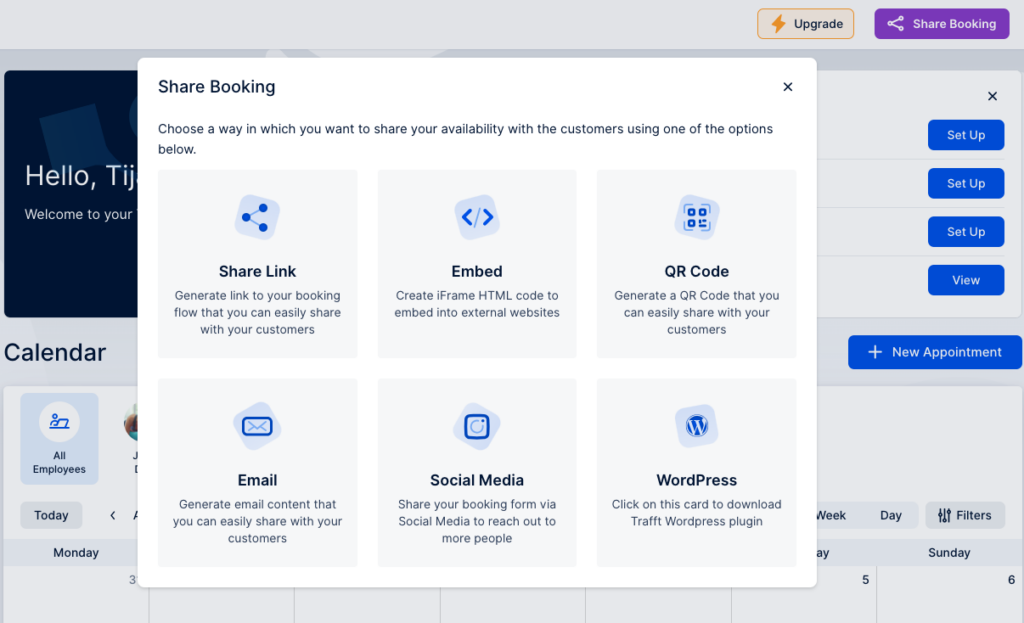
On the top right corner of your dashboard click the “Share Booking” button.
trafft share appointments

You’ll see a pop-up with various options to share appointments with your clients. Let’s see how each of them works.

Share the appointment via a link

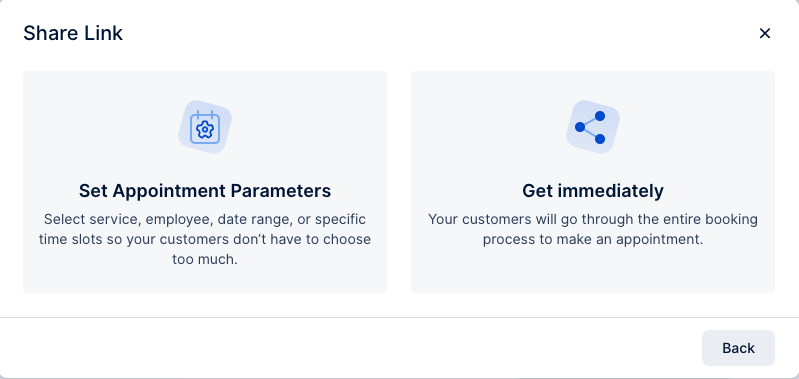
When you click on the “Share Link” button, you’ll see a pop-up where you can choose to set appointment parameters or to get the link immediately.
trafft share link

When setting up the appointment parameters, choose the service category you want to share, the service, whether you want to include any extras, and choose the employee and the location.

When it comes to date, you can either choose a date range when this appointment can be booked, or an exact date.
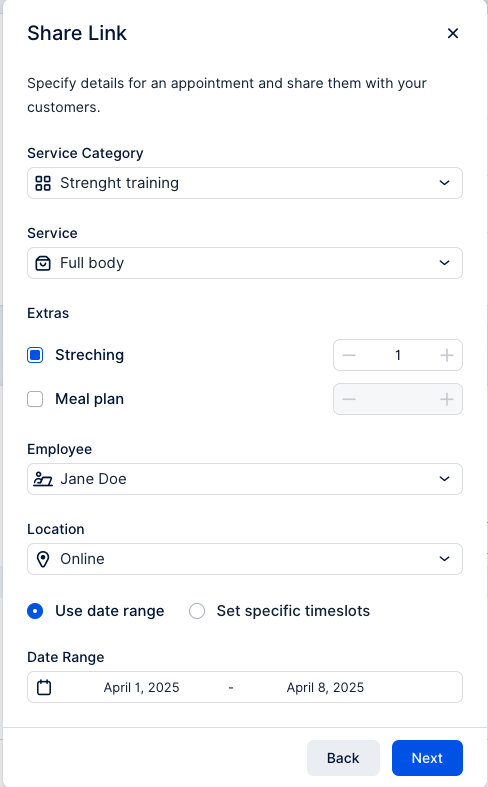
share link appointment parametre trafft

Click “Next”, and you’ll see a link you can share with your clients. Also, you can choose an option to set the link to expire once the first booking is completed.
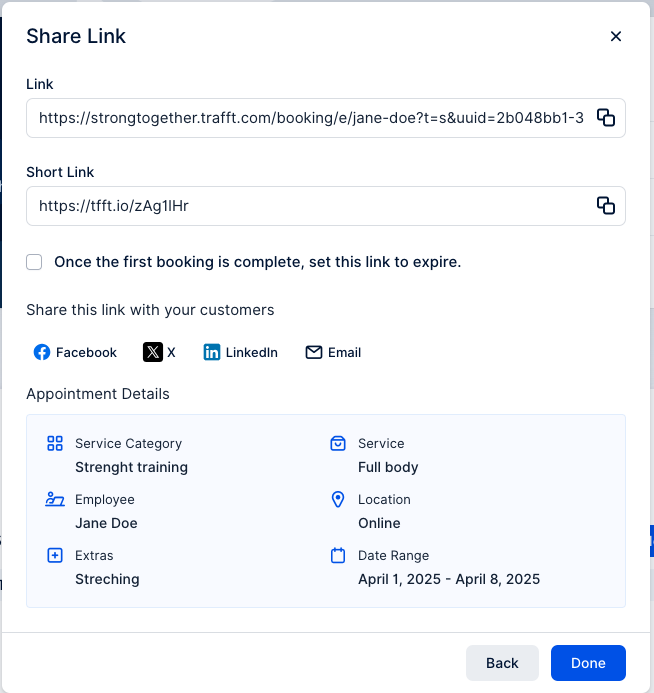
generated link trafft

If you don’t set up the appointment parameters, you’ll get a link that leads directly to your booking page where clients can choose the service they want to book.

Share the appointment via QR code

Choose a QR option from a list, and again you can choose whether to set appointment parameters, or create a QR code that will lead directly to the booking website.
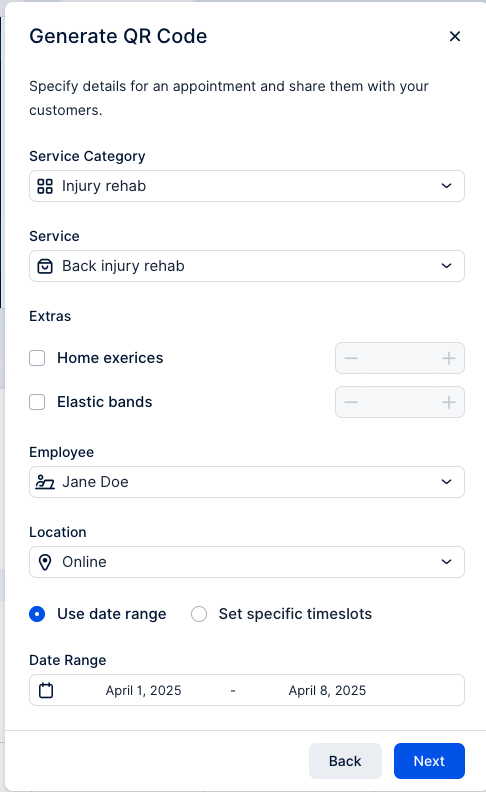
generate qr code trafft

Set up all your appointment parameters, and copy the QR code link, or download an image.
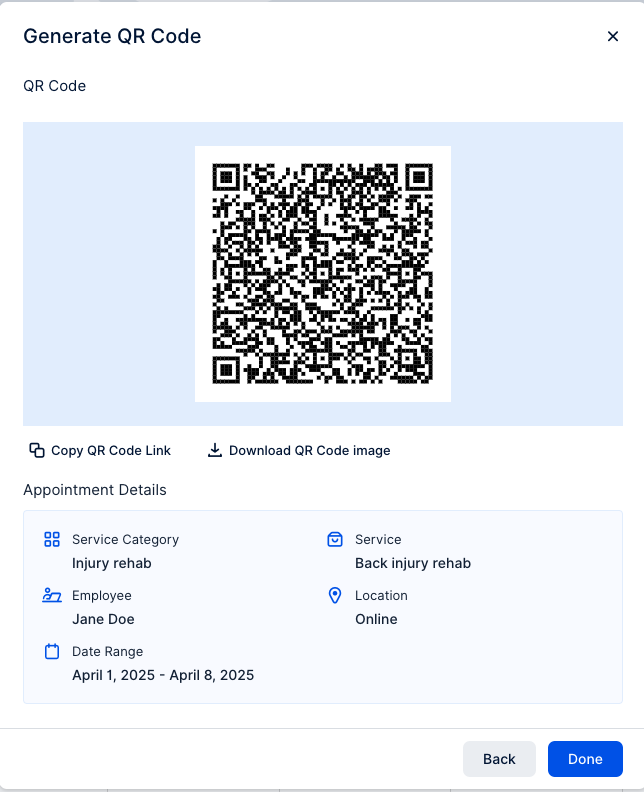
qr code trafft

Downloading an image of QR code can be used, for example, to print it out and stick it to your shop window, so every passerby can quickly scan the code and book an appointment.

Share the appointment directly through an email

You can share appointments with a specific person through an email and boost customer satisfaction. Again, you can choose to set up appointment parameters, or just copy a portion of an email with a booking link.
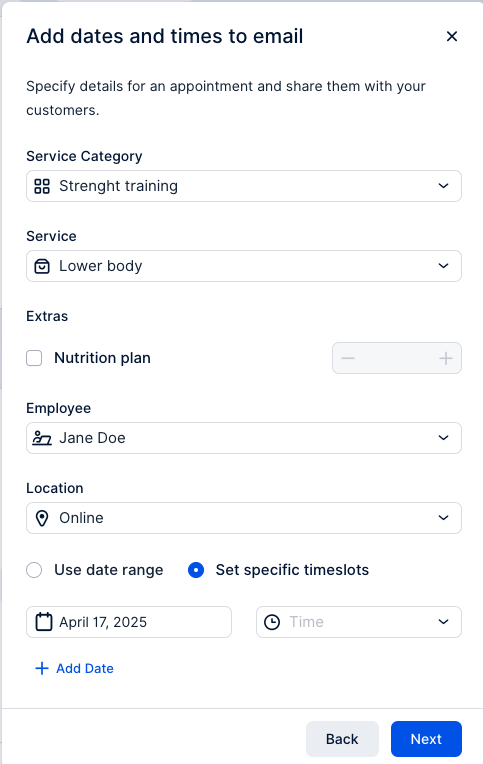
email appointment sharing trafft

Sharing via email can be a great option if it's a client's birthday, or you just want to reward their loyalty.

Share the appointment via social media

Sharing your appointments through social media is a great way to quickly fill in an appointment slot, especially if someone else canceled at the last minute.

After setting up appointment parameters, or choosing to share the whole booking page, you’ll see a selection of images you can use to share the appointment on your social media, or you can upload your own image.
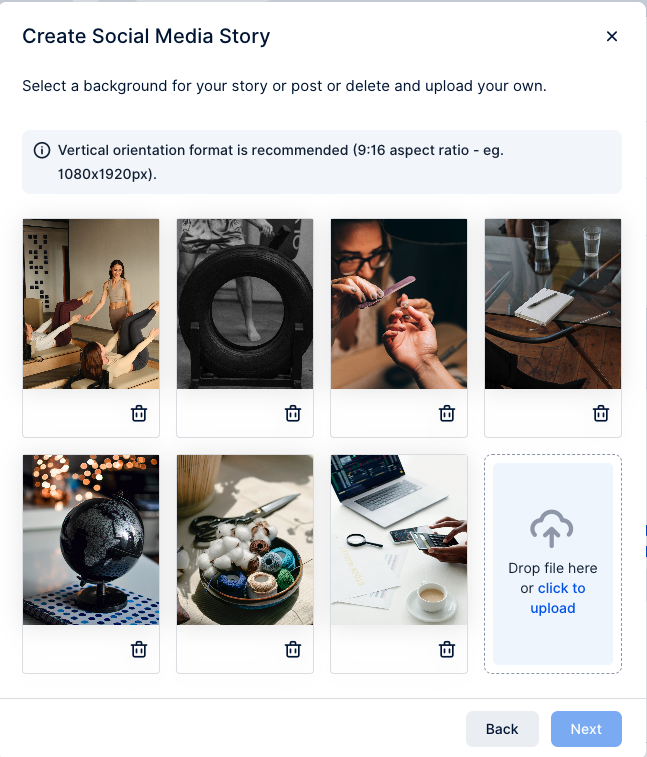
social media appointment sharing trafft

After choosing an image, you can custom title, description and font options that will show up on the image.
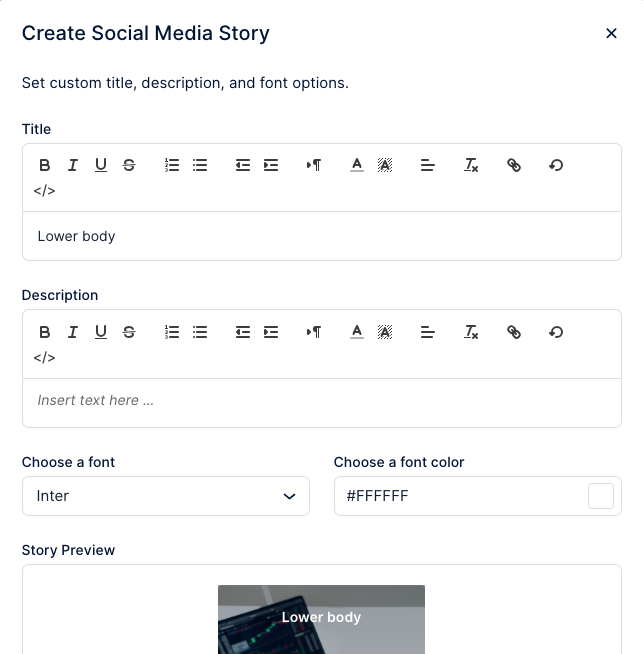
create social media story trafft

When you’ve added all your details, download the image and copy the link to the appointment booking.
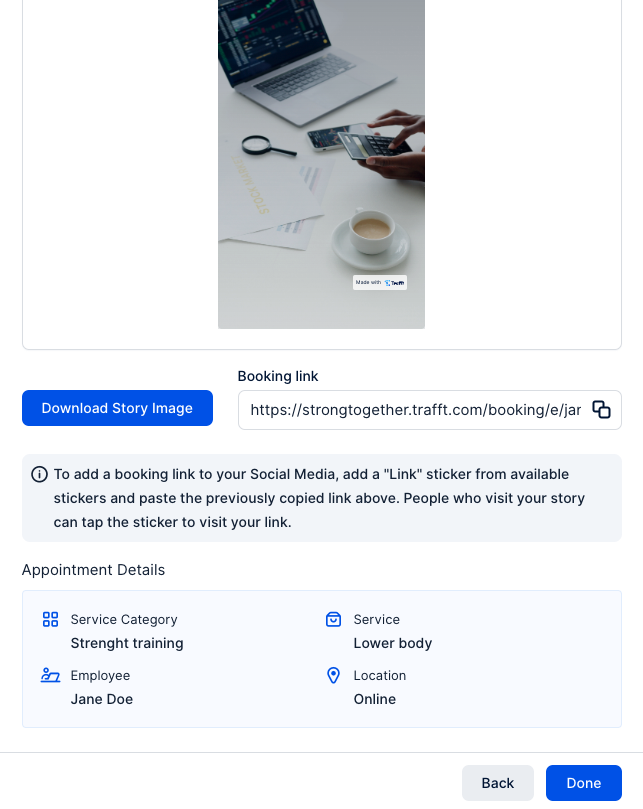
generated link for social media

Now that you know all the options Trafft gives you to share appointments with your clients, you can streamline your booking process in no time! Log in and give it a try!


Jetzt kostenlos testen