Durée limitée Durée limitée
Plongez dans la croissance de votre entreprise
Jusqu'à 20%Off
Avec un code promo BFCM70
Jusqu'à 20%Off
Profitez de l'offre
APERÇU DES FONCTIONNALITÉS ET INTÉGRATIONS
  • Toutes les fonctionnalités
    Toutes les fonctionnalités

    Notifications, Fuseaux horaires, Extras, Coupons, Remboursements, et plus

  • Toutes les intégrations
    Toutes les intégrations

    WhatsApp, PayPal, Teams, Zoom, Zapier, Google Agenda et bien plus encore

  • Réserver avec Google
    Réserver avec Google

    Acceptez des réservations via la Recherche Google et Maps

  • Extension WordPress
    Extension WordPress

    Ajoutez le formulaire de réservation Trafft à n'importe quelle page de votre site Web WordPress

    Ressources
  • Blog Trafft
    blogue-2
    Blog Trafft

    Consultez les dernières informations sur les tendances du secteur et obtenez des conseils pour gérer une entreprise de services en ligne

  • Guides et documentation
    docs-2
    Guides et documentation

    Obtenez une explication détaillée du fonctionnement de chaque fonctionnalité et intégration de Trafft

  • Notre histoire Notre histoire

    Lisez l'histoire, la mission et les valeurs que nous partageons de Trafft

  • Relations investisseurs Relations investisseurs

    Contactez-nous si vous souhaitez investir dans Trafft

  • Partenaires affiliés Partenaires affiliés

    Rejoignez-nous dans notre mission d'aider les entreprises de services à prospérer grâce à l'automatisation

  • Pourquoi Trafft Pourquoi Trafft

    En savoir plus sur les raisons de choisir Trafft

  • Partenaires Partenaires

    Devenez partenaire de Trafft et étendez votre portée sur le marché

  • Contactez-nous Contactez-nous

    N'hésitez pas à nous contacter si vous avez des questions ou des suggestions.

Fonctionnalités
APERÇU DES FONCTIONNALITÉS ET INTÉGRATIONS
  • Toutes les fonctionnalités Toutes les fonctionnalités

    Notifications, Fuseaux horaires, Extras, Coupons, Remboursements, et plus

  • Toutes les intégrations Toutes les intégrations

    WhatsApp, PayPal, Teams, Zoom, Zapier, Google Agenda et bien plus encore

  • Réserver avec Google Réserver avec Google

    Acceptez des réservations via la Recherche Google et Maps

  • Extension WordPress Extension WordPress

    Ajoutez le formulaire de réservation Trafft à n'importe quelle page de votre site Web WordPress

Ressources
    Ressources
  • Blog Trafft

    Consultez les dernières informations sur les tendances du secteur et obtenez des conseils pour gérer une entreprise de services en ligne

    blogue-2
    Blog Trafft
  • Guides et documentation

    Obtenez une explication détaillée du fonctionnement de chaque fonctionnalité et intégration de Trafft

    docs-2
    Guides et documentation
À propos de nous
  • Notre histoire Notre histoire

    Lisez l'histoire, la mission et les valeurs que nous partageons de Trafft

  • Relations investisseurs Relations investisseurs

    Contactez-nous si vous souhaitez investir dans Trafft

  • Partenaires affiliés Partenaires affiliés

    Rejoignez-nous dans notre mission d'aider les entreprises de services à prospérer grâce à l'automatisation

  • Pourquoi Trafft Pourquoi Trafft

    En savoir plus sur les raisons de choisir Trafft

  • Partenaires Partenaires

    Devenez partenaire de Trafft et étendez votre portée sur le marché

  • Contactez-nous Contactez-nous

    N'hésitez pas à nous contacter si vous avez des questions ou des suggestions.

Trafft Hacks: How to Share Appointments with Your Clients

Accueil» Blogue» Trafft Hacks: How to Share Appointments with Your Clients
manage salon chains with trafft multi-location scheduling software

Sharing appointment slots with your clients can be very useful when you want to reward their loyalty and give them special treatment, or when an appointment gets canceled and you want to quickly fill in that slot. Trafft offers a few ways you can share appointments with clients, so let’s see how it’s done!

How to Share Appointments with Trafft?

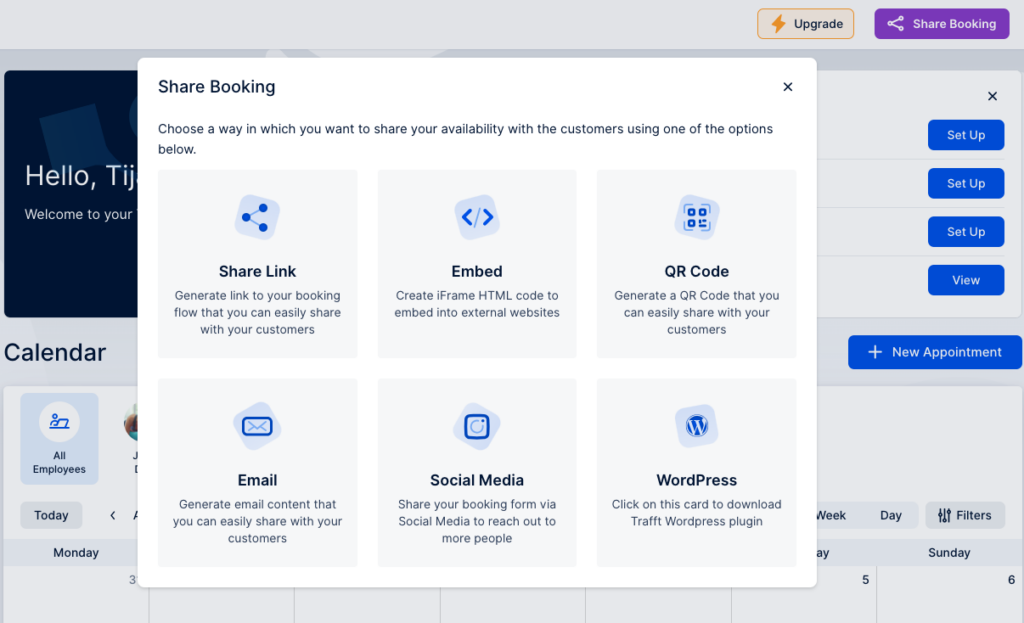
On the top right corner of your dashboard click the “Share Booking” button.
trafft share appointments

You’ll see a pop-up with various options to share appointments with your clients. Let’s see how each of them works.

Share the appointment via a link

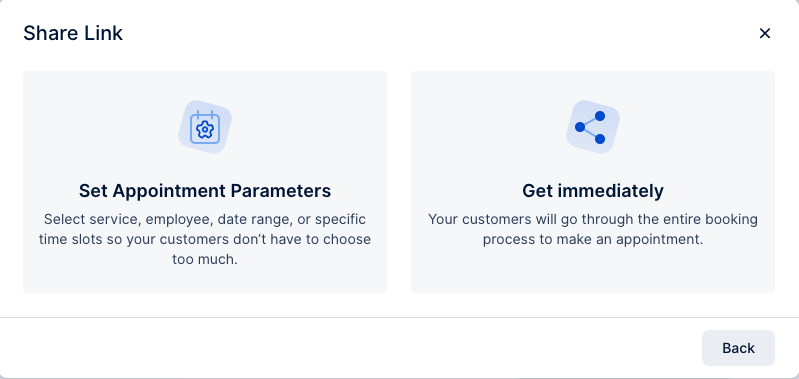
When you click on the “Share Link” button, you’ll see a pop-up where you can choose to set appointment parameters or to get the link immediately.
trafft share link

When setting up the appointment parameters, choose the service category you want to share, the service, whether you want to include any extras, and choose the employee and the location.

When it comes to date, you can either choose a date range when this appointment can be booked, or an exact date.
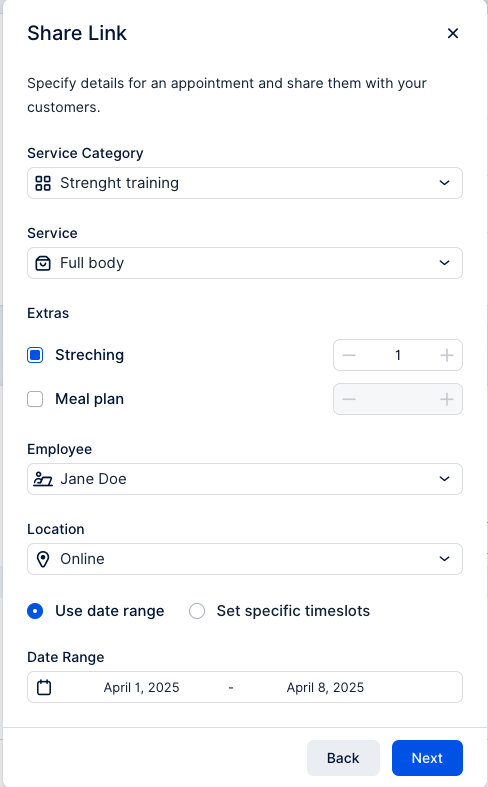
share link appointment parametre trafft

Click “Next”, and you’ll see a link you can share with your clients. Also, you can choose an option to set the link to expire once the first booking is completed.
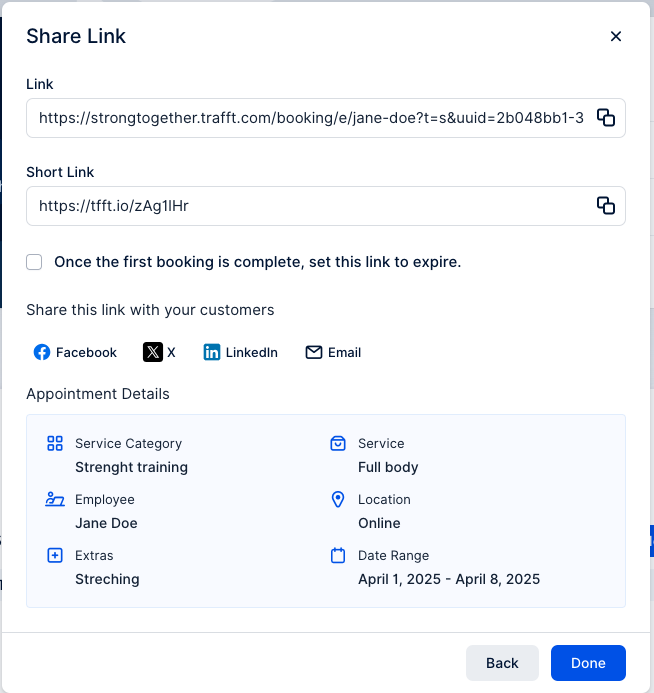
generated link trafft

If you don’t set up the appointment parameters, you’ll get a link that leads directly to your booking page where clients can choose the service they want to book.

Share the appointment via QR code

Choose a QR option from a list, and again you can choose whether to set appointment parameters, or create a QR code that will lead directly to the booking website.
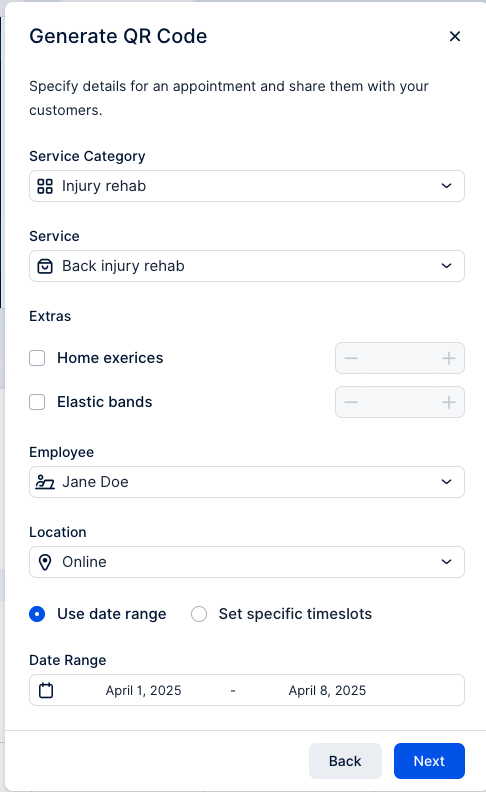
generate qr code trafft

Set up all your appointment parameters, and copy the QR code link, or download an image.
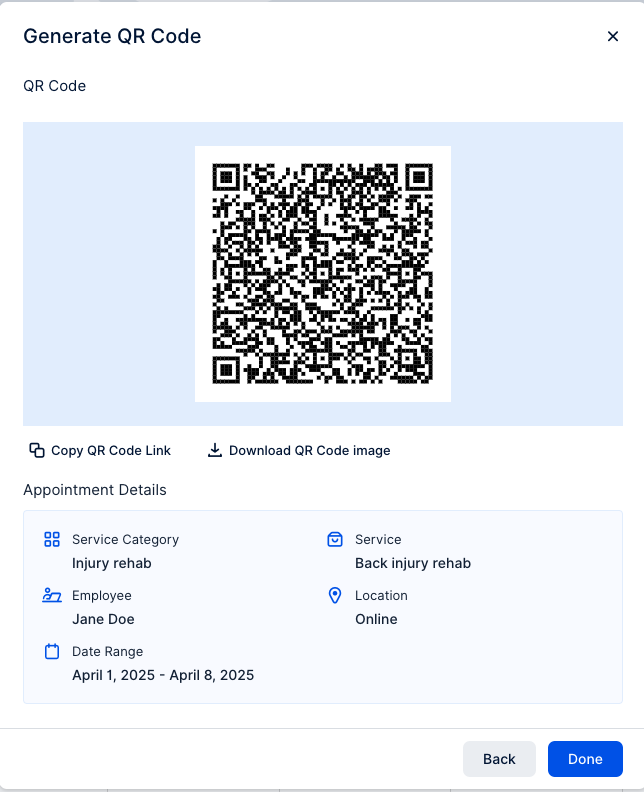
qr code trafft

Downloading an image of QR code can be used, for example, to print it out and stick it to your shop window, so every passerby can quickly scan the code and book an appointment.

Share the appointment directly through an email

You can share appointments with a specific person through an email and boost customer satisfaction. Again, you can choose to set up appointment parameters, or just copy a portion of an email with a booking link.
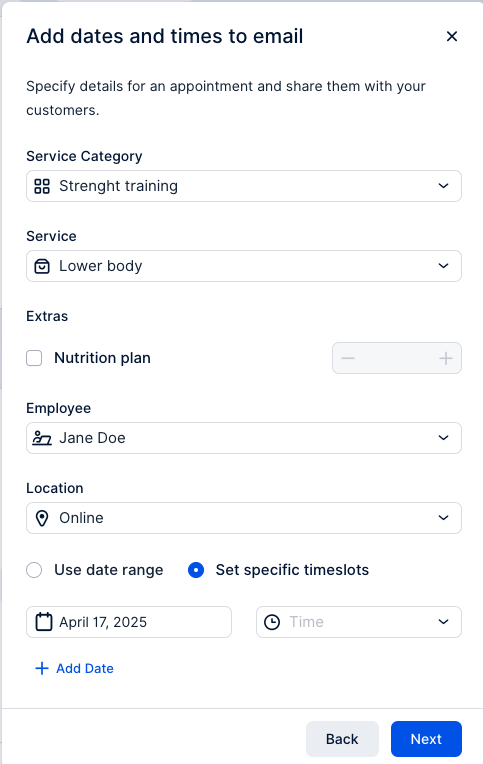
email appointment sharing trafft

Sharing via email can be a great option if it's a client's birthday, or you just want to reward their loyalty.

Share the appointment via social media

Sharing your appointments through social media is a great way to quickly fill in an appointment slot, especially if someone else canceled at the last minute.

After setting up appointment parameters, or choosing to share the whole booking page, you’ll see a selection of images you can use to share the appointment on your social media, or you can upload your own image.
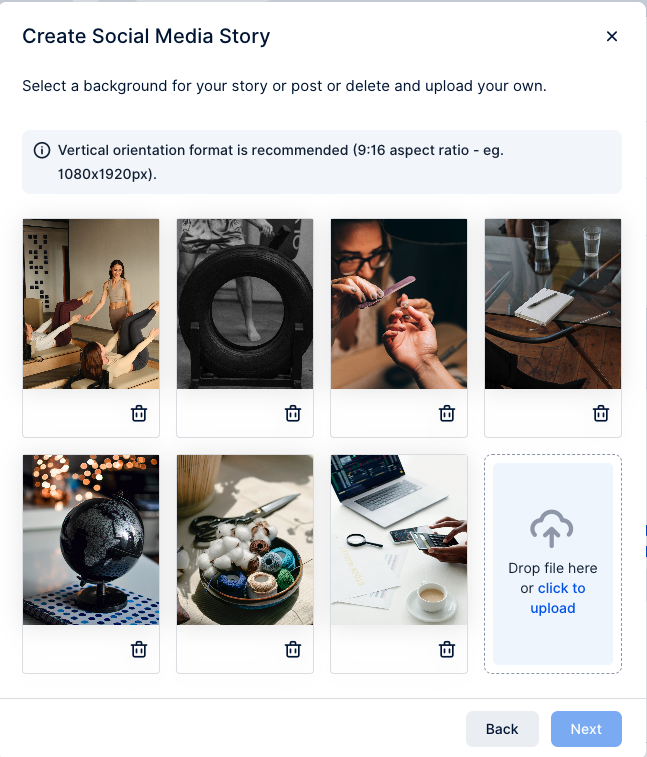
social media appointment sharing trafft

After choosing an image, you can custom title, description and font options that will show up on the image.
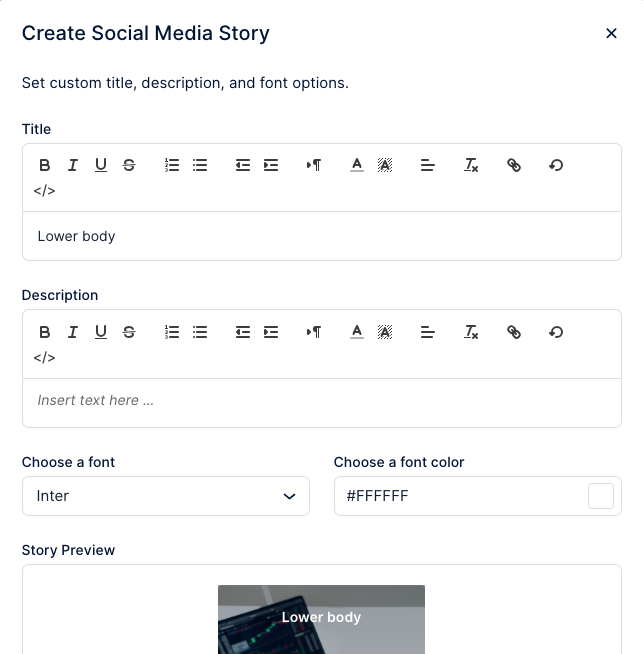
create social media story trafft

When you’ve added all your details, download the image and copy the link to the appointment booking.
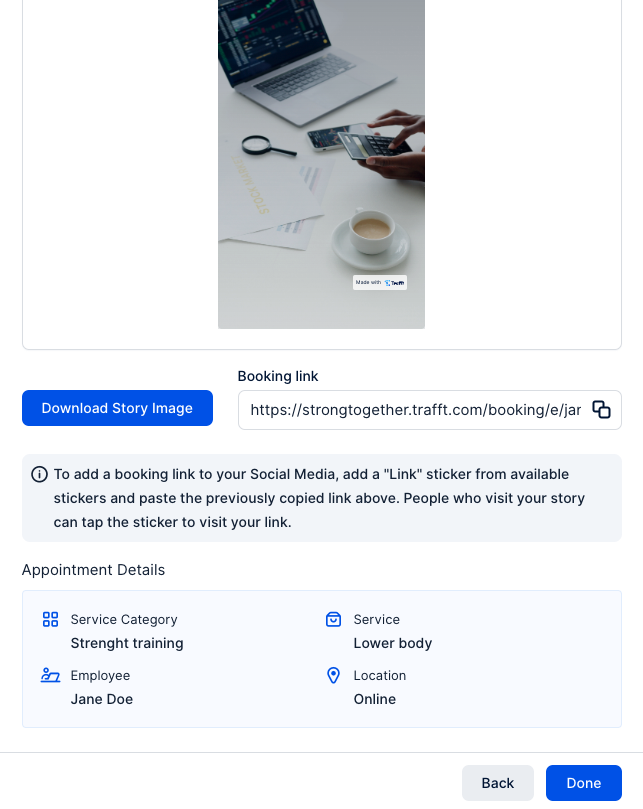
generated link for social media

Now that you know all the options Trafft gives you to share appointments with your clients, you can streamline your booking process in no time! Log in and give it a try!


Essayez gratuitement