
Begrenzte Zeit Begrenzte Zeit
Stürzen Sie sich in das Unternehmenswachstum
Bis zu 20%Off
Mit einem Gutscheincode BFCM70
Bis zu 20%Off
Schnapp dir das Angebot
ÜBERBLICK ÜBER FUNKTIONEN UND INTEGRATIONEN
  • Alle Funktionen
    Alle Funktionen

    Benachrichtigungen, Zeitzonen, Extras, Gutscheine, Rückerstattungen und mehr

  • Alle Integrationen
    Alle Integrationen

    WhatsApp, PayPal, Teams, Zoom, Zapier, Google Kalender und mehr

  • Über Google reservieren
    Über Google reservieren

    Buchungen über die Google Suche und Maps annehmen

  • WordPress-Plugin
    WordPress-Plugin

    Fügen Sie das Trafft-Buchungsformular zu jeder Seite Ihrer WordPress-Website hinzu

    Ressourcen
  • Trafft-Blog
    Blog 2
    Trafft-Blog

    Informieren Sie sich über die neuesten Informationen zu Branchentrends und holen Sie sich Tipps für die Führung eines Online-Dienstleistungsunternehmens

  • Anleitungen und Dokumentation
    Dokumente-2
    Anleitungen und Dokumentation

    Erhalten Sie eine detaillierte Erklärung, wie jede Trafft-Funktion und -Integration funktioniert

  • Unsere Geschichte Unsere Geschichte

    Lesen Sie über die Geschichte, Mission und die gemeinsamen Werte von Trafft

  • Investor Relations Investor Relations

    Melden Sie sich bei uns, wenn Sie daran interessiert sind, in Trafft zu investieren.

  • Affiliate-Partner Affiliate-Partner

    Begleiten Sie uns auf unserem Weg, Dienstleistungsunternehmen durch Automatisierung zum Erfolg zu verhelfen.

  • Warum Trafft Warum Trafft

    Erfahren Sie mehr darüber, warum Sie sich für Trafft entscheiden sollten

  • Partner Partner

    Werden Sie Partner von Trafft und erweitern Sie Ihre Reichweite auf dem Markt

  • Kontaktieren Sie uns Kontaktieren Sie uns

    Bei Fragen oder Anregungen können Sie sich gerne an mich wenden.

Funktionen
ÜBERBLICK ÜBER FUNKTIONEN UND INTEGRATIONEN
  • Alle Funktionen Alle Funktionen

    Benachrichtigungen, Zeitzonen, Extras, Gutscheine, Rückerstattungen und mehr

  • Alle Integrationen Alle Integrationen

    WhatsApp, PayPal, Teams, Zoom, Zapier, Google Kalender und mehr

  • Über Google reservieren Über Google reservieren

    Buchungen über die Google Suche und Maps annehmen

  • WordPress-Plugin WordPress-Plugin

    Fügen Sie das Trafft-Buchungsformular zu jeder Seite Ihrer WordPress-Website hinzu

Ressourcen
    Ressourcen
  • Trafft-Blog

    Informieren Sie sich über die neuesten Informationen zu Branchentrends und holen Sie sich Tipps für die Führung eines Online-Dienstleistungsunternehmens

    Blog 2
    Trafft-Blog
  • Anleitungen und Dokumentation

    Erhalten Sie eine detaillierte Erklärung, wie jede Trafft-Funktion und -Integration funktioniert

    Dokumente-2
    Anleitungen und Dokumentation
Über uns
  • Unsere Geschichte Unsere Geschichte

    Lesen Sie über die Geschichte, Mission und die gemeinsamen Werte von Trafft

  • Investor Relations Investor Relations

    Melden Sie sich bei uns, wenn Sie daran interessiert sind, in Trafft zu investieren.

  • Affiliate-Partner Affiliate-Partner

    Begleiten Sie uns auf unserem Weg, Dienstleistungsunternehmen durch Automatisierung zum Erfolg zu verhelfen.

  • Warum Trafft Warum Trafft

    Erfahren Sie mehr darüber, warum Sie sich für Trafft entscheiden sollten

  • Partner Partner

    Werden Sie Partner von Trafft und erweitern Sie Ihre Reichweite auf dem Markt

  • Kontaktieren Sie uns Kontaktieren Sie uns

    Bei Fragen oder Anregungen können Sie sich gerne an mich wenden.

Trafft Hacks: How to Set Employee Work Schedules

Startseite» Blog» Trafft Hacks: How to Set Employee Work Schedules
how to set working hours with trafft cover image

Offering flexible working hours can significantly enhance your business operations, especially if you employ part-time staff or those with irregular schedules. This adaptability in Trafft’s booking system accommodates the unique needs of each employee. 

Let’s find out how to set employee working schedules in Trafft!

Working Hours In Trafft

When you’ve created your employees’ profiles, their working hours will automatically be set from 9 AM to 5 PM, Monday to Friday. However, you can change this to any working hours you prefer, directly within the employee profiles. This feature allows you to customize shifts according to your business needs, employee availability, or seasonal fluctuations.
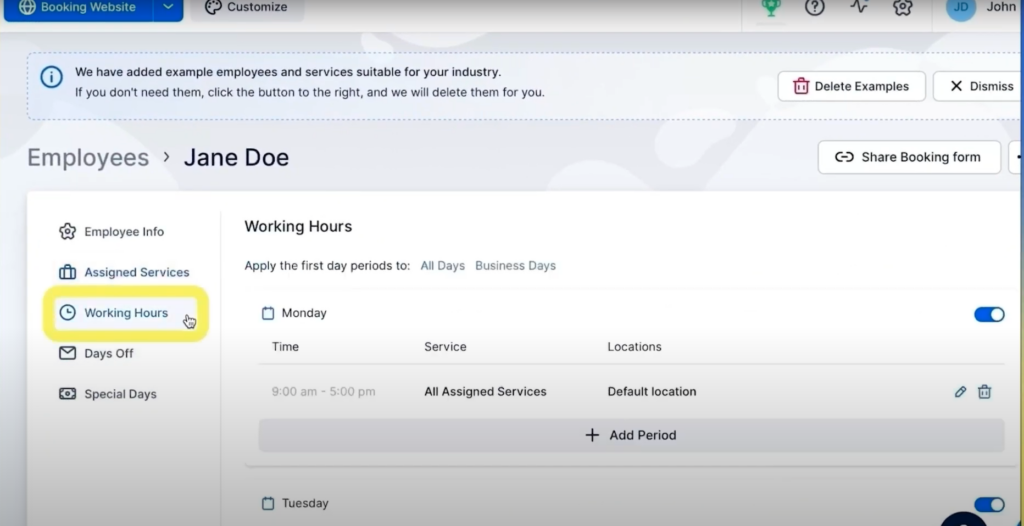
employee working hours trafft

After selecting an employee whose working hours you wish to change, navigate to the Working Hours tab on the left.

From here, click on the pencil icon on the right. You can set different working hours for each day of the week, choose the services this employee provides, and the location they work at.
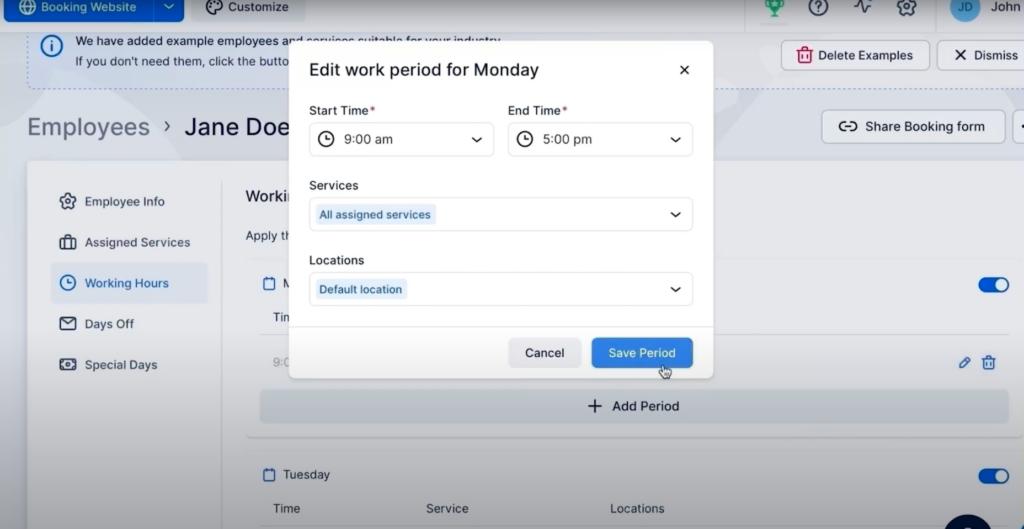
edit work period trafft scheduling software

How Does Setting Up Working Hours Work in Practice?

For instance, consider an employee whose schedule includes working only on Mondays. They start their day at 9 AM and work until 11 AM, take an hour-long break from 11 AM to 12 PM, and then resume work from 12 PM until 3 PM.

How do you set this up?

Firstly, disable working hours for all the other days of the week with the toggle button on the right, and leave only Monday.
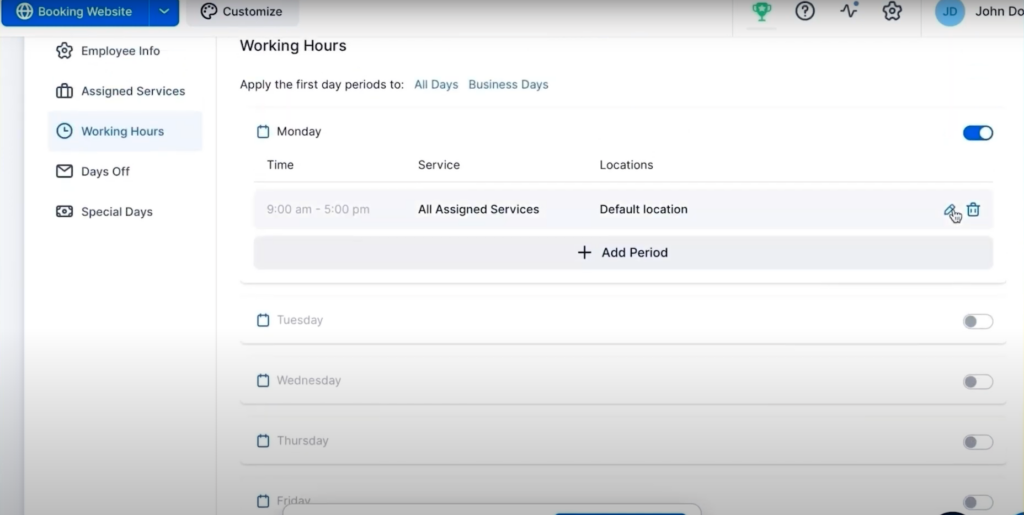
edit work days trafft scheduling software

Next, click on the pencil icon on the right to open the editing box, and enter the working hours from 9 AM to 11 AM, and the service they provide.
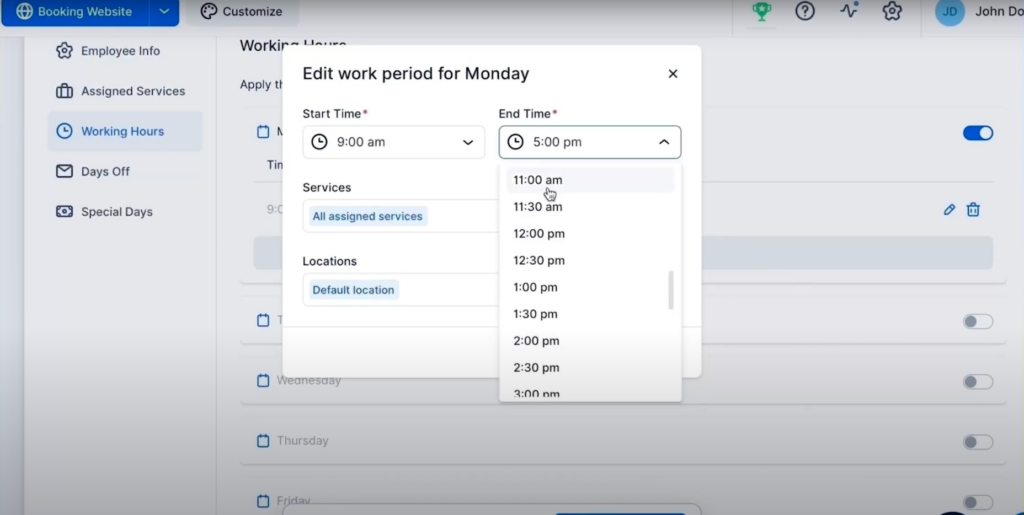
edit working hours trafft scheduling software

Click on the Save Period button to set their working hours for the first part of the day.

To add the working hours in the second part of the day, click on the +Add Period button.
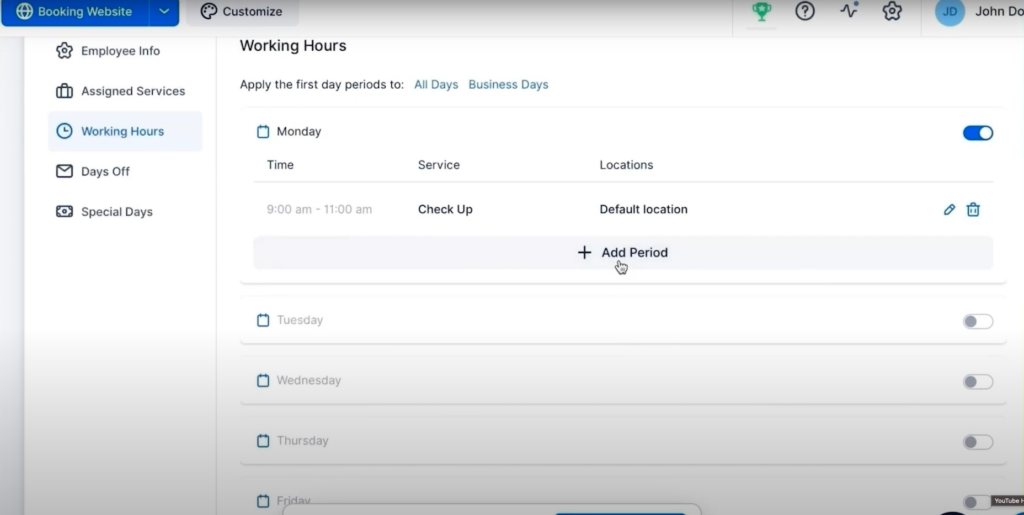
add working period trafft scheduling software

Next, edit the working hours and service for the second part of the day.
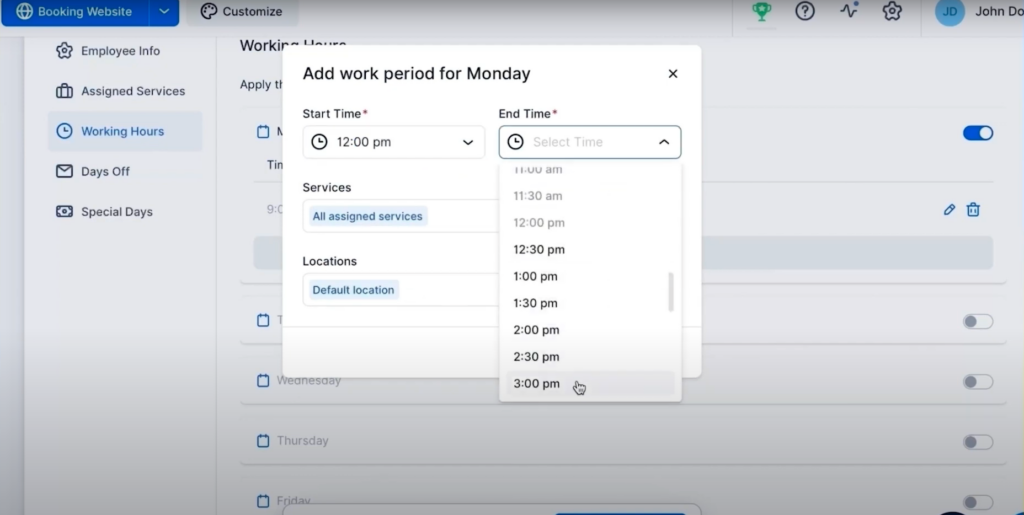
edit working hours trafft scheduling software

That’s it, you’ve successfully set up working hours for your employees!

The time period between 11 AM and 12 PM will act as a break. Your clients won’t be able to book this employee in this time period.

If you have employees who work in multiple locations during the week, simply choose the location for every day of the week.

Don't forget to check our video tutorial:

Read more Trafft hacks:

Jetzt kostenlos testen