Tiempo limitado Tiempo limitado
Caiga en el crecimiento empresarial
Hasta 20%Off
Con un código de descuento BFCM70
Hasta 20%Off
Aprovecha la oferta
RESUMEN DE CARACTERÍSTICAS E INTEGRACIONES
  • Todas las funciones
    Todas las funciones

    Notificaciones, Zonas horarias, Extras, Cupones, Reembolsos y más

  • Todas las integraciones
    Todas las integraciones

    Whatsapp, Paypal, Teams, Zoom, Zapier, Google Calendar y más

  • Reservar con Google
    Reservar con Google

    Acepta reservas a través de la Búsqueda y Maps de Google

  • Complemento de WordPress
    Complemento de WordPress

    Añade el formulario de reservas de Trafft a cualquier página de tu sitio web de WordPress

    Recursos
  • Blog de Trafft
    blog-2
    Blog de Trafft

    Consulta la información más reciente sobre las tendencias de la industria y obtén asesoramiento para administrar un negocio de servicios en línea

  • Guías y documentación
    documentos-2
    Guías y documentación

    Obtén una explicación detallada de cómo funciona cada función e integración de Trafft

  • Nuestra Historia Nuestra Historia

    Lee sobre la historia, la misión y los valores que compartimos de Trafft

  • Relación con Inversores Relación con Inversores

    Contáctanos si estás interesado en invertir en Trafft

  • Socios afiliados Socios afiliados

    Únete a nosotros en nuestro viaje para ayudar a las empresas de servicios a prosperar a través de la automatización

  • ¿Por qué Trafft ¿Por qué Trafft

    Obtén más información sobre por qué deberías elegir Trafft

  • Socios Socios

    Asóciate con Trafft y expande tu alcance en el mercado

  • Contáctenos Contáctenos

    No dudes en ponerte en contacto si tienes alguna pregunta o sugerencia

Características
RESUMEN DE CARACTERÍSTICAS E INTEGRACIONES
Recursos
    Recursos
  • Blog de Trafft

    Consulta la información más reciente sobre las tendencias de la industria y obtén asesoramiento para administrar un negocio de servicios en línea

    blog-2
    Blog de Trafft
  • Guías y documentación

    Obtén una explicación detallada de cómo funciona cada función e integración de Trafft

    documentos-2
    Guías y documentación
Sobre nosotros
  • Nuestra Historia Nuestra Historia

    Lee sobre la historia, la misión y los valores que compartimos de Trafft

  • Relación con Inversores Relación con Inversores

    Contáctanos si estás interesado en invertir en Trafft

  • Socios afiliados Socios afiliados

    Únete a nosotros en nuestro viaje para ayudar a las empresas de servicios a prosperar a través de la automatización

  • ¿Por qué Trafft ¿Por qué Trafft

    Obtén más información sobre por qué deberías elegir Trafft

  • Socios Socios

    Asóciate con Trafft y expande tu alcance en el mercado

  • Contáctenos Contáctenos

    No dudes en ponerte en contacto si tienes alguna pregunta o sugerencia

Trafft Hacks: How to Set Employee Work Schedules

Inicio» Blog» Trafft Hacks: How to Set Employee Work Schedules
how to set working hours with trafft cover image

Offering flexible working hours can significantly enhance your business operations, especially if you employ part-time staff or those with irregular schedules. This adaptability in Trafft’s booking system accommodates the unique needs of each employee. 

Let’s find out how to set employee working schedules in Trafft!

Working Hours In Trafft

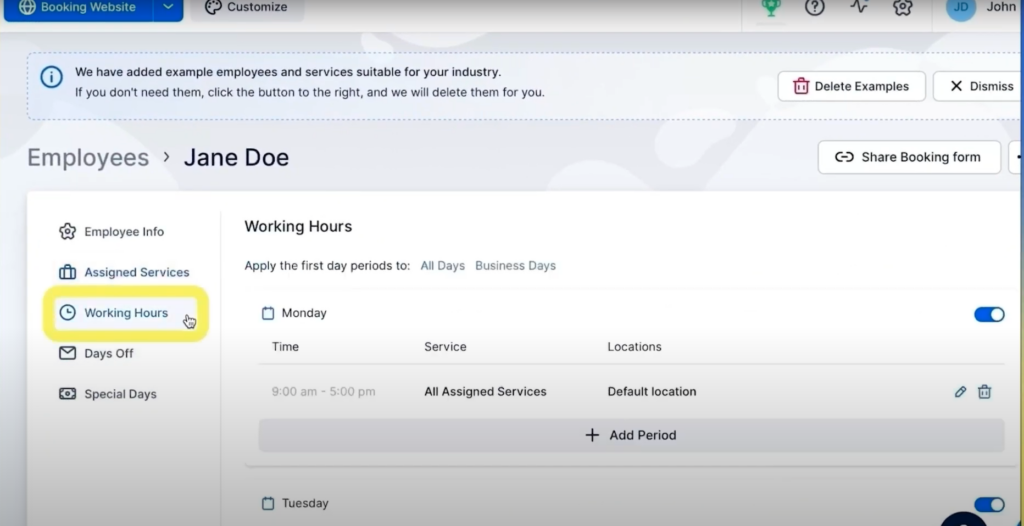
When you’ve created your employees’ profiles, their working hours will automatically be set from 9 AM to 5 PM, Monday to Friday. However, you can change this to any working hours you prefer, directly within the employee profiles. This feature allows you to customize shifts according to your business needs, employee availability, or seasonal fluctuations.
employee working hours trafft

After selecting an employee whose working hours you wish to change, navigate to the Working Hours tab on the left.

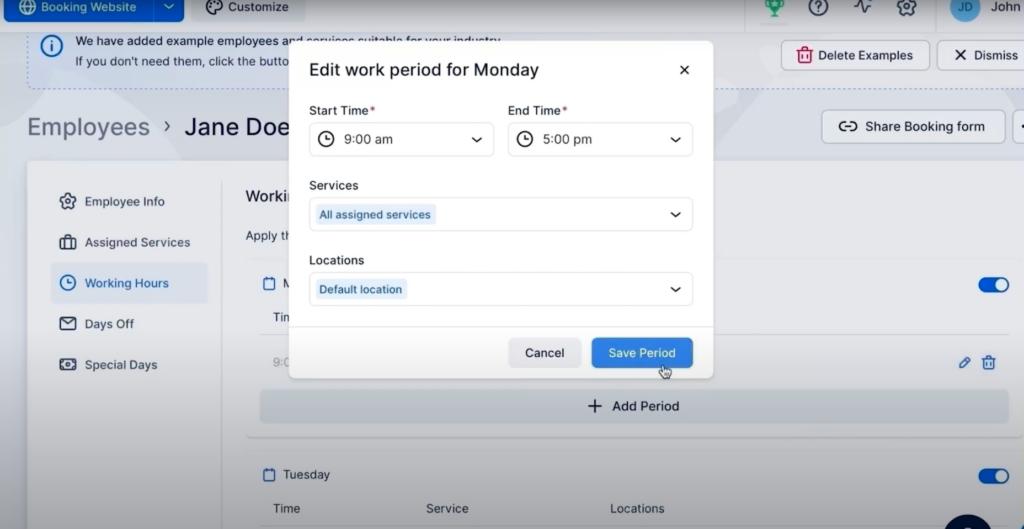
From here, click on the pencil icon on the right. You can set different working hours for each day of the week, choose the services this employee provides, and the location they work at.
edit work period trafft scheduling software

How Does Setting Up Working Hours Work in Practice?

For instance, consider an employee whose schedule includes working only on Mondays. They start their day at 9 AM and work until 11 AM, take an hour-long break from 11 AM to 12 PM, and then resume work from 12 PM until 3 PM.

How do you set this up?

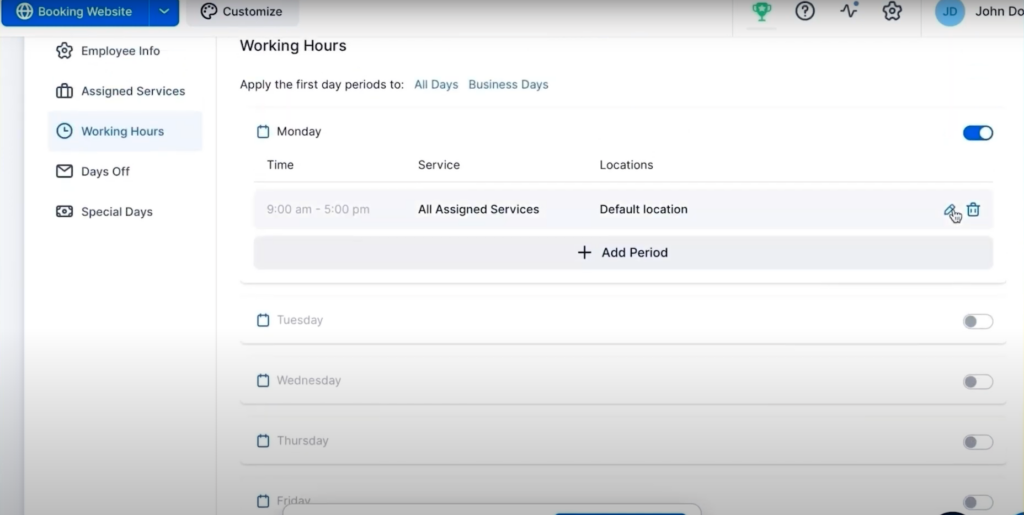
Firstly, disable working hours for all the other days of the week with the toggle button on the right, and leave only Monday.
edit work days trafft scheduling software

Next, click on the pencil icon on the right to open the editing box, and enter the working hours from 9 AM to 11 AM, and the service they provide.
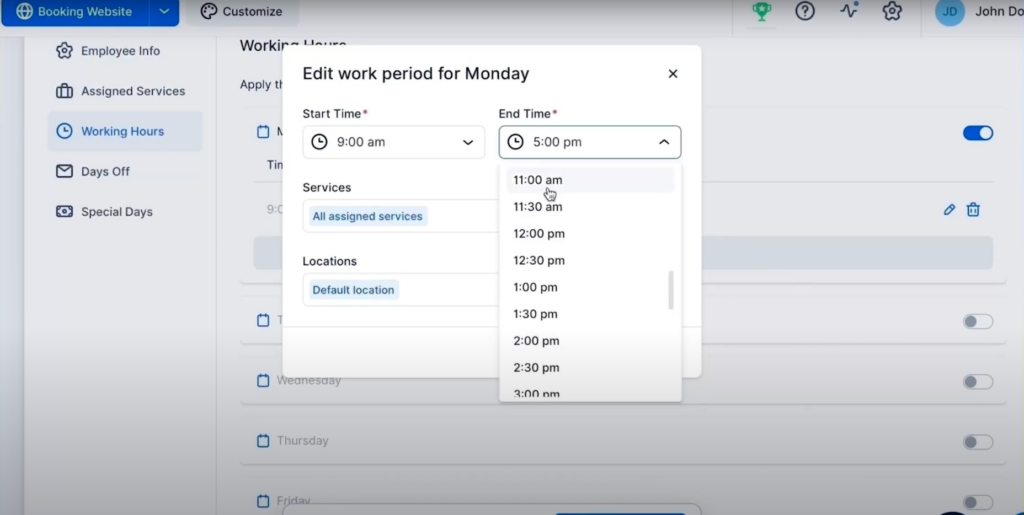
edit working hours trafft scheduling software

Click on the Save Period button to set their working hours for the first part of the day.

To add the working hours in the second part of the day, click on the +Add Period button.
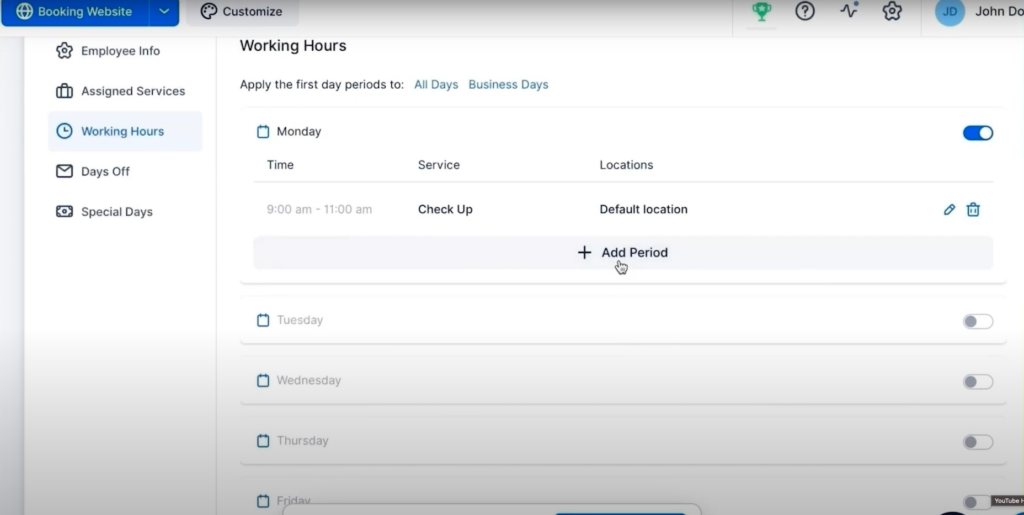
add working period trafft scheduling software

Next, edit the working hours and service for the second part of the day.
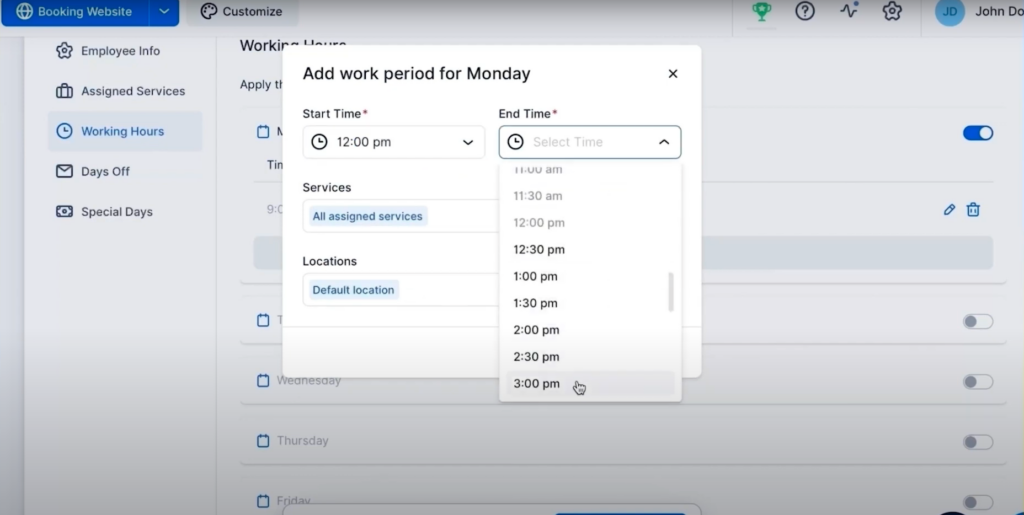
edit working hours trafft scheduling software

That’s it, you’ve successfully set up working hours for your employees!

The time period between 11 AM and 12 PM will act as a break. Your clients won’t be able to book this employee in this time period.

If you have employees who work in multiple locations during the week, simply choose the location for every day of the week.

Don't forget to check our video tutorial:

Read more Trafft hacks:

Pruébalo gratis