Durée limitée Durée limitée
Plongez dans la croissance de votre entreprise
Jusqu'à 20%Off
Avec un code promo BFCM70
Jusqu'à 20%Off
Profitez de l'offre
APERÇU DES FONCTIONNALITÉS ET INTÉGRATIONS
  • Toutes les fonctionnalités
    Toutes les fonctionnalités

    Notifications, Fuseaux horaires, Extras, Coupons, Remboursements, et plus

  • Toutes les intégrations
    Toutes les intégrations

    WhatsApp, PayPal, Teams, Zoom, Zapier, Google Agenda et bien plus encore

  • Réserver avec Google
    Réserver avec Google

    Acceptez des réservations via la Recherche Google et Maps

  • Extension WordPress
    Extension WordPress

    Ajoutez le formulaire de réservation Trafft à n'importe quelle page de votre site Web WordPress

    Ressources
  • Blog Trafft
    blogue-2
    Blog Trafft

    Consultez les dernières informations sur les tendances du secteur et obtenez des conseils pour gérer une entreprise de services en ligne

  • Guides et documentation
    docs-2
    Guides et documentation

    Obtenez une explication détaillée du fonctionnement de chaque fonctionnalité et intégration de Trafft

  • Notre histoire Notre histoire

    Lisez l'histoire, la mission et les valeurs que nous partageons de Trafft

  • Relations investisseurs Relations investisseurs

    Contactez-nous si vous souhaitez investir dans Trafft

  • Partenaires affiliés Partenaires affiliés

    Rejoignez-nous dans notre mission d'aider les entreprises de services à prospérer grâce à l'automatisation

  • Pourquoi Trafft Pourquoi Trafft

    En savoir plus sur les raisons de choisir Trafft

  • Partenaires Partenaires

    Devenez partenaire de Trafft et étendez votre portée sur le marché

  • Contactez-nous Contactez-nous

    N'hésitez pas à nous contacter si vous avez des questions ou des suggestions.

Fonctionnalités
APERÇU DES FONCTIONNALITÉS ET INTÉGRATIONS
  • Toutes les fonctionnalités Toutes les fonctionnalités

    Notifications, Fuseaux horaires, Extras, Coupons, Remboursements, et plus

  • Toutes les intégrations Toutes les intégrations

    WhatsApp, PayPal, Teams, Zoom, Zapier, Google Agenda et bien plus encore

  • Réserver avec Google Réserver avec Google

    Acceptez des réservations via la Recherche Google et Maps

  • Extension WordPress Extension WordPress

    Ajoutez le formulaire de réservation Trafft à n'importe quelle page de votre site Web WordPress

Ressources
    Ressources
  • Blog Trafft

    Consultez les dernières informations sur les tendances du secteur et obtenez des conseils pour gérer une entreprise de services en ligne

    blogue-2
    Blog Trafft
  • Guides et documentation

    Obtenez une explication détaillée du fonctionnement de chaque fonctionnalité et intégration de Trafft

    docs-2
    Guides et documentation
À propos de nous
  • Notre histoire Notre histoire

    Lisez l'histoire, la mission et les valeurs que nous partageons de Trafft

  • Relations investisseurs Relations investisseurs

    Contactez-nous si vous souhaitez investir dans Trafft

  • Partenaires affiliés Partenaires affiliés

    Rejoignez-nous dans notre mission d'aider les entreprises de services à prospérer grâce à l'automatisation

  • Pourquoi Trafft Pourquoi Trafft

    En savoir plus sur les raisons de choisir Trafft

  • Partenaires Partenaires

    Devenez partenaire de Trafft et étendez votre portée sur le marché

  • Contactez-nous Contactez-nous

    N'hésitez pas à nous contacter si vous avez des questions ou des suggestions.

Trafft Hacks: How to Gather Customer Feedback with Ratings and Reviews

Accueil» Blogue» Trafft Hacks: How to Gather Customer Feedback with Ratings and Reviews
how to gather customer feedback with ratings and reviews cover image

Customer feedback can truly be a powerhouse that drives your business growth. It offers crucial insights into customer experiences, helping you identify strengths and uncover areas for improvement. But in order to leverage this goldmine, you first need to successfully collect it.

Normally, gathering feedback requires a lot of strategic planning and thoughtful execution. However, with Trafft, this task doesn’t have to be such a difficult undertaking.

In the next few segments, we’ll help you learn how to gather customer feedback with ratings and reviews. From enabling it to setting it up, we’ll cover everything needed to prepare you for success.

How to Enable the Ratings and Reviews Feature

If you are looking to gain insights into customer satisfaction and improve your services based on real-time feedback, here is how to activate Ratings and Reviews for your account:

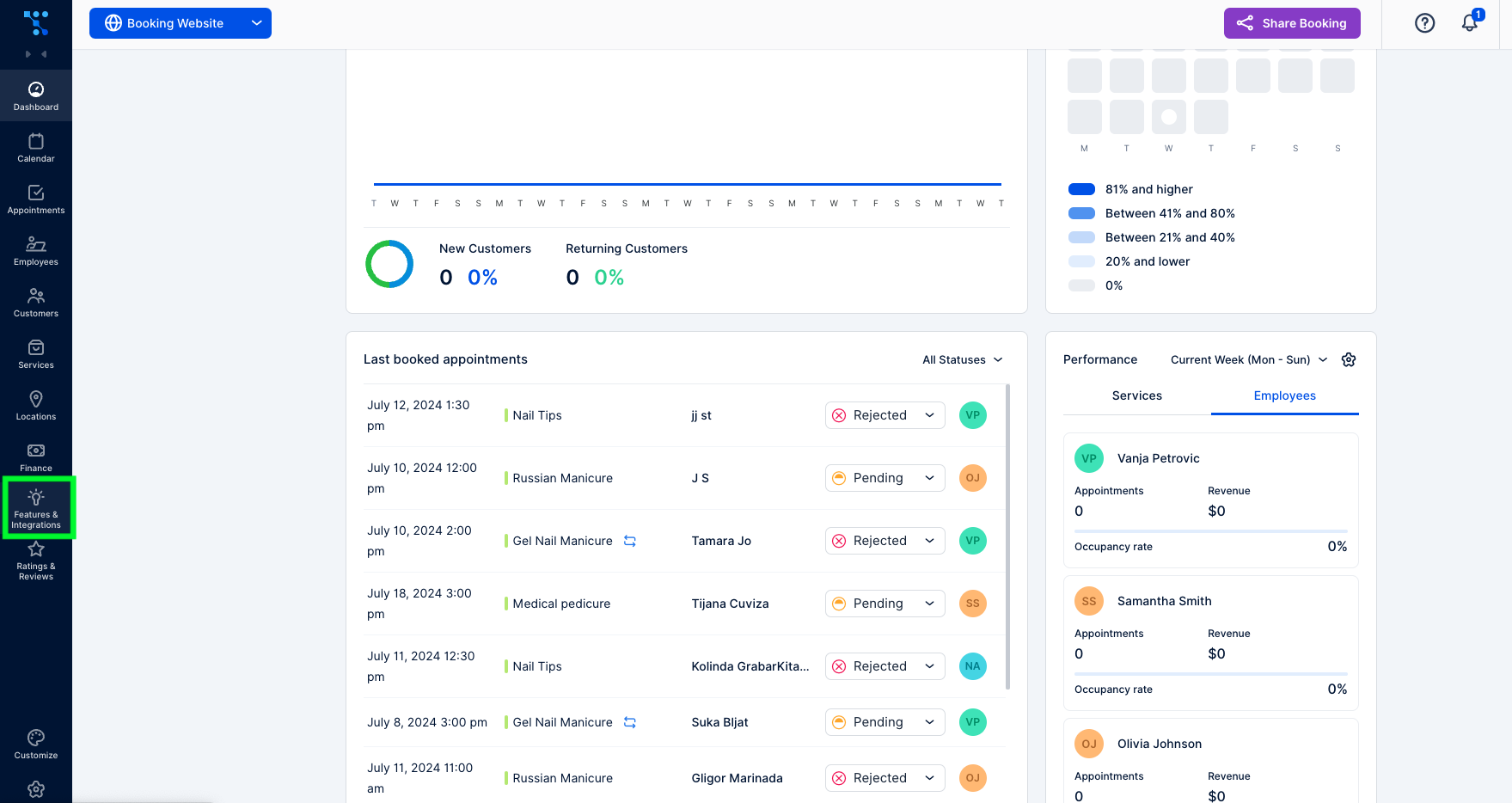
  1. After logging into your Trafft account, navigate to the “Features & Integration” sectionTrafft dashboard
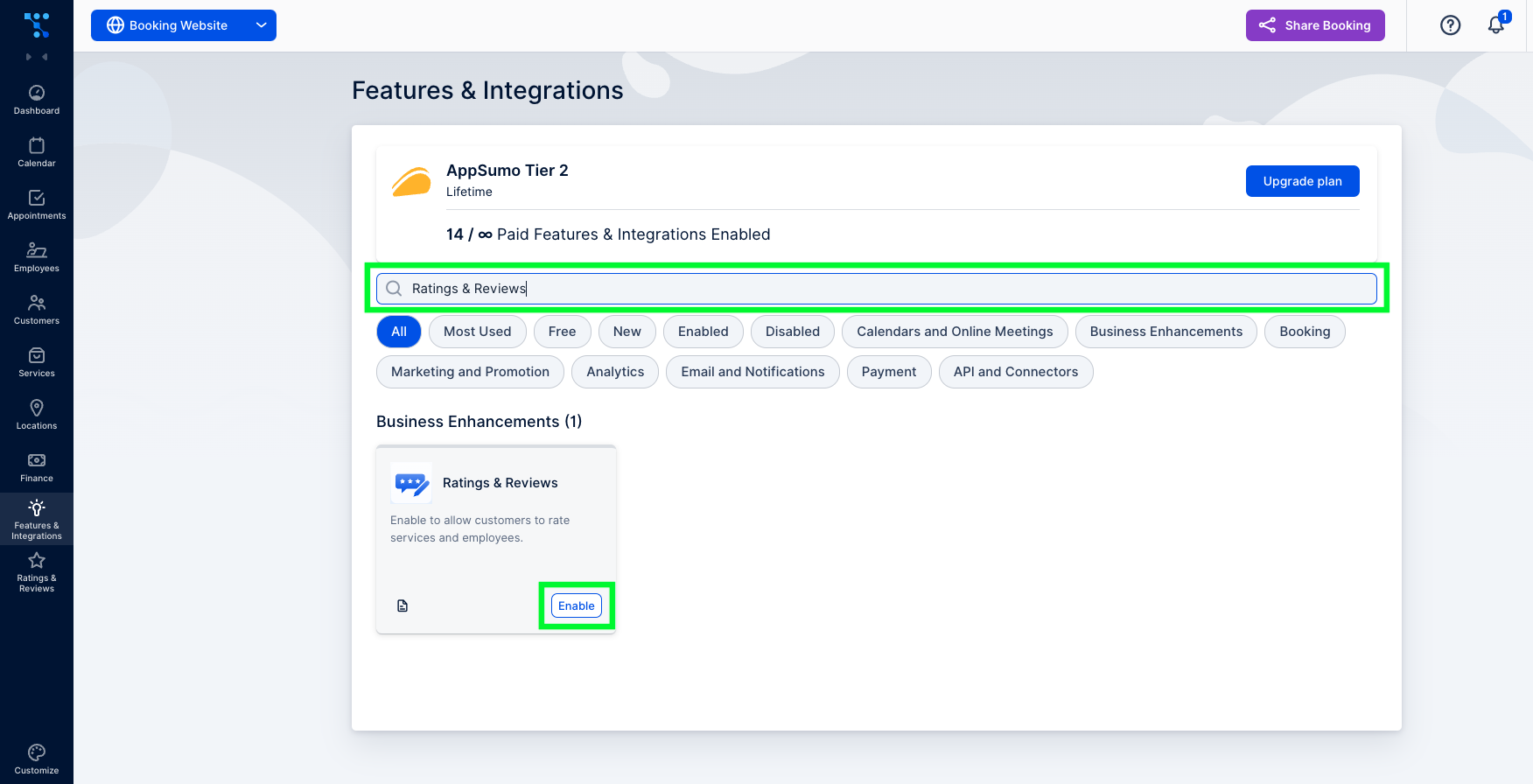
  2. In the search bar, type in “Ratings & Reviews” and click on the “Enable” buttonTrafft's features and integrations tab
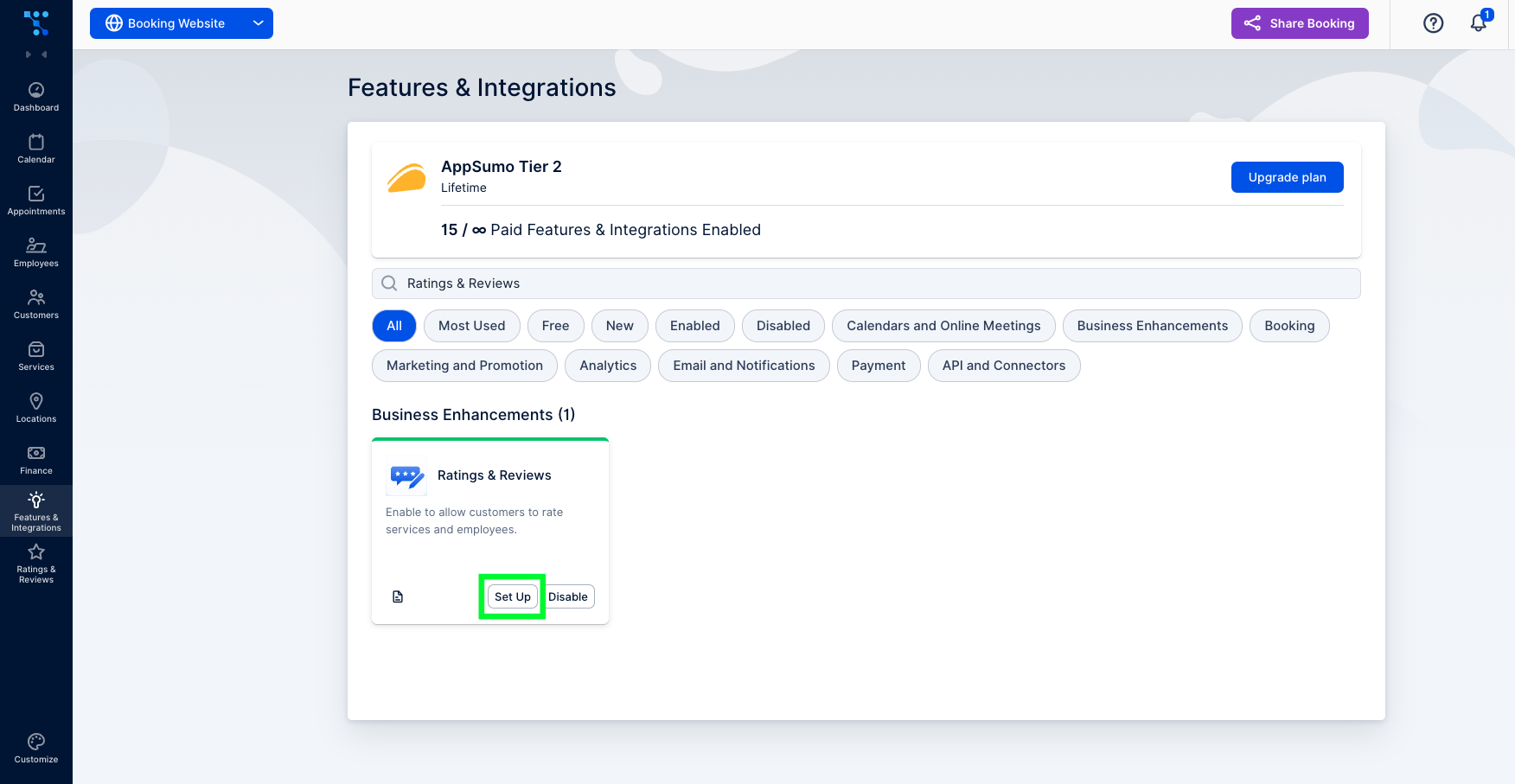
  3. Once activated, the setup button will appear.Trafft's ratings and reviews feature set up

How to Set up the Ratings and Reviews Feature?

Now that you’ve enabled this feature on your account, you can either click on the “Set Up” button or follow these steps:

1. Go to the “Rating & Reviews” section. Initially, this section will be empty since you don’t have any reviews yet. But once you do, you’ll have an option to filter reviews by most recent or by their rating. You can also filter them based on review status.
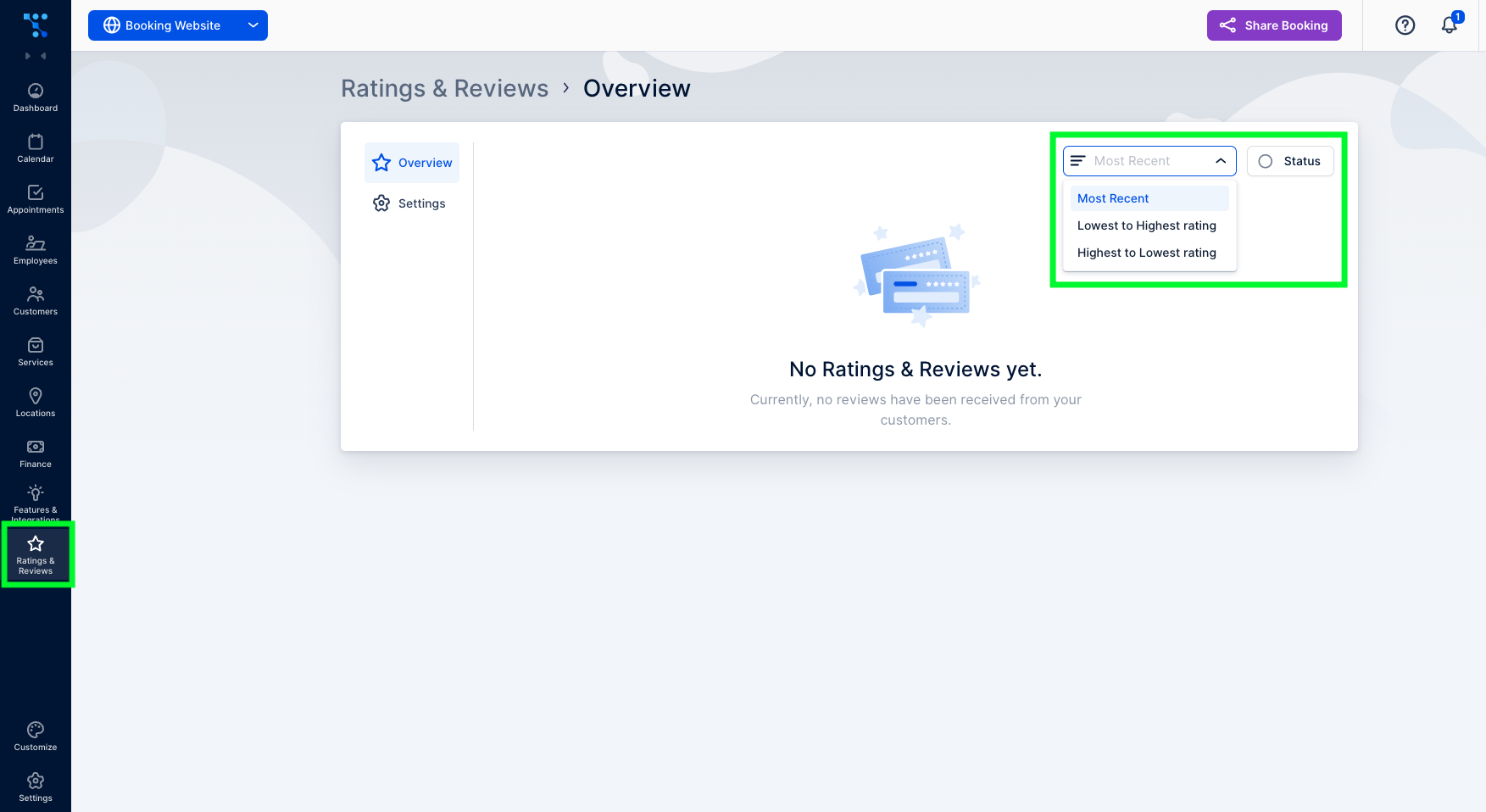
Ratings and reviews tab in Trafft

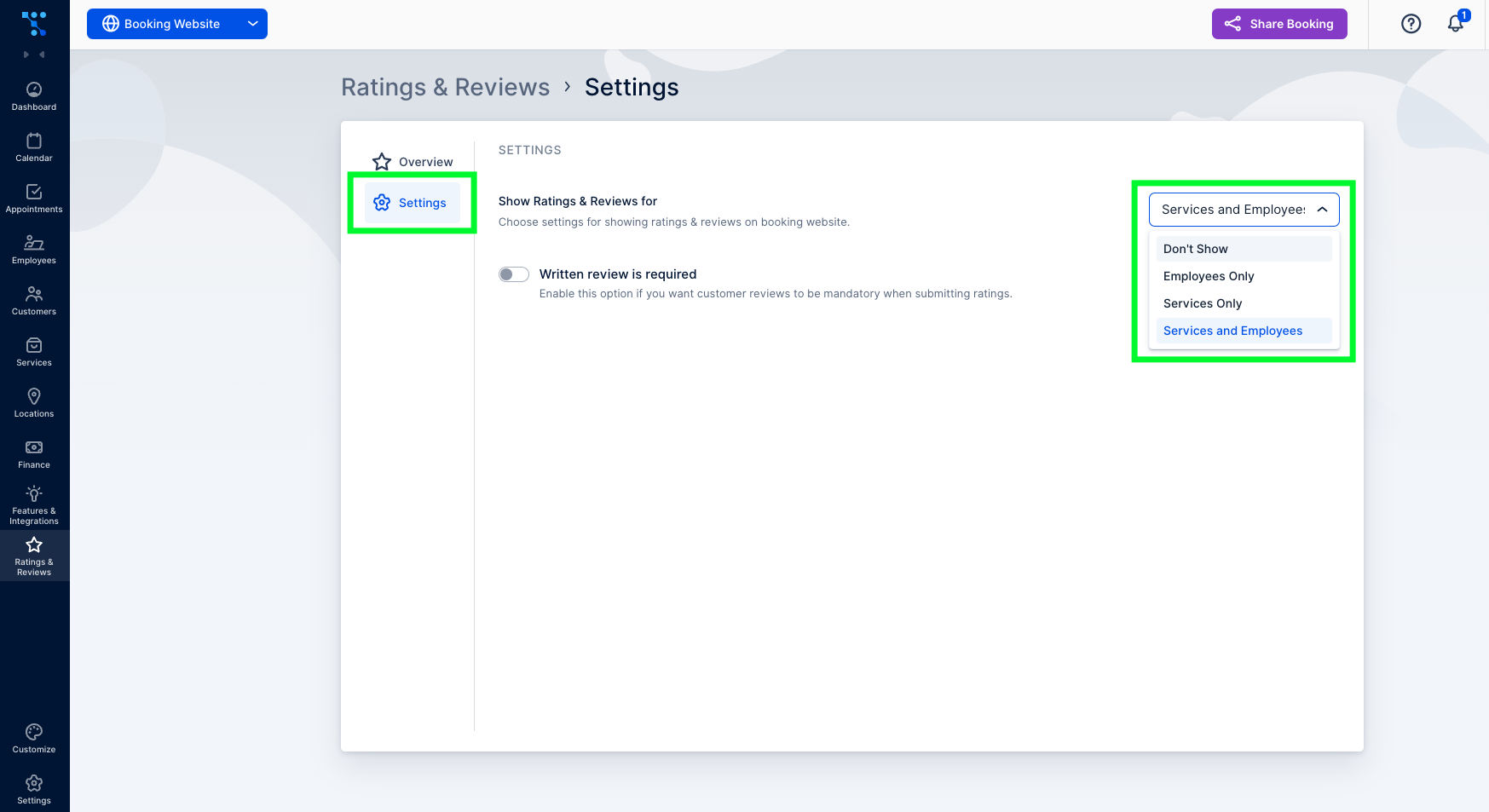
2. Under the “Settings” tab, you can choose how the reviews will appear on your booking website. You can choose between showing them under both employees and services, under only employees or services, or not showing them at all.Ratings and reviews settings
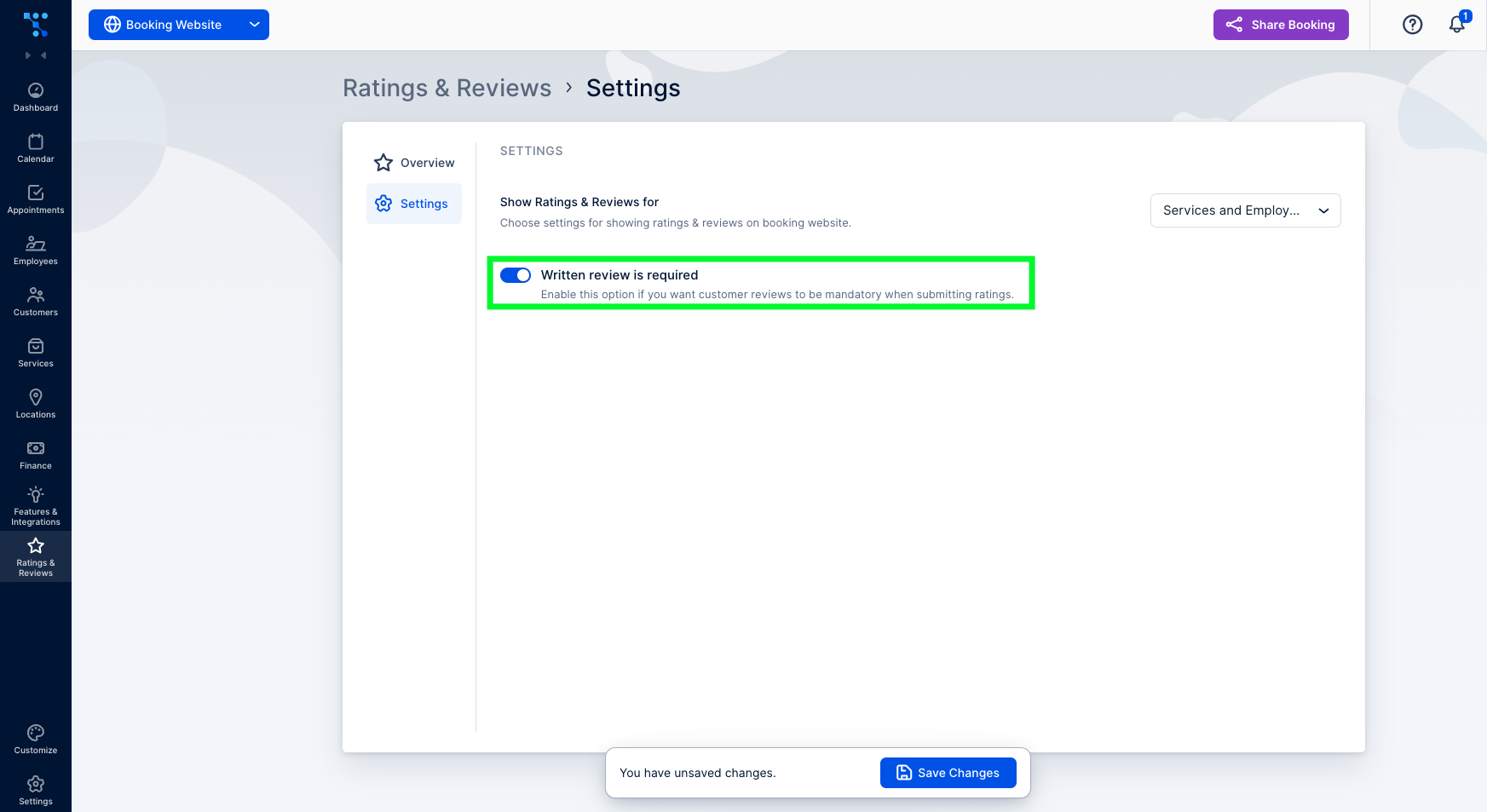
3. Here, you can also enable the required written review alongside the star rating. This ensures that customers provide feedback explaining their ratings.how to enable required written reviews
How to Ask For a Client Review?

To allow customers to leave a review, you must first send them a review link. Typically, this occurs after the appointment, but you can also include the necessary placeholder in any customer-related email notification template. To do so, follow these steps:

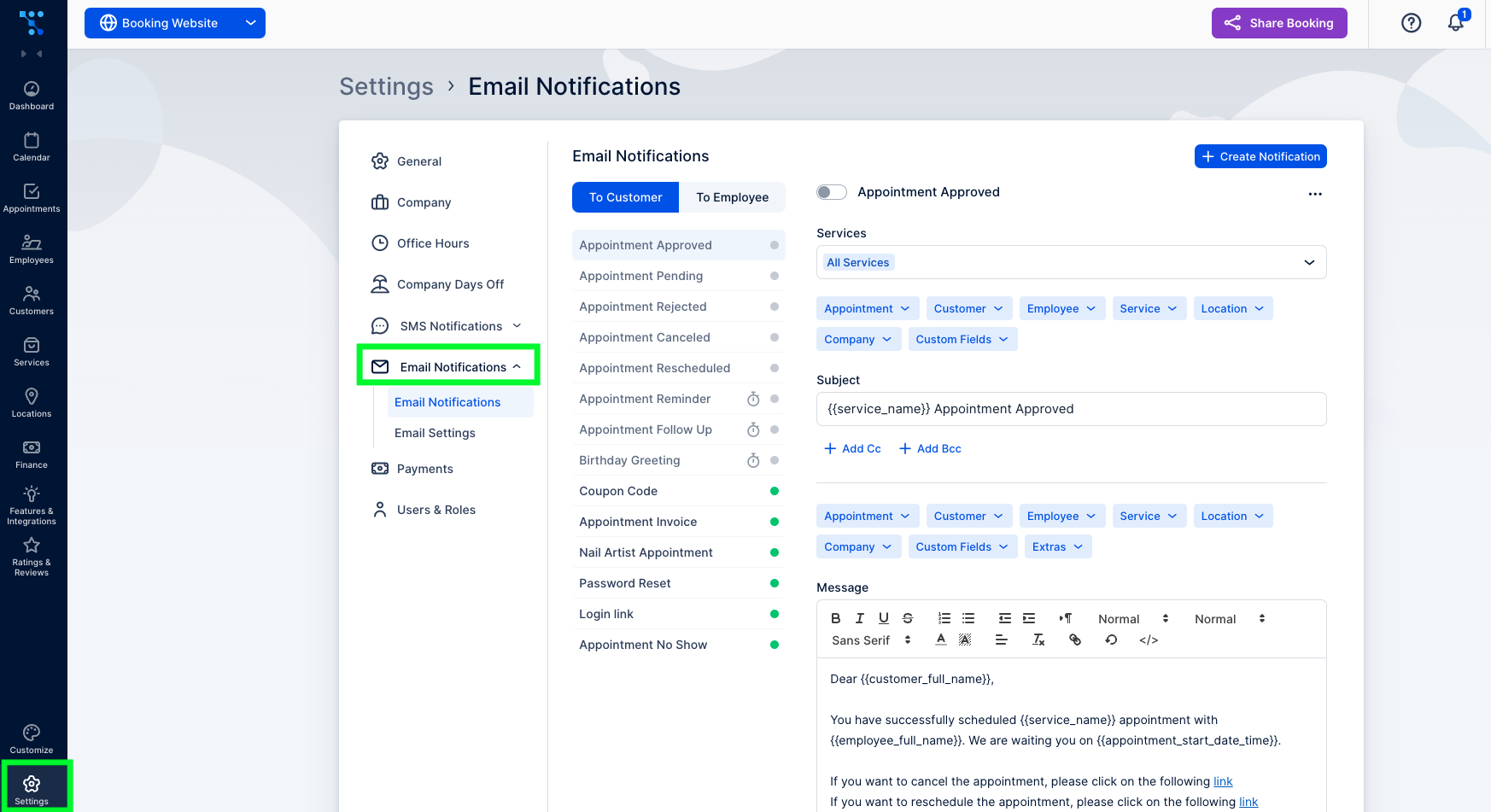
  1. Go to “Settings” and click on the “Email Notifications” tabHow to gather customer feedback with ratings and reviews using automated emails
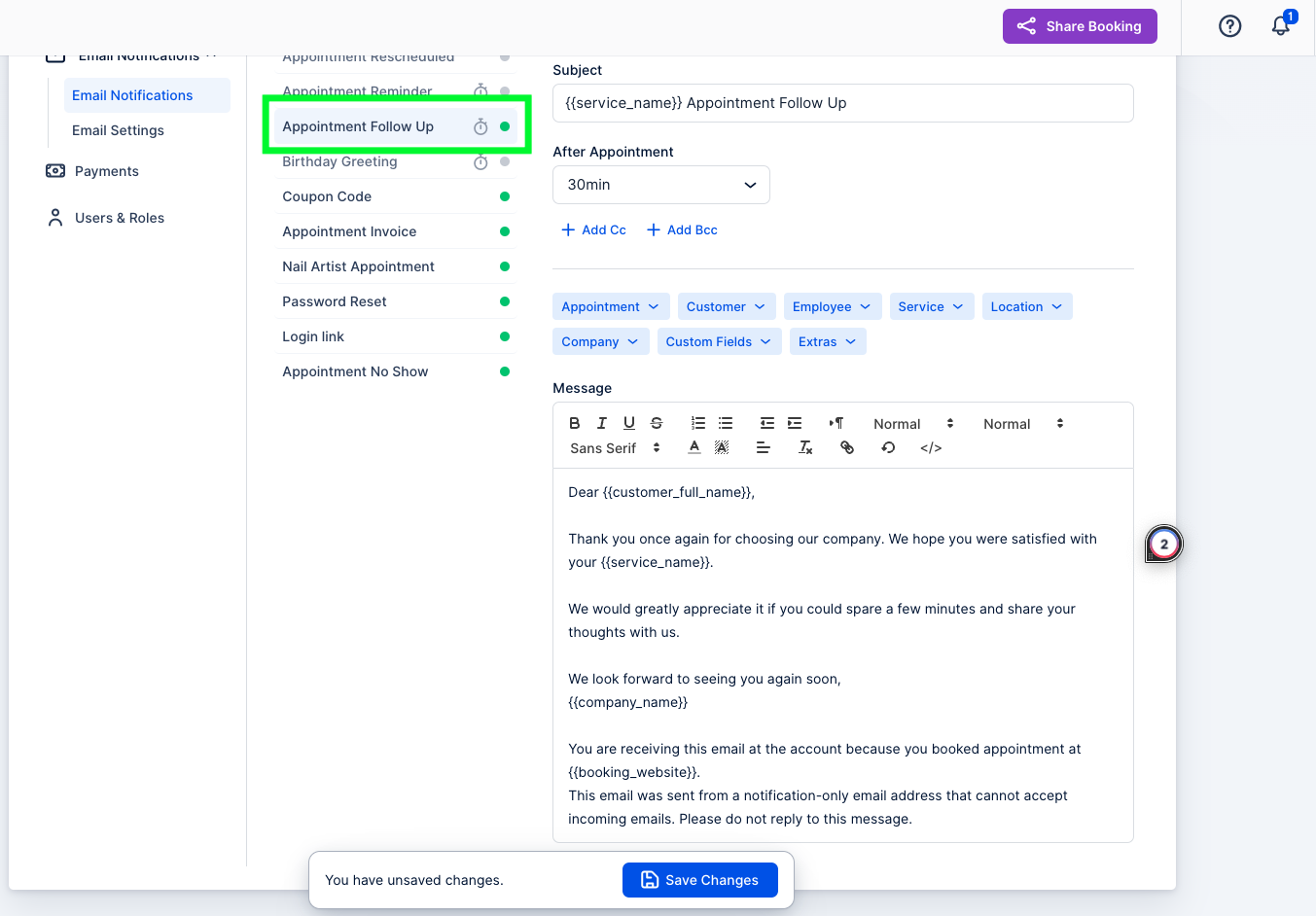
  2. Under “Email Notifications,” choose “Appointment Follow-Up,” as it is sent after the appointment.Setting up follow-up emails to gather customer feedback
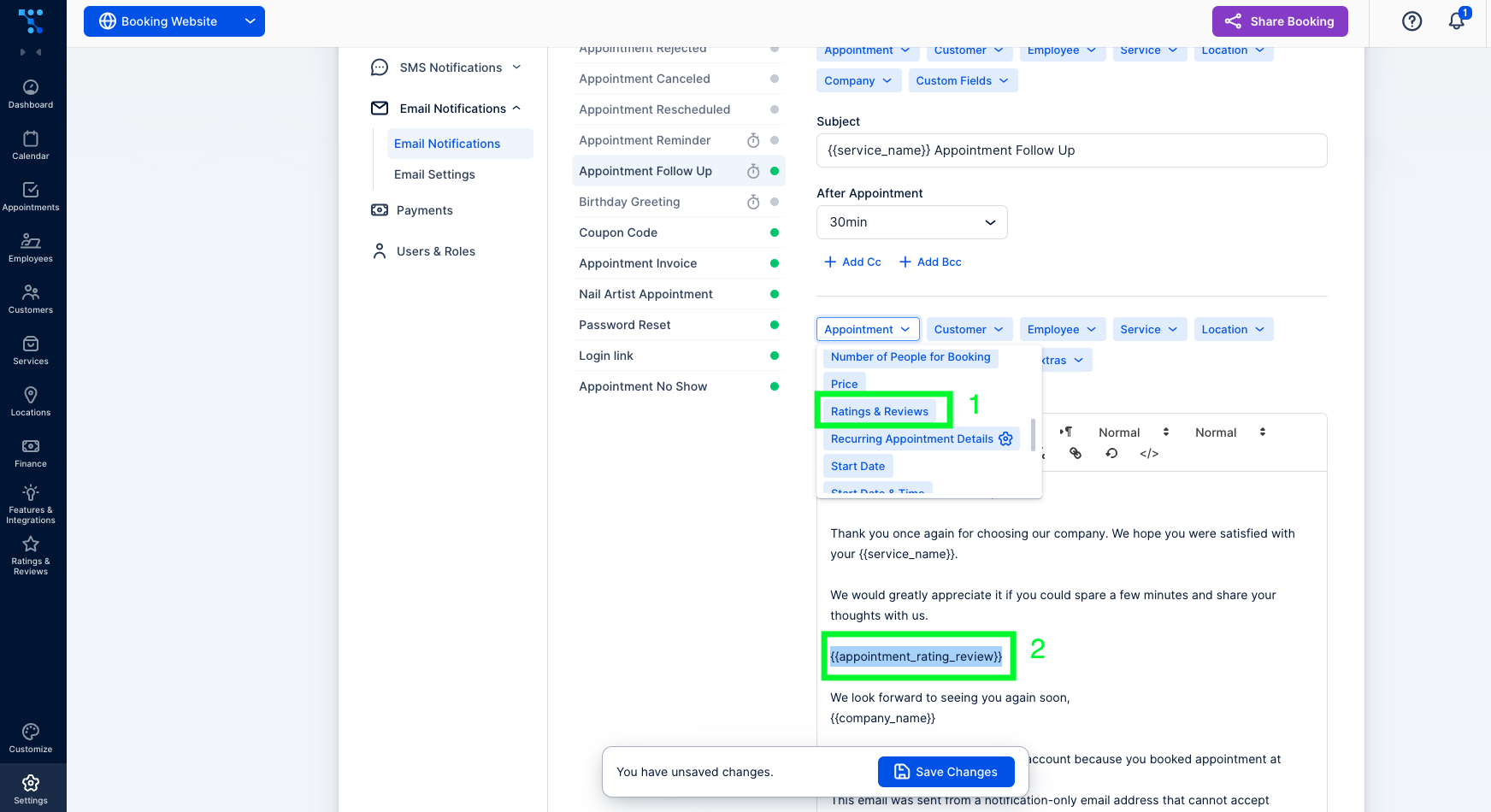
  3. In the “Message” section, insert a placeholder as a hyperlink in your email template. Remember that the link must be combined with the text to form a hyperlink.
  4. First, under the “Appointment” drop-down menu, select “Ratings & Reviews.” After the placeholder text has appeared in your message, copy it.Adding ratings and reviews placeholder in follow-up emails
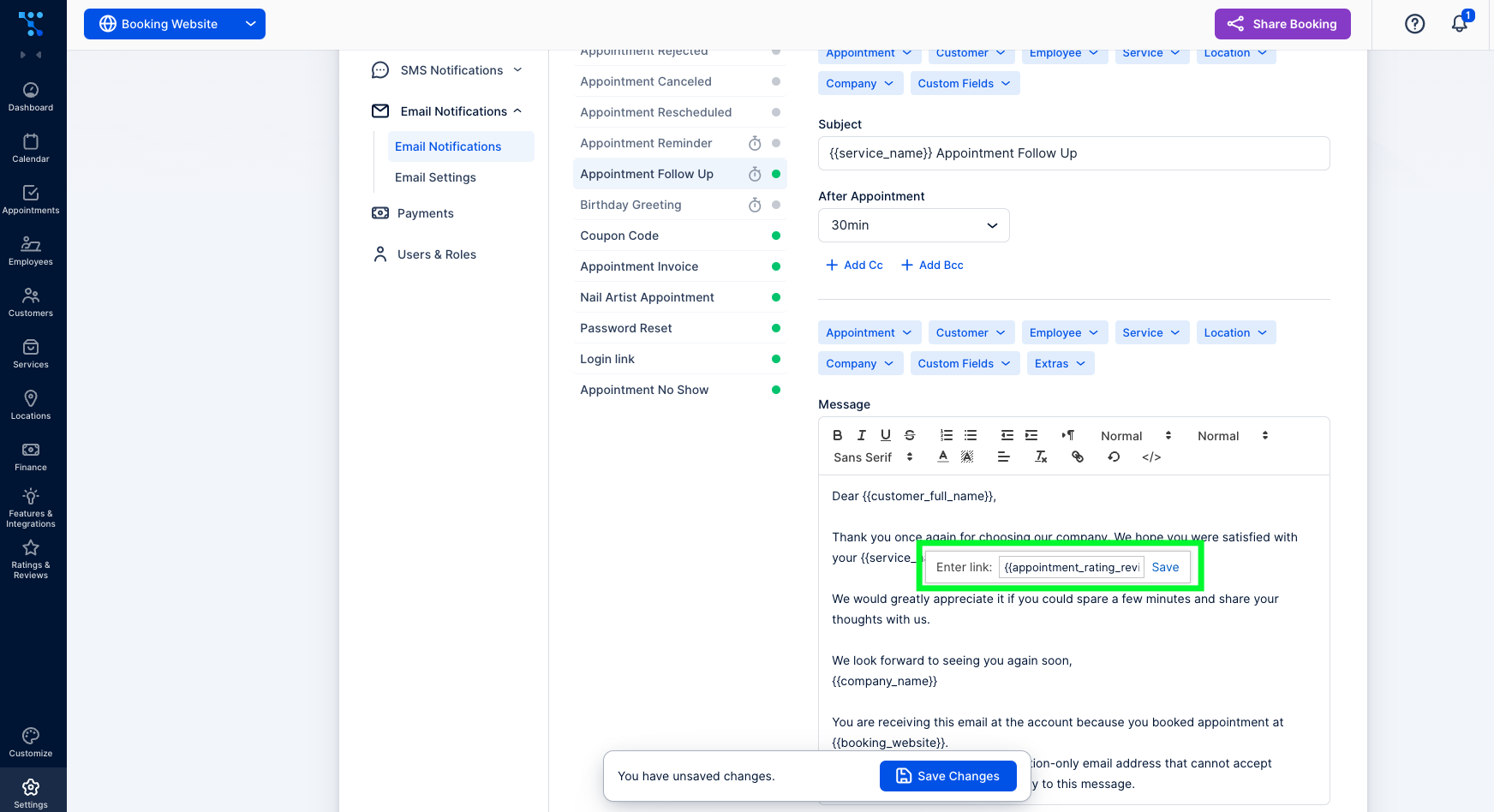
  5. Select the text you want to hyperlink and click on the “Chain icon.” In the pop-up window that appears, paste the appointment rating review placeholder and click on “Save.”Creating a hyperlink in a follow-up email for leaving a review

Lastly, keep in mind that both guest and registered customers can rate their experience on a scale of one to five stars and provide additional comments if desired or required.

And, that’s it! You’ve just successfully enabled and configured the Ratings and reviews feature. If you had any problems navigating through this written guide, here is everything in the video version:

Don’t forget to read more Trafft hacks:

Essayez gratuitement