Begrenzte Zeit Begrenzte Zeit
Stürzen Sie sich in das Unternehmenswachstum
Bis zu 20%Off
Mit einem Gutscheincode BFCM70
Bis zu 20%Off
Schnapp dir das Angebot
ÜBERBLICK ÜBER FUNKTIONEN UND INTEGRATIONEN
  • Alle Funktionen
    Alle Funktionen

    Benachrichtigungen, Zeitzonen, Extras, Gutscheine, Rückerstattungen und mehr

  • Alle Integrationen
    Alle Integrationen

    WhatsApp, PayPal, Teams, Zoom, Zapier, Google Kalender und mehr

  • Über Google reservieren
    Über Google reservieren

    Buchungen über die Google Suche und Maps annehmen

  • WordPress-Plugin
    WordPress-Plugin

    Fügen Sie das Trafft-Buchungsformular zu jeder Seite Ihrer WordPress-Website hinzu

    Ressourcen
  • Trafft-Blog
    Blog 2
    Trafft-Blog

    Informieren Sie sich über die neuesten Informationen zu Branchentrends und holen Sie sich Tipps für die Führung eines Online-Dienstleistungsunternehmens

  • Anleitungen und Dokumentation
    Dokumente-2
    Anleitungen und Dokumentation

    Erhalten Sie eine detaillierte Erklärung, wie jede Trafft-Funktion und -Integration funktioniert

  • Unsere Geschichte Unsere Geschichte

    Lesen Sie über die Geschichte, Mission und die gemeinsamen Werte von Trafft

  • Investor Relations Investor Relations

    Melden Sie sich bei uns, wenn Sie daran interessiert sind, in Trafft zu investieren.

  • Affiliate-Partner Affiliate-Partner

    Begleiten Sie uns auf unserem Weg, Dienstleistungsunternehmen durch Automatisierung zum Erfolg zu verhelfen.

  • Warum Trafft Warum Trafft

    Erfahren Sie mehr darüber, warum Sie sich für Trafft entscheiden sollten

  • Partner Partner

    Werden Sie Partner von Trafft und erweitern Sie Ihre Reichweite auf dem Markt

  • Kontaktieren Sie uns Kontaktieren Sie uns

    Bei Fragen oder Anregungen können Sie sich gerne an mich wenden.

Funktionen
ÜBERBLICK ÜBER FUNKTIONEN UND INTEGRATIONEN
  • Alle Funktionen Alle Funktionen

    Benachrichtigungen, Zeitzonen, Extras, Gutscheine, Rückerstattungen und mehr

  • Alle Integrationen Alle Integrationen

    WhatsApp, PayPal, Teams, Zoom, Zapier, Google Kalender und mehr

  • Über Google reservieren Über Google reservieren

    Buchungen über die Google Suche und Maps annehmen

  • WordPress-Plugin WordPress-Plugin

    Fügen Sie das Trafft-Buchungsformular zu jeder Seite Ihrer WordPress-Website hinzu

Ressourcen
    Ressourcen
  • Trafft-Blog

    Informieren Sie sich über die neuesten Informationen zu Branchentrends und holen Sie sich Tipps für die Führung eines Online-Dienstleistungsunternehmens

    Blog 2
    Trafft-Blog
  • Anleitungen und Dokumentation

    Erhalten Sie eine detaillierte Erklärung, wie jede Trafft-Funktion und -Integration funktioniert

    Dokumente-2
    Anleitungen und Dokumentation
Über uns
  • Unsere Geschichte Unsere Geschichte

    Lesen Sie über die Geschichte, Mission und die gemeinsamen Werte von Trafft

  • Investor Relations Investor Relations

    Melden Sie sich bei uns, wenn Sie daran interessiert sind, in Trafft zu investieren.

  • Affiliate-Partner Affiliate-Partner

    Begleiten Sie uns auf unserem Weg, Dienstleistungsunternehmen durch Automatisierung zum Erfolg zu verhelfen.

  • Warum Trafft Warum Trafft

    Erfahren Sie mehr darüber, warum Sie sich für Trafft entscheiden sollten

  • Partner Partner

    Werden Sie Partner von Trafft und erweitern Sie Ihre Reichweite auf dem Markt

  • Kontaktieren Sie uns Kontaktieren Sie uns

    Bei Fragen oder Anregungen können Sie sich gerne an mich wenden.

Trafft Hacks: How to Gather Customer Feedback with Ratings and Reviews

Startseite» Blog» Trafft Hacks: How to Gather Customer Feedback with Ratings and Reviews
how to gather customer feedback with ratings and reviews cover image

Customer feedback can truly be a powerhouse that drives your business growth. It offers crucial insights into customer experiences, helping you identify strengths and uncover areas for improvement. But in order to leverage this goldmine, you first need to successfully collect it.

Normally, gathering feedback requires a lot of strategic planning and thoughtful execution. However, with Trafft, this task doesn’t have to be such a difficult undertaking.

In the next few segments, we’ll help you learn how to gather customer feedback with ratings and reviews. From enabling it to setting it up, we’ll cover everything needed to prepare you for success.

How to Enable the Ratings and Reviews Feature

If you are looking to gain insights into customer satisfaction and improve your services based on real-time feedback, here is how to activate Ratings and Reviews for your account:

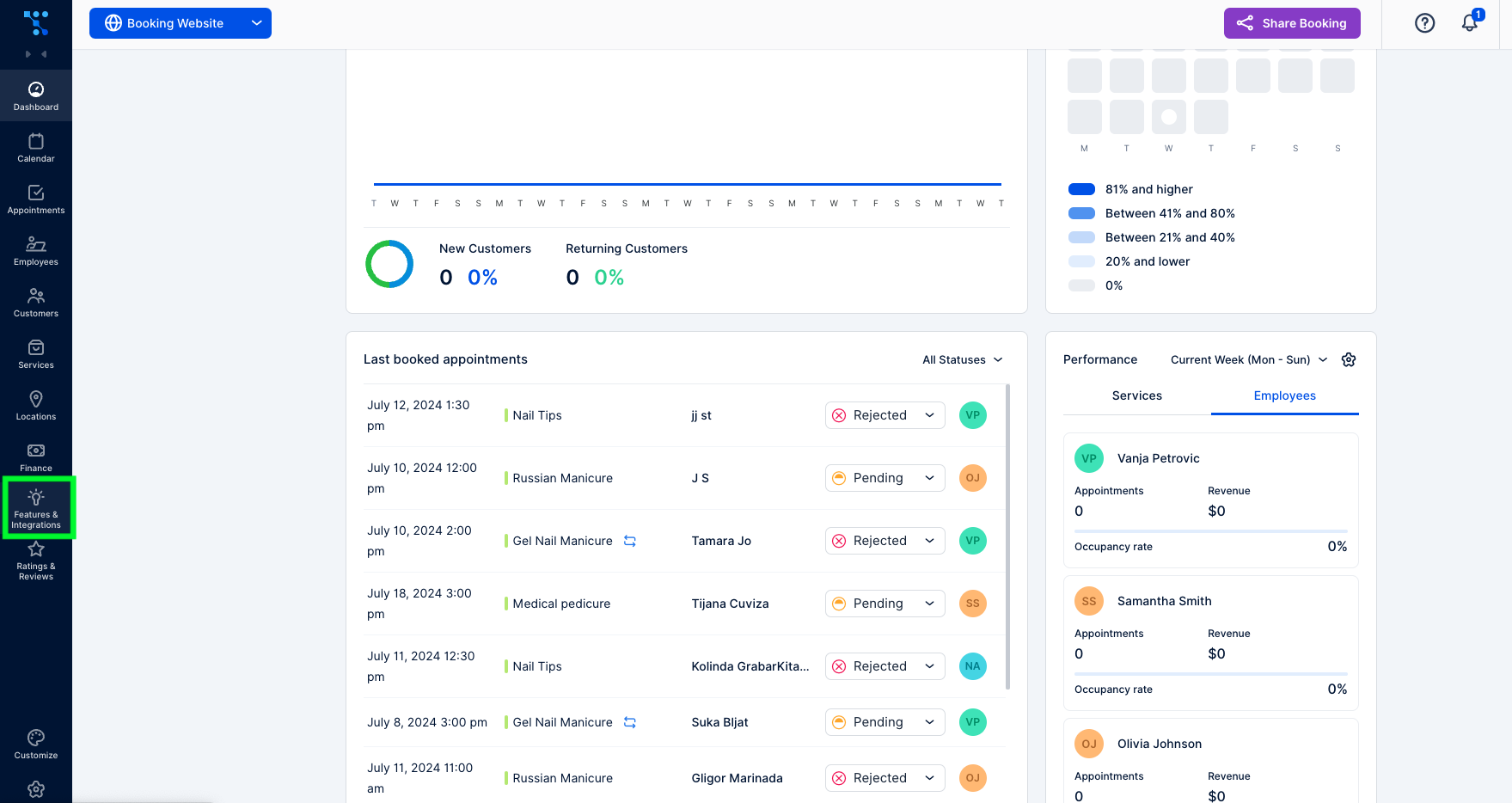
  1. After logging into your Trafft account, navigate to the “Features & Integration” sectionTrafft dashboard
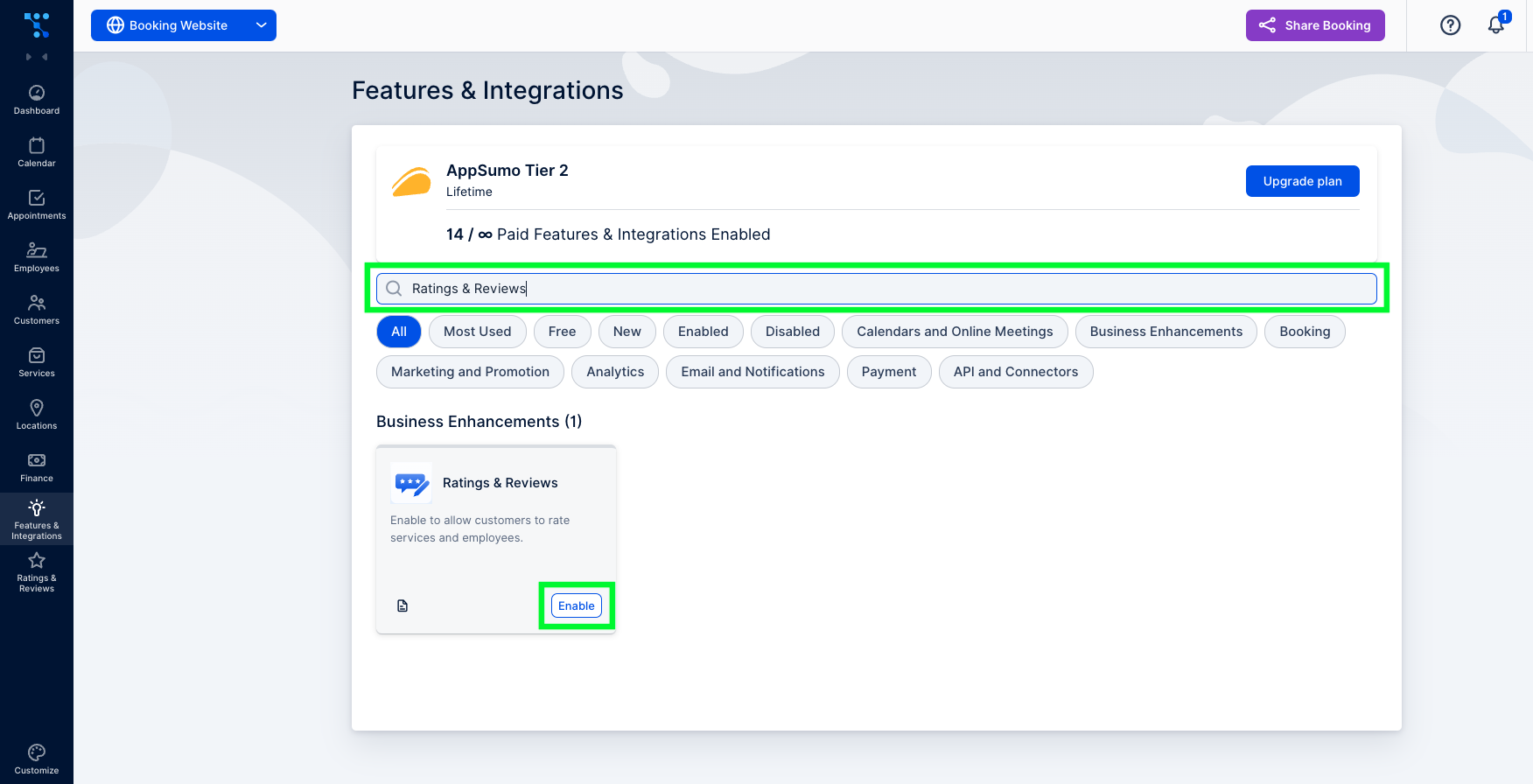
  2. In the search bar, type in “Ratings & Reviews” and click on the “Enable” buttonTrafft's features and integrations tab
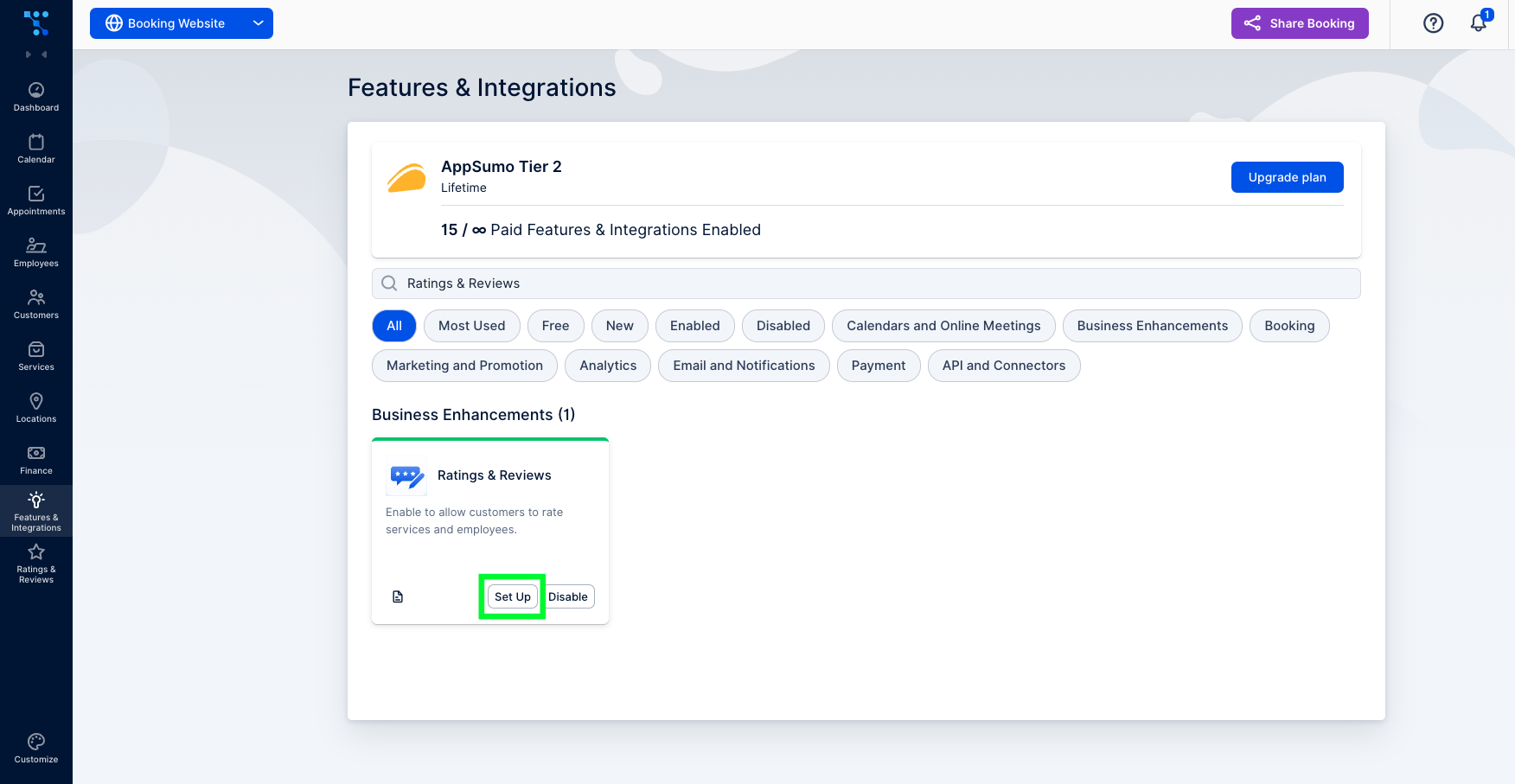
  3. Once activated, the setup button will appear.Trafft's ratings and reviews feature set up

How to Set up the Ratings and Reviews Feature?

Now that you’ve enabled this feature on your account, you can either click on the “Set Up” button or follow these steps:

1. Go to the “Rating & Reviews” section. Initially, this section will be empty since you don’t have any reviews yet. But once you do, you’ll have an option to filter reviews by most recent or by their rating. You can also filter them based on review status.
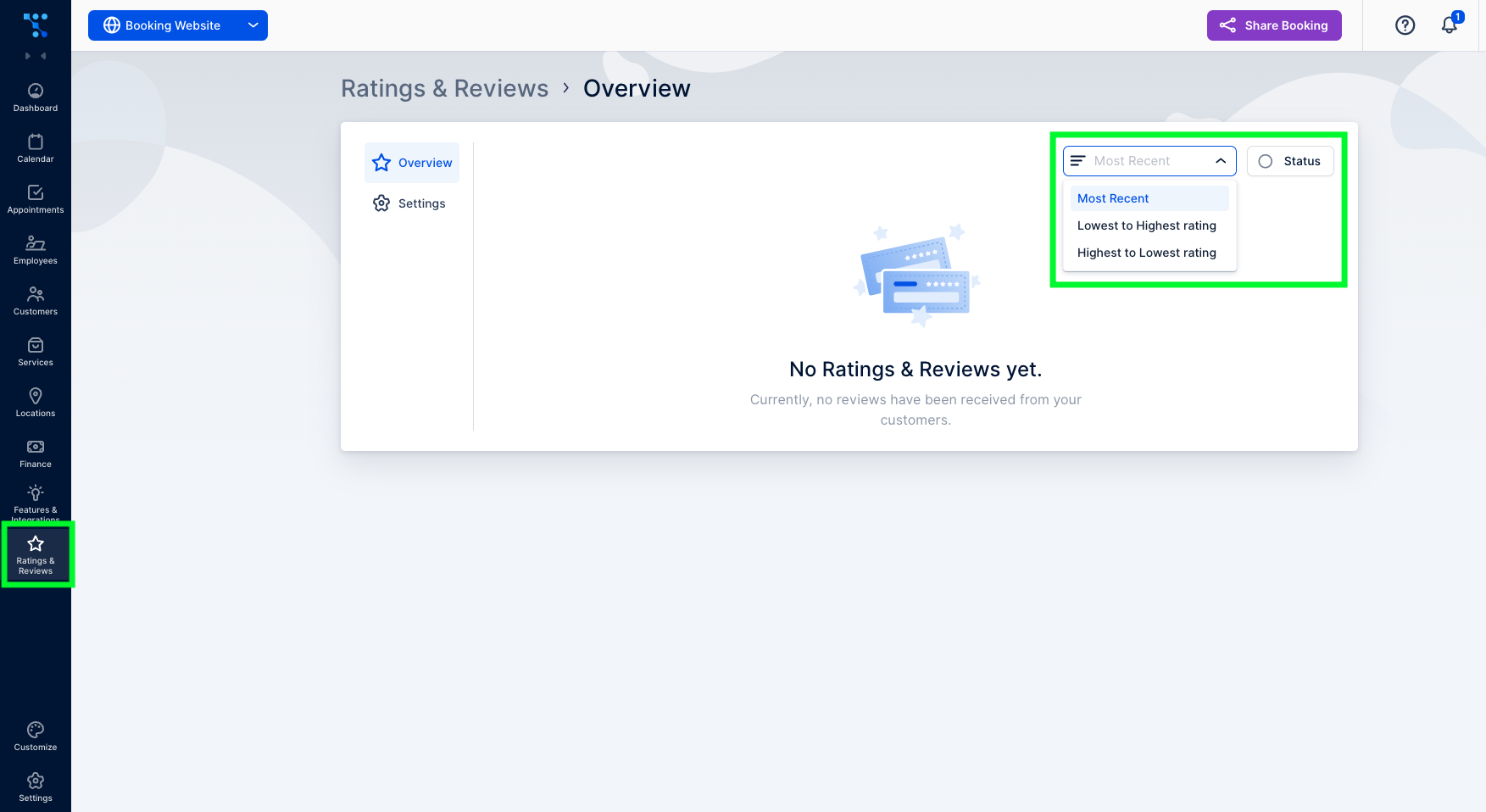
Ratings and reviews tab in Trafft

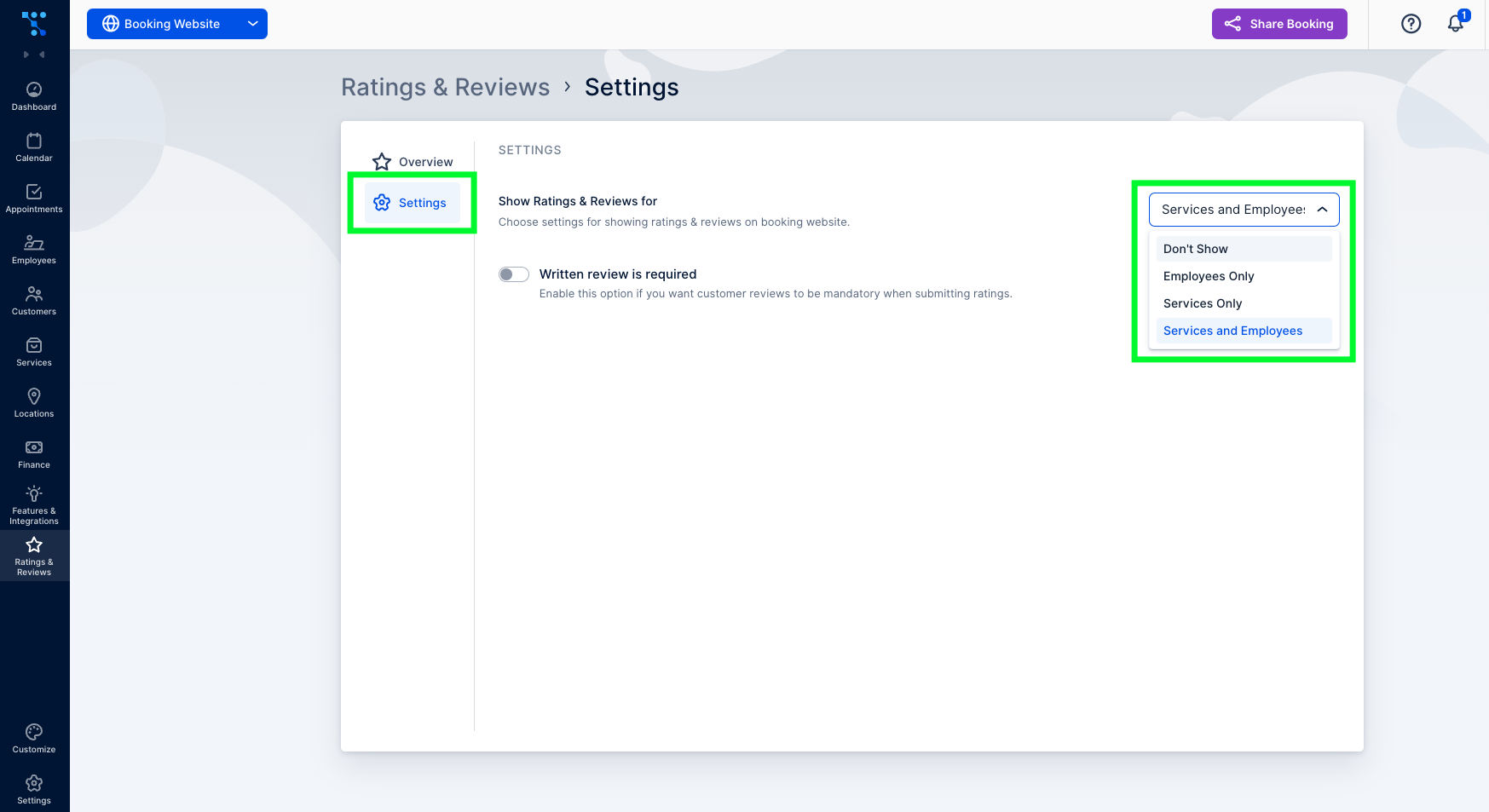
2. Under the “Settings” tab, you can choose how the reviews will appear on your booking website. You can choose between showing them under both employees and services, under only employees or services, or not showing them at all.Ratings and reviews settings
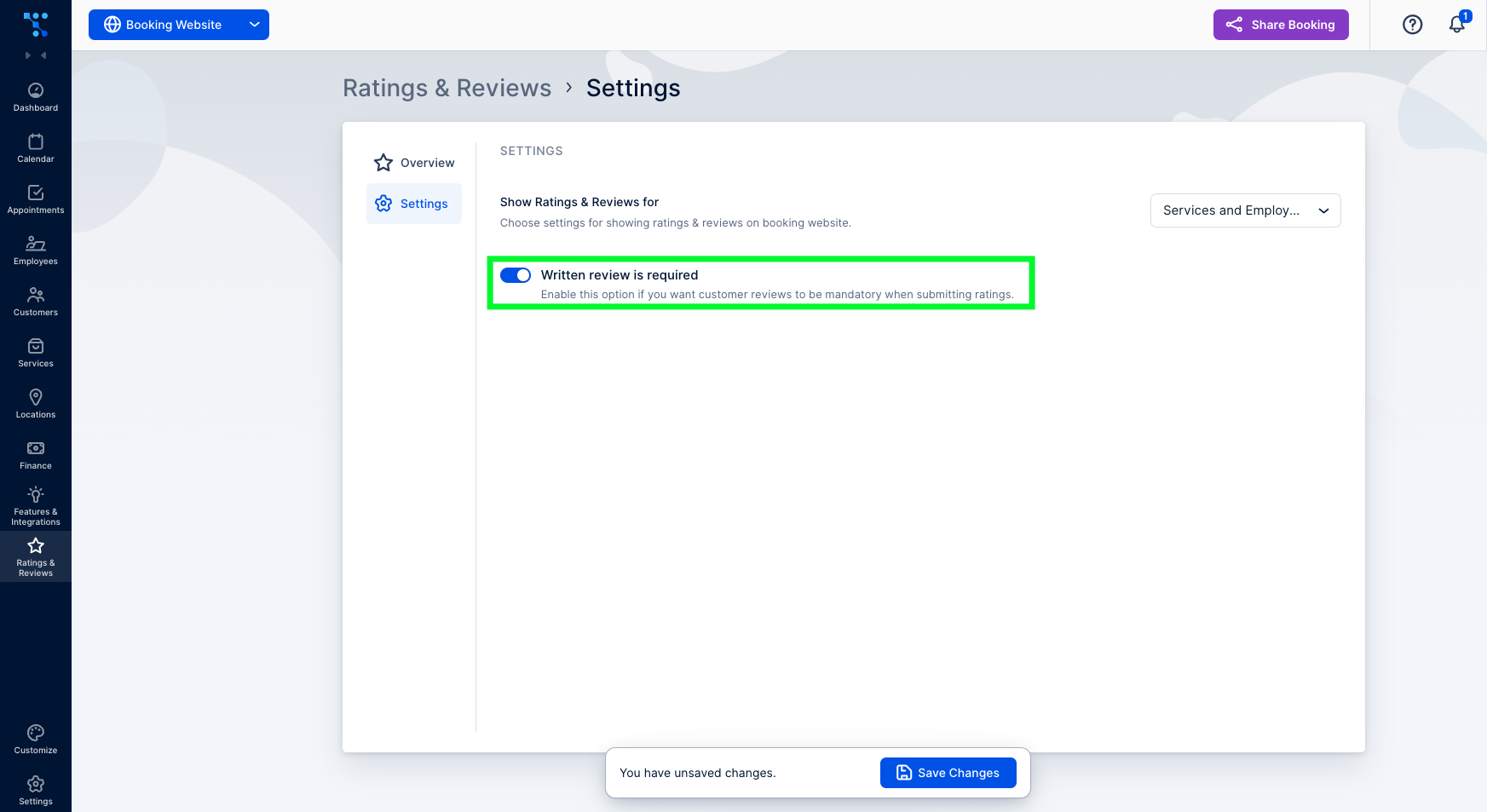
3. Here, you can also enable the required written review alongside the star rating. This ensures that customers provide feedback explaining their ratings.how to enable required written reviews
How to Ask For a Client Review?

To allow customers to leave a review, you must first send them a review link. Typically, this occurs after the appointment, but you can also include the necessary placeholder in any customer-related email notification template. To do so, follow these steps:

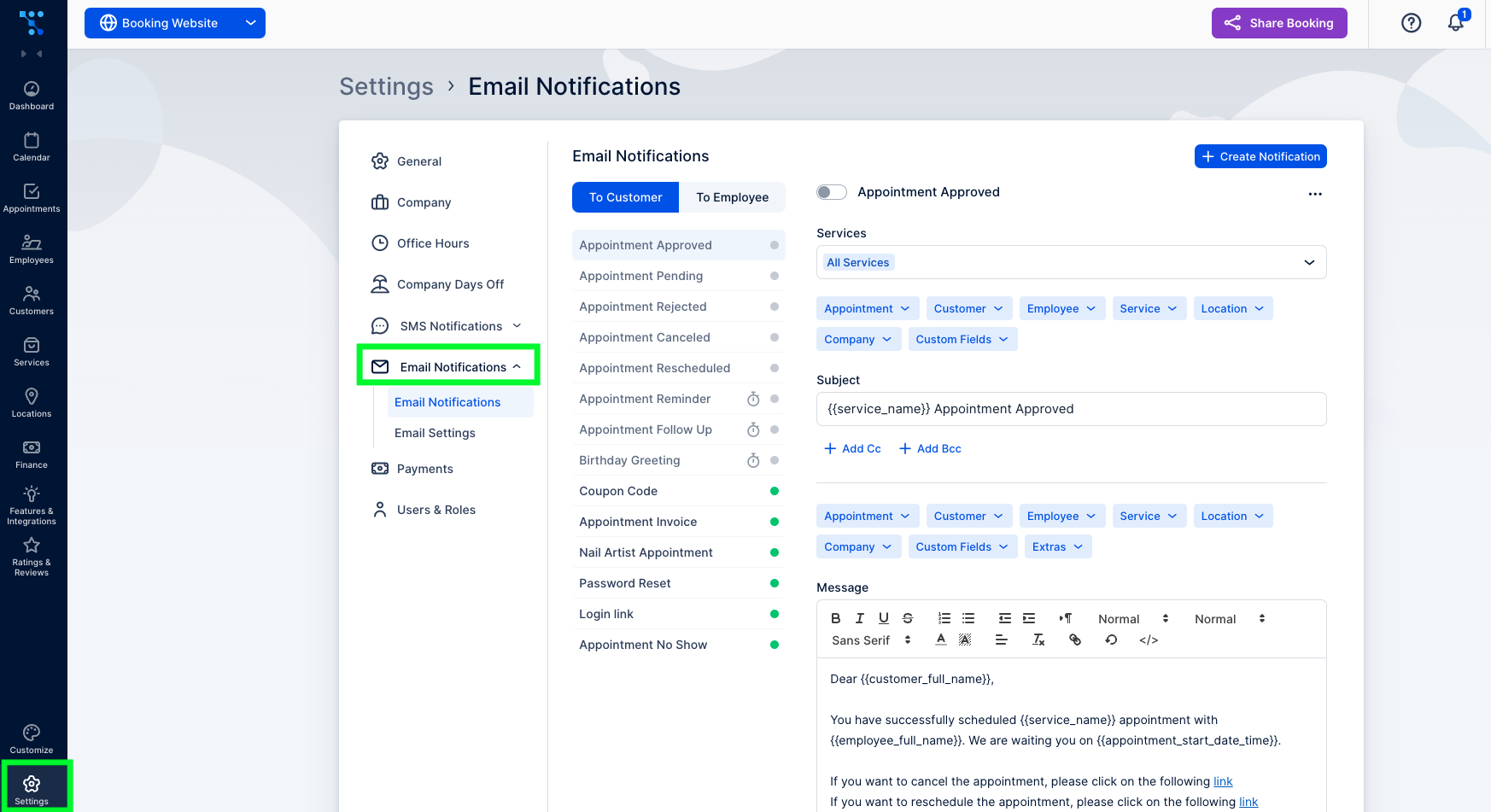
  1. Go to “Settings” and click on the “Email Notifications” tabHow to gather customer feedback with ratings and reviews using automated emails
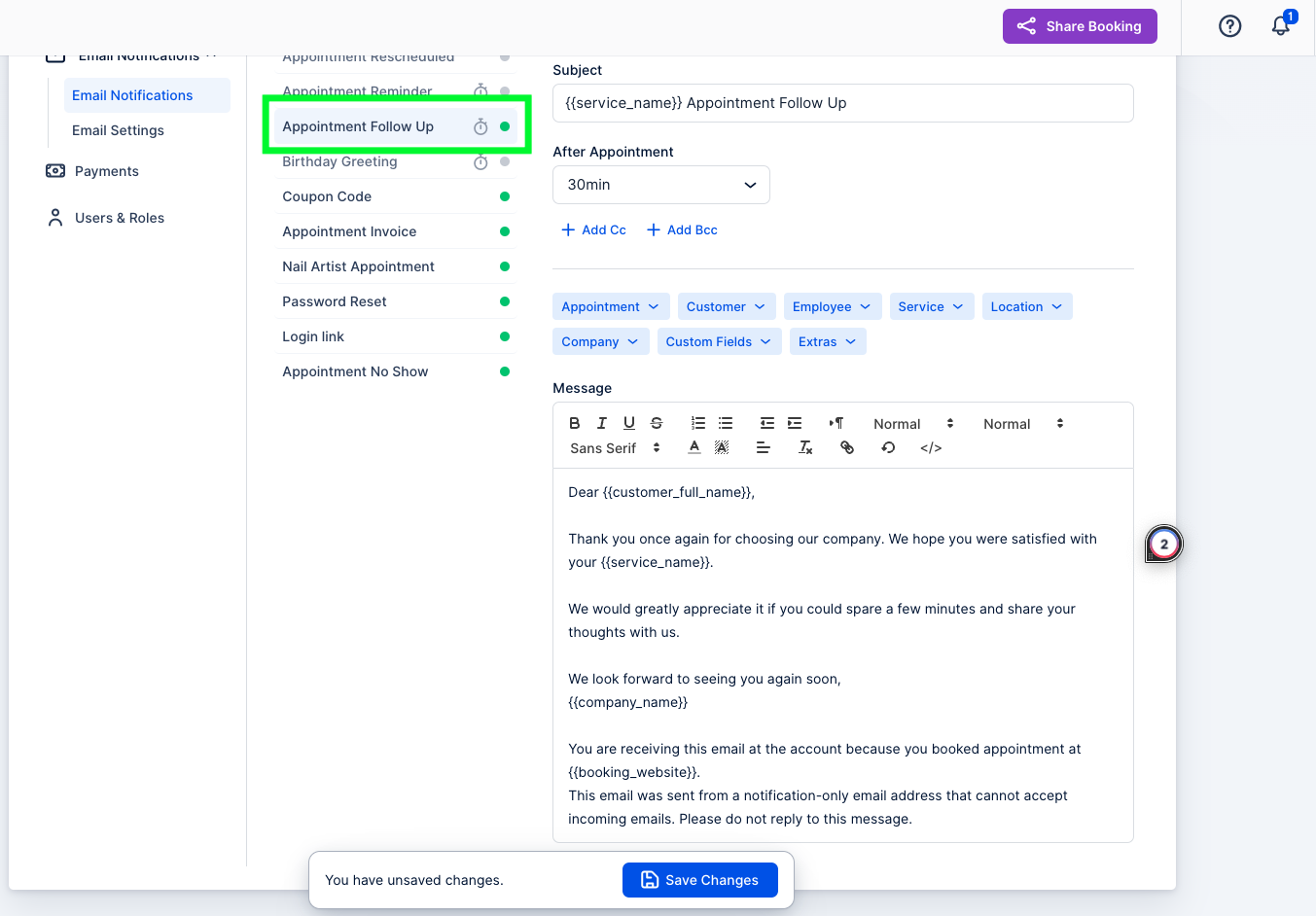
  2. Under “Email Notifications,” choose “Appointment Follow-Up,” as it is sent after the appointment.Setting up follow-up emails to gather customer feedback
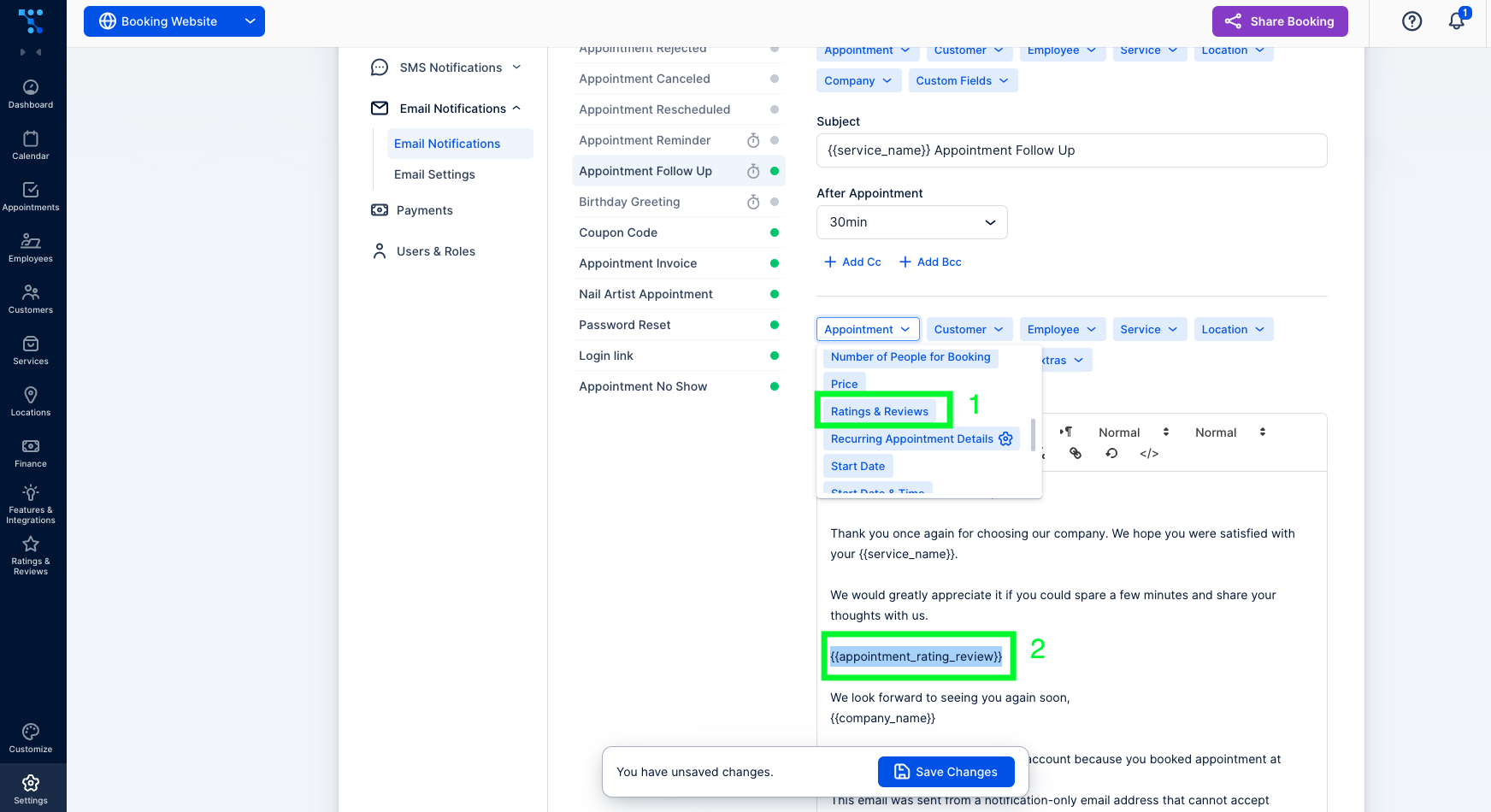
  3. In the “Message” section, insert a placeholder as a hyperlink in your email template. Remember that the link must be combined with the text to form a hyperlink.
  4. First, under the “Appointment” drop-down menu, select “Ratings & Reviews.” After the placeholder text has appeared in your message, copy it.Adding ratings and reviews placeholder in follow-up emails
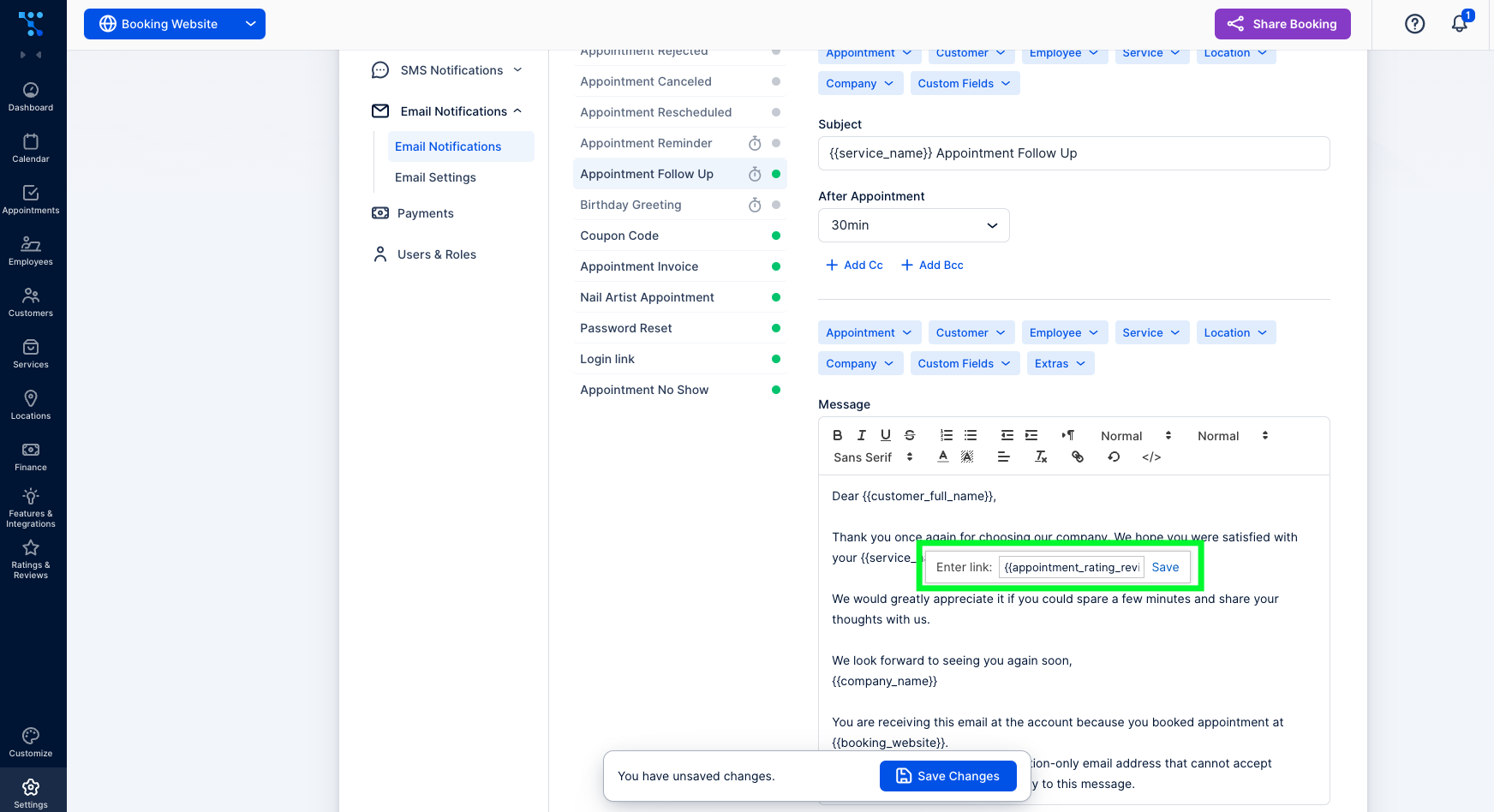
  5. Select the text you want to hyperlink and click on the “Chain icon.” In the pop-up window that appears, paste the appointment rating review placeholder and click on “Save.”Creating a hyperlink in a follow-up email for leaving a review

Lastly, keep in mind that both guest and registered customers can rate their experience on a scale of one to five stars and provide additional comments if desired or required.

And, that’s it! You’ve just successfully enabled and configured the Ratings and reviews feature. If you had any problems navigating through this written guide, here is everything in the video version:

Don’t forget to read more Trafft hacks:

Jetzt kostenlos testen