










¿Alguna vez te has preguntado qué hace que un negocio de servicios destaque en el saturado mundo en línea? Las reseñas. Ayudan a generar confianza, fortalecen tu reputación en línea e influyen en los clientes potenciales cuando deciden a quién contratar. Pero, ¿cómo le pides una reseña a un cliente sin sonar demasiado insistente?
En esta guía, te mostraremos cómo pedir una reseña de forma amable y eficaz, con consejos prácticos, ejemplos y plantillas listas para usar para correos electrónicos, SMS y reseñas de Google.
¿Por qué son importantes las reseñas?
Las reseñas juegan un papel importante en cómo los clientes potenciales evalúan su empresa. Influyen en la confianza, moldean tu reputación en línea y a menudo impactan en si alguien decide contratar tus servicios o sigue buscando.
Eso importa porque la mayoría de la gente ya depende de las reseñas al tomar decisiones. De hecho, 90% de los consumidores lee reseñas en línea antes de tomar una decisión de compra, 88% confía en las reseñas en línea tanto como las recomendaciones personales, y 72% de los clientes no tomarán medidas hasta que hayan leído las reseñas. Las reseñas positivas también refuerzan la credibilidad, con El 72% de los consumidores diciendo que confían más en las empresas cuando tienen reseñas positivas y 92% que dicen las reseñas positivas hacen que confíen más en un negocio local.
Las reseñas también pueden afectar directamente al rendimiento del negocio. Las investigaciones muestran que incluso una Un aumento de 1 estrella en una valoración de Yelp puede generar un incremento del 5-9% en los ingresos. Más allá de la visibilidad y las conversiones, las reseñas también te ofrecen comentarios útiles y te ayudan a entender qué es lo que más valoran los clientes de tu servicio.
Cómo pedir una reseña: Mejores prácticas

Imagen de jcomp en Freepik
La mejor manera de pedir una reseña a un cliente es mantenerla sencilla, oportuna y personal. Comunícate después del servicio, agradece al cliente e incluye un enlace directo para dejar una reseña. Haz que el proceso sea rápido y fácil, y utiliza canales como el correo electrónico o los SMS para mejorar las tasas de respuesta.
Aquí hay algunas buenas prácticas que debes tener en cuenta al pedir reseñas a los clientes:
1. Elige el momento adecuado
Enviar una solicitud de reseña poco después de completar un proyecto o entregar un producto. Calcular bien el momento garantiza que el la experiencia positiva está fresca en la mente del cliente.
2. Haz que tu solicitud de reseña sea personal
Mencione aspectos específicos del proyecto o servicio que haya apreciado. Por ejemplo: "Disfruté trabajando en [proyecto específico] con usted, y sus perspectivas contribuyeron realmente a su éxito"."
3. Elige la plataforma adecuada
Proporcione enlaces directos a sus plataformas de reseñas preferidas. Por ejemplo, "Si tiene un momento, ¿podría dejar una reseña en nuestra página de Google? Aquí tiene el enlace directo: [insertar enlace]"."
4. Proporcione instrucciones claras
Incluir instrucciones paso a paso en su solicitud. Por ejemplo, "Para dejar una reseña en Google, simplemente haz clic en el enlace, inicia sesión y luego haz clic en 'Escribir una reseña'." Si estás recopilación de reseñas en el formulario, simplemente puedes compartir el código QR dinámico junto con pasos concisos para retirar la reseña.
5. Expresar gratitud
¡Gracias por elegir nuestros servicios! Sus comentarios son increíblemente valiosos para nosotros."
6. Destaca la importancia
Su reseña ayudará a otros clientes a tomar decisiones informadas y contribuirá al crecimiento de nuestro negocio."
7. Mantenlo breve y sencillo
Mantén tu mensaje conciso. Por ejemplo, "¡Nos encantaría conocer tu opinión! ¿Podrías tomar un momento para dejar una reseña en [plataforma]?"
8. Enviar un seguimiento
Envía un mensaje de seguimiento amistoso si no hay respuesta. Por ejemplo: "Solo quería saber si tuviste la oportunidad de dejar una reseña. ¡Tus comentarios significan mucho para nosotros!"
9. Realizar un seguimiento y responder a las reseñas de los clientes
Supervisa y responde con prontitud a las reseñas. Por ejemplo: "¡Gracias tus amables palabras! Nos entusiasma saber que tuviste una experiencia positiva. Si tienes más comentarios, estamos aquí para escuchar."
No importa cómo lo enfoques, aprender a pedirle una reseña a un cliente se reduce a buena sincronización, un mensaje claro y simplificar el proceso.
Cómo pedir una reseña por correo electrónico
El correo electrónico es una de las maneras más fáciles y eficaces de pedir una reseña, especialmente si deseas mantener tu mensaje profesional, claro y fácil de seguir. La clave es mantenerlo breve, personal y centrado en la experiencia reciente del cliente.
Al escribir un correo electrónico de solicitud de reseña, comienza agradeciendo al cliente por elegir tu negocio. Luego, explica brevemente por qué importan sus comentarios e incluye un enlace directo a la plataforma de reseñas. Cuanto más fácil hagas el proceso, más probabilidades habrá de que dejen una reseña.
El momento oportuno también importa. Para la mayoría de las empresas basadas en servicios, enviar una solicitud de reseña entre 24 y 48 horas después de la cita o del servicio completado funciona bien, mientras la experiencia aún está fresca en la mente del cliente.
Mejores prácticas para pedir una reseña por correo electrónico
- Quédate con el mensaje corto y claro
- Personalizar con el nombre o el servicio del cliente
- Incluir un directo enlace de reseña
- Menciona por qué sus comentarios son importantes
- Manda uno seguimiento cordial si es necesario
Cómo pedir una reseña: plantillas de correo electrónico
Plantilla de correo electrónico para solicitar reseñas de servicios de salón o spa
Asunto: ¿Alguna vez has tenido una experiencia que era simplemente demasiado buena para no compartirla?
Hola [Nombre del cliente],
We hope you're feeling fantastic after your recent visit to [Salon/Spa Name]. We'd love to hear about your experience! Your feedback helps us improve and assists others in choosing the perfect pampering spot. Would you mind sparing a moment to share your thoughts on [review platform]? Your words mean the world to us!
Thank you for choosing us,
[Your Name]
[Salon/Spa Name]
Ask for a review email template for legal services
Subject: Your Feedback Makes a Difference!
Dear [Client's Name],
We trust our legal assistance was valuable in handling [case/project]. Your insights matter greatly to us and potential clients. Could you take a brief moment to share your thoughts about your experience working with us? Your feedback on [review platform] would be immensely appreciated!
Warm regards,
[Your Name]
[Law Firm Name]
Ask for a review email template for fitness or personal training
Subject: Share Your Fitness Journey!
Hola [Nombre del cliente],
We hope you're enjoying your fitness journey with us at [Gym/Studio Name]! Your feedback motivates us to excel. Would you mind sharing your experience on [review platform]? Your insights can inspire others on their fitness path!
Stay active,
[Your Name]
[Gym/Studio Name]
Ask for a review email template for hospitality or restaurant services
Subject: Tell Us About Your Visit!
Hello [Client's Name],
We trust you had a delightful time at [Restaurant/Hotel Name]. We're eager to hear about your experience! Sharing your thoughts on [review platform] could guide fellow food enthusiasts or travelers. We appreciate your time!
Warm regards,
[Your Name]
[Restaurant/Hotel Name]
Ask for a review email template for coaching services
Subject: Share Your Thoughts!
Dear [Client's Name],
We trust our coaching sessions have been enlightening and impactful. Your feedback is invaluable in shaping our coaching approach. Would you kindly spare a moment to share your experience on [review platform]? Your words can guide others seeking personal growth and guidance.
Gratefully,
[Your Name]
[Coaching Company Name]
Ask for a review email template for cleaning services
Subject: Your Satisfaction Matters!
Hola [Nombre del cliente],
We hope your space is sparkling after our recent cleaning session! Your satisfaction drives us. Could you share your experience with [Cleaning Company Name] on [review platform]? Your review helps us maintain high standards!
Best wishes,
[Your Name]
[Cleaning Company Name]
Ask for a review email template for restaurants or cafes
Subject: How Was Your Experience, [Customer's Name]?
Hi [Customer's Name],
We hope you enjoyed dining with us! Your feedback means a lot. Would you mind sharing your thoughts about our dishes and service? Click [Review Link] to let us know your experience.
Thank you for choosing us!
Best regards,
[Your Restaurant/Cafe]
Cómo pedir una reseña por SMS

Imagen de pikisuperstar en Freepik
A text message holds immense potential for post-service review requests due to its directness. It's short, impactful, and can prompt quick actions from customers.
Advantages of SMS for reviews
If you decide to ask for a review by SMS, you get:
- Immediacy: SMS reaches customers instantly, prompting immediate action.
- Direct Reach: It directly engages customers without getting lost in cluttered inboxes.
- High Open Rates: SMS messages boast high open rates, increasing the chances of review submissions.
- Impactfulness: Its brevity ensures a focused message that's easy to comprehend and act upon.
Ask for a review by SMS: Best practices
Timing matters: Send SMS requests shortly after the service. Aim for a window where the experience is fresh in the customer's mind.
Personalization counts: Use the customer's name and reference the service to add a personal touch, increasing the likelihood of engagement.
Clear call to action (CTA): Provide a direct link to the review platform. Make it easy for customers to access and leave their feedback.
Respect customers' time: Keep the message brief and to the point. Respect their time by not bombarding them with lengthy texts.
Asking client for a review: SMS templates
Text message review request: Immediate gratification
Hi [Customer's Name]! We hope you enjoyed your recent [service]. Your feedback helps us improve. Click [Review Link] to share your thoughts!
Review request message sample: Personal touch
Hey there, [Customer's Name]! How did you find our [service]? We'd love to hear your thoughts. Tap [Review Link] to let us know!
Review request message: Thank you & review request
Thanks for choosing us, [Customer's Name]! Your opinion matters. Please take a moment to review our [service]. Click [Review Link] to share.
Automate Every Aspect of Your Service Business With Trafft
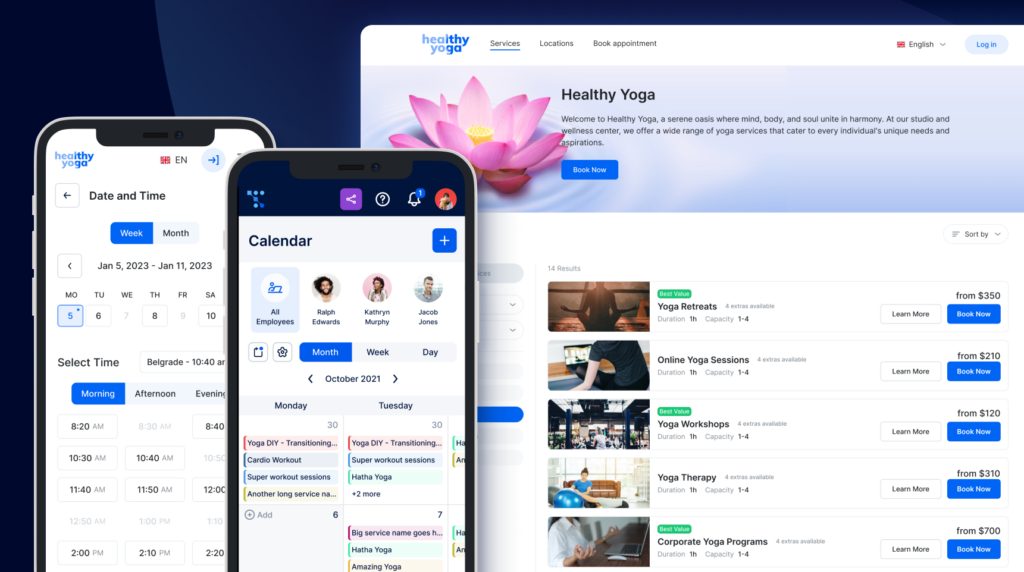
Trafft booking software is a game-changer for your business!
Beyond effortlessly handling all your bookings, employee schedules, and organizing your calendar, Trafft goes the extra mile.
Imagine this: with Trafft, you can automate the sending of follow-up emails and text messages to your clients. That means you can seamlessly ask for reviews without lifting a finger.
Trafft streamlines the entire process, from scheduling appointments to gently nudging your clients for their feedback. It's like having a personal assistant dedicated to boosting your online reputation!
What do you get with Trafft?
- Effortless Booking Management: Trafft takes the hassle out of managing bookings, employee schedules, and calendars. It's your all-in-one solution for streamlining your business operations.
- Automated Follow-Up Messages: But here's the kicker! Trafft doesn't stop at managing your schedule. It can automate the process of sending follow-up emails and text messages to your clients after their appointments.
- Seamless Review Requests: Imagine the convenience! With Trafft, you can effortlessly ask for reviews without any extra effort. Let Trafft do the heavy lifting by gently reminding your clients to share their experiences.
- Enhanced Client Interactions: By automating review requests, Trafft helps you create a stronger connection with your clients. It's a subtle yet effective way to show your clients that their feedback matters.
- Tailored Customer Experience: Personalized follow-ups show your clients you care. Trafft allows you to customize your messages, ensuring a personalized touch that resonates with each client.
- Simplify and Elevate: Trafft isn't just about managing your bookings; it's about enhancing your client interactions, simplifying your workflow, and boosting your business's online presence.
Ready to transform your business with Trafft?
Cómo pedir una reseña de Google
As a service business owner, the most important platform to focus on when trying to gather client reviews is Google (btw, have you had a chance to try Reservar con Google?
In order to ask for a review on Google, you first need to create a Google My Business profile. Ensure your business is listed on Google My Business (GMB). Optimize it with accurate information and engaging visuals.
Next, in order to ask for a Google review, you'll first need to guide customers on how to leave a Google review. Provide a simple walkthrough or a link directing them to your GMB profile review section. In addition, include the direct link to your GMB profile in emails, SMS, or on your website to streamline the review process.
Here's a Google review template you can use when asking your client for Google reviews:
How to ask for a Google review: examples
Subject: Your Feedback Matters - Share Your Experience with [Your Company]!
Dear [Customer's Name],
We hope this message finds you well. At [Your Company], we strive to provide the best possible experience for our customers, and your feedback is invaluable in helping us achieve that goal.
If you've had a positive experience with our products or services, we would greatly appreciate it if you could take a moment to share your thoughts on Google. Your review can make a significant difference for others seeking similar solutions.
How to Leave a Google Review:
- Visit our Google My Business page by clicking [Insert Direct Link to Your Google My Business Page].
- Scroll down to the "Write a Review" section.
- Rate your experience with us and leave a brief comment about your experience.
Why Your Review Matters:
- Help Others: Your insights can guide others in making informed decisions.
- Improve Our Services: Constructive feedback helps us continually enhance our offerings.
- Community Connection: Join our community by sharing your thoughts and connecting with other customers.
We appreciate your time and support. Thank you for being a valued part of the [Your Company] community!
Best Regards,
[Your Name]
[Position]
[Contact Information]
Don't forget to express gratitude for Google reviews. After you ask for a Google review and a customer leaves one, respond promptly with a thank-you note. This encourages further engagement.
How to ask for a 5-star Google review
When asking for a 5-star Google review, focus on expressing appreciation and emphasizing the value of their feedback. Start by thanking the customer for their support and highlighting their positive experience.
Instead of directly asking for a 5-star rating, encourage them to share their thoughts if they were fully satisfied. You can say something like, "If you had a great experience with us, we’d love for you to leave a Google review. Your feedback helps us continue providing top-quality service and helps others find us, too!"
Make the process easy by providing a direct link and reassuring them that their review is valuable. Keep the request friendly, natural, and customer-focused.
How to ask for a Google review: templates
How to ask for a Google review via email
Subject: Quick Favor – Share Your Thoughts? ⭐
Hi [Customer’s Name],
Thank you for choosing [Your Business Name]! We truly appreciate your support and would love to hear about your experience. If you have a moment, could you leave us a Google review? Your feedback helps us improve and helps others find us too!
You can leave your review here: [Insert Google Review Link]
Thanks again for your time and support!
Best,
[Your Name/Your Business Name]
How to ask for a Google review via text
Hi [Customer’s Name], thanks for choosing [Your Business Name]! 😊 If you enjoyed your experience, would you mind leaving us a quick Google review? It only takes a minute and helps us a lot! Just click here: [Insert Google Review Link]. Thanks so much!
How to get more Google reviews
To get more Google reviews for your business, it's essential to actively engage with your customers and make the review process as straightforward as possible.
Encourage satisfied customers to share their experiences by verbally asking for reviews during in-person interactions or through digital communication channels. Utilize your website, emails, and social media platforms to provide clear instructions on how to leave a Google review, including a direct link to your Google My Business page. Consider implementing incentives or special promotions for customers who take the time to leave feedback. Respond promptly and appreciatively to existing reviews, showcasing a commitment to customer satisfaction.
Additionally, create a seamless and positive customer experience, as happy customers are more likely to share their positive encounters. By fostering a culture of feedback and making the review process convenient, you can organically increase the Google reviews you get from your clients.
Cómo pedirle una opinión a un cliente en persona
Asking for a review in person is about finding the right moment and using a friendly approach. Here's how you can do it:
- Timing is key: Choose a moment when your client is happy with your service. It could be after completing a successful treatment, providing a service, or when they express satisfaction.
- Casual conversation: Keep it natural. Start by expressing gratitude for their business. Then, casually ask if they'd be willing to share their experience with others.
- Be specific: Politely ask if they could leave a review on a specific platform, mentioning how much it would mean to your business.
- Provide guidance: If they agree, guide them on how they can leave the review. You might suggest doing it on their phone or later when they have time.
Remember, the key is to make it feel like a natural part of the conversation and not pushy.
Consider the scenario of Mike’s Garage, a mechanic shop. Instead of a generic request, their mechanic, John, personalized the question based on the service provided. After fixing a customer’s car, he’d say, “I'm glad we got your car running smoothly again! Would you mind sharing your experience with us?”
This personalized approach often led to enthusiastic reviews.
Pro tip: When asking for a review in person, you can always offer your client a leave us a review card or a " leave us a review template." That'll make the process of leaving a review streamlined, increasing your chances of actually getting a review.
Leave us a review card template
Front of the Card:
Header: Leave Us a Review!
Visual Element: (You can include your company logo or a relevant image)
Text: We value your feedback! Share your experience with us by leaving a review. Your opinion matters to us, and it helps us improve our services.
Back of the Card:
Call to Action: How to Leave a Review:
- Visit our website: [YourWebsite.com/reviews]
- Find us on [Social Media Platform] and leave a review.
- Scan the QR code to access our review page directly.
Message: Your feedback helps us grow! Thank you for choosing [Your Company Name] and taking the time to share your thoughts. We appreciate your support.
Leave us a review flyer
Leave Us a Review!
[Your Company Logo]
We value your feedback and would love to hear about your experience with us! Your reviews help us improve our services and assist other customers in making informed choices.
How to Leave a Review:
- Visit our website: [YourWebsite.com/reviews]
- Find us on [Social Media Platform] and leave a review.
- Scan the QR code to access our review page directly.
Share Your Thoughts:
Tell us what you loved about our service and any suggestions you may have. Your opinion matters!
[Space for Customer Testimonials or Reviews]
Stay Connected:
Follow us on social media for updates, promotions, and more!
[Your Social Media Icons or Handles]
Thank you for choosing [Your Company Name]!
[Contact Information]
Cómo pedir reseñas por teléfono
To ask for a review over the phone, be polite and genuine. Start by thanking the person for their time and mentioning how much you value their opinion. You can say something like, “I’d love to hear your thoughts on your experience with [product/service]. Would you be willing to leave a review? It only takes a few minutes, and it really helps us improve.”
Keep the tone friendly and make it easy for them by providing any necessary details, like where to leave the review or how to do it.
Let's take Anna, for example. Anna is a customer service representative at a software company. She mastered the art of seamlessly integrating review requests into her closing calls. Her script is simple yet impactful: “I hope our software has been beneficial to your workflow. Would you be willing to share your thoughts with us?”
Her friendly tone and genuine interest often result in positive feedback and subsequent reviews.
Cómo pedir reseñas puede ayudarte a elevar tu negocio
As a service business owner or manager, getting reviews isn't just about shining online. It's about building trust, making friends with clients, and getting better at what you do.
If you want to learn how to ask a client for a review, you need to master a few things first: the art of timing, the beauty of personalized communication, and the magic of communication.
Remember, it's not just about the number of reviews but the quality and authenticity they carry. Each review is a testament to the excellence of your services and a building block for your business's credibility.
Cheers to thriving in the world of reviews while providing exceptional services that speak volumes!
Preguntas frecuentes sobre cómo solicitar reseñas
1. How do you politely ask for a review?
Thank the customer first, keep the message short, and ask in a simple, direct way. Adding a review link also makes it easier for them to follow through.
2. How do you ask for a review without being pushy?
Ask after a positive experience, keep the tone natural, and avoid sending multiple reminders. One clear, friendly request is usually enough.
3. How do I politely ask for a Google review?
Send a short follow-up message, thank them for their time, and include a direct Google review link so they can leave feedback quickly.
4. How do I ask customers for a review?
Ask soon after the service while the experience is still fresh, keep the message simple, and make it easy by including a direct link.