Durée limitée Durée limitée
Plongez dans la croissance de votre entreprise
Jusqu'à 20%Off
Avec un code promo BFCM70
Jusqu'à 20%Off
Profitez de l'offre
APERÇU DES FONCTIONNALITÉS ET INTÉGRATIONS
  • Toutes les fonctionnalités
    Toutes les fonctionnalités

    Notifications, Fuseaux horaires, Extras, Coupons, Remboursements, et plus

  • Toutes les intégrations
    Toutes les intégrations

    WhatsApp, PayPal, Teams, Zoom, Zapier, Google Agenda et bien plus encore

  • Réserver avec Google
    Réserver avec Google

    Acceptez des réservations via la Recherche Google et Maps

  • Extension WordPress
    Extension WordPress

    Ajoutez le formulaire de réservation Trafft à n'importe quelle page de votre site Web WordPress

    Ressources
  • Blog Trafft
    blogue-2
    Blog Trafft

    Consultez les dernières informations sur les tendances du secteur et obtenez des conseils pour gérer une entreprise de services en ligne

  • Guides et documentation
    docs-2
    Guides et documentation

    Obtenez une explication détaillée du fonctionnement de chaque fonctionnalité et intégration de Trafft

  • Notre histoire Notre histoire

    Lisez l'histoire, la mission et les valeurs que nous partageons de Trafft

  • Relations investisseurs Relations investisseurs

    Contactez-nous si vous souhaitez investir dans Trafft

  • Partenaires affiliés Partenaires affiliés

    Rejoignez-nous dans notre mission d'aider les entreprises de services à prospérer grâce à l'automatisation

  • Pourquoi Trafft Pourquoi Trafft

    En savoir plus sur les raisons de choisir Trafft

  • Partenaires Partenaires

    Devenez partenaire de Trafft et étendez votre portée sur le marché

  • Contactez-nous Contactez-nous

    N'hésitez pas à nous contacter si vous avez des questions ou des suggestions.

Fonctionnalités
APERÇU DES FONCTIONNALITÉS ET INTÉGRATIONS
  • Toutes les fonctionnalités Toutes les fonctionnalités

    Notifications, Fuseaux horaires, Extras, Coupons, Remboursements, et plus

  • Toutes les intégrations Toutes les intégrations

    WhatsApp, PayPal, Teams, Zoom, Zapier, Google Agenda et bien plus encore

  • Réserver avec Google Réserver avec Google

    Acceptez des réservations via la Recherche Google et Maps

  • Extension WordPress Extension WordPress

    Ajoutez le formulaire de réservation Trafft à n'importe quelle page de votre site Web WordPress

Ressources
    Ressources
  • Blog Trafft

    Consultez les dernières informations sur les tendances du secteur et obtenez des conseils pour gérer une entreprise de services en ligne

    blogue-2
    Blog Trafft
  • Guides et documentation

    Obtenez une explication détaillée du fonctionnement de chaque fonctionnalité et intégration de Trafft

    docs-2
    Guides et documentation
À propos de nous
  • Notre histoire Notre histoire

    Lisez l'histoire, la mission et les valeurs que nous partageons de Trafft

  • Relations investisseurs Relations investisseurs

    Contactez-nous si vous souhaitez investir dans Trafft

  • Partenaires affiliés Partenaires affiliés

    Rejoignez-nous dans notre mission d'aider les entreprises de services à prospérer grâce à l'automatisation

  • Pourquoi Trafft Pourquoi Trafft

    En savoir plus sur les raisons de choisir Trafft

  • Partenaires Partenaires

    Devenez partenaire de Trafft et étendez votre portée sur le marché

  • Contactez-nous Contactez-nous

    N'hésitez pas à nous contacter si vous avez des questions ou des suggestions.

Trafft Hacks: How To Embed the Booking Form Into Your Website

Accueil» Blogue» Trafft Hacks: How To Embed the Booking Form Into Your Website
how to add a booking system to website

Adding a booking form into your website can significantly streamline your appointment scheduling process, enhancing both user experience and operational efficiency.

In this article, we’ll walk you through the simple steps to easily embed the Trafft booking form into your website, ensuring seamless integration and a professional appearance. By the end of this guide, you’ll be able to provide your clients with an easy-to-use booking system directly on your site, saving time and reducing hassle for both you and your customers.

A Step-By-Step Guide on How To Embed the Trafft Booking Form Into Your Website

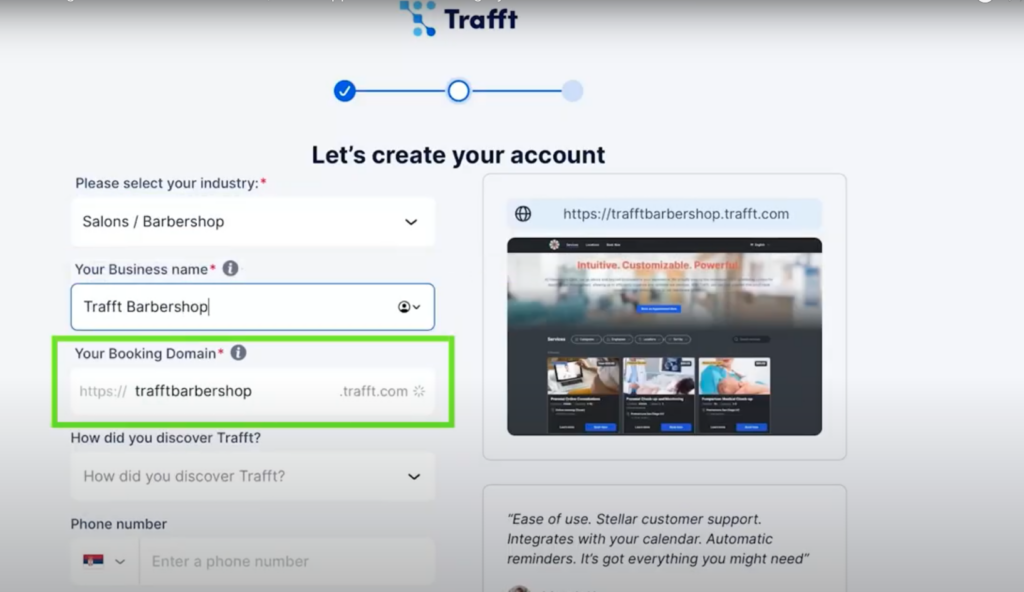
Once you've created your Trafft account, a booking page is automatically generated with a trafft.com extension.
creating your trafft account

This page becomes operational once you've added your employees, working hours, et services, allowing your clients to book appointments through this auto-generated page.

However, if you already have a website, you can seamlessly integrate the Trafft booking form into it.

How?

Step #1: Start by navigating to the ‘Share Booking‘ button, located at the top right corner of your dashboard.

trafft embed code

Step #2: Next, click on the ‘Intégrer’ button.

trafft booking software embed code

Then click the ‘Get immediately’ button.

embed iframe trafft booking software

You will see the code. Regardless of the CMS or the underlying code, this code will integrate seamlessly into your website.

trafft embed code


Booking Form for Specific Appointments

Trafft also offers the capability to embed a booking form tailored to specific appointments, complete with predefined details. To use this feature, you need to:

Step #1: Click on the 'Share Booking' button at the top right of your dashboard.

Step #2: Select the 'Intégrer' option.
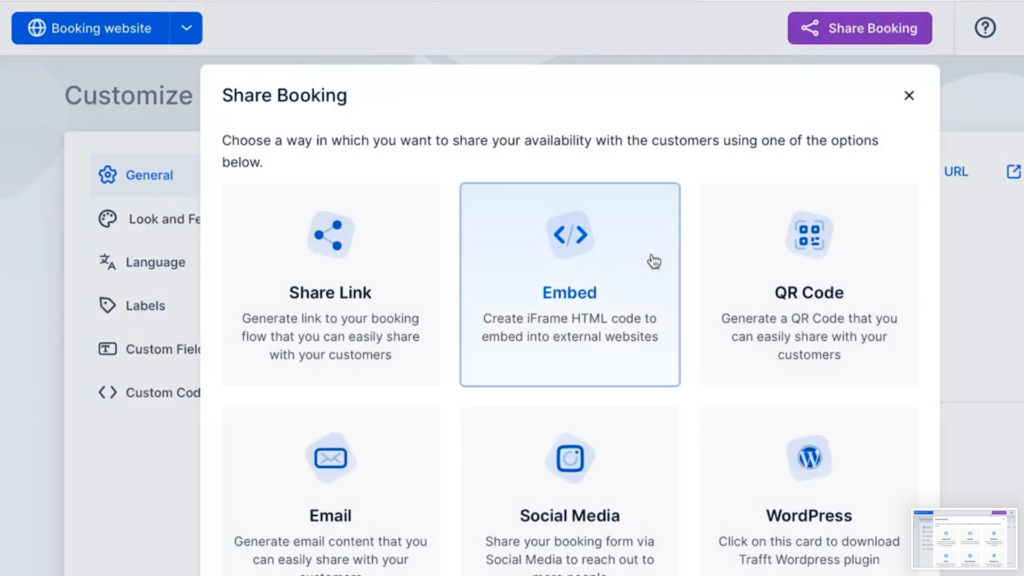
share booking form tab overview

Then click the ‘Set Appointment Parametres’.

embed iframe trafft booking software

Step #3: Then, you can specify which fields to include – services, employees, and date range. This option will create a booking form based solely on your selected parameters.
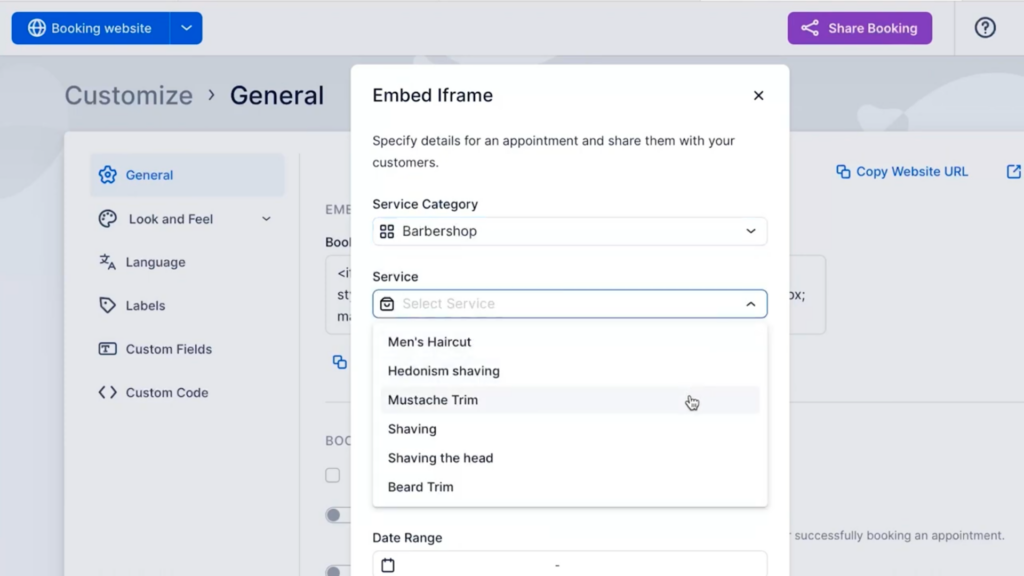
trafft embeded iframe - selection of which fields to include in the booking form

Step #4: After making your selections, click 'Next'.

An embedded iframe will be generated, which you need to copy and paste into your website.
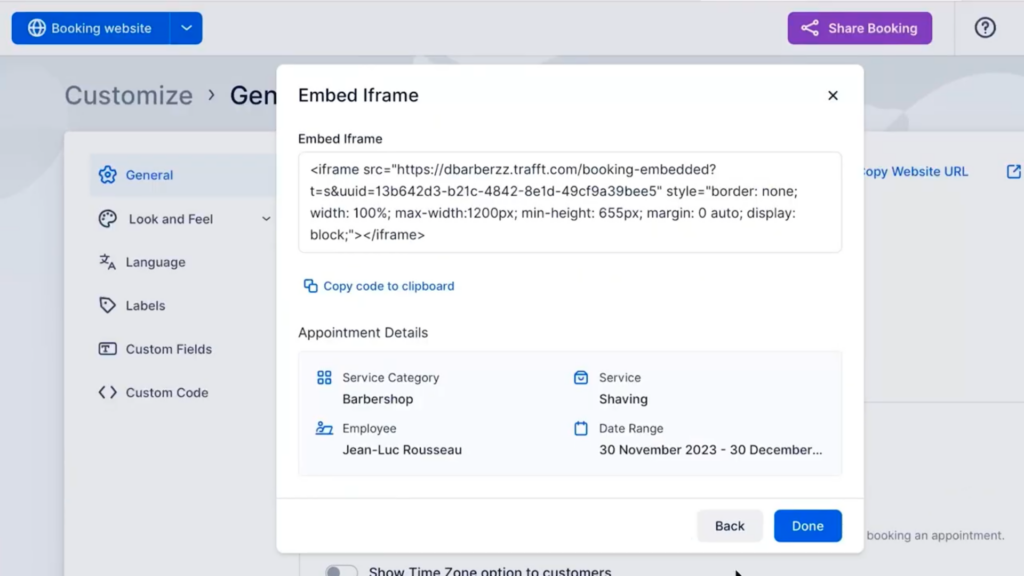
code for trafft embed iframe

If you decide not to customize any of the fields, you’ll receive the code for the main booking form instead.
This flexibility enables you to tailor the booking experience to suit the unique needs of your business and clients. It also allows you to create multiple booking forms to cater to specific purposes.
We hope this guide on embedding the Trafft booking form helps you set everything up. To get more details and explore all that Trafft can do, be sure to check out our extensive
documentation.

Happy scheduling!

Essayez gratuitement