Begrenzte Zeit Begrenzte Zeit
Stürzen Sie sich in das Unternehmenswachstum
Bis zu 20%Off
Mit einem Gutscheincode BFCM70
Bis zu 20%Off
Schnapp dir das Angebot
ÜBERBLICK ÜBER FUNKTIONEN UND INTEGRATIONEN
  • Alle Funktionen
    Alle Funktionen

    Benachrichtigungen, Zeitzonen, Extras, Gutscheine, Rückerstattungen und mehr

  • Alle Integrationen
    Alle Integrationen

    WhatsApp, PayPal, Teams, Zoom, Zapier, Google Kalender und mehr

  • Über Google reservieren
    Über Google reservieren

    Buchungen über die Google Suche und Maps annehmen

  • WordPress-Plugin
    WordPress-Plugin

    Fügen Sie das Trafft-Buchungsformular zu jeder Seite Ihrer WordPress-Website hinzu

    Ressourcen
  • Trafft-Blog
    Blog 2
    Trafft-Blog

    Informieren Sie sich über die neuesten Informationen zu Branchentrends und holen Sie sich Tipps für die Führung eines Online-Dienstleistungsunternehmens

  • Anleitungen und Dokumentation
    Dokumente-2
    Anleitungen und Dokumentation

    Erhalten Sie eine detaillierte Erklärung, wie jede Trafft-Funktion und -Integration funktioniert

  • Unsere Geschichte Unsere Geschichte

    Lesen Sie über die Geschichte, Mission und die gemeinsamen Werte von Trafft

  • Investor Relations Investor Relations

    Melden Sie sich bei uns, wenn Sie daran interessiert sind, in Trafft zu investieren.

  • Affiliate-Partner Affiliate-Partner

    Begleiten Sie uns auf unserem Weg, Dienstleistungsunternehmen durch Automatisierung zum Erfolg zu verhelfen.

  • Warum Trafft Warum Trafft

    Erfahren Sie mehr darüber, warum Sie sich für Trafft entscheiden sollten

  • Partner Partner

    Werden Sie Partner von Trafft und erweitern Sie Ihre Reichweite auf dem Markt

  • Kontaktieren Sie uns Kontaktieren Sie uns

    Bei Fragen oder Anregungen können Sie sich gerne an mich wenden.

Funktionen
ÜBERBLICK ÜBER FUNKTIONEN UND INTEGRATIONEN
  • Alle Funktionen Alle Funktionen

    Benachrichtigungen, Zeitzonen, Extras, Gutscheine, Rückerstattungen und mehr

  • Alle Integrationen Alle Integrationen

    WhatsApp, PayPal, Teams, Zoom, Zapier, Google Kalender und mehr

  • Über Google reservieren Über Google reservieren

    Buchungen über die Google Suche und Maps annehmen

  • WordPress-Plugin WordPress-Plugin

    Fügen Sie das Trafft-Buchungsformular zu jeder Seite Ihrer WordPress-Website hinzu

Ressourcen
    Ressourcen
  • Trafft-Blog

    Informieren Sie sich über die neuesten Informationen zu Branchentrends und holen Sie sich Tipps für die Führung eines Online-Dienstleistungsunternehmens

    Blog 2
    Trafft-Blog
  • Anleitungen und Dokumentation

    Erhalten Sie eine detaillierte Erklärung, wie jede Trafft-Funktion und -Integration funktioniert

    Dokumente-2
    Anleitungen und Dokumentation
Über uns
  • Unsere Geschichte Unsere Geschichte

    Lesen Sie über die Geschichte, Mission und die gemeinsamen Werte von Trafft

  • Investor Relations Investor Relations

    Melden Sie sich bei uns, wenn Sie daran interessiert sind, in Trafft zu investieren.

  • Affiliate-Partner Affiliate-Partner

    Begleiten Sie uns auf unserem Weg, Dienstleistungsunternehmen durch Automatisierung zum Erfolg zu verhelfen.

  • Warum Trafft Warum Trafft

    Erfahren Sie mehr darüber, warum Sie sich für Trafft entscheiden sollten

  • Partner Partner

    Werden Sie Partner von Trafft und erweitern Sie Ihre Reichweite auf dem Markt

  • Kontaktieren Sie uns Kontaktieren Sie uns

    Bei Fragen oder Anregungen können Sie sich gerne an mich wenden.

Trafft Hacks: How To Embed the Booking Form Into Your Website

Startseite» Blog» Trafft Hacks: How To Embed the Booking Form Into Your Website
how to add a booking system to website

Adding a booking form into your website can significantly streamline your appointment scheduling process, enhancing both user experience and operational efficiency.

In this article, we’ll walk you through the simple steps to easily embed the Trafft booking form into your website, ensuring seamless integration and a professional appearance. By the end of this guide, you’ll be able to provide your clients with an easy-to-use booking system directly on your site, saving time and reducing hassle for both you and your customers.

A Step-By-Step Guide on How To Embed the Trafft Booking Form Into Your Website

Once you've created your Trafft account, a booking page is automatically generated with a trafft.com extension.
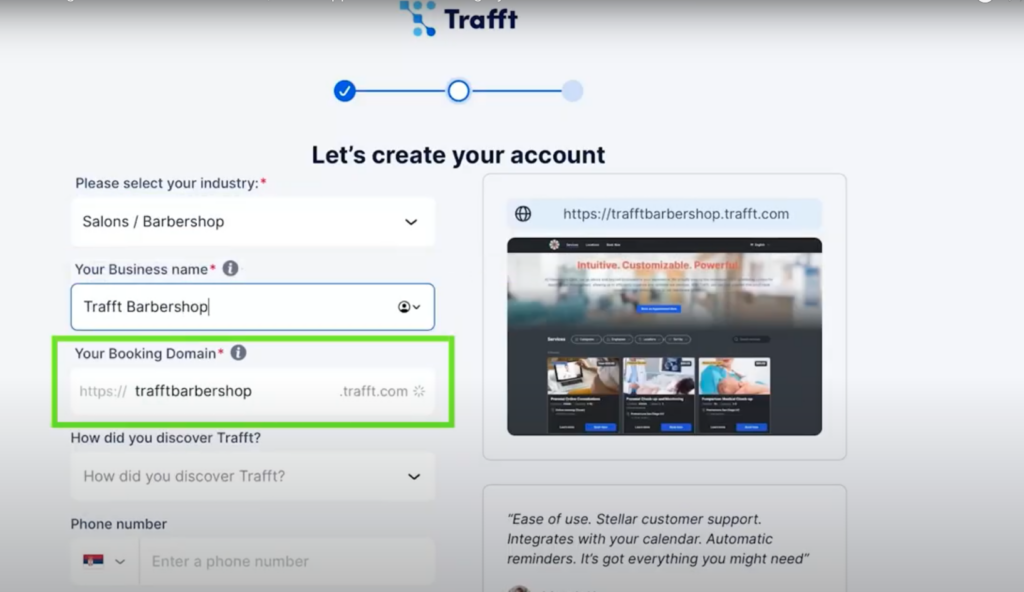
creating your trafft account

This page becomes operational once you've added your employees, working hours, und services, allowing your clients to book appointments through this auto-generated page.

However, if you already have a website, you can seamlessly integrate the Trafft booking form into it.

How?

Step #1: Start by navigating to the ‘Share Booking‘ button, located at the top right corner of your dashboard.

trafft embed code

Step #2: Next, click on the ‘Einbetten’ button.

trafft booking software embed code

Then click the ‘Get immediately’ button.

embed iframe trafft booking software

You will see the code. Regardless of the CMS or the underlying code, this code will integrate seamlessly into your website.

trafft embed code


Booking Form for Specific Appointments

Trafft also offers the capability to embed a booking form tailored to specific appointments, complete with predefined details. To use this feature, you need to:

Step #1: Click on the 'Share Booking' button at the top right of your dashboard.

Step #2: Select the 'Einbetten' option.
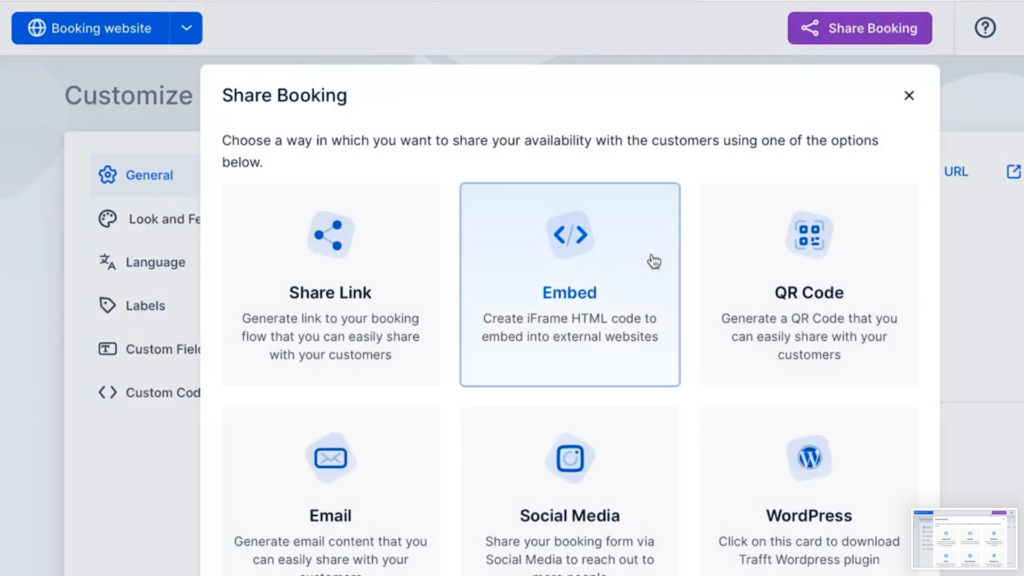
share booking form tab overview

Then click the ‘Set Appointment Parametres’.

embed iframe trafft booking software

Step #3: Then, you can specify which fields to include – services, employees, and date range. This option will create a booking form based solely on your selected parameters.
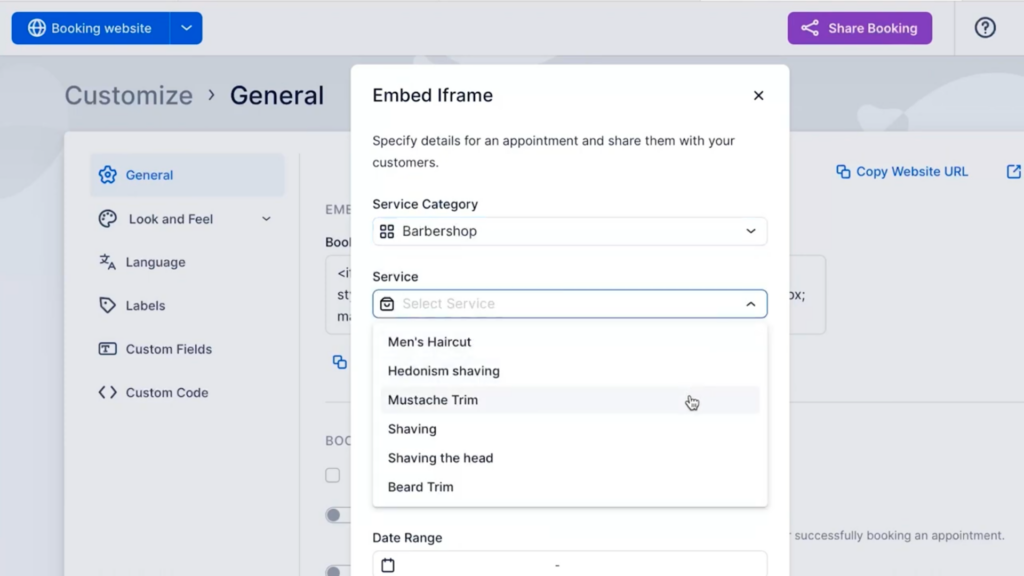
trafft embeded iframe - selection of which fields to include in the booking form

Step #4: After making your selections, click 'Next'.

An embedded iframe will be generated, which you need to copy and paste into your website.
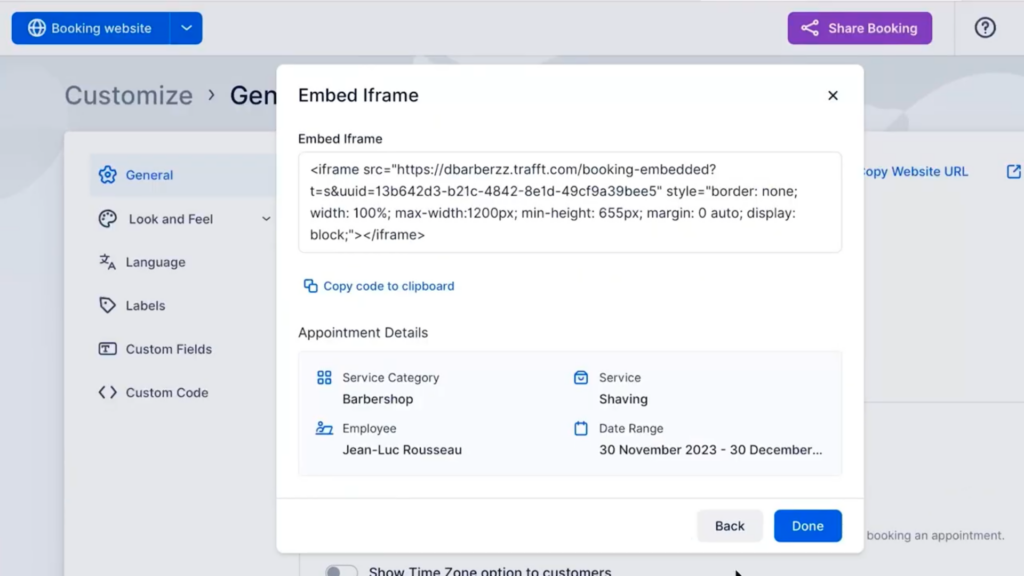
code for trafft embed iframe

If you decide not to customize any of the fields, you’ll receive the code for the main booking form instead.
This flexibility enables you to tailor the booking experience to suit the unique needs of your business and clients. It also allows you to create multiple booking forms to cater to specific purposes.
We hope this guide on embedding the Trafft booking form helps you set everything up. To get more details and explore all that Trafft can do, be sure to check out our extensive
documentation.

Happy scheduling!

Jetzt kostenlos testen