
Booking forms are the heartbeat of any service-based business—but you don’t have to start from scratch. With the right booking form template, you can launch high-converting, beautifully designed forms in minutes. And when backed by real-world examples, you’ll know exactly what works—and why.
In this guide, we’ll walk you through the best booking form templates available, showcase powerful examples from real businesses, and break down what makes them effective. Whether you run a salon, teach classes, offer consultations, or manage events, you’ll find inspiration and practical tools to create booking forms that not only look great but drive real results.
P.S. You’ll also discover how to customize ready-made templates using Trafft—no tech skills required.
What Is a Booking Form?
A booking form is an online “document” that allows customers to book services and appointments in just a few clicks. It’s a bridge between customers and businesses that allows seamless communication that’s 100% automated. Booking form facilitates the whole scheduling process and many industries take advantage of it. And who wouldn’t? They allow you to gather specific customer information and effectively meet customer needs.
Booking Form Design Best Practices
Designing a booking form that’s visually appealing provides crucial information, is user-friendly, and converts customers can be tough, so keep these tips in mind:
- Keep it simple: Avoid clutter and utilize white space. Seamlessly guide customers by using a logical flow when you organize sections. It’s important to minimize the number of fields, while still getting essential information.
- Go for a clean design: Use your brand colors wisely and make your booking form visually appealing and peaceful, rather than using too many elements and colors.
- Visual hierarchy: Take advantage of different font sizes, and styling to create a visual hierarchy that draws customers’ attention to the most important sections. Highlight them and use visual cues such as asterisk (*) to indicate required fields. It’s also important to group related fields together and use consistent formatting.
- Intuitive input fields: Choose appropriate input fields depending on the type of information (e.g. dropdown menus, checkboxes, text fields).
- Make it mobile-friendly: Responsiveness is a must! Ensure your form displays properly on all devices and different screen sizes. Make sure the text is 100% readable and that your form doesn’t appear crowded anywhere.
- Progress bar: If your booking form is longer and consists of multiple steps, provide a progress indicator to avoid overwhelming your customers. Highlight the current step and provide a visual representation of the steps they’ve already completed.
- Clear and powerful CTA: Clearly communicate what will happen after they click on the call to action by making it descriptive. You can also redirect them to a confirmation page where they’ll see more information. Your CTA should be descriptive, but still concise (e.g. Book now).
- Test and optimize: Ask customers to provide feedback about your booking form and identify any areas for improvement. Play with different elements, such as the size and color of your CTA button to measure which option is more effective.
Booking Form Examples
It’s about time we see some awesome booking forms in action. Check out our favorite booking form examples and get inspired to create your own:
Rafflesbeauty
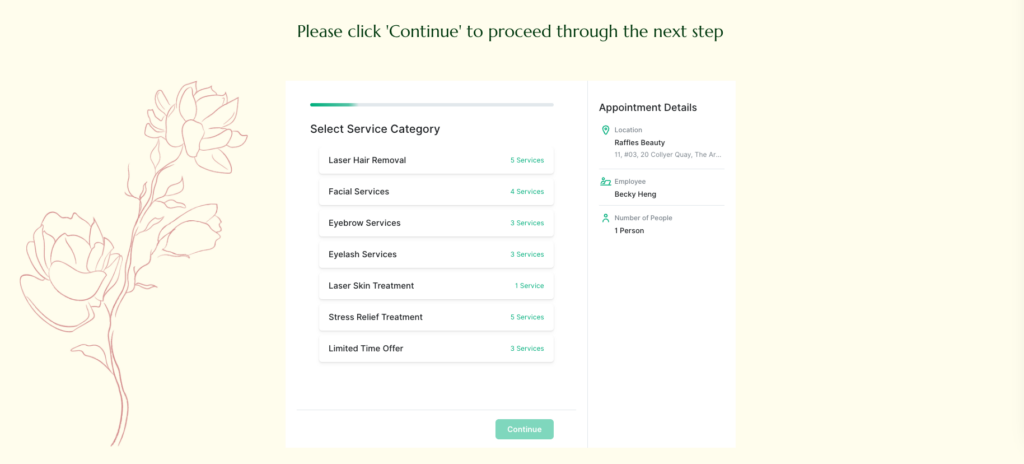
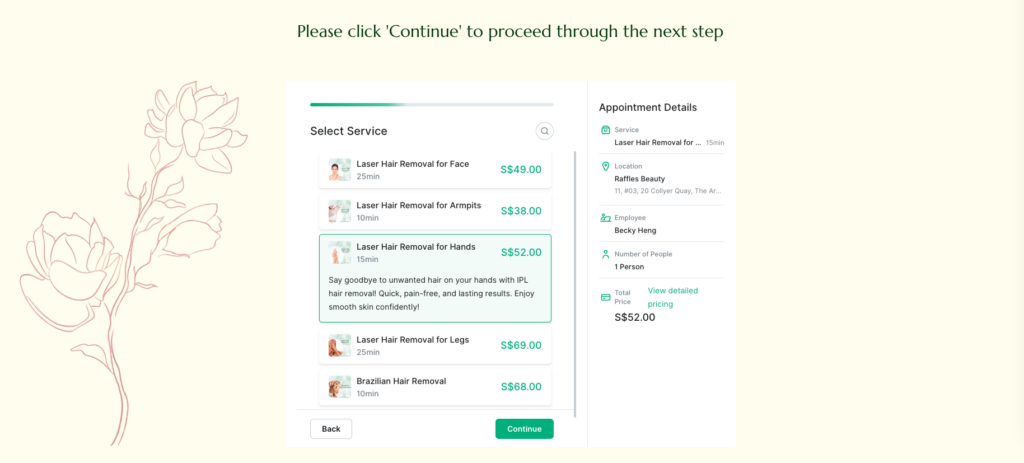
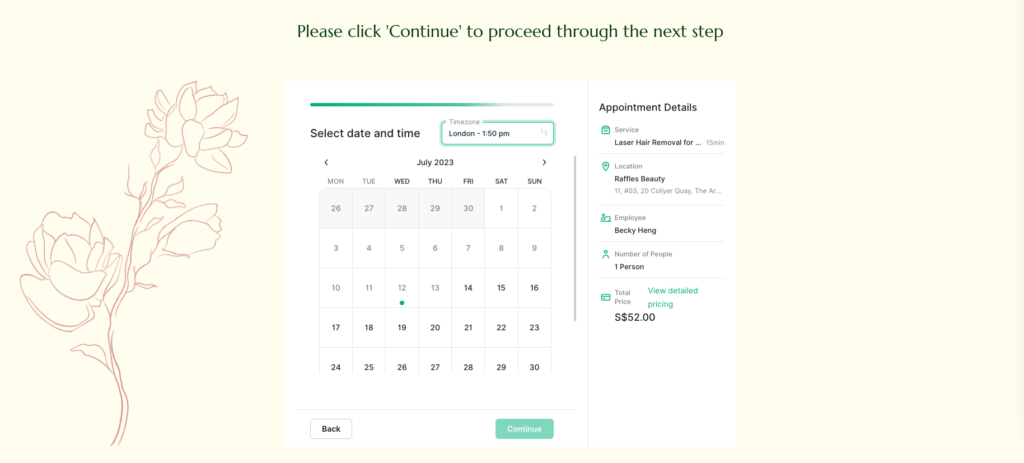
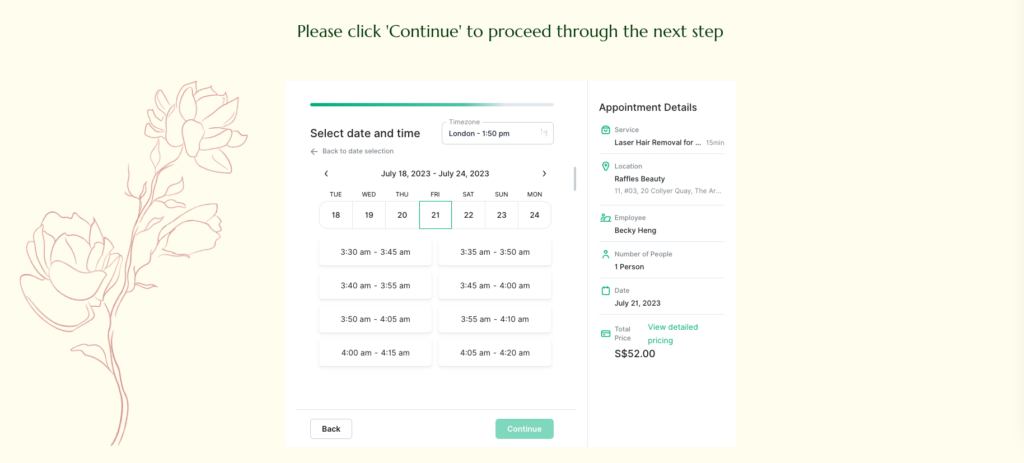
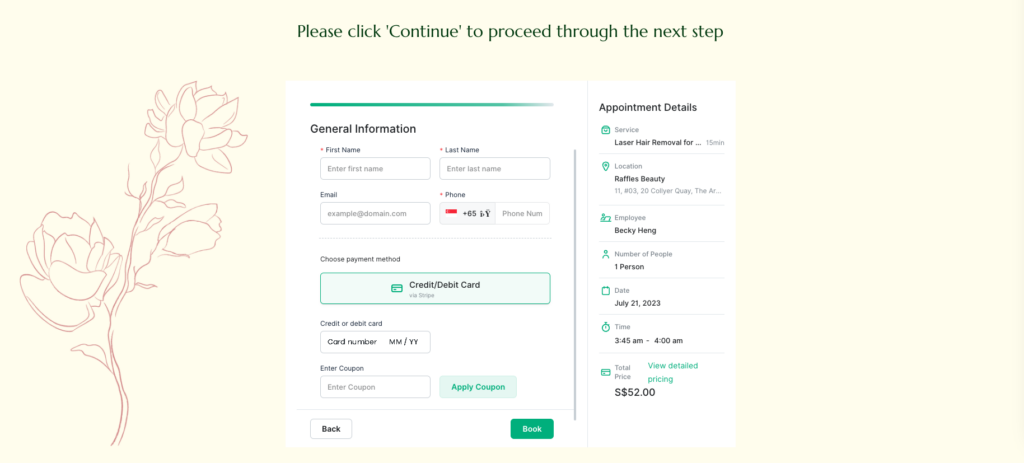
In this fantastic booking form example, you can see how you can make it detailed and user-friendly. Customers first choose the service category, then they choose the service, date, and time, and enter their contact details in the last step. Payment method is also integrated and they can pay directly. Since it’s a multistep booking form, customers can see the progress bar and book an appointment in less than 3 minutes. They see everything they need to convert, from services, descriptions, prices, location, and employees.
The Shave Club 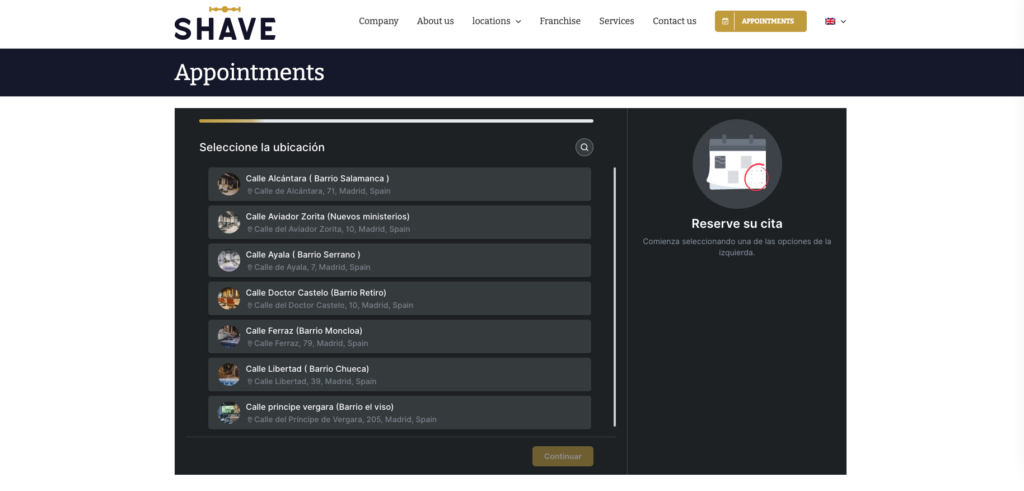
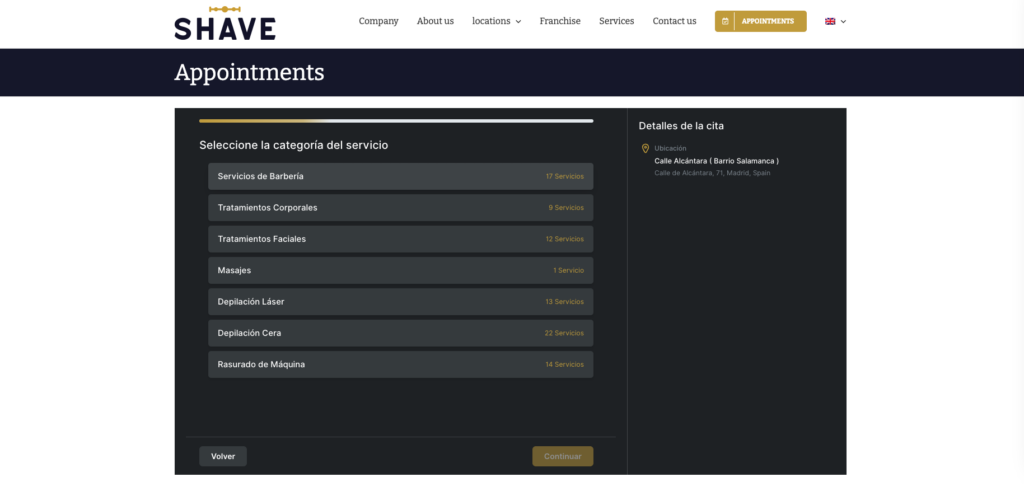
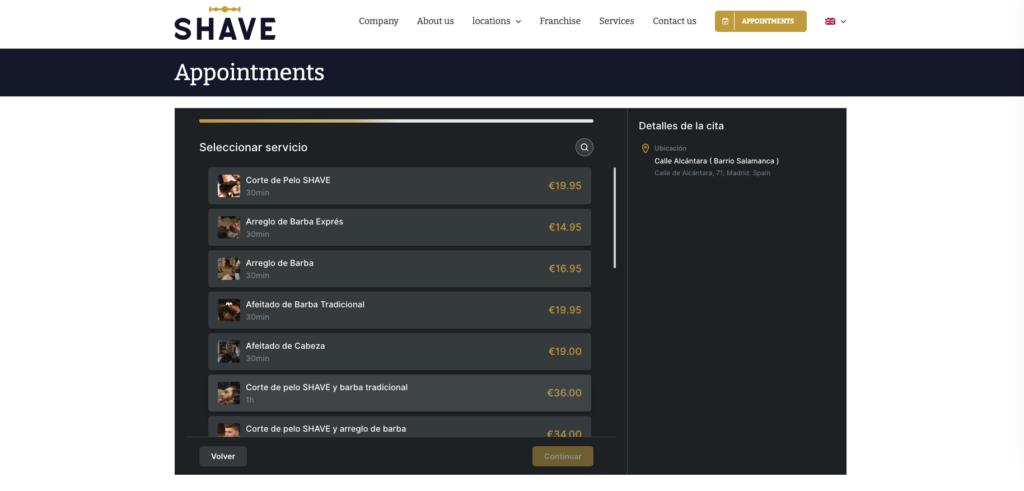
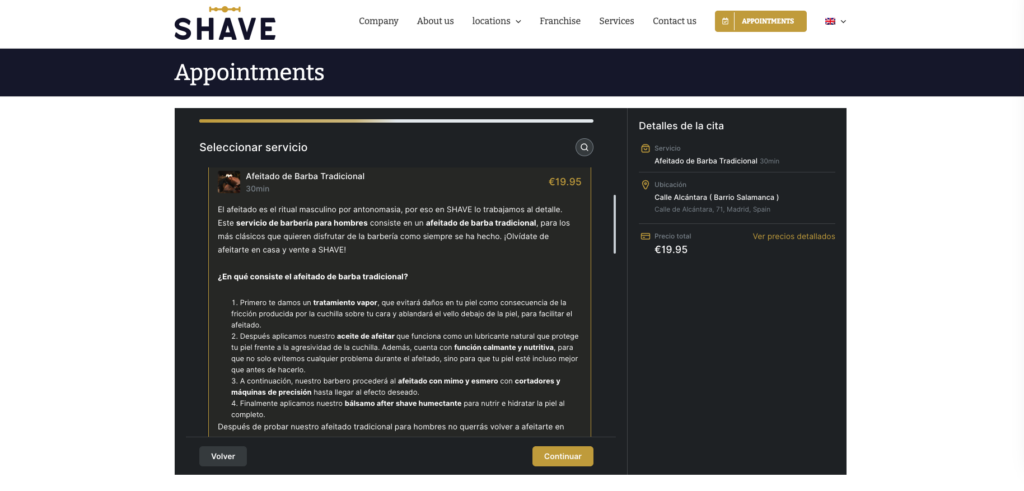
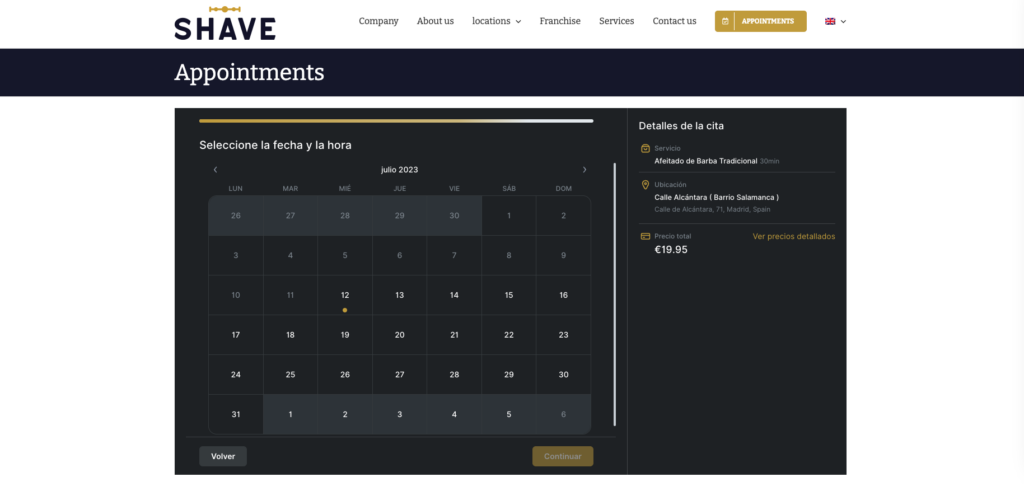
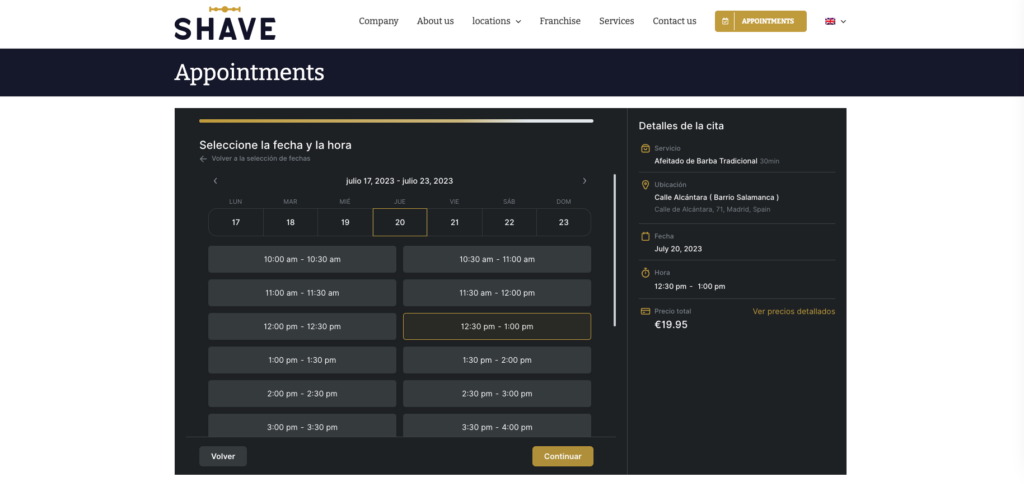
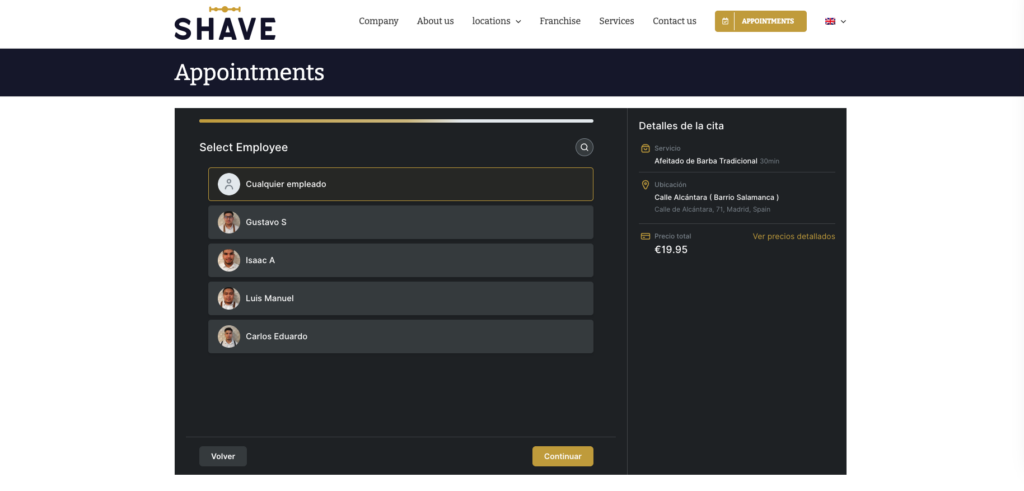
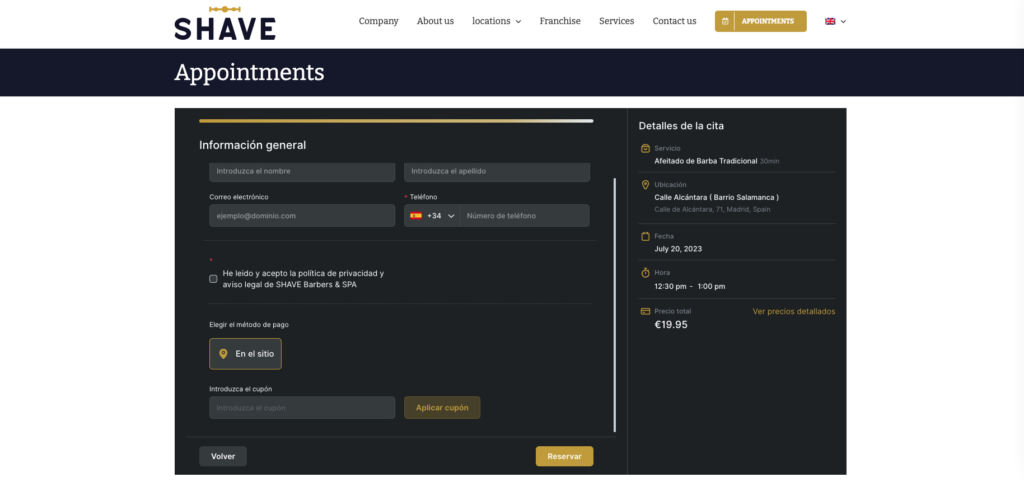
Even though it’s in Spanish, we couldn’t resist sharing this awesome booking form example with you. It perfectly fits the brand identity of the business, and customers book appointments in a logical flow without room for errors and misunderstandings. They start with choosing the location since this business operates in multiple locations. Once they’ve done that, they prompt their clients to choose the service category, service, date, time, and employee and enter their contact details.
This example shows you how you can enter descriptions for services, and promote customer loyalty with coupons. You can also see the ToS checkbox, meaning customers are familiar with the salon cancellation policy and other rules.
Booking Form Templates
Did you like the booking form examples we’ve just shown you? What if we tell you that you can create similar forms in no time?
Trafft offers you pre-made booking form templates you can use right away.
We know diversity is important, and because of that, we’ve prepared templates for various industries such as
- Soins de santé
- Salon Industry
- Les salons de coiffure
- Coaching
- Consulting
- Education & Teaching
- Fitness & Sports
- Cabinets dentaires
- Services de nettoyage
- Services à la personne
- Services automobiles
- Services à domicile
- Government & administrative services
All you need to do is sign up for Trafft for free and choose your favorite booking form template. You can customize it to fit your needs, add custom fields, and payment options, and create discount coupons directly on Trafft.
The best thing about it? Trafft is absolutely FREE for up to 5 members, and pricing starts for as low as $19 for up to 10 users. See for yourself how easy it is to create, embed, and share booking forms with Trafft.
Final Thoughts: Bring Your Booking Form to Life (Without the Headache)
A great booking form can transform the way you run your business—but building one from scratch isn’t always practical. That’s where templates and real-world examples come in. With the right starting point and a bit of customization, you can create forms that look polished, work smoothly, and actually convert.
Whether you’re in beauty, fitness, healthcare, coaching, or beyond, Trafft’s booking form templates help you launch fast, impress clients, and stay organized—all without touching a single line of code.
👉 Ready to get started?
Sign up for Trafft for free, choose a template that fits your industry, and start booking more business today.
FAQ about Booking Form Templates
1. Can I customize the booking form templates in Trafft?
Absolutely! Every template is fully customizable. You can change the layout, add custom fields, adjust appointment types, insert branding elements, enable online payments, and more—no coding needed.
2. Are these forms mobile-friendly?
Yes! All Trafft booking forms are responsive and designed to work seamlessly across phones, tablets, and desktops.
3. Can I integrate payments into the booking form?
Yes. Trafft supports online payments, including integrations with popular providers like Stripe and PayPal. You can also enable coupon codes, deposits, or full payments during booking.
4. What industries are the templates made for?
Templates cover a wide range of industries—from healthcare and personal services to education and government. They’re designed to be flexible and adaptable to any business that schedules appointments.
5. How do I embed the booking form on my website?
Once your form is ready, you’ll get an embed code or direct link you can place on your website, share in emails, or post on social media.
6. Do I need a paid Trafft account to use the templates?
Not at all. Trafft is free for up to 5 users, making it ideal for solo professionals or small teams. As your business grows, affordable paid plans unlock even more features.