Tiempo limitado Tiempo limitado
Caiga en el crecimiento empresarial
Hasta 20%Off
Con un código de descuento BFCM70
Hasta 20%Off
Aprovecha la oferta
RESUMEN DE CARACTERÍSTICAS E INTEGRACIONES
  • Todas las funciones
    Todas las funciones

    Notificaciones, Zonas horarias, Extras, Cupones, Reembolsos y más

  • Todas las integraciones
    Todas las integraciones

    Whatsapp, Paypal, Teams, Zoom, Zapier, Google Calendar y más

  • Reservar con Google
    Reservar con Google

    Acepta reservas a través de la Búsqueda y Maps de Google

  • Complemento de WordPress
    Complemento de WordPress

    Añade el formulario de reservas de Trafft a cualquier página de tu sitio web de WordPress

    Recursos
  • Blog de Trafft
    blog-2
    Blog de Trafft

    Consulta la información más reciente sobre las tendencias de la industria y obtén asesoramiento para administrar un negocio de servicios en línea

  • Guías y documentación
    documentos-2
    Guías y documentación

    Obtén una explicación detallada de cómo funciona cada función e integración de Trafft

  • Nuestra Historia Nuestra Historia

    Lee sobre la historia, la misión y los valores que compartimos de Trafft

  • Relación con Inversores Relación con Inversores

    Contáctanos si estás interesado en invertir en Trafft

  • Socios afiliados Socios afiliados

    Únete a nosotros en nuestro viaje para ayudar a las empresas de servicios a prosperar a través de la automatización

  • ¿Por qué Trafft ¿Por qué Trafft

    Obtén más información sobre por qué deberías elegir Trafft

  • Socios Socios

    Asóciate con Trafft y expande tu alcance en el mercado

  • Contáctenos Contáctenos

    No dudes en ponerte en contacto si tienes alguna pregunta o sugerencia

Características
RESUMEN DE CARACTERÍSTICAS E INTEGRACIONES
Recursos
    Recursos
  • Blog de Trafft

    Consulta la información más reciente sobre las tendencias de la industria y obtén asesoramiento para administrar un negocio de servicios en línea

    blog-2
    Blog de Trafft
  • Guías y documentación

    Obtén una explicación detallada de cómo funciona cada función e integración de Trafft

    documentos-2
    Guías y documentación
Sobre nosotros
  • Nuestra Historia Nuestra Historia

    Lee sobre la historia, la misión y los valores que compartimos de Trafft

  • Relación con Inversores Relación con Inversores

    Contáctanos si estás interesado en invertir en Trafft

  • Socios afiliados Socios afiliados

    Únete a nosotros en nuestro viaje para ayudar a las empresas de servicios a prosperar a través de la automatización

  • ¿Por qué Trafft ¿Por qué Trafft

    Obtén más información sobre por qué deberías elegir Trafft

  • Socios Socios

    Asóciate con Trafft y expande tu alcance en el mercado

  • Contáctenos Contáctenos

    No dudes en ponerte en contacto si tienes alguna pregunta o sugerencia

Trafft Hacks: How to Set Up Service Extras

Inicio» Blog» Trafft Hacks: How to Set Up Service Extras
how to set up service extras with trafft cover image

Extra services, such as premium add-ons or complementary products, can be really handy for service business owners. These services or products are offered in addition to the main purchase, enabling effective cross-selling y upselling strategies. For example, a car wash might offer waxing or interior detailing as extra services.

Using a platform like Trafft, you can easily integrate and manage these offerings directly from the dashboard and improve your upselling and cross-selling efforts. Let’s see how to set up extra services!

How to Add Extra Services?

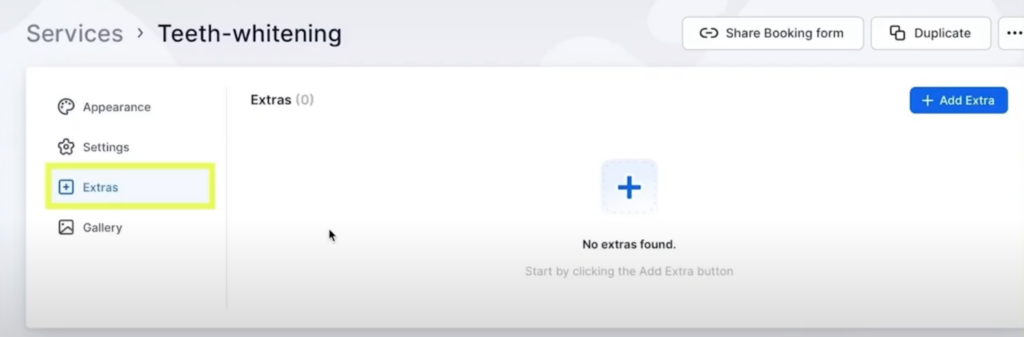
On your Trafft dashboard navigate to the “Service” button, select a service you wish to add extra to, and click the “Extras” button on the left.
add extra service trafft

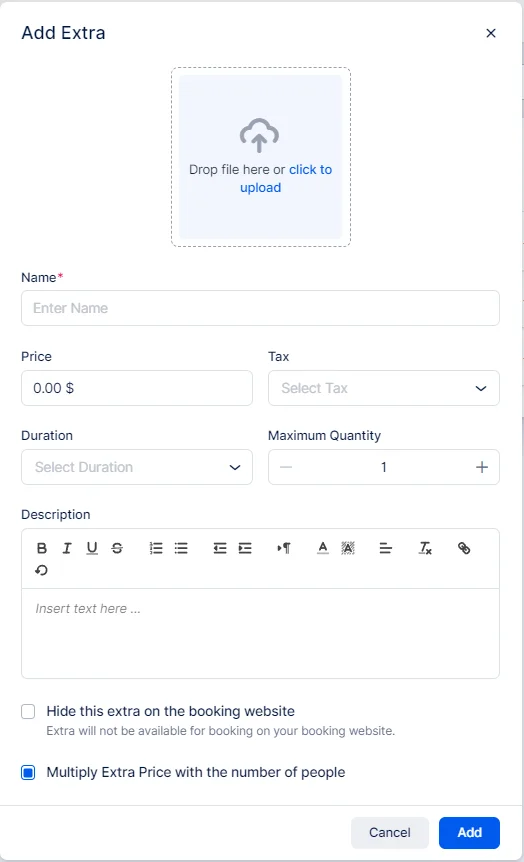
To create your first extra, click the blue “Add Extra” button on the right. A pop up will appear where you fill in the details of the extra service you’re offering.
trafft add extra service details

Fill in the following details:

  • Image: Upload a visual for the extra on the booking form.
  • Name: Provide a mandatory name for the extra.
  • Price: Set a price, defaulting at 0. Adjust currency and format under Settings/Payment.
  • Tax: Choose a tax to apply from your existing options.
  • Duration: Specify the duration beyond service time, adjusting time slots in General Settings if needed.
  • Maximum quantity: Set a maximum booking quantity per customer, default is 1 but can be increased.
  • Description: Write a detailed description of the extra service/product, visible on the booking form.
  • Hide this Extra: Toggle to hide the extra on the booking website, but it can still be added via the admin dashboard.
  • Multiply Extra Price: If selected, the extra’s price multiplies by the number of attendees for group bookings; if not, it remains constant.

When you're done filling out all the details, click “Add”, and the extra services will show during the booking process.

When clients are booking, they will see the extra services offered like this:
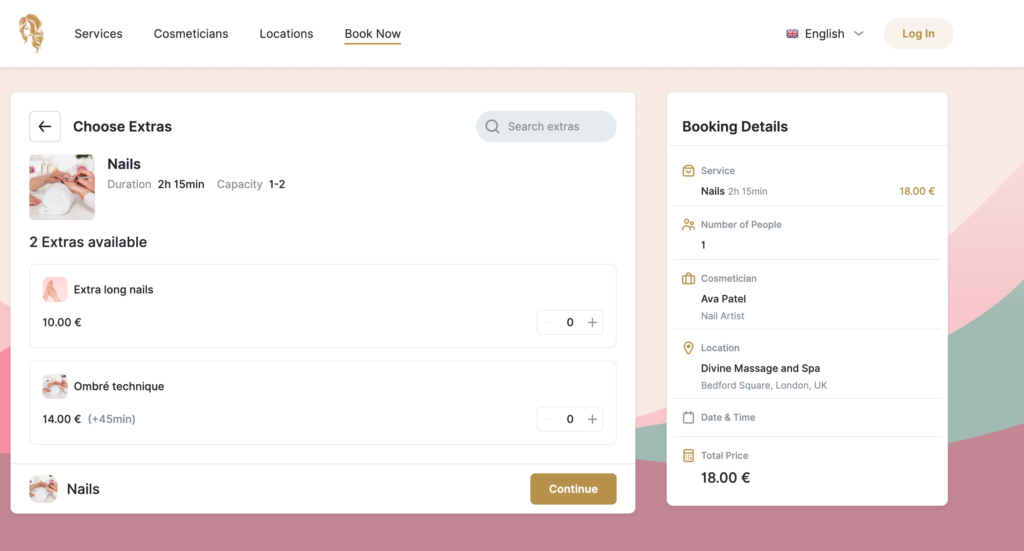
trafft beauty salon extra services

Integrating extra services into your offerings through Trafft is a straightforward and effective way to enhance customer satisfaction y increase your profits. You can easily add value to your primary services and make your business more versatile and appealing to clients.

Watch a video tutorial on how to set up extra services in Trafft:

Happy bookings!

Don’t forget to read:

Pruébalo gratis